





© ROOT-NATION.com - Use of content is permitted with a backlink.

Buying a laser cutting machine is a significant investment, and one of the most common questions people ask is whether a 100w co2 laser cutter is worth the extra cost over a 60W or 80W machine. Most people would agree that 100W sits right at the point where a laser cutter stops being a hobby tool and starts being a genuine production asset – but that advice on its own doesn’t tell you whether it’s the right fit for your specific workload.
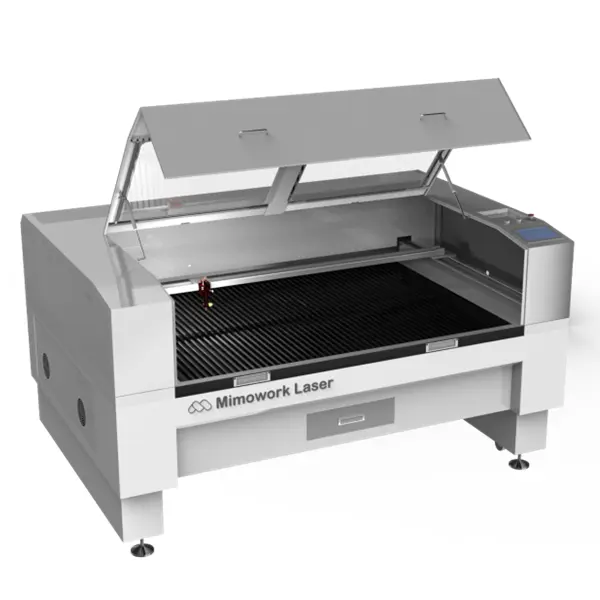
A 100W CO2 laser cutter is a mid-to-upper tier machine built for cutting and engraving thicker non-metal materials at commercial speed. What makes this power class appealing is that it opens up thicker acrylic and wood cutting than a 60W or 80W machine can comfortably handle, while still staying well below the cost and footprint of a 300W-500W industrial system.
TABLE OF CONTENTS:
Who Is a 100W CO2 Laser Cutter Best For
The Production Profile That Fits Best
If you’re cutting acrylic signage, wood panel products, or leather and fabric goods at a commercial scale, a 100W CO2 laser cutter is generally the machine that removes the thickness and speed limitations of smaller systems. This power class is typically the workhorse choice for sign shops, furniture and cabinetry prototyping, and small-to-mid volume manufacturers who need to move past thin-material work.
Why It’s Not Always the Right First Machine
- You’d be paying for cutting capacity and a larger working table that may sit underused while you’re still learning the basics
- If your material mix stays thin (under 6mm), a 60W or 80W machine can often produce the same result at lower cost
- Committing to a 100W system before you have consistent order volume can tie up capital that would be better spent scaling gradually
For beginners without a proven order pipeline, it’s usually wiser to start with a smaller, more affordable machine and grow into a 100W system once production actually demands it.
Should You Buy a 100W CO2 Laser Cutter
Let Demand, Not Excitement, Drive the Decision
The purchasing decision should be driven by a genuine need to scale. When orders start requiring thicker acrylic or wood than your current machine can cut cleanly, or when production speed has become the bottleneck rather than order volume, that’s the point where a 100W system earns its cost. Entry-level machines are excellent for learning the fundamentals, but limited cutting thickness, slower speeds, and a smaller working table eventually start holding real projects back.
Most buyers who move to 100W have already spent time on a smaller CO2 laser, understand their material requirements well, and are looking to remove a specific production limitation rather than simply chasing a bigger spec sheet.
What Can a 100W CO2 Laser Cutter Actually Do
Where 100W Performs Best
A 100W CO2 laser cutter delivers a robust energy output that meaningfully expands processing capability compared to lower-power models. At this level, the machine handles acrylic, plywood, and fabric at practical commercial speeds, making it a common choice for shops that have outgrown a 60W-80W setup but don’t yet need a heavy industrial system. For reliably and quickly cutting plywood around 11mm with a clean edge, a 100W (or higher) laser is generally the recommended starting point for production work.
Where 100W Starts to Reach Its Limit
For thinner materials like paper, fabric, and light plywood, power in the 60W-100W range is generally sufficient for both cutting and engraving. But once a job calls for cutting notably thicker wood or acrylic – in the roughly 10mm-20mm range – at a fast, production-friendly speed, that’s typically the point where a 150W-300W system becomes the more efficient choice.
| Power Range | Best Suited Materials | Notes |
| 60W-100W | Paper, fabric, thinner plywood, acrylic | Efficient for cutting and engraving thinner stock |
| 100W | Acrylic, plywood (around 11mm), fabric | Reliable production-speed cutting with clean edges |
| 150W-300W | Thicker wood or acrylic (~10-20mm) | Recommended when speed matters on heavier stock |
What Determines Real-World Results
Actual cutting performance also depends on factors like the laser tube type, focal length of the lens, speed and power settings, and how well the machine’s optical path is maintained. Materials thicker than a machine’s comfortable range can sometimes still be processed, but usually at reduced speed, with multiple passes, or with some drop in edge quality – which is why matching power to your typical material thickness matters more than chasing the highest wattage available.
What a 100W CO2 Laser Cutter Cannot Do
Power Limits Worth Knowing Before You Buy
- Cutting metals – 100W of CO2 power is not concentrated enough to cut through steel, aluminum, or other metals; that requires a fiber laser system or a considerably higher-powered CO2 tube
- Engraving bare, untreated metal – a CO2 beam largely reflects off raw metal surfaces rather than marking them directly, so metal marking generally requires a coating process first
- Very thick stock in a single pass – material meaningfully beyond the ranges above will usually need multiple passes, slower speeds, or a higher-power tube to keep edges clean
Configuration Options That Shape Real Performance
Beyond the Wattage Number
Choosing the right 100W CO2 laser cutter depends as much on the machine platform as on the tube itself. Mimowork builds its systems around fully customizable working areas rather than a single fixed bed size – standard flatbed dimensions are common, but extended configurations such as long-format beds for roll materials or larger flatbeds for oversized panels are also available depending on what you produce.

- Glass tube vs. RF metal tube – a standard glass laser tube covers most general-purpose needs at a lower cost, while an RF metal tube offers a notably longer lifetime, more consistent power output, and lower maintenance, making it the better fit for intensive, multi-shift industrial production
- Gantry-style vs. conveyor-based platform – a gantry machine with a stationary bed suits flat sheet materials like acrylic and plywood, while a conveyor-based, roll-to-roll system with automatic feeding is built for continuous processing of rolled goods like fabric or labels
- Dual laser heads and shuttle tables – for higher-volume environments, dual-head setups allow parallel processing, and shuttle table systems enable non-stop loading and unloading without pausing production
- Auto-focus and camera registration – these optional upgrades help maintain consistent cut quality and speed up job setup, particularly useful for shops running varied materials or pre-printed stock
Comparing Configuration Priorities by Use Case
| Consideration | Standard Configuration | Production-Focused Configuration |
| Laser tube | Glass tube | RF metal tube for longer life and multi-shift use |
| Machine platform | Gantry, stationary flatbed | Conveyor-based roll-to-roll for continuous fabric/label feeding |
| Throughput | Single laser head | Dual laser heads or shuttle table for non-stop production |
| Setup accuracy | Manual alignment | Auto-focus and camera registration for faster, consistent setup |
Where a 100W CO2 Laser Cutter Gets Used
Wood and Panel Projects
- Cutting and engraving cabinetry components, decorative panels, and furniture prototypes in plywood or MDF
- Producing detailed engraved signage and photo-style engravings on hardwood surfaces
- Creating layered wood art and interlocking joinery pieces at commercial thickness
Acrylic Projects
- Edge-lit signage and retail display pieces cut from thicker cast acrylic
- Architectural and POP display components that need a clean, well-polished edge on thicker cast acrylic
- Multi-layer acrylic assemblies for awards, signage, and branded displays
Leather, Fabric, and Textile Projects
- Cutting and engraving leather goods, patches, and accessories at production speed
- Textile and apparel cutting for advertising, shoemaking, and garment applications
- Automotive and upholstery-adjacent fabric cutting where clean, sealed edges matter

100W vs 60W vs 300W: Where It Fits in the Lineup
Matching Power to Material Needs
| Power Level | Best Suited Materials | Best Fit |
| 60W | Paper, fabric, thin plywood and acrylic | Small business, detailed thin-material work |
| 100W | Acrylic, plywood (around 11mm), fabric | Mid-volume production at commercial speed |
| 150W-300W | Thicker wood or acrylic (~10-20mm) | High-volume, thicker-stock production |
Why the Platform Matters as Much as the Tube
Since Mimowork engineers its systems with customizable working areas and platform types – gantry-style beds, roll-to-roll conveyor systems, dual laser heads, or shuttle tables – a business can often start with a 100W tube on a platform sized for its current needs, then scale up power or add automation later as production grows, rather than replacing the entire machine. This platform-first approach is worth checking for when comparing 100W options, since it directly affects how much room a business has to scale.
Three Rules of Thumb for Buying a 100W CO2 Laser Cutter
- Don’t skip fume extraction – cutting and engraving with a CO2 laser generates smoke, fumes, and particulates; a properly sized fume extraction system protects the machine’s optics, keeps operators safe, and helps maintain consistent processing quality
- Choose the right tube for your duty cycle – a glass tube works well for general or intermittent use, while an RF metal tube’s longer lifetime and lower maintenance make it the better fit for multi-shift industrial production
- Match the platform to your material flow – a gantry-style flatbed suits sheet materials like acrylic and plywood, while a conveyor-based roll-to-roll system with automatic feeding is the better fit for continuous fabric or label processing
Frequently Asked Questions
1. What materials can a 100W CO2 laser cutter handle well?
A 100W system handles acrylic, plywood, and fabric at practical commercial speeds, and is generally recommended for reliably and quickly cutting plywood around 11mm with a clean edge. For notably thicker wood or acrylic in the 10-20mm range, a 150W-300W system is typically more efficient.
2. Does a 100W CO2 laser cutter come in a fixed working area size?
No. Working areas are generally customizable rather than fixed to one size – standard flatbed dimensions are common, but extended configurations such as long-format beds for roll materials or larger flatbeds for oversized panels are also available depending on your production needs.
3. Is a 100W CO2 laser cutter better than a 60W model?
For materials like plywood and moderately thick acrylic, yes – 100W generally handles these at better speed and reliability than a 60W tube. For shops working mainly with thin materials like paper and fabric, a 60W-100W range may both perform well, so the choice often comes down to expected material thickness and volume.
4. Should I choose a glass tube or an RF metal tube for a 100W CO2 laser cutter?
A glass tube is a cost-effective choice for general or intermittent use. An RF metal tube offers a longer lifetime, more consistent power output, and lower maintenance, making it the better option for intensive, multi-shift industrial production.
Conclusion
A 100w co2 laser cutter is one of the most practical upgrades for a shop that has outgrown the material and speed limits of a 60W or 80W machine. It offers a genuine step up in processing acrylic, plywood, and fabric at commercial speed, along with configuration options – from tube type to platform style to automation upgrades – that let the machine keep pace with real production demand, while remaining well below the cost of a fully industrial system.
That said, bigger isn’t always better – if your material mix stays thin and your order volume is still building, a smaller machine may offer better value for now. But if orders are increasing, cutting speed has become a bottleneck, or your material needs have outgrown your current setup, a 100W CO2 laser cutter is typically one of the more worthwhile production investments available. If you’d like to compare configurations, platform options, or upgrade paths in more detail, you can explore the full 100W lineup at mimowork-laser.com.

