




© ROOT-NATION.com - Use of content is permitted with a backlink.
Mobapad has spent the last couple of years quietly becoming the company you point people to when they complain about Joy-Con drift, and its flagship pads – the Chitu2, the M12 – have gotten genuinely glowing coverage for matching or beating Nintendo’s own hardware. The C2 Lite is the other end of that lineup: a stripped-down, retro-styled Pro Controller alternative that keeps the one feature everybody actually asks for (Hall effect sticks that won’t drift) and cuts almost everything else to hit a lower price.

TABLE OF CONTENTS:
Positioning
Mobapad’s catalog is basically tiered by how much drift-proofing and premium material you’re willing to pay for. At the top sits the Chitu2 HD family, which runs $49.99 and shares TMR “glide” sticks and NFC support for Amiibo across both versions, then splits on button feel: the standard HD uses mechanical micro-switches, while the Silent Edition swaps those for liquid-silicone buttons and sound-damping foam for quieter play. The C2 Lite sits underneath that whole family, built explicitly as, in Mobapad’s own words, “the lower-price Switch/Switch 2 version.” It drops the 2.4GHz USB dongle, the NFC reader, and the pricier TMR stick tech in favor of standard Hall effect sensors and membrane buttons, which is exactly the kind of trade Nintendo Switch owners on a tighter budget want to make, even without a confirmed price to compare it against directly.

Hardware
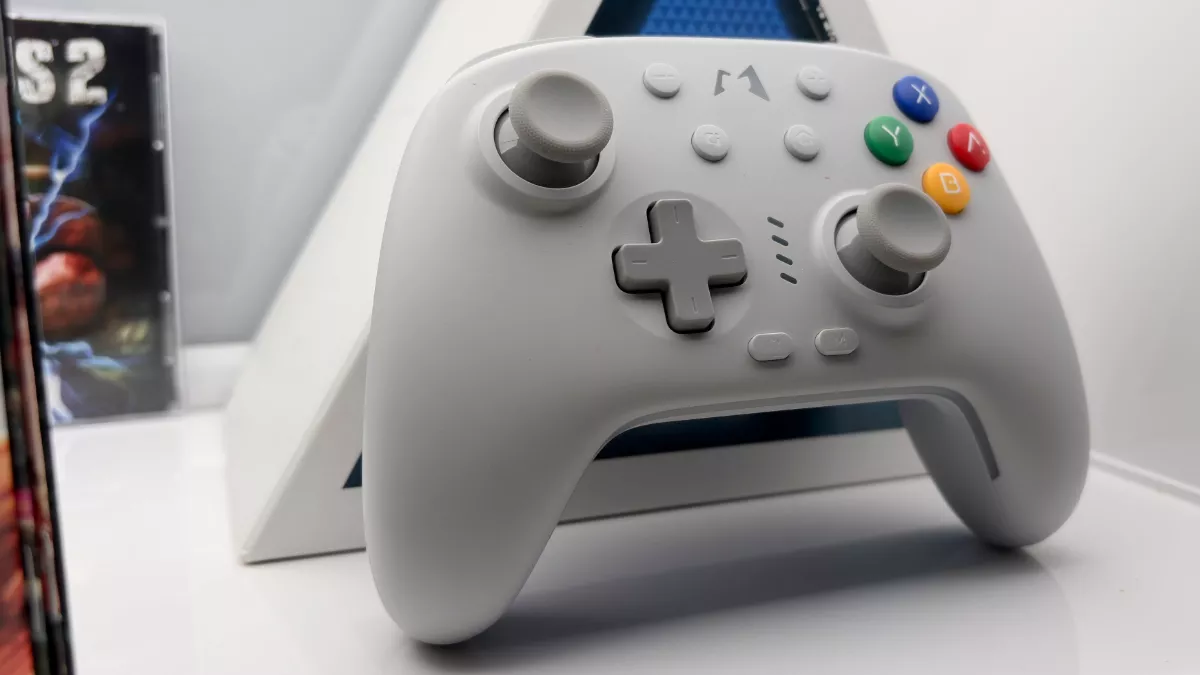
The shell is where the C2 Lite tries hardest to earn its keep visually. It’s done up in a two-tone gray finish with four-color ABXY buttons, a deliberate throwback look that reads more like a classic console pad than the black-on-black minimalism most third-party controllers default to, and Mobapad layers customizable RGB lighting on top so it doesn’t feel entirely stuck in the past. The D-pad is tuned specifically for fighting games and retro platformers, which tracks with the whole aesthetic.
Under the hood, both sticks use Hall effect sensors, meaning magnetic sensing instead of the physical potentiometers that wear down and cause stick drift over time. It’s the single most important spec on a budget controller in 2026, since drift is the reason most people are shopping for a replacement pad in the first place, and Mobapad didn’t cheap out on it here even while cutting corners elsewhere. A six-axis gyroscope handles motion aiming for shooters, and there’s dual adjustable vibration rather than a single rumble motor. The buttons themselves are membrane switches rather than mechanical or liquid-silicone units, which keeps things quiet enough for late-night sessions but won’t have the same crisp, clicky feedback as the Chitu2 HD’s mechanical buttons – a fair trade for the price cut, and honestly a plus if you share a wall with a roommate.
Read also: Mobapad M12 HD: The Joy-Con Nintendo Refuses to Make

Two programmable back buttons and a dedicated M key cover remapping and macros, and turbo mode works on any button. Connectivity is Bluetooth for Switch, PC, or phone, or wired USB-C when you want zero input lag for something competitive. There’s no 2.4GHz dongle in the box, which is the one real omission compared to Mobapad’s pricier pads. The 800mAh battery is rated for roughly 20 hours, enough to get through a weekend without hunting for a cable.
Switch 2 compatibility
The C2 Lite pairs to Switch 2 the same way any third-party Bluetooth controller does, and once it’s connected it behaves like a normal Pro Controller alternative – sticks, gyro, back buttons, and turbo all work as advertised. Where it’s worth being upfront: Mobapad’s higher-end controllers, including the M12 and Chitu2 HD, got a firmware update that lets them wake a sleeping Switch 2 with a tap of the Home button – a trick that Nintendo’s own original Switch Pro Controller notably can’t do when connected to a Switch 2, per Nintendo’s own support documentation, though Nintendo’s current Switch 2 Pro Controller is built to handle it natively. That wake-up feature isn’t part of the C2 Lite’s capabilities. So you’ll still be reaching for the console itself, or a controller that’s already awake, to bring Switch 2 out of sleep. It’s a minor asterisk on an otherwise clean multi-platform story that also covers Switch 1, PC, iOS, and Android without needing separate adapters.

Mobapad’s companion app just added official C2 Lite support, and it covers the ground you’d expect: joystick curve and dead zone tuning, turbo and rapid-fire settings, full button remapping with one-key macros, vibration intensity, RGB lighting customization, and firmware updates with a built-in button tester. All of it saves as per-game profiles, so you’re not re-tuning dead zones every time you switch from a shooter to a platformer. It’s the same app backing Mobapad’s entire lineup, which means it’s mature software rather than a rushed companion app bolted onto a budget product, and that maturity shows in how deep the customization goes for something at this price.
Read also: Mobapad Chitu 2 review: a premium Switch 2 controller that makes no compromises

Verdict
The C2 Lite doesn’t try to out-spec the Chitu2 HD family, and it shouldn’t – it’s a different product for a different budget, and it makes smart cuts to get there. Keeping genuine Hall effect sticks while dropping mechanical buttons, NFC, and the 2.4GHz dongle is exactly the right set of trade-offs for a controller in this price bracket, and the retro shell gives it a personality that a lot of budget pads skip entirely. The missing Switch 2 wake-up trick is a real omission if you’ve gotten used to that convenience on Mobapad’s pricier controllers, but it’s a small price for sticks that won’t drift and an app that actually supports the hardware properly. For anyone who wants Mobapad’s anti-drift reliability without paying flagship money, the C2 Lite is an easy recommendation.

