





© ROOT-NATION.com - Use of content is permitted with a backlink.

Unwanted people in the background can easily ruin a perfect video shot. An AI object remover provides a seamless way to erase these items or hide sensitive details with ease. Media.io AI Object Remover stands out as a top-tier choice because itts smart algorithms can easily remove object from video.
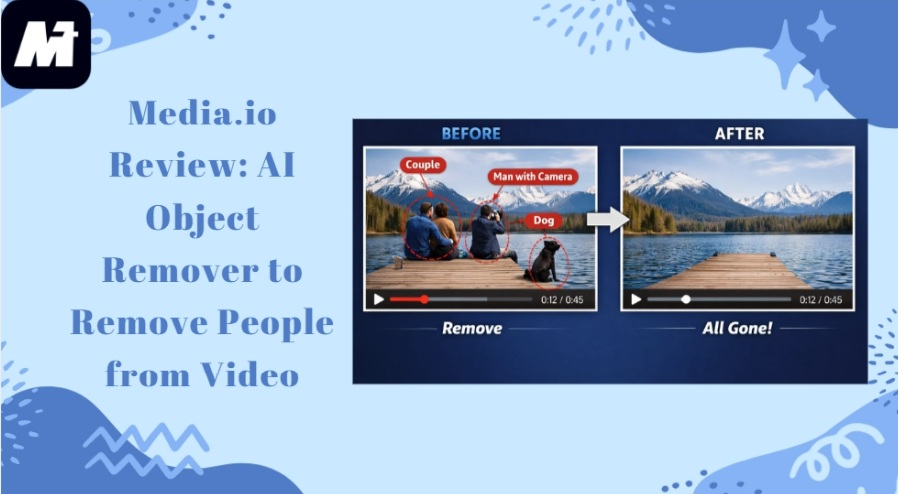
In addition, this AI tool provides multiple removal modes so you can achieve the exact visual effect you want. Another great benefit is the customizable brush feature. This allows for precise edits without frustration. Plus, it is incredibly easy to use since you only have to upload the video and provide a simple prompt. In this full review, we will explore the major features of this platform. We will also look at the operating steps, alongside its pros and cons. Let us dive right in.
TABLE OF CONTENTS:
A Brief Introduction to Media.io AI Object Remover
Media.io AI Object Remover is an intelligent tool designed to clean up your footage. It is capable of removing people from video or editing something out of a video. You can easily select specific areas and adjust the brush size for maximum precision.
This AI video object remover also offers various removal modes to ensure the final effect matches the original style. It is perfect for content creators or social media managers, who need to hide logos and faces quickly. By providing over 5000 templates, Media.io helps anyone produce polished videos without advanced technical skills.
Main Features of Media.io AI Object Remover
Media.io AI Object Remover combines power with simplicity to deliver impressive results. Let’s look at its key features.
- Flexible Object Masking: You can paint over any part of your video and adjust the brush for better accuracy. This feature works flawlessly with common file types (MP4 or MOV) to save you time during the initial setup.
- Specialized Removal Techniques: Whether you need a smooth fill or a blurred effect, the tool provides specific modes for every scenario. High-quality Gaussian blur is particularly effective for masking faces or license plates in public footage.
- All-in-One AI Editor: Media.io features a wide range of audio and video tools alongside 5,000 templates for creative transitions. These resources mean you never have to leave the site to finish your entire video project.
- Curated Content Gallery. The “Explore” section curates templates by current trends. With one click, you can adopt any style from a global community of editors. Therefore, you can easily create the perfect look for social media.
- Zero-Cost Starting Credits: Every registered member enjoys a daily allowance of free credits for their editing tasks. This makes it easy to experiment with the AI object remover on different types of footage.
How to Remove People from Video with Media.io AI Object Remover
You do not need to be a professional editor to get great results with Media.io AI Object Remover. Just follow these easy steps to erase unwanted items from your favorite clips.
Step 1. Pick an Erasing Style
Select a mode, such as Smooth Filling or Gaussian Blur, from the menu. Different options allow you to decide exactly how the background should look after the object is removed.
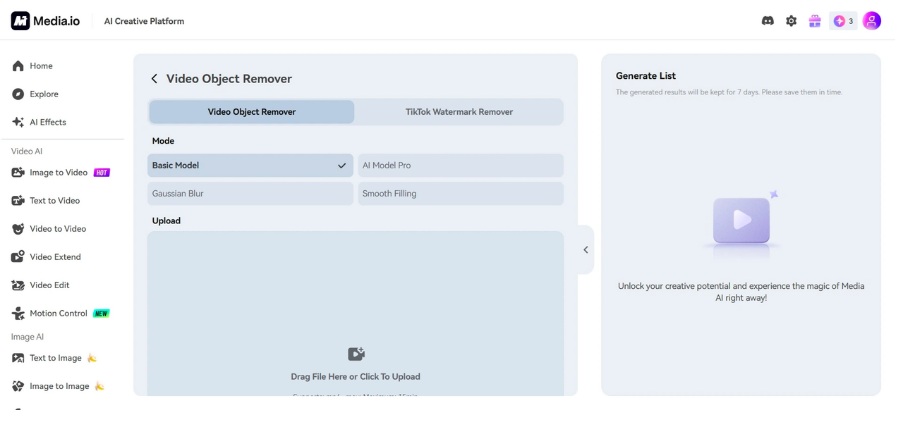
Step 2. Add Your Video and Generate
Upload or drag a video in a supported format, like MP4 or MOV. Ensure it is shorter than 15 minutes for the best performance. Then simply paint over the people or other objects you want to remove with your mouse. Hit the “Generate” button to remove people from video.
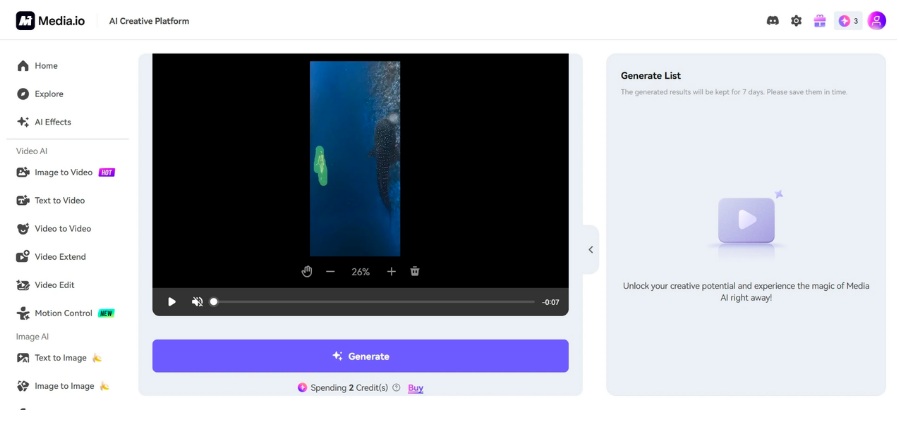
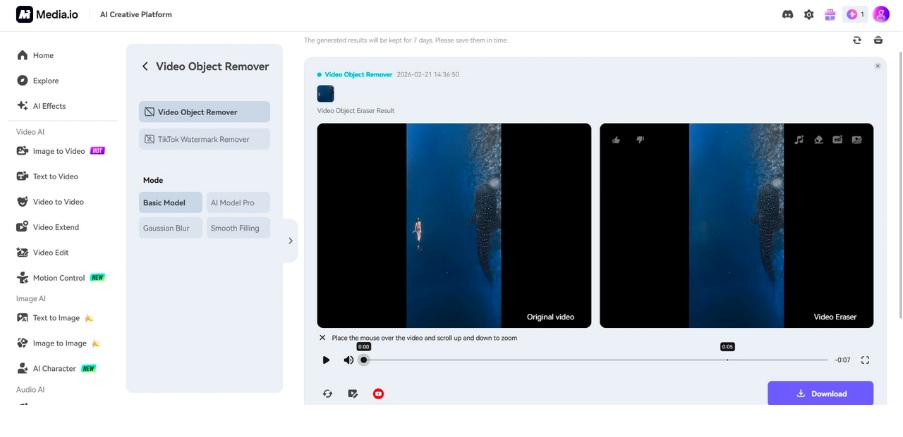
Step 3. Preview and Download Video
Check the playback to confirm the background is clean. You can then save the video to your device or click the YouTube button to publish it to your channel.
Benefits and Drawbacks of Media.io AI Object Remover
Understanding the pros and cons allows you to make the most of the Media.io AI Object Remover. Here is a detailed look at the advantages and the one main catch.
Pros
- Seamless AI Reconstruction: The tool effectively replaces unwanted items with a natural background that matches the original footage. This high level of precision makes the software very reliable for professional work.
- Time-Saving Operation: The user interface is built for speed, so you can get your work done in record time. This makes it ideal for social media managers who handle multiple videos every day.
- Variable Erase Styles: Users can choose the best removal mode to fit their specific privacy or aesthetic requirements. Whether you need to blur a face or erase a sign, the tool has the right setting.
- Comprehensive Media Platform: Media.io acts as a complete creative hub with over 5,000 templates and many other editing tools. This allows you to build a finished product without ever switching to another website.
- Flexible Device Compatibility: You can use the tool on any operating system because it runs directly on web browser.
- Daily Account Benefits: The daily credit system provides a risk-free way to test the platform’s capabilities. It is an excellent feature for people who want to try this AI video object remover before buying a subscription.
Cons
- Internet Speed Requirements: A reliable web connection is necessary for the tool to function at its best. Slow internet may result in longer processing times when the AI is rendering your final video.
Final Verdict
In this review, we analyzed Media.io AI Object Remover through its features, tutorials, and practical advantages. The platform proves to be a reliable partner for erasing distractions and enhancing video quality.
Media.io is a top-tier creation platform that truly masters AI-driven video and audio editing. It removes people from video effortlessly and provides flexible settings to help you achieve your specific vision. Because the site also includes thousands of templates and various media tools, it acts as a complete studio for your projects. This helps you stay organized and finish your work much faster than traditional methods. We highly recommend visiting Media.io to test these powerful features on your own videos.

