




© ROOT-NATION.com - Use of content is permitted with a backlink.

If your Pokémon keep fleeing and PokéStops are empty, you may be experiencing a soft ban in Pokémon GO. Discover how long this temporary restriction lasts, the exact distance-to-time cooldown rules you must follow, and why the old 40-spin trick no longer works. We also explore how built-in smart timers can help you safely manage location changes.
TABLE OF CONTENTS:
What is a Soft Ban in Pokémon GO? (And How Long Does It Last?)
Quick Answer: A soft ban in Pokémon GO usually lasts up to 2 hours maximum, depending on how far you traveled in-game. It is essentially a strict cooldown enforcement, completely different from Niantic’s permanent 3-strike policy. Your account is not permanently disabled, and normal gameplay will automatically resume once the timer expires.
Why Are My Pokémon Fleeing? Recognizing Soft Ban Symptoms
If you suspect you have been soft-banned, the game will display a few very specific, unmistakable symptoms. These occur because the game detected an impossible travel speed, such as teleporting to a new location without waiting the required cooldown time.
Here are the main symptoms of an active soft ban:
- 100% Flee Rate: Every wild Pokémon you try to catch will break out of the Poké Ball and flee immediately.
- Empty PokéStops: You can spin PokéStops, but they will give you zero items and will not turn purple.
- Gym Lockouts: You will be unable to place your Pokémon in Gyms or participate in Gym battles.
It is important to note that only certain actions trigger this cooldown enforcement (like catching wild Pokémon, spinning stops, and fighting in gyms). Other actions, such as hatching eggs, evolving Pokémon, or trading, are completely safe and do not trigger or reset a soft ban. For broader tips on playing safely and resolving location-based issues, explore comprehensive Pokémon GO guides.
Does the 40-Spin PokéStop Trick Still Work?
If you search online for ways to remove a soft ban quickly, you will likely find older guides claiming you can bypass the restriction by spinning a single PokéStop 40 times.
This is an outdated myth. Niantic patched this workaround long ago. Today, spinning a PokéStop 40 times will not remove a soft ban – it will only waste your time and leave you frustrated. The only true fix for an active soft ban is simply waiting out the required cooldown timer. Do not attempt this trick, as it no longer works and further delays your natural cooldown period.

The Rule You Must Follow: Pokémon GO Cooldown Timer
The core mechanic behind soft bans is the cooldown timer. This rule dictates exactly how long you must wait before performing a game action in a new location, based entirely on the physical distance you jumped. Understanding Pokémon GO cooldown rules is essential for any player navigating virtual movement.
Here is a standard distance-to-time cooldown reference table:
| Travel Distance | Required Cooldown Time |
| 1 km | 1 to 2 minutes |
| 10 km | 7 to 10 minutes |
| 50 km | 20 to 25 minutes |
| 100 km | 45 minutes |
| 250 km | 75 minutes |
| 1500+ km | 120 minutes (2 hours maximum) |
Tracking this math manually is the main reason most players end up soft-banned. Constantly calculating distances and setting phone alarms is frustrating and highly error-prone. Just one miscalculation means your Pokémon will start fleeing again. Because manual tracking is so difficult, many players look for automated ways to handle their location changes safely.
How to Prevent Soft Bans with a Smart Cooldown Timer
When trying to move virtually without triggering a soft ban, many players mistakenly rely on modified third-party apps. These hacked versions of the game carry inherent risks and are frequently cited as common triggers for bans because their app modifications are easily detected.
A more controlled alternative is using a desktop-tethered GPS changer like Fonelora Location Changer. Instead of altering the game app itself on your phone, Fonelora changes your supported iOS or Android device’s GPS location at the system level.
To actively prevent teleportation mistakes, Fonelora Location Changer features a built-in Smart Cooldown Timer. This tool automatically tracks your virtual distance and calculates the required wait time before you perform any in-game actions. While no tool can provide a 100% anti-ban guarantee, using a tethered desktop solution with active cooldown tracking significantly reduces the risk of accidental soft bans.
Managing Virtual Movement with Fonelora Location Changer
If you want to track your cooldowns easily and simulate movement under supported conditions, here is how the workflow operates using Fonelora Location Changer:
- Connect Your Device: Launch the desktop software and connect your supported iOS or Android device via USB or Wi-Fi.

- Choose a Movement Mode: Select Teleport Mode for long-distance jumps across the map, or Joystick Mode to navigate your local area naturally in real time.
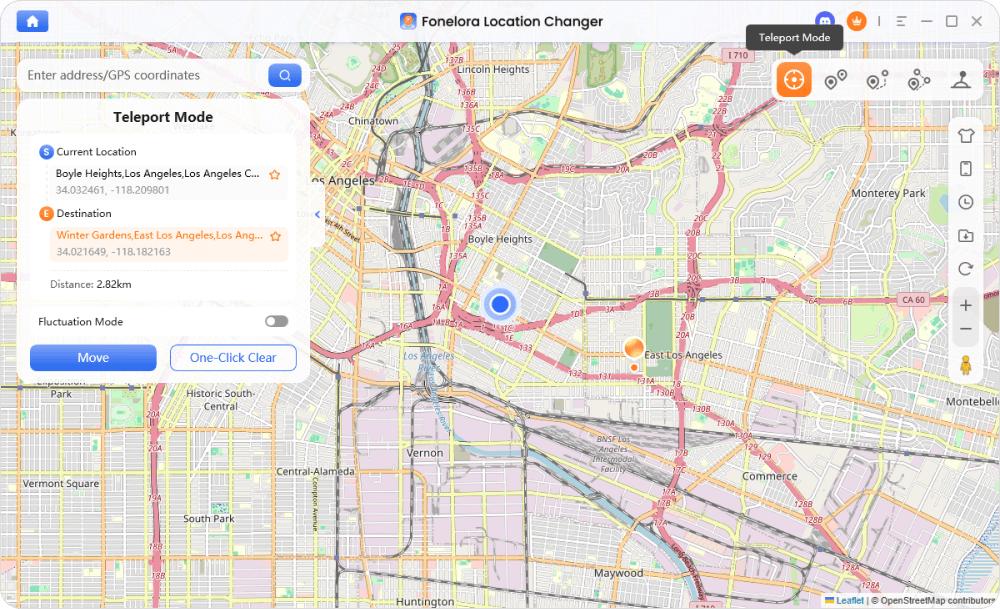
Teleport mode for jumps - Observe the Smart Cooldown Timer: Before performing any in-game action (like spinning a stop or catching a Pokémon), enable the cooldown timer in the interface to see exactly how long you must wait.
- Use Realistic Mode: If you are simulating a walking route, enable Realistic Mode to naturally vary your walking speeds instead of using a robotic, fixed pace.

By following this guided workflow, you eliminate the guesswork of manual tracking and protect your account from careless location jumps.
Ready to move safer? Learn how to safely change location in Pokémon GO with guided desktop tools.
FAQs About Pokémon GO Soft Bans and Cooldowns
Q1. Can a soft ban turn into a permanent ban?
A soft ban itself is a temporary restriction based on distance and speed. However, repeated suspicious behavior and constant soft bans might eventually flag your account for a formal strike under Niantic’s policy.
Q2. What is the difference between a soft ban and a strike?
A soft ban is an automatic cooldown enforcement mechanism that lasts up to 2 hours to prevent impossible travel speeds. A strike is a formal account warning or suspension issued specifically for violating the game’s terms of service.
Q3. What in-game actions trigger a cooldown?
Actions that interact with a specific location trigger cooldowns. These include catching wild Pokémon, spinning PokéStops, participating in Gym battles, placing defenders, and feeding berries to Pokémon in Gyms.
Q4. Do I need to keep the game open during the cooldown?
No. The cooldown timer is based entirely on real-world time passing. You can safely close the app and reopen it once the required wait time has elapsed.
Final Thoughts: Manage Your Virtual Movement Safely
If you are currently experiencing a soft ban in Pokémon GO, remember that your account is not permanently disabled. The only real way to clear it is to wait out the maximum 2-hour timer, and you should completely ignore outdated myths like the 40-spin PokéStop trick.
Moving forward, tracking your teleport distances manually is a risky game of guesswork that often leads to more soft bans. For users who struggle with manual cooldown math and want a safer, more controlled way to play, Fonelora Location Changer offers a practical desktop-tethered solution. By using its built-in Smart Cooldown Timer and flexible movement modes, you can simulate natural routes and respect game rules without the constant anxiety of miscalculating your jumps. Always manage your virtual location responsibly to protect your account.

