




© ROOT-NATION.com - Use of content is permitted with a backlink.

A locked Huawei device can feel incredibly frustrating when it happens because of a forgotten password or the dreaded FRP lock. Many users find themselves stuck after a reset, unable to move past the Google verification screen. It can happen on a second-hand phone or a reset gone wrong. The result is the same: you get locked out of your device.
Unfortunately, traditional methods of regaining access can be too technical or time-consuming. Not to mention, it might simply not work on newer models. That’s why finding a reliable and simple Android phone unlocker has become so important for everyday users. Read on to find the best available choice to regain mobile access.

TABLE OF CONTENTS:
Part 1. Understanding Huawei FRP Lock and When It Triggers
Why Factory Reset Protection lock even exists is the first thing to figure out when trying to unlock your Huawei phone. This security feature was designed by Google to protect your personal data, and it can catch many users off guard when they least expect it. Knowing more about it will help perform the FRP bypass much more smoothly.
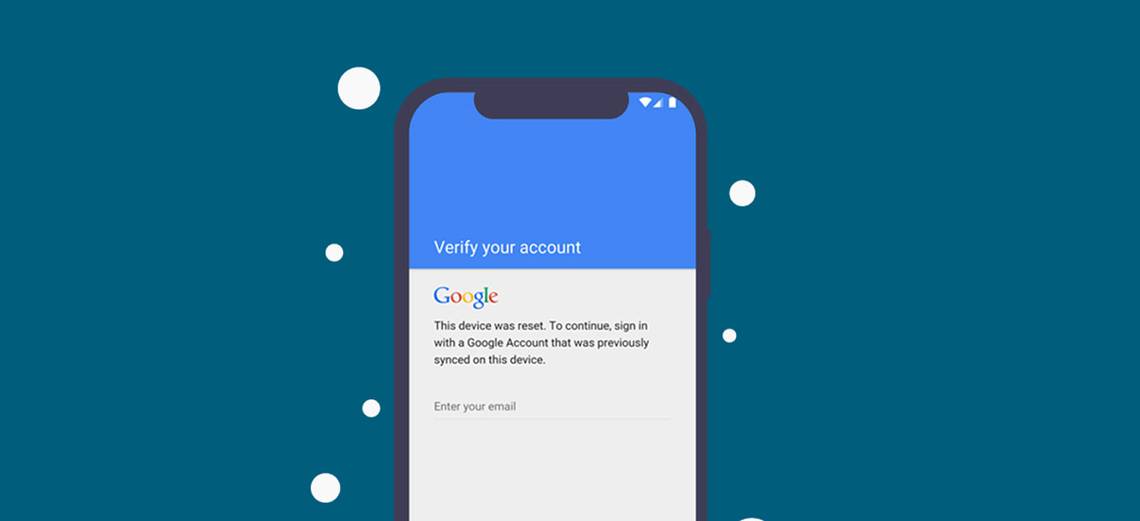
After a factory reset, your Huawei phone will prompt you to sign in with the last Google account used on the device. It happens because FRP is automatically activated during the initial setup of a Google account on your phone. When you can’t remember your login details, or if the device is second-hand and you don’t know the previous owner’s account, the FRP lock will block access completely.
It’s a strong security measure, but it can feel more like a roadblock than protection for those who’ve forgotten passwords. That’s why many users are turning to Android phone unlockers to safely bypass this lock and regain control of their Huawei phones.
Part 2. Why Standard Methods Often Fail on Huawei Devices?
Moving beyond the basics, it’s important to understand why typical solutions often don’t work. On Huawei devices, multiple factors can be held responsible for this situation. While you might find success with other Android phones, Huawei’s security features make these standard Huawei FRP tools unreliable. Summarized below are a few common factors leading to it:
- Limited Bootloader Access: Huawei has stopped officially supporting bootloader unlock codes. That means you’re stuck with a locked system that resists most manual workarounds.
- Custom Recovery Complications: Many Huawei devices don’t allow you to flash custom recovery images to bypass FRP and other locks. It makes recovery-based bypass methods useless for most models.
- Failure of Manual Tricks: Such methods often fail because Huawei devices block attempts to downgrade or use firmware loopholes. That makes it really hard to remove this lock on the phone.
- Hardware-level Security Updates: As Huawei updates its firmware, it leaves fewer options for unlocking. The older bypass tricks that used to work are now almost completely patched.
- Strict App Security Policies: Using external apps or downloads rarely works, as Huawei’s security policies block these apps from running. Furthermore, the firmware rarely allows access to the parts of the phone needed to unlock.
Part 3. Dr.Fone – Your Reliable Huawei FRP Bypass and Unlock Tool
Seeing how standard methods can’t break through Huawei’s security, it’s reassuring to have a specialized option that makes the process easier and safer. For anyone feeling stuck or overwhelmed, a dedicated solution like Dr.Fone – Screen Unlock (Android) can be a true lifesaver. It is a professional Android phone unlocker trusted for its ability to handle even the toughest FRP locks and forgotten passwords on Huawei models.
This tool has been carefully crafted to bypass these barriers without risking your mobile integrity or leaving you more frustrated. From the moment you start using Dr.Fone, you’ll notice how much simpler the unlocking process becomes compared to traditional methods. What makes it stand out even more is the dedicated support it brings to Huawei users.
Its dynamic approach is designed for everyone, even those who don’t consider themselves tech-savvy. Plus, it can delete any sort of forgotten mobile screen lock with ease. Working on all the models and supporting most Android OS is a comprehensive approach. In the end, Dr.Fone is the trusted way to regain access and control over your Huawei device when it’s an FRP lock or a forgotten password.
Part 4. Step-by-Step: Bypass Huawei FRP and Unlock Your Screen
With the right tool in your hands, it’s time to see just how easy it can be to get rid of this annoying lock and regain access to your mobile. Dr.Fone – Screen Unlock (Android) makes it a straightforward process, even for those who haven’t tried anything like this before. Here’s how to perform the FRP bypass operation and unlock your Huawei screen step by step:
Step 1. Open the Tool and Choose the Screen Unlock Option
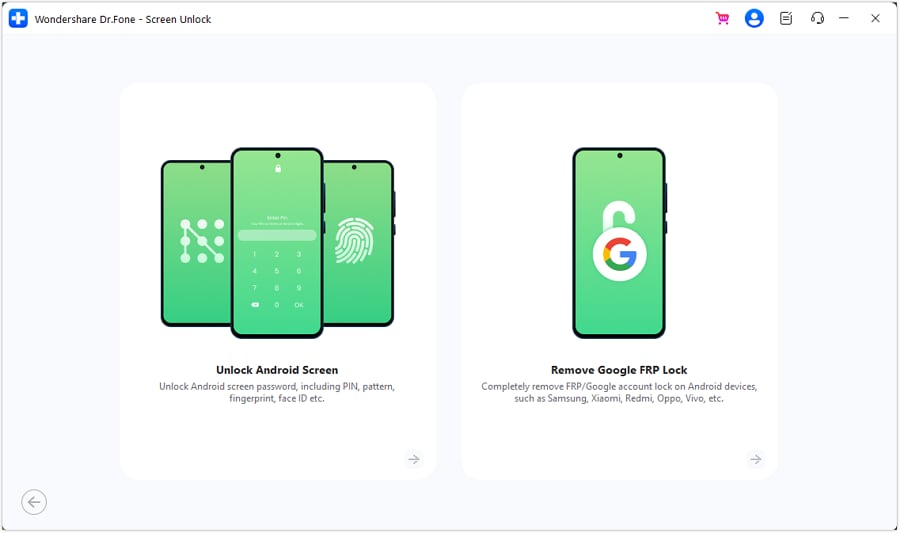
Kickstart the operation with Dr.Fone on your computer and access the “Toolbox” area to choose the “Screen Unlock” option. Following that, opt for “Android” as your device type before you hit the “Remove Google FRP Lock” button and continue.
Step 2. Select the Right Brand and Make the Connection
Moving forward, opt for “Huawei” from the supported brand list and follow the provided instructions to access the “EMUI” page. After performing the instructed actions, reboot the phone and enter the “EMUI” page again.
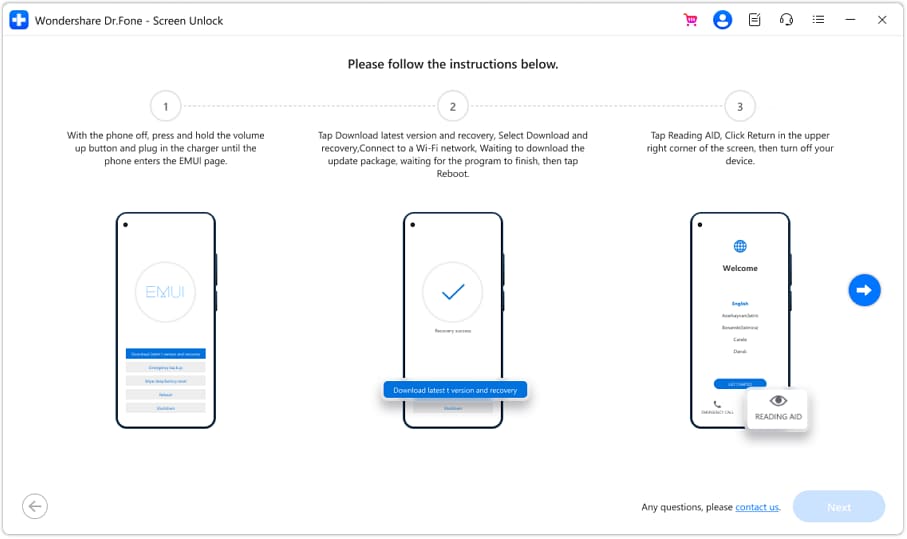
Step 3. Get Rid of the FRP from Your Huawei Mobile
Following that, get into the “Emergency Backup” mode and follow the step-by-step instructions to get rid of the Google lock. Lastly, reboot your mobile once you have successfully achieved the goal of concluding the operation.
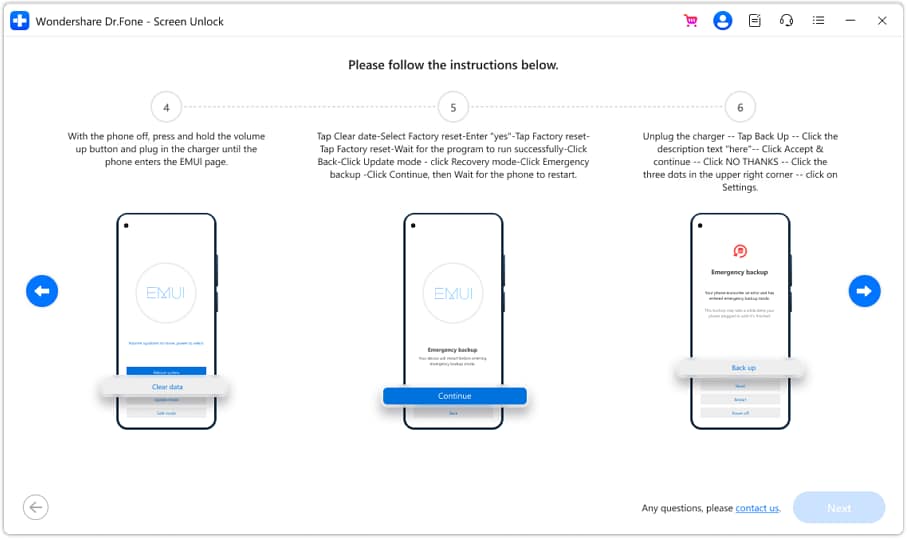
Part 5. Other Brands Supported by Dr.Fone
Beyond just Huawei, it’s helpful to know that Dr.Fone – Screen Unlock (Android) has your back on a wide range of Android phones. The following is a list of other popular brands that Dr.Fone can unlock for FRP bypass:
- Samsung
- LG
- Xiaomi
- Lenovo
- Oppo
- Vivo
- OnePlus
- Motorola
- Google Pixel
- Sony
- HTC
- Asus
- Micromax
Conclusion
In summary, it is clear how challenging Huawei’s FRP lock can be and how traditional methods often fall short. Hence, getting a reliable choice like Dr.Fone – Screen Unlock (Android) makes a huge difference.
This Android phone unlocker not only works effortlessly with Huawei devices but also extends its support to other popular brands. With its stepwise guidance, even those without technical experience can confidently bypass FRP and regain full access.

