




© ROOT-NATION.com - Use of content is permitted with a backlink.
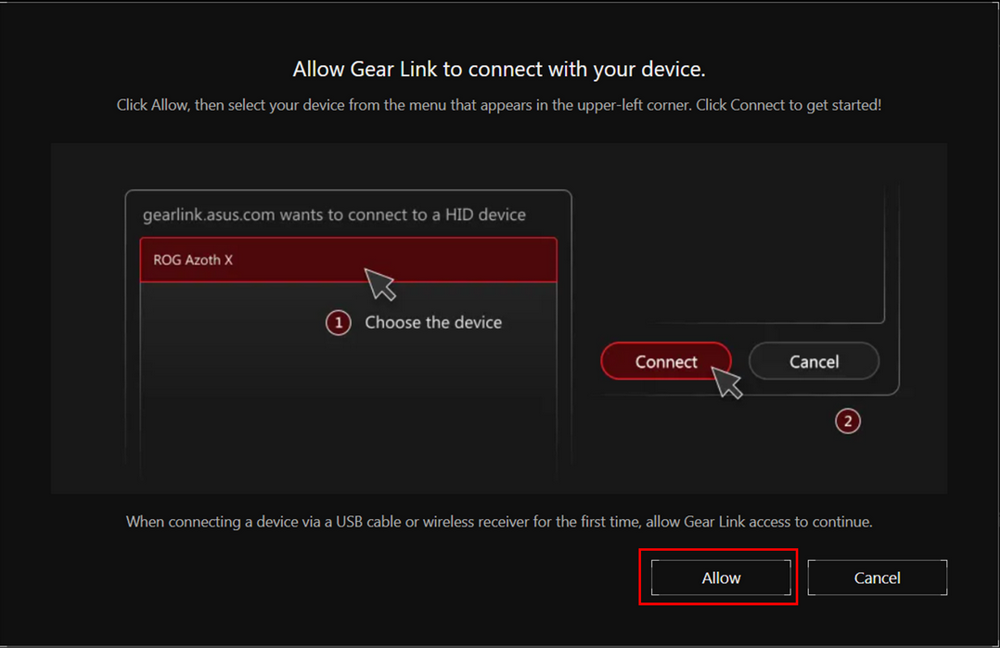
ASUS has introduced a new tool called Gear Link, a web-based application designed to simplify managing ROG keyboards and mice. It allows users to adjust settings directly from a browser, making peripheral configuration more accessible.

There’s no longer a need to download large software packages or hunt for drivers on official product pages. Users can simply visit gearlink.asus.com, connect their device, and adjust settings according to their preferences.
Read also: ASUS VA259HGA Review: An Affordable Full HD Gaming Monitor with 120Hz and Eye Care+
TABLE OF CONTENTS:
What can be configured via Gear Link?
Gear Link offers a range of features suitable for most gaming peripheral scenarios. Users can remap buttons, create and edit macros, adjust DPI settings, configure RGB lighting, manage profiles, and access power-saving options. The browser interface also allows firmware updates for connected devices.

The main advantage of Gear Link is that it runs directly in a web browser. This makes it easy to adjust settings quickly without installing the full Armoury Crate software, especially for minor tweaks to a keyboard or mouse. The application can even work offline if the device is already connected and the Gear Link tab remains open. The interface also provides access to help resources and the latest updates.
Read also:ASUS TUF RX 7900 XT 16GB Review: 5 Key Facts and a Full Set of Benchmarks
Gear Link or Armoury Crate?
The question arises: can Gear Link fully replace Armoury Crate? Most likely not. Armoury Crate remains a more comprehensive platform for managing all ROG devices, offering advanced customization options. For instance, synchronizing lighting across multiple connected devices can only be done through Armoury Crate. It also handles product registration, subscription to ASUS promotions, and participation in the ROG Elite loyalty program.
In the past, ASUS attempted to simplify the user experience with a lighter version of the software – Armoury Crate Gear – focused specifically on peripheral settings. However, this version had limitations: each device model required its own app version, so managing a full set of peripherals meant downloading multiple installation packages. Users also still had to monitor updates and spend time on installation.
In this regard, Gear Link presents a lightweight and fast solution for basic adjustments without installing additional software. Its functionality is sufficient for convenient keyboard or mouse management, as long as users do not require extensive customization.
Read also: ASUS ROG Falchion Ace HFX review: Gaming Keyboard with Magnetic Switches
Which devices are supported?
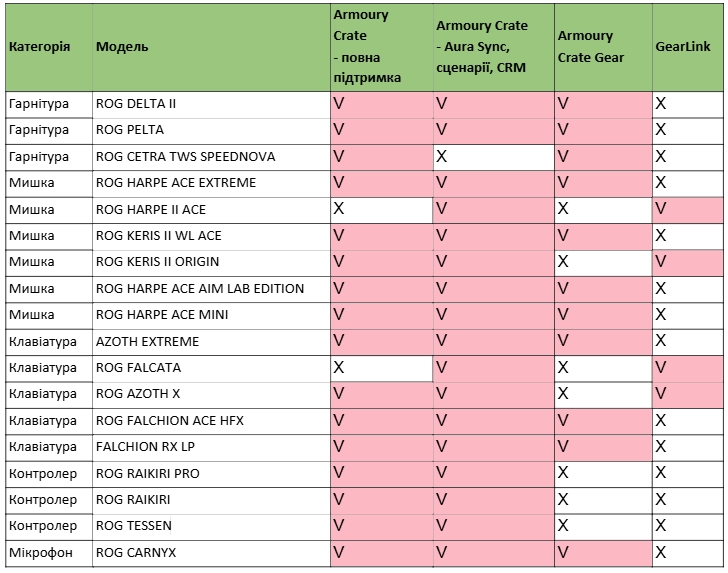
Currently, Gear Link supports ROG Azoth X and Falcata keyboards, as well as ROG Keris II Origin and Harpe II Ace mice. A full list of compatible devices is available in the official table on the website. In the future, the web application is expected to support all new models in the ROG lineup.
Overall, for users who value the ability to adjust peripheral settings quickly without extra downloads, Gear Link is worth considering when choosing a new keyboard or mouse. It offers a practical option for gamers who prefer to save time and avoid complex installations and lengthy configuration processes.
Read also:
- ASUS ROG Keris II Origin Wireless Gaming Mouse Review: Sleek and Affordable
- ASUS ROG Azoth X Keyboard Review: Futuristic Design, Hot-Swap Support, and OLED Display

