





© ROOT-NATION.com - Use of content is permitted with a backlink.
A high-performance PC is almost always a hot PC. This is not just a general assumption, but a physical reality: technologies that increase performance are inherently tied to technologies that dissipate heat. During the summer, the situation becomes more challenging – high ambient temperatures add extra stress to components that are already operating close to their thermal limits. So what can be done to help a system handle the hot season reliably?
Thermal management is particularly important for gaming PCs and workstations that operate under sustained heavy workloads for hours at a time. For this reason, it is important to consider not only the cooling solution for the CPU or GPU individually, but the entire system ecosystem as a whole: the case, the liquid cooling setup, and the power supply unit.
TABLE OF CONTENTS:
Case
Contrary to popular belief, the case often has a greater impact on cooling performance than the liquid cooling system itself. It determines how efficiently hot air is removed from the system – even a high-end liquid cooler will not reach its full potential inside a case with poor airflow.
Inside a modern PC, several components generate heat simultaneously:
- the graphics card heats the air inside the case
- the processor transfers heat through its heatsink or radiator
- SSDs and the motherboard VRM also contribute to overall thermal output
If hot air is not removed quickly enough, the temperature of all components begins to rise at the same time. At that point, the issue becomes more than just user discomfort – it can affect overall system stability. This is why modern PC cases increasingly feature:
- mesh panels and larger ventilation openings
- pre-installed fans
- dual-chamber layouts
- optimized airflow paths
- well-designed cable management solutions
A practical and reasonably priced option is the ASUS Prime AP303 – compact and minimalist on the outside, but thoughtfully designed internally. Its key features include a convenient cable management system, a mesh front panel for improved airflow intake, support for radiators up to 360 mm, and space for up to seven fans.

For users willing to invest in a higher-end solution, the ROG STRIX HELIOS II is another option to consider. Its mesh front panel with a distinctive gaming-oriented design, combined with four pre-installed 140 mm fans, provides strong airflow out of the box. The spacious interior also makes it easier to build an efficient airflow layout and maintain clean cable management.

However, buying a new case is not always necessary – in many situations, improving the airflow of an existing system may be enough. A set such as the ASUS Prime MR120 ARGB can help with that. It combines a modern appearance with relatively quiet operation at around 21 dB, airflow rated at 58 CFM, and a maximum fan speed of 1600 RPM. In practice, this is sufficient to achieve a noticeable reduction in overall system temperatures.

Liquid Cooling System
The advantages of liquid cooling over traditional air coolers are well known: an AIO liquid cooler can remove heat from the processor more quickly and dissipate it more efficiently through a larger radiator surface. Unlike large tower-style air coolers, liquid cooling systems also do not obstruct airflow inside the case, which is important for the overall thermal balance of the system.
There are generally two common approaches to radiator placement:
- front-mounted installation – prioritizes maximum CPU cooling performance
- top-mounted installation – improves overall airflow circulation inside the case
The most balanced configuration is typically a top-mounted liquid cooler, front intake fans, and a rear exhaust fan. This setup helps maintain consistent airflow through the case, directing cool air toward heat-generating components while efficiently exhausting warm air upward and out the back in line with natural heat movement.
Liquid cooling systems are also often chosen for the visual aspect of a build, not just thermal performance. The ROG RYUO IV 360 ARGB is one example of combining these two priorities, featuring a 360 mm radiator, an Asetek Gen 8 V2 pump, and a 6.67-inch curved AMOLED display.
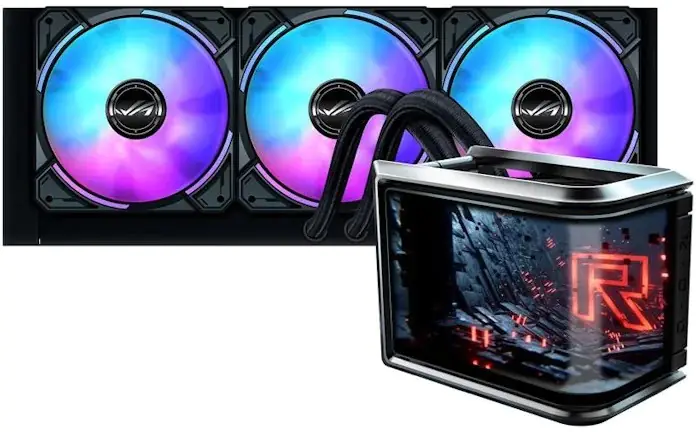
If there is no need for a premium solution, the MAX GAMING LC 360 ARGB LCD is also capable of handling the task. It provides effective heat dissipation, a clean overall appearance, and reliable long-term operation.

Power Supply Unit (PSU)
The impact of the power supply unit on system thermal conditions is often underestimated. In practice, any PSU generates heat during operation, and less efficient models produce noticeably more of it, increasing the overall temperature inside the case. For this reason, modern cases often feature a dual-chamber layout that isolates the PSU from the main system components and provides it with a dedicated cooling zone.
For contemporary gaming PCs, PSUs with 80 PLUS Gold or Platinum certification are commonly used. Higher efficiency means lower energy losses and, consequently, reduced heat output. Power headroom also matters: if the PSU is constantly operating close to its limit:
- component temperatures increase
- the fan system becomes louder
- system stability decreases
For PCs equipped with modern high-performance graphics cards, it is generally recommended to maintain a power headroom of around 20–30%.
A balanced option for a mid-range system is the ASUS TUF GAMING 750G EVO. It provides sufficient headroom even for NVIDIA 50-series graphics cards, features 80 PLUS Gold efficiency certification, and is subjected to additional testing aligned with military-grade standards, which is intended to indicate operational reliability under a wide range of conditions.

For systems built with high-end components, the ROG THOR 1200W Platinum III is a suitable option. It provides sufficient power headroom even for configurations using an RTX 5090-class GPU. The GPU First technology prioritizes power delivery to the graphics card, while GaN transistors are used to improve efficiency, reliability, and overall operational stability.

Conclusion
In modern PC builds, it is no longer sufficient to simply install a powerful CPU and GPU and expect stable operation – the overall system ecosystem is becoming increasingly important. Properly selected cooling components not only keep temperatures under control, but also reduce noise levels, improve FPS stability in games, extend the lifespan of hardware components, and make everyday computer use more comfortable. Summer is a good time to evaluate whether your current build requires an upgrade to its cooling setup. This can be done through discounts available at official ASUS partner retailers.
Read also:
- ASUS TUF Gaming LC III 360 ARGB LCD Review: Affordable Liquid Cooling Solution
- ASUS Prime AP202 Case Review: Distinctive Design Even When Powered Off
- 9 Key Features of ASUS TUF and ASUS ROG/ROG Thor Power Supplies

