





© ROOT-NATION.com - Use of content is permitted with a backlink.
If you need both a mouse and a keyboard, you can choose either individual models that pair particularly well together or an all-in-one 2-in-1 set that includes both peripherals. This gives you the flexibility to build your own setup or choose a ready-made combo for different needs – from gaming and entertainment to work. To help you navigate the wide range of options, we have put together a list of the ten best mouse-and-keyboard combos and complete sets in our view. Their intended uses, price points, features, and connectivity options vary, so there should be an option here to suit both your budget and your needs.
Read also: All gaming mouse reviews

TABLE OF CONTENTS:
Canyon CNS-HBTK11 + OnClick 24
If you are looking for a sleek setup with laptop-style ergonomics, this combo is worth considering. The Canyon CNS-HBTK11 wireless keyboard comes in an ultra-slim body measuring just 19 mm thick. It uses a low-profile scissor-switch mechanism that provides quiet typing and helps minimize accidental keystrokes. The keyboard also features spill resistance and stylish RGB backlighting. It can connect via Bluetooth or a wireless receiver, supports Multi-Device functionality, and integrates easily with both Windows and macOS ecosystems. The built-in 1,600 mAh battery also eliminates the need to replace batteries.

The mouse has a symmetrical shape, making it comfortable for both right- and left-handed users. It also has an interesting design, with a semi-transparent finish on the lower part of the body. The Canyon OnClick 24 is an optical mouse with a 1,200 DPI sensor. It connects wirelessly via Bluetooth or a wireless receiver, supports Multi-Device functionality, and its built-in battery provides long usage between charges. The Canyon OnType 10 keyboard starts at $45/€40, while the OnClick 24 mouse costs just $13/€11.
Lorgar KBP70MW Mechanical Pro + MSP80
This combo is designed for gamers who prioritize low latency, extensive customization, and a generous bundle of accessories. The Lorgar KBP70MW Mechanical Pro keyboard uses an ultra-compact form factor and offers three connection options: Bluetooth 5.0, 2.4 GHz wireless, or wired. A soft and quiet typing experience is provided by the Gasket Mount design and Lorgar Toxic Purple linear mechanical switches, rated for up to 50 million keystrokes and supporting hot-swapping. The keyboard is made of durable ABS plastic and features wear-resistant PBT keycaps, a mechanical volume knob, and RGB backlighting. The generous package includes a cable, spare switches and a switch puller, a carrying case, and even a cup holder.

It can be paired with the wired Lorgar MSP80 gaming mouse. Inside is a PixArt PAW3395 optical sensor with a resolution of up to 26,000 DPI, 50G acceleration, and a polling rate of up to 8,000 Hz. For convenient control, the mouse features 10 programmable buttons rated for up to 80 million clicks, along with a unique 0.85-inch color TFT display for showing system parameters or custom images. Smooth gliding is ensured by 100% PTFE feet, while the flexible 1.8-meter silicone cable provides plenty of freedom of movement during intense gaming sessions. At the time of writing, the Lorgar KBP70MW Mechanical Pro keyboard is available at a discounted price of $65/€55, while the MSP80 mouse costs $55/€45.
Read also: Canyon HKB-W11 Wireless Keyboard Review: Worth a Closer Look
Logitech G316 X 98 + G305
This combo is an excellent choice for gamers and demanding users looking for uncompromising speed, advanced features, and the reliability of a trusted brand. The Logitech G316 X 98 is a compact, wired, full-size keyboard in the 1800 layout. It retains the numeric keypad while taking up less desk space.
It features tactile mechanical switches, durable PBT keycaps, and hot-swappable switches for quick replacement. The keyboard’s key features include a small LCD display, a convenient volume control wheel, bright RGB backlighting, and an impressive 8,000 Hz polling rate, delivering a response time of just 0.125 ms and ensuring virtually instant response in even the most fast-paced battles.

A reliable companion for the keyboard is the wireless Logitech G305 mouse, which has already become something of a classic among gamers. Thanks to Logitech’s proprietary LIGHTSPEED wireless technology, it offers a latency of just 1 ms and a 1,000 Hz polling rate. Inside is a high-precision HERO optical sensor with a resolution ranging from 200 to 12,000 DPI and 40G acceleration. The mouse features a symmetrical ergonomic body with PTFE feet, weighs 99 grams, and is powered by a single AA battery that provides an impressive 250 hours of active gaming. The mouse also offers five programmable buttons and supports saving profiles to its onboard memory. The Logitech G316 X 98 keyboard starts at $100/€90, while the G305 mouse is available from $40/€35.
GamePro Asgard Odin GM035 + Yord MK266
If you are looking for gaming peripherals that offer a good balance between price and quality, consider pairing the GamePro Asgard Odin GM035 mouse with the Yord MK266 keyboard.
The keyboard uses a mechanical design with RGB backlighting in a compact 75% layout. It supports all three major connection options: Bluetooth 5.4, 2.4 GHz wireless, and wired connectivity. The Gasket Mount design also helps reduce typing noise. The keyboard is equipped with Keychron Super Red linear switches rated for 50 million keystrokes. The PBT keycaps contribute to the keyboard’s durability and long-term reliability. Hot-swappable switches are supported as well, while a dedicated control knob in the upper-right corner provides convenient volume adjustment. The model is available in four colors – white, blue, black, and red. If you are pairing it with the white mouse, the white version is the most natural match.

Read also: XVX L75 Air Wireless Mechanical Keyboard Review: Versatile, Comfortable, Well-Built, and Stylish
The optical mouse features a clean, almost office-style design and is available exclusively in white. It also supports all three connection options and has four programmable buttons. It uses a PixArt 3950 sensor with a polling rate of up to 30,000 Hz. The Odin GM035 is equipped with Huano switches rated for up to 80 million clicks, while the mouse weighs just 39 g. At the time of writing, this GamePro combo can be assembled for around $95/€85. The GamePro Asgard Odin GM035 starts at $45/€40, while the Yord MK266 is available from $50/€45.
Lenovo 100 Wireless Combo
This set is an excellent basic solution for home use, studying, or setting up a workspace where simplicity, reliability, and a cable-free setup are the priorities. The full-size membrane keyboard uses a standard ANSI layout with familiar key placement and low-profile keys for comfortable everyday typing. It also features dedicated multimedia keys, while the computer connection is handled by a single compact USB wireless receiver that provides a stable wireless connection.

У комплект входить легка та компактна бездротова миша, яка ідеально підходить для стандартних робочих завдань та навігації в інтернеті. Вона має симетричний корпус, дві класичні кнопки й зручне колесо прокрутки. Оптичний сенсор із роздільною здатністю 1000 DPI забезпечує передбачуване та точне позиціонування курсора на більшості робочих поверхонь. Купити набір Lenovo 100 Wireless Combo можна від $30/25€.
A4 Tech FG1010
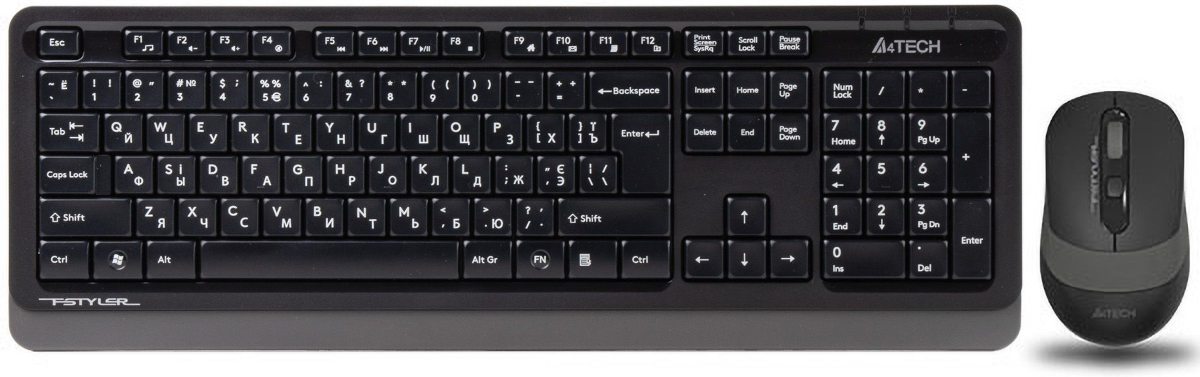
The budget-friendly A4Tech FG1010 mouse-and-keyboard set is primarily designed for work. It also features a wireless radio connection, making the peripherals more convenient to use and easier to transport when needed.
Read also: 1stPlayer NEO87 Rome Keyboard Review: Blend of Modern Engineering and Vintage Design
The A4Tech FG1010 keyboard uses a membrane mechanism and features a full-size, low-profile design. It weighs 494 g. The mouse is optical, with a dedicated DPI switch and a sensor resolution of 2,000 DPI. It weighs 67 g and is powered by two AA batteries. Both devices offer a wireless range of up to 15 meters from the connected source. The A4Tech FG1010 set is available from around $17/€15.
Dell Pro Wireless KM5221W
The Dell Pro Wireless KM5221W is a neat-looking and fairly affordable keyboard-and-mouse combo designed for both work and everyday leisure. The peripherals connect via a wireless receiver. The mouse is optical and relatively lightweight at 92 g. It is powered by two AA batteries and features two buttons, along with a sensor adjustable from 1,000 to 4,000 DPI.
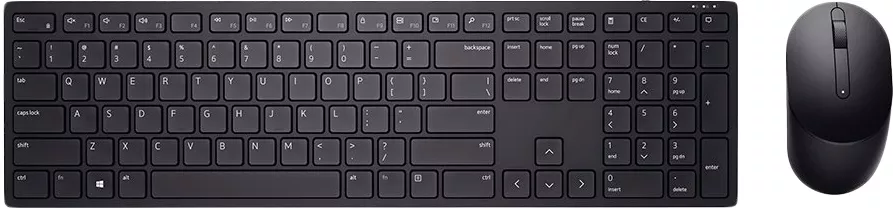
The Dell KM5221W set also includes a full-size ANSI keyboard. It weighs just 400 g. The keyboard can connect via USB or a wireless receiver and is powered by two AAA batteries. It uses a membrane mechanism with low-profile, island-style keys. The Dell KM-636 set is available from around $40/€35.
MSI Vigor GK30 Combo
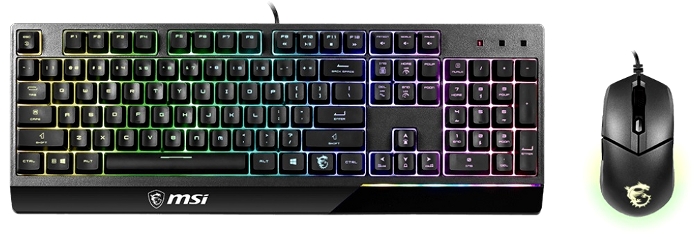
The full-size mecha-membrane keyboard included with the MSI Vigor GK30 Combo features high-profile keys and Anti-Ghosting support. It also offers a dedicated gaming mode, customizable MSI Mystic Light Sync backlighting, and macro support.
Read also: Logitech Mobi Fold Review: Foldable Wireless Mouse Designed for Maximum Portability
The keyboard has a stated weight of 1,042 g, while its корпус features spill resistance. The mouse is a wired optical gaming model with five buttons and MSI’s signature logo on the body. It also supports multiple RGB lighting modes. The MSI Vigor GK30 Combo is available from around $60/€50.
HP 580C Multi-Device Dual-Mode
This ready-made office set from HP is an excellent choice for copywriters, analysts, and other professionals who work with large amounts of text and need an ergonomic everyday tool. The full-size wireless keyboard uses a low-profile scissor-switch mechanism with island-style keys, making typing fast and comfortable. It supports dual-mode connectivity via Bluetooth or a USB wireless receiver, with Multi-Device functionality. Dedicated CMD/OPT keys also make it suitable for use with both Windows and macOS. Additional features include a detachable wrist rest, seven extra function keys, and impressive battery life of up to 36 months from two AAA batteries.

The included wireless mouse weighs just 76 g and complements the keyboard well for everyday work. It features a high-resolution optical sensor with up to 4,000 DPI, providing precise cursor positioning. The mouse has four buttons, a scroll wheel, and is powered by a single AA battery. Bluetooth or wireless receiver connectivity provides a stable connection without adding unnecessary cables to the desk. The HP 580C Multi-Device Dual-Mode starts at around $85/€70.
HP 720 Wireless Keyboard and Mouse Combo
The HP 720 Multi-Device Rechargeable Wireless Keyboard and Mouse Combo is a modern peripheral set designed for those who spend half the day or more at a computer. The full-size keyboard features low-profile island-style scissor keys, making typing easy and comfortable. It also includes additional keys for quick access to multimedia controls and system settings. The keyboard supports Bluetooth and wireless receiver connectivity, can be paired with multiple devices, and is powered by a rechargeable battery that provides up to 60 days of battery life.

The set also includes a wireless optical mouse with a sensor resolution of up to 4,000 DPI. It features four buttons, a scroll wheel, an ergonomic shape, and weighs around 90 g. The mouse is also powered by a rechargeable battery. This HP combo is available from around $100/€85. There are plenty of ready-made sets on the market, as well as mouse-and-keyboard combinations that work particularly well together. Most preconfigured options fall into the office – and often budget – segment. If you are looking for something more advanced or gaming-oriented, it is generally better to choose compatible models from the same brand. This way, the devices will match not only in terms of design but also in their key features and functionality. Do you use a mouse-and-keyboard combo? If so, share its pros and cons in the comments, along with any proven models that did not make our list. And if you prefer buying peripherals separately, we would also be interested to hear why.
Read also: Top 10 Gaming Mice

