© ROOT-NATION.com - Use of content is permitted with a backlink.
The last time I reviewed a Redragon keyboard, I was one step away from being completely impressed. The K761 offered such an exceptional price-to-performance ratio that it almost felt unfair – certainly beyond what anyone would reasonably expect at its price point. The Redragon K719 PRO Anime Edition, however, brings something the K761 lacked: a clearly defined target audience.
Read also: All gaming keyboard reviews

TABLE OF CONTENTS:
Technical specifications
- Dimensions: 39.4 × 14.4 × 3.9 cm
- Weight: 1.15 kg
- Layout: 95-key / 96%
- Mounting Style: Gasket Mount
- Sound Dampening: 5-layer acoustic insulation
- Connectivity: USB Type-C, 2.4 GHz wireless, Bluetooth 5.0
- Switches: Proprietary pre-lubricated linear mechanical switches
- Hot-Swap Support: Yes, compatible with 3-pin and 5-pin switches
- Keycaps: OEM-profile Dye-Sub PBT, Latin layout
- Display: Yes, TFT
- RGB Lighting: Yes
- Software Support: Yes
Redragon K719 PRO Anime Edition video review
Market Position
Don’t get me wrong – the K761 looked great, and the K719 is not exactly a full-blown “Waifu Edition.” Instead, it is designed with visual appeal as a priority, an approach I can genuinely appreciate. More importantly, the K719 addresses several of the shortcomings I noted with the K761 while remaining only modestly more expensive. Specifically, it is priced at around $80–90, roughly $15–20 higher than the Wyvern Pro.

Incidentally, the Redragon K719 is available in several additional design variants. The Artemis Pro features an anime-inspired aesthetic, while the non-Pro Artemis comes in a Graffiti theme with a street-style design reminiscent of the Savage Impact. There are also three Galatin Pro variants: Essential Black, Jade Cloud, and Ice Blue. Keep in mind that most of these versions come equipped with different switch types, so the typing experience may vary depending on the model.
Advantages of the Redragon K719 PRO Anime Edition
What makes this particularly interesting is that it is not even a full-size 108-key keyboard. Instead, it uses a 96% layout with 95 keys, yet still manages to retain a dedicated numeric keypad.
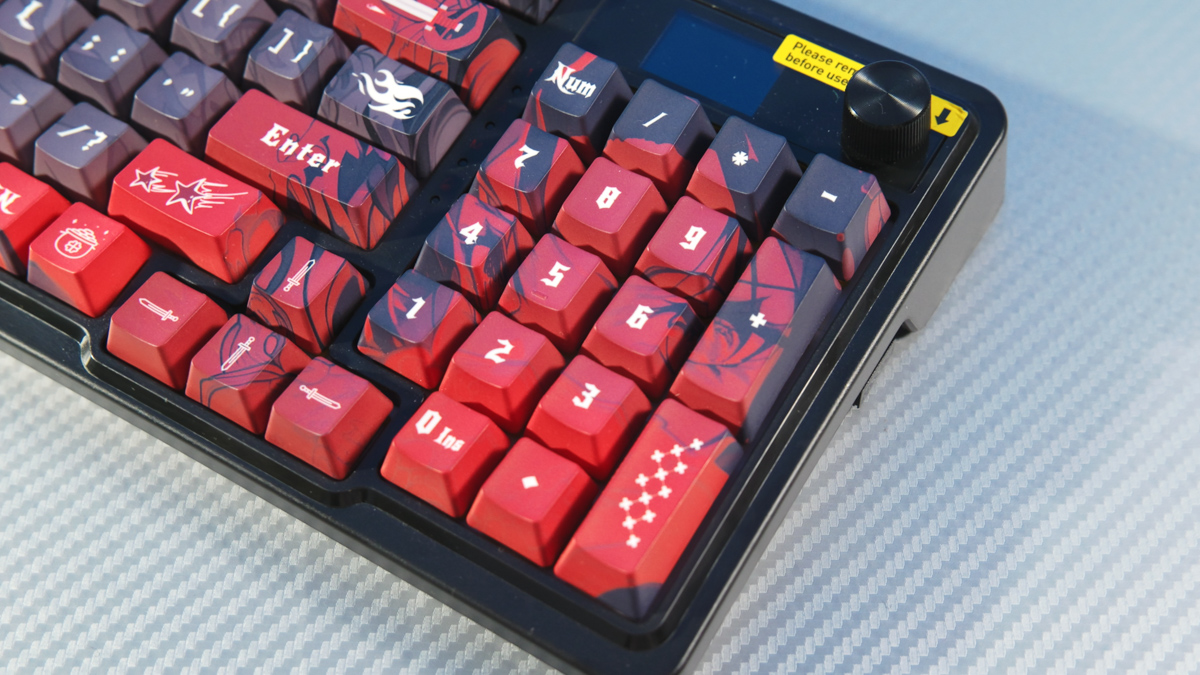

It also retains most of the features offered by its more affordable sibling. A built-in battery? Present. Three connectivity modes, including two wireless options? Present. Seamless switching between them? Present. A fully functional display? Present. A dedicated volume knob? Present. PC software for managing the display and other keyboard functions? Present. Two sets of adjustable feet? Present.

The keycaps are made from dye-sublimated PBT in an OEM profile with five-sided sublimation printing. The texture feels excellent under the fingers. The acoustics are equally impressive because, for once, I can genuinely tell that all five layers of sound dampening are doing their job: a 3.5 mm polyolefin foam layer, an IXPE switch pad, a PET acoustic pad, a silicone bottom pad, and a gasket-mounted construction.

Then there are the switches. They are called Hi-Fi – yes, that is their actual name. It is an unusual choice of branding, but these are factory-lubricated linear switches, and they are genuinely excellent. They feel smooth yet responsive, precise without being overly stiff, making for a lively typing experience. You can hear how they sound in the video above.

The switches are also hot-swappable. The Redragon K719 PRO Anime Edition is compatible with both 3-pin and 5-pin mechanical switches. In fact, this is one of the most important features to check when buying a wireless mechanical keyboard with hot-swap support.


With standard Cherry-style stems – as is the case here – the switches and keycaps are entirely a matter of personal preference. You can replace them whenever you like to achieve the feel and appearance you want. What you cannot change, however, is the keyboard’s overall design, software support, or core hardware features such as battery capacity and connectivity options.

User Experience
Now, a few words about the actual user experience. I absolutely love the Redragon K719 PRO Anime Edition for gaming, but I am far less enthusiastic about it for typing. As a gaming keyboard, it performs exceptionally well, thanks in large part to its OEM-profile keycaps.

Typing on it, however, is a less enjoyable experience. That said, the Artemis Pro does offer one advantage over the Wyvern Pro: its homing bumps are much more pronounced and noticeably easier to locate by touch.

The side-mounted USB port is largely a matter of personal preference. The USB wireless receiver is also stored on the side. While the storage slot is not magnetic, it is considerably more convenient than placing the receiver underneath the keyboard.

As expected, the display is genuinely useful. It can show the time, adjust RGB lighting modes and brightness, configure the date and time, and switch to animated GIFs. The companion PC software is not unified across Redragon’s product lineup, which is unfortunate, but it is functional and, somewhat surprisingly, well designed. Rather than looking dated, it has a distinctly gaming-inspired aesthetic. The English localization is not flawless, but it is perfectly usable.
Conclusion
This keyboard is unquestionably better than the Wyvern Pro. In fact, I would go a step further and say it is the best Redragon keyboard I have tested to date. It looks great, performs exceptionally well, is packed with features, delivers outstanding acoustics, and addresses the shortcomings that remained in the Wyvern Pro. For those reasons, I can confidently recommend the Redragon K719 PRO Anime Edition.
That concludes this review. Now I’d love to hear your thoughts – which keycap profile is your favorite? The Artemis Pro comes equipped with OEM-profile keycaps, which are perfectly suited for gaming. Personally, though, I prefer KAT and MDA profiles. I find them so comfortable for typing that they were one of the reasons I switched from scissor-switch keyboards to mechanical ones. Let me know your favorites in the comments.
Where to buy Redragon K719 PRO Anime Edition