





© ROOT-NATION.com - Use of content is permitted with a backlink.
If your laptop or PC doesn’t have enough ports and you want to connect a variety of peripherals, it’s worth considering a USB hub. Also known as a USB concentrator, it is a device that provides multiple ports, audio inputs, and even card readers.

Although a USB hub takes up one valuable port, it gives you several additional connections in return. Depending on the model, these can include standard USB-A ports, modern USB-C connections, or HDMI for connecting an external monitor. We’ve put together a selection of the best and most popular USB hubs, in our view, for different use cases and budgets.
Read also: JSAUX Accessories for Portable Consoles Review, part 1: Docking Stations and Joy-Con Connector
TABLE OF CONTENTS:
BASEUS UltraJoy AIR 7-Port Type-C HUB Adapter
BASEUS UltraJoy AIR is a compact hub with a built-in card reader that connects to a computer or laptop via USB-C at 5 Gbps (USB 3.2 Gen 1). The device features a high-quality plastic housing and an integrated cable. For everyday convenience, it also has a status indicator and a dedicated power switch, allowing you to quickly cut power to connected peripherals without having to unplug the cable.

The hub offers a versatile selection of ports: two USB-A ports with speeds of up to 5 Gbps, an HDMI 2.0 video output, a 3.5 mm audio jack, and SD and microSD card slots. A dedicated USB-C Power Delivery port supports pass-through charging at up to 100 W, making the hub a particularly practical solution for compact ultrabooks with a limited number of ports. This configuration is well suited for connecting an external monitor, transferring photos from memory cards, using wired headphones, and charging a laptop at high speed. The BASEUS UltraJoy AIR 7-Port Type-C HUB Adapter is available from around $32/€28.
BASEUS Metal Gleam Series 6-in-1 Type-C Hub
Featuring a metal housing that effectively dissipates heat under heavy workloads, the BASEUS Metal Gleam Series 6-in-1 Multifunctional Type-C Hub combines durability with a compact design measuring 115.5 × 44.5 × 16.5 mm. It connects to the host device via a universal USB-C port supporting speeds of up to 5 Gbps (USB 3.2 Gen 1), while a status indicator on the housing provides a quick way to monitor its operating state.

The hub’s port selection is designed to cover a range of use cases: it offers three USB-A ports with speeds of up to 5 Gbps, a full-featured USB-C port supporting up to 5 Gbps, and a LAN interface with Gigabit Ethernet support. It also features an HDMI video output and supports pass-through charging via Power Delivery 3.0 at up to 60 W. The BASEUS Metal Gleam Series 6-in-1 Multifunctional Type-C Hub is available from around $29/€25.
ANKER 332 USB-C Hub 5-in-1
Thanks to its slim 12 mm metal housing, the stylish ANKER 332 USB-C Hub 5-in-1 easily fits into any bag or backpack pocket. The aluminum body not only provides good resistance to everyday wear and tear but also helps dissipate heat more efficiently during operation. The device connects to a PC or laptop via USB-C (USB 3.2 Gen 1).

The hub offers a compact but well-thought-out selection of ports: two standard USB-A ports with speeds of up to 5 Gbps, a USB-C data port supporting up to 5 Gbps, and an HDMI 1.4 video output for connecting an external monitor. A second USB-C port with Power Delivery is dedicated exclusively to power and supports pass-through charging at up to 85 W. The ANKER 332 USB-C Hub 5-in-1 is available from around $25/€21.
Lenovo ThinkPad Universal USB-C Dock
The Lenovo ThinkPad Universal USB-C Dock from the brand’s business-oriented lineup is designed to consolidate all the necessary peripherals into a single hub. The docking station features a plastic housing measuring 171 × 80 × 31 mm, a power button on the top panel, and a detachable cable for connecting to a PC via USB-C or USB-A at speeds of up to 10 Gbps. With its dedicated power supply, the dock supports up to 100 W of pass-through charging via Power Delivery, making it suitable for powering business laptops.

Read also: Beelink EX Mate Pro Review: The Best Hub?
The port selection is geared toward a full-fledged workstation: five USB-A ports, combining USB 2.0 with high-speed 10 Gbps ports, a USB-C port supporting 10 Gbps, a Gigabit Ethernet port, and a combined 3.5 mm audio jack. Of particular note is the video output section, which includes HDMI and two DisplayPort outputs with 4K support. This makes the dock a strong choice for programmers, analysts, and video editors who need two or three external monitors for their workflow. It is the most advanced and most expensive hub in our selection, with prices starting at around $155/€135.
Verbatim USB-C Wireless Display Adapter WDA-01
The multifunctional Verbatim USB-C Wireless Display Adapter WDA-01 with a built-in card reader is designed with versatility in mind. The device features a compact plastic housing and connects to a computer or laptop via USB-C (USB 3.2 Gen 1). Its key feature is the combination of modern and legacy video interfaces, making it a practical choice for office workers, teachers, and presenters who regularly need to connect to a wide range of equipment, from modern 4K displays to older office projectors.

The interface selection is designed to cover most everyday tasks: for data transfer, the hub provides two USB-A ports with speeds of up to 5 Gbps, a USB-C port supporting up to 5 Gbps, and an audio jack. For working with media files, it also includes SD and microSD card slots. For video output, there are both a modern HDMI port and an analog VGA connector. The Verbatim USB-C Wireless Display Adapter WDA-01 is available from around $100/€85.
Canyon CNS-TDS17
The ultra-slim Canyon CNS-TDS17 with a built-in card reader features a sleek metal housing measuring just 113 × 31 × 11 mm, making it an excellent portable hub that is easy to carry around. It is particularly well suited to content creators, photographers, and other professionals who need a lightweight and compact adapter for connecting peripherals, an external monitor, and memory cards.

Read also: Canyon DS-90 Review: Updated universal USB hub
The Canyon CNS-TDS17 connects to a PC or laptop via a built-in 15 cm USB-C cable supporting USB 3.2 Gen 1. The port selection includes two USB-A ports with speeds of up to 5 Gbps, a USB-C port supporting up to 5 Gbps, and a microSD card slot. For connecting an external monitor, there is an HDMI port with support for 4K video output, while a dedicated USB-C Power Delivery port supports up to 100 W, allowing you to charge a range of devices, including laptops. The CNS-TDS17 is available for around $34/€29.
Xiaomi 5-in-1 Type-C Hub
The compact Xiaomi hub comes in a minimalist plastic housing, a design approach typical of many of the brand’s devices. It is lightweight and portable, so it takes up little space on a desk or in a bag pocket. The Xiaomi 5-in-1 Type-C Hub connects to the host device via a standard USB-C port.

The hub provides five ports: three standard USB-A ports, a USB-C port supporting speeds of up to 5 Gbps, and an HDMI video output for connecting an external monitor. The Xiaomi 5-in-1 Type-C Hub is a good choice for students, office workers, and owners of modern ultrabooks who need a simple and reliable way to connect multiple peripherals and an additional display at the same time. Prices start at around $25/€21.
Acer 12-in-1 Type C Dongle
If you need to connect a lot of devices at once, Acer’s versatile dongle can significantly expand your PC’s connectivity options. It includes everything you might need: four USB-A ports, combining USB 2.0 for peripherals with high-speed 5 Gbps ports for storage devices, a USB-C port supporting up to 5 Gbps, Gigabit Ethernet, SD and microSD card slots, and a 3.5 mm mini-jack audio connector. For external displays, there are both HDMI and DisplayPort outputs, while the USB-C port also supports up to 100 W of pass-through charging.

Read also: Wavlink WL-UTD58-M Hub Review: Thunderbolt 5 Support at Last
The device connects to a computer or laptop via USB-C with support for transfer speeds of up to 5 Gbps. The model features a well-thought-out port layout that helps keep the workspace organized and reduces cable clutter on the desk. The Acer 12-in-1 Type C Dongle is available from around $54/€46.
Apple USB-C Digital AV Multiport Adapter
Apple’s official hub is a must-have accessory for MacBook, iPad, and iMac owners who need to expand their device’s connectivity. It makes it easy to connect a laptop or tablet to a 4K monitor, TV, or projector while still allowing you to use external storage devices and keep the host device powered from the mains.
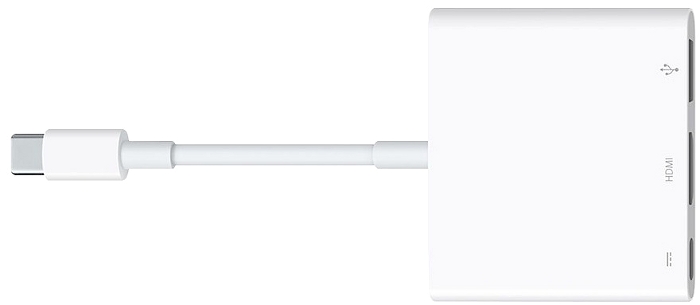
The Apple USB-C Digital AV Multiport Adapter is a compact hub with a minimalist white housing and a USB-C cable supporting Thunderbolt 3. Its port selection includes an HDMI 2.0 video output capable of delivering 4K video at 60 Hz, a USB-A port for connecting traditional peripherals or SSDs, and a USB-C port with Power Delivery. The latter supports pass-through charging, allowing you to connect an Apple power adapter and keep a MacBook or iPad powered while using the hub. The Apple hub is available from around $55/€47.
Gembird UHB-U3P7P-01
This budget-friendly hub is a great option for anyone whose desk is constantly crowded with peripherals and who simply doesn’t have enough ports on their PC or laptop. The ability to power each port on or off individually using a dedicated button is a major advantage for hardware repair technicians, testers, photographers, and office workers. This means there is no need to repeatedly unplug external hard drives, webcams, flash drives, or other devices, reducing unnecessary wear on their connectors.

The Gembird UHB-U3P7P-01 features a compact plastic housing with an integrated cable. It connects to a PC via USB-A (USB 3.2 Gen 1, up to 5 Gbps) and provides seven high-speed USB-A 3.2 Gen 1 ports, each supporting speeds of up to 5 Gbps. Every port has its own power switch and individual LED indicator, while the housing also includes a connector for an external power supply. The Gembird UHB-U3P7P-01 is available from as little as $16/€14.
Based on the models featured above, USB hubs come in a wide range of shapes and sizes, with different combinations of connectors and ports. Some are equipped with card readers, while many also offer video and audio outputs, as well as additional connectivity options.
Do you use USB hubs? If so, share the names of any models you’ve tried and trust in the comments, along with your experience and impressions. If not, tell us how you manage with the ports available on your device and what your current setup looks like.
Read also: j5create JCD554 Review: High-Speed USB4 Hub

