





© ROOT-NATION.com - Use of content is permitted with a backlink.
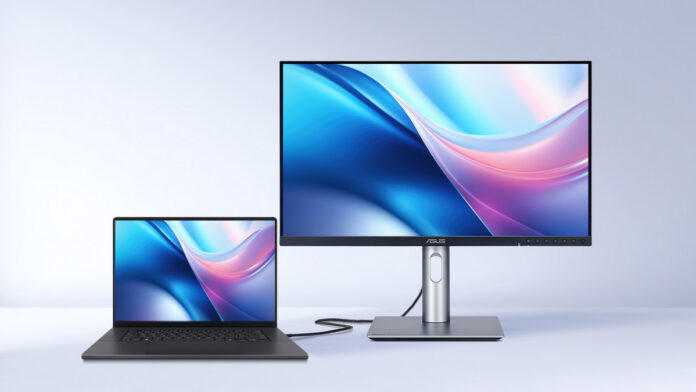
ASUS has introduced new features for its ProArt professional displays, optimized for use with MacBook, Mac mini, and Mac Studio systems. The updated ASUS DisplayWidget Center software for macOS allows users to adjust key display parameters – such as brightness, contrast, and color temperature – directly from the operating system, eliminating the need to access the monitor’s built-in OSD menu.
The software supports brightness control on ProArt displays using the standard MacBook keys and includes a dedicated M Model P3 mode. This mode synchronizes color output between the monitor and the connected laptop, ensuring consistent color accuracy in multi-monitor setups and improving predictability of results for professional workflows.

ProArt displays combine high resolution and increased pixel density with professional-grade color accuracy, achieving Delta E < 1 and covering 99% of the DCI-P3 color space. These specifications make the monitors well-suited for tasks such as photo retouching, video editing, graphic design, and 3D visualization. Certain models also support variable refresh rates up to 240 Hz, enabling smooth performance when paired with Mac devices equipped with Apple ProMotion technology, which automatically adjusts the display refresh rate to optimize for content and provides fluid scrolling and responsive input with touch or Apple Pencil.

All ProArt displays undergo independent compatibility testing with MacBook Pro, Mac mini and Mac Studio systems. USB-C and Thunderbolt 4 interfaces support data transfer, DisplayPort functionality, and power delivery of up to 96 W, allowing users to charge a MacBook and connected peripherals through a single cable, simplifying workspace setup.
Read also:ASUS ProArt P16 H7606WX Review: Ultrabook with RTX 5090 and 24 GB of VRAM
TABLE OF CONTENTS:
Intuitive Control in macOS
ASUS DisplayWidget Center integrates seamlessly with the macOS ecosystem, allowing users to adjust display settings without interrupting their workflow. Screen parameters can be modified quickly without accessing the monitor’s OSD menu, streamlining routine tasks and improving efficiency in everyday use.

The M Model P3 Color mode ensures consistent color reproduction between a MacBook display and a ProArt monitor. This synchronization is particularly important for professional workflows that demand high color accuracy, including photo editing, video production, and graphic design.
Professional Color Accuracy
Each ProArt display undergoes factory calibration to meet Calman Verified standards. The ProArt Calibration software for macOS supports both SDR and HDR workflows and stores color profiles directly in the monitor’s internal memory. This ensures consistent color performance regardless of the connected device.

The software also supports the creation of ICC profiles for both ProArt monitors and MacBook displays, allows scheduled calibration, and is compatible with popular hardware calibrators, including ProArt CaliContrO, X-Rite, Calibrite, Datacolor, Klein, and Colorimetry Research devices. For collaborative workflows, ASUS provides the online ProArt Color Center platform.
Read also: ASUS ProArt PA401 Wood Edition Review: Computer Case for Connoisseurs
Connectivity and Multitasking
ProArt displays are equipped with USB-C, HDMI, and DisplayPort inputs supporting daisy-chaining, and the monitor can function as a full-featured USB hub. This reduces the need for a separate docking station and simplifies workspace organization. The Auto KVM feature allows users to switch quickly between two connected MacBooks or PCs, controlling both with a single keyboard and mouse connected directly to the monitor. This enhances workflow efficiency and supports seamless multitasking in professional environments.
Comfort for Extended Use
ProArt displays feature an ergonomic stand with height, tilt, and swivel adjustments, and they support quick, tool-free VESA mounting. This facilitates easy integration into a variety of professional workspaces and promotes comfortable long-duration use.

TÜV Rheinland-certified Flicker-Free and Low Blue Light technologies reduce eye strain during extended use. The level of blue light filtering can be adjusted via the OSD, allowing the display to be tailored to individual usage scenarios.
Read also: ASUS ProArt PA278CFRV Professional Monitor Review
Adobe Bonus
In select regions, buyers of ProArt displays receive a complimentary three-month subscription to Adobe Creative Cloud. The package includes Lightroom, Photoshop, Premiere Pro, Illustrator, Adobe Substance 3D, Adobe Stock, and Acrobat Standard, further enhancing the value of the ProArt ecosystem for creative teams and professional studios.

The offer can be activated through the official ASUS program until 31 August 2026.
Read also:
- ASUS ROG STRIX GS-BE18000 Review: Wi-Fi 7 for Gamers
- ASUS ProArt P16 H7606WX Review: Ultrabook with RTX 5090 and 24 GB of VRAM