




© ROOT-NATION.com - Use of content is permitted with a backlink.
On October 14, 2025, Microsoft will officially end support for Windows 10. But what about users who don’t want to move to Windows 11? Let’s take a look at the available options.
Read also: Instructions, Guides, How To for Windows
TABLE OF CONTENTS:
Extended Security Updates (ESU) – What is it?
Windows 10 is entering the final stage of its lifecycle, with official support ending on October 14, 2025. For Microsoft, this marks not just a technical milestone but also a shift toward a new business model. The company is gradually preparing users for a reality where maintaining security on the older OS will come at an extra cost.
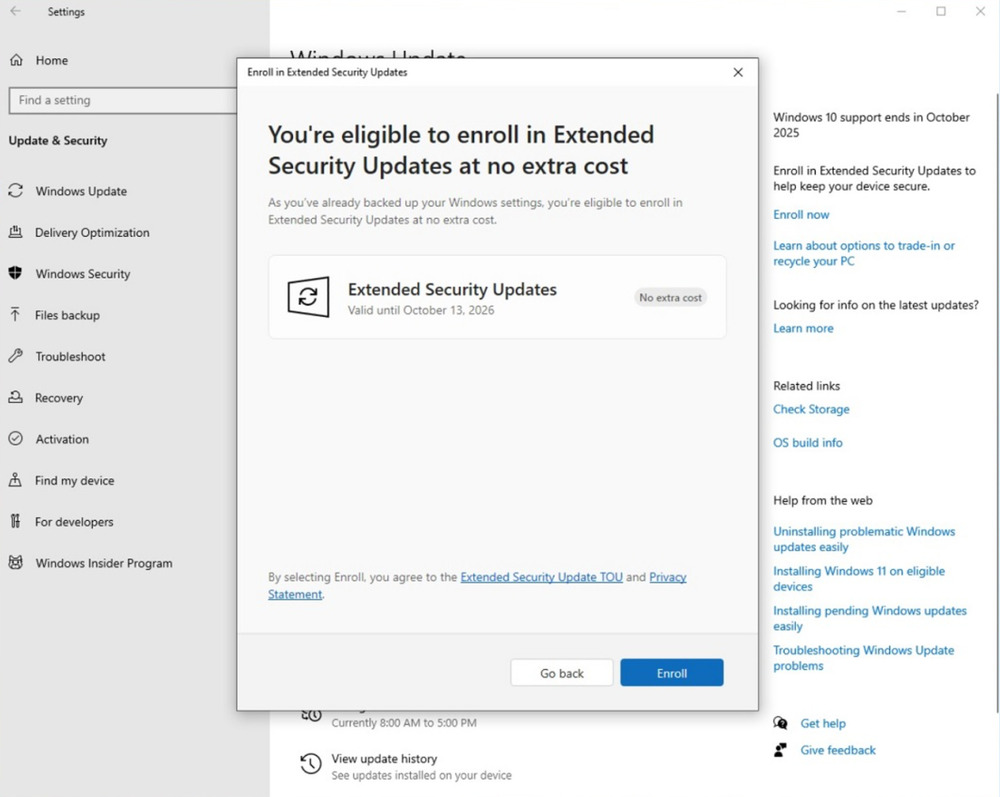
A recent Windows Update highlighted this change. In the system settings, a new “Register now” button has appeared, linking to the Extended Security Updates (ESU) program. This paid service provides access to critical security updates even after Windows 10 reaches its official end of life.
This move reflects Microsoft’s broader strategy: shifting from free support to a model where long-term security becomes a subscription-based service.
The rollout of ESU isn’t happening all at once. Microsoft has confirmed that the new option will appear gradually for users, with full coverage expected by October. This phased approach helps reduce the risk of technical issues while preparing the market for an unavoidable choice: either upgrade to Windows 11 or remain on Windows 10 under paid support.
Notably, Microsoft resolved issues with the ESU activation tool over the summer, which had caused errors during setup. This indicates the company’s effort to simplify the process and minimize risks for business users, for whom even brief downtime in cybersecurity could have serious consequences.
In this way, the approach to Windows 10’s “end-of-life” date serves as a test not only of Microsoft’s technical readiness but also of users’ willingness to treat an operating system as a service rather than a one-time purchase.
Read also: Windows 11 Open Source: Myth or Reality?
Three paths to freedom, but each has its price
Microsoft has outlined three ways to access extended Windows 10 updates, but none of them offer truly free long-term support. In effect, the company is pushing users to make a choice: either pay directly or become increasingly tied to the Microsoft ecosystem.
The first option is straightforward: a one-time payment of \$30 per year for extended support. This is the most affordable solution for users who want to stay on Windows 10 without fully integrating into Microsoft’s broader services.
The second option appears “conditionally free” by using 1,000 Microsoft Rewards points. On paper, it’s simple: search with Bing, use Edge, make purchases in the Microsoft Store, and accumulate points. In practice, earning enough points can take months of consistent activity, effectively turning users into regular consumers of Microsoft services. In this case, the cost isn’t monetary – it’s measured in time and behavioral engagement.
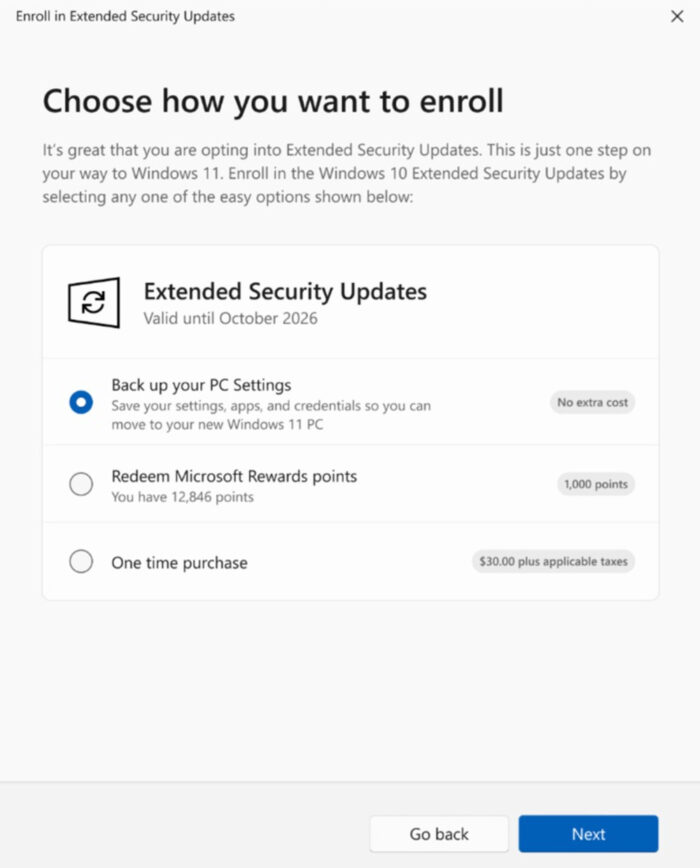
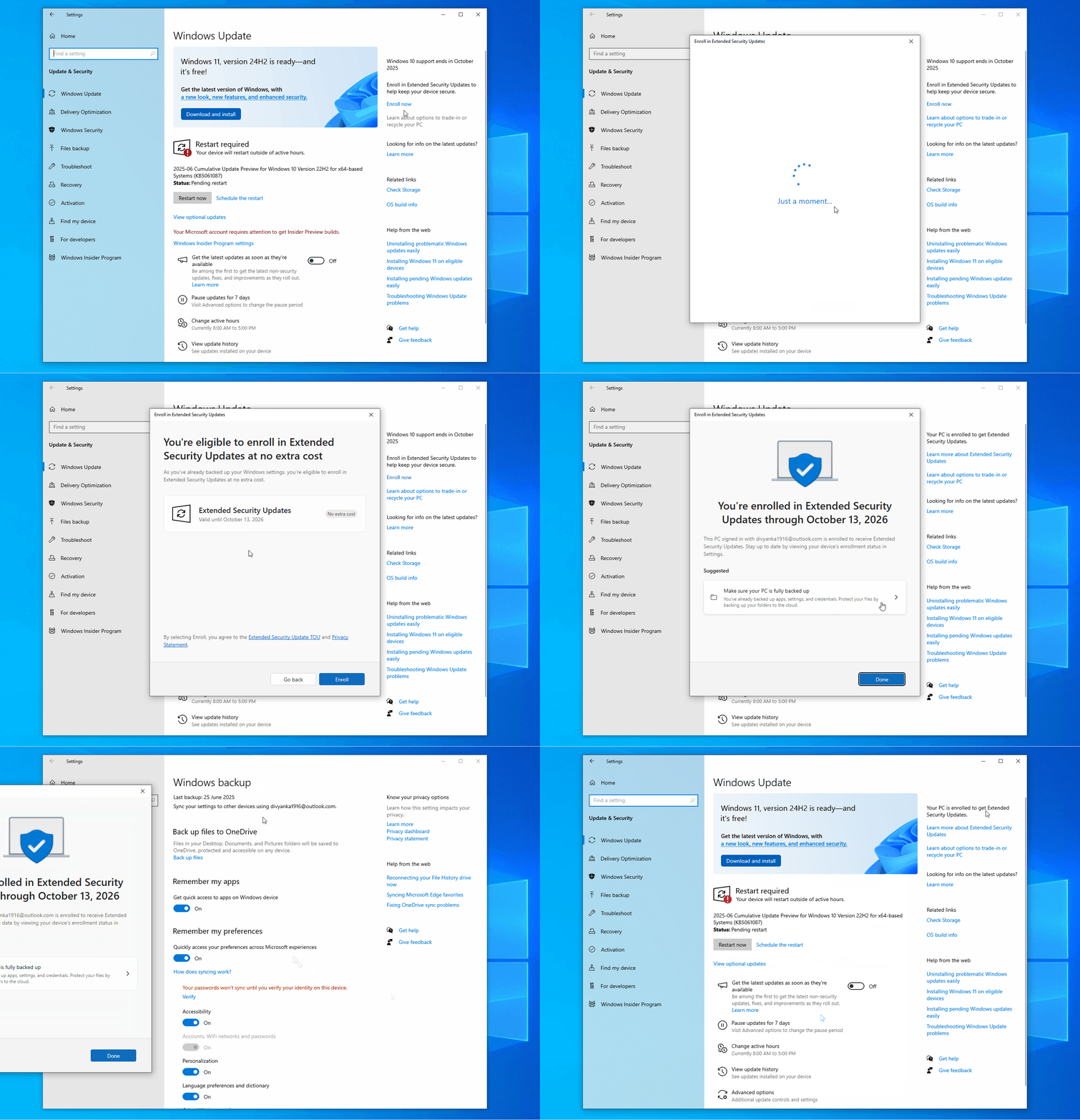
The third option is presented by Microsoft as completely free: simply enable PC settings synchronization with the cloud through Windows Backup. But there’s a catch. A Microsoft account is required, and the free 5 GB cloud storage limit is quickly reached. Beyond that, users are inevitably prompted to purchase a Microsoft 365 subscription or additional OneDrive storage.
In all cases, a Microsoft account is required – there’s no way around it. For many users who have long relied on local accounts, valuing privacy and independence from the cloud, this requirement is likely to be the most unwelcome.
Effectively, Microsoft leaves no room for the “old model” of using Windows 10: standalone, without a subscription, and without tying it to an account. Even extended updates become a tool that nudges users toward a cloud-based, service-oriented approach.
Read also: Rare Earth Metal Situation: Whoever Controls the Resources, Rules the World
One licence for ten computers
Microsoft has introduced a partial concession: a single ESU license can now be used on up to ten devices linked to one Microsoft account. This is a significant change – owners of multiple PCs no longer need to pay $30 per device, as earlier announcements suggested. For small offices or families with several computers, this lowers the entry barrier considerably.
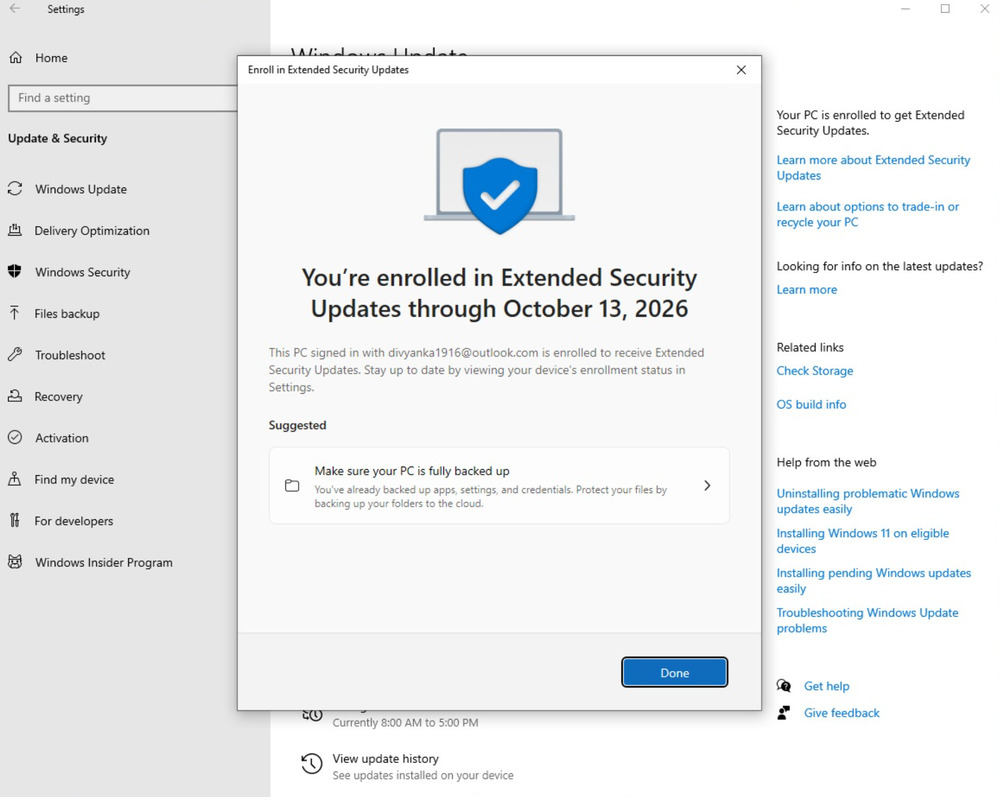
The ESU program will run from October 15, 2025, to October 13, 2026. Formally, Microsoft provides a full year for users to weigh their options and decide whether to subscribe. In practice, however, it’s merely a temporary reprieve: after this period, anyone who hasn’t chosen one of the available paths will be left without security updates.
In this way, Microsoft combines a “carrot” – multi-device access – with a “stick” – the looming deadline. On one hand, the company shows flexibility by lowering costs for active users; on the other, it steadily nudges them toward the new support model, where the choice essentially comes down to a trade-off between security and reliance on the Microsoft ecosystem.
Interstitial advertising is another means of pressure
Alongside the ESU rollout, Microsoft is intensifying its marketing efforts to accelerate user migration to Windows 11. Windows 10 users are increasingly reporting intrusive full-screen banners that appear over their work, promoting either a system upgrade or the purchase of a new PC with Windows 11 preinstalled.
These aggressive promotion tactics are particularly controversial, as they don’t just inform users – they interrupt their workflow. The advertising is adaptive: if a PC meets Windows 11’s technical requirements, users receive direct prompts to upgrade for free. If the hardware is outdated, the message immediately encourages purchasing a new PC, often highlighting “artificial intelligence” as a key advantage of the new ecosystem.
In this way, Microsoft employs a classic “carrot and stick” approach: on one hand, it offers security through ESU – but at a cost; on the other, it constantly reminds users that a full-featured future is available only to those willing to upgrade to Windows 11 or purchase new hardware. For users, this gradually erodes the neutrality of choice: staying on Windows 10 becomes increasingly difficult, not just due to support limitations but also because of mounting marketing pressure.
Read also: Cryptography: What It Is and How It Works
Microsoft 365 as a consolation until 2028
One small consolation for Windows 10 users is that Microsoft 365 apps will remain compatible with the system until October 2028. This means Office, Teams, and other key productivity tools will continue to receive security updates even after the OS itself reaches the end of its lifecycle. For many business users, this is a critical factor, as the security of work documents and communications often takes priority over updates to the operating system.
However, there’s a downside. Starting in August 2026, Windows 10 users will no longer receive new features in Microsoft 365. Essentially, development of Office apps on version 2608 will be frozen, while all future innovations, AI integrations, and new tools will appear exclusively on Windows 11. In this sense, “support” will be limited to maintaining basic security without any forward progress.
This move fits squarely within Microsoft’s broader strategy, which increasingly enforces migration. In practice, users are only given a paper choice: either remain on Windows 10 with limited functionality and no new features, or upgrade to Windows 11 to access the full range of capabilities. With each new phase, this “choice” feels increasingly like an ultimatum.
Read also: Review of the Series “Alien: Earth” – But Why?!
The future of Windows 10 – dominance despite pressure
Despite Microsoft’s aggressive campaign, Windows 10 remains remarkably resilient. According to StatCounter data from July, it still holds around 43% of the market, while Windows 11 has recently overtaken it at 53%. Formally, the newer system leads, but the margin is relatively small given years of promotion and the company’s extensive marketing efforts.
The global picture is even more interesting: in many regions, especially in developing countries, Windows 10 still dominates. The main reason is technical barriers imposed by Microsoft. Requirements like TPM 2.0 and newer-generation processors effectively exclude a large number of otherwise functional PCs. For users in these regions, the choice is clear-cut: continue using Windows 10 or buy a new PC – an option that isn’t always financially feasible.
As a result, Microsoft faces a paradox: despite intense marketing and efforts to enforce migration, a significant portion of the world continues to rely on Windows 10. This indicates that Windows 11’s dominance is far from assured, and the global transition is likely to take years – especially in regions where hardware requirements shift from technical prerequisites to economic barriers.
Read also: The Third World War of Browsers: Has It Already Begun?
Is it worth paying for ESU?
The Extended Security Updates (ESU) program appears to be a classic monetization tool for the “transition period” before Windows 10 is fully retired. At first glance, the $30 per year fee seems reasonable, but it’s important to note that this covers only critical security updates. Users will not receive new features, system bug fixes, or full technical support.
For home users, this effectively amounts to buying an extra year to “think things over” before making the inevitable choice. The situation is far more complex for businesses. Here, the cost starts at $61 per device in the first year and doubles each subsequent year. Over three years, total expenses can reach hundreds of thousands of dollars for medium and large organizations. This creates a strong incentive to accelerate migration to Windows 11 or consider alternative solutions, including Linux or cloud-based environments.
Effectively, Microsoft is turning users’ resistance to change into a business model. ESU is not just technical support – it’s a way to capitalize on the reluctance or inability to upgrade hardware and software. Users are therefore faced with a strategic choice: either pay for what was previously free support, or take more radical steps, from investing in new hardware to fully switching to alternative operating systems.
In this sense, ESU serves not only as a “bridge” between Windows generations but also as an indicator of how Microsoft envisions the future of its ecosystem: free support is gradually disappearing, and security is becoming a commodity that must be purchased separately.
Read also:
- AI in Medicine: Is the Future Already Here?
- Online Safety: How to Protect Your Data – Even When You Let Your Guard Down

