© ROOT-NATION.com - Use of content is permitted with a backlink.
The Acer Swift Go 16 AI SFG16-A71-R48W combines a large OLED display, a slim aluminum chassis, the AMD Ryzen AI platform, and a broad selection of connectivity options.
Acer has transitioned the Swift Go 16 AI to AMD’s new “Gorgon Point” platform (Ryzen AI 400 Series), with most announced configurations deliberately positioned as a more affordable entry point into the Copilot+ PC segment compared to the previous Intel-based generation. The Steam Blue SFG16-A71-R48W represents that entry-level configuration, featuring the Ryzen AI 5 430 processor, 16 GB of memory, and a 512 GB SSD.
One detail, however, sets this model apart from the usual expectation that a lower-tier processor is paired with a less capable display. Acer has retained a full-featured OLED panel in this configuration, while some other AMD-based Swift Go 16 variants are available only with IPS displays. Rather than being uniformly scaled back, this version is selectively configured: it pairs a more modest processor and memory capacity with the same premium OLED display found in higher-end models. This review takes a comprehensive look at the configuration to determine whether the OLED display justifies the performance trade-off, how well the Ryzen AI 5 430 performs in a 16-inch form factor, and which users are most likely to benefit from this balance of features.

TABLE OF CONTENTS:
What Makes the Acer Swift Go 16 AI SFG16-A71-R48W Stand Out?
The key point of interest with this model is its attempt to demonstrate that a premium user experience does not necessarily depend on having a flagship processor.
Read also: All Acer laptop reviews
Powered by the Ryzen AI 5 430, the Swift Go 16 AI is not intended to compete as a high-performance powerhouse. Instead, it demonstrates that a 16-inch OLED display, a well-built chassis, and Copilot+ PC capabilities can be offered in a more accessible and practical configuration without feeling like a stripped-down version of the product.

At 1.6 kg, the Swift Go 16 AI is not exceptionally light for a 16-inch laptop, but it remains well within the expected range for its class. It is light enough to carry comfortably on a daily basis without feeling like a mobile workstation. More importantly, the display is not a standard IPS panel but a full OLED screen with a glossy finish, deep blacks, and vibrant colors. This is an uncommon feature for a configuration built around the entry-level processor in the lineup and plays a significant role in the model’s overall positioning.
As mentioned earlier, the laptop is powered by the AMD Ryzen AI 5 430, paired with 16 GB of LPDDR5X memory and a 512 GB SSD. This hardware is aimed at users who prioritize responsiveness and quiet operation over maximum multitasking performance. It is well suited for web browsing, document editing, video conferencing, and light multimedia workloads. More demanding tasks, such as complex video editing or compute-intensive applications, fall outside the intended use case for this configuration.

As a Copilot+ PC, the Swift Go 16 AI also includes a neural processing unit (NPU) rated at up to 50 TOPS. This enables AI-powered features such as real-time captions, enhanced video and audio quality during video calls, intelligent noise suppression, and local semantic file search. The feature set is consistent across the product family, and even the entry-level processor delivers the full AI experience, as the NPU in this architecture operates independently of the CPU’s core count.
The selection of ports covers virtually all modern connectivity requirements, including two USB4 ports, two USB 3.1 Type-A ports, HDMI, a wired LAN connector, and Wi-Fi 7. The inclusion of an Ethernet port is a welcome addition in a 16-inch laptop, where the larger chassis makes room for a feature that remains valuable in many professional and home office environments.

At the same time, the SFG16-A71-R48W is not designed to compete with high-performance mobile workstations. Its quad-core Ryzen AI 5 430 processor, 16 GB of onboard memory, and integrated Radeon 840M graphics are intended for smooth everyday computing rather than demanding 3D rendering or modern AAA gaming. The key question, therefore, is whether this level of performance is sufficient to justify the price of a laptop that combines a premium OLED display with Copilot+ PC capabilities.
This configuration is best suited for students, office professionals, and users who value a large, comfortable display for everyday productivity, document editing, and media consumption but have little need for the additional processing power offered by higher-end CPUs. With a retail price in Ukraine starting at UAH 64,399, the OLED display stands out as the model’s primary selling point.
Acer Swift Go 16 AI SFG16-A71-R48W Specifications
- Type: Ultrabook
- Display: 16″, OLED, glossy, 1920×1200 Full HD (16:10)
- Refresh rate: 60 Hz
- Processor: AMD Ryzen AI 5 430, 4 cores, base frequency 2 GHz, NPU up to 50 TOPS
- RAM: 16 GB, LPDDR5X, on-board
- Graphics card: integrated, AMD Radeon 840M
- Storage type: SSD
- Storage capacity: 512 GB
- Ports and connections: 3.5 mm audio jack, HDMI, LAN, 2 x USB 3.1 Type-A, 2 x USB4
- Wi-Fi: Wi-Fi 7 (802.11be)
- Bluetooth: v 5.4
- Keyboard backlight: white
- Keyboard: with numeric keypad (NumberPad), Ukrainian layout
- Battery capacity: 65 Wh
- Max. battery life: up to 12 hours
- Power supply: via USB-C
- Included power adaptor: 100 W
- Pre-installed OS: Windows 11 Home
- Dimensions (W×D×H): 355.50×251.20×15.99 mm
- Weight: 1.60 kg
- Colour: Steam Blue (blue)
- Warranty: 1 year.
Read also: Acer Swift Go 14 AI Review: General-purpose laptop with OLED display
Package Contents
Acer continues to emphasize sustainability, and this approach is evident from the packaging. The Swift Go 16 AI is shipped in a box made from recyclable materials, with recycled content used in its construction. The design is minimalist, featuring only essential product information and the standard set of technical markings without unnecessary visual clutter.

The contents are equally straightforward and practical, including only the laptop, a 100 W power adapter, and a brief quick-start guide. No additional adapters or printed materials are included, reflecting the broader industry trend toward minimizing paper documentation.

For a configuration in this segment, this approach is appropriate, as the focus is clearly on the laptop itself rather than on bundled accessories.
Read also: Acer Aspire 17 A17-51M-52RX Review: Big Display with Big Ambitions
Design and Portability
The Acer Swift Go 16 AI features a restrained yet distinctive design. The Steam Blue finish gives the chassis a unique character without being overly bold. Rather than a bright blue that quickly becomes distracting, it is a deep, cool-toned shade that fits naturally in a professional workspace, a university classroom, or a café.

The aluminum chassis, accented by laser-engraved detailing on the lid, conveys a refined appearance. While the laptop does not attempt to present itself as a flagship model, it clearly retains the premium character of the Swift series. Clean lines, a slim profile, and minimal decorative elements reflect Acer’s established design philosophy for the lineup: practical, contemporary, and free of unnecessary visual distractions.

At 1.6 kg, the Swift Go 16 AI delivers a solid result for a 16-inch laptop. Naturally, a 14-inch ultrabook will be more compact. Its dimensions of 355.5 × 251.2 × 15.99 mm mean it requires a slightly larger backpack or carrying case, but in return users benefit from a significantly larger display area. For many workloads, from working with spreadsheets to reading documents, that additional screen space is likely to be more valuable than saving an extra 100–200 grams in weight.

The hinge opens to 180 degrees. While this is not a feature most users will rely on every day, it is genuinely useful during meetings, in educational settings, or when sharing the screen with someone seated across the table. In everyday use, the more important advantage is that the chassis remains slim, and the larger form factor never feels unnecessarily bulky.
Attention has also been given to everyday usability. The lid opens smoothly without lifting the base, locks firmly into position, and operates without unwanted noise. A well-designed notch makes one-handed opening easy, while the hinge provides stable support and securely maintains the selected viewing angle.

As with many laptops featuring a dark metallic finish, the lid and palm rest are prone to collecting fingerprints. While this is not a significant drawback, occasional cleaning is required to keep the chassis looking its best.

The placement of the ventilation outlets between the display and the chassis is another thoughtful design element. This layout directs warm air upward rather than toward the user’s hands, improving cooling efficiency while enhancing comfort during extended use.

The front bezel is also carefully designed. Above the display, there is a glossy section that houses the webcam, microphones, and a physical privacy shutter.

The slider is easy to locate by touch, moves with a precise action, and immediately indicates whether the camera is covered. It is a practical solution for users who value privacy without relying on additional software settings.

The underside of the chassis features ventilation openings and four rubber feet. These provide a stable grip on the desk, prevent the laptop from sliding, and ensure sufficient clearance for airflow. Speaker grilles are positioned on both sides of the chassis, helping to minimize sound obstruction during everyday use.

Overall, the Acer Swift Go 16 AI leaves the impression of a well-balanced and thoughtfully designed device. It combines solid build quality, a restrained premium aesthetic, good portability, and careful attention to practical details, from its cooling design to its privacy features. The result is a laptop that feels equally at home as a productivity tool and as a stylish companion for everyday use.
Read also: Acer Aspire Go 15 AG15-71P Review: Affordable Laptop for Study and Everyday Use
Ports and Connectivity: No Need to Rely on Adapters
One of the Swift Go 16 AI’s strongest features is its selection of ports. Many modern ultrabooks require users to carry a USB hub for even basic tasks such as connecting a flash drive, an external monitor, or a memory card. Here, the situation is considerably more practical.
The laptop is equipped with two fully featured USB4 Type-C ports. They support charging, high-speed data transfer, and external display connectivity. In practice, this means a single USB-C cable from a compatible monitor or docking station can provide power, video output, and access to peripheral devices, creating a cleaner and more convenient workspace.

Additional connectivity includes:
- Two USB-A ports for flash drives, mice, external SSDs, and legacy peripherals.
- An HDMI 2.1 port for direct connection to an external monitor or TV.
- A 3.5 mm combination audio jack.
- A microSD card reader, which is particularly useful for photographers, video creators, and users who frequently work with portable storage media.

Here, Acer has prioritized practicality over pursuing the thinnest possible design. It is a sensible decision, as a large productivity laptop should be convenient to use in real-world scenarios, not just look appealing in product photos.
Support for Wi-Fi 7 and Bluetooth 5.4 also provides a degree of future readiness. Even if a next-generation router is not yet part of the user’s setup, the wireless hardware is already capable of taking advantage of faster and more reliable networks as they become available.
Read also: Acer Swift Go 14 Review: Affordable Laptop with Qualcomm Snapdragon X
Keyboard, Touchpad, and Security
The 16-inch form factor has allowed Acer to equip the Swift Go 16 AI with a full-size keyboard that includes a dedicated numeric keypad. For accountants, engineering students, financial professionals, analysts, and anyone who frequently works with spreadsheets, this is a meaningful productivity advantage rather than a minor convenience.

The keyboard layout is well designed, with large, clearly legible Latin characters that are easy to read at a glance. Key travel is approximately 2 mm, a traditional design choice that continues to work well in practice. Keystrokes are crisp yet comfortable, with minimal resistance, making the keyboard well suited for extended typing sessions. The layout is easy to adapt to, and after only a few days of use, touch typing becomes natural.
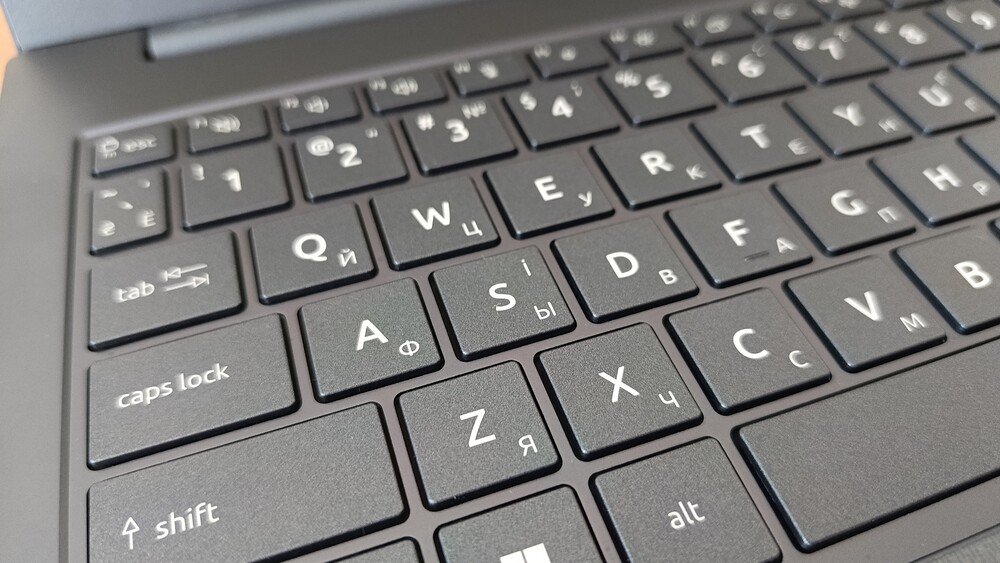
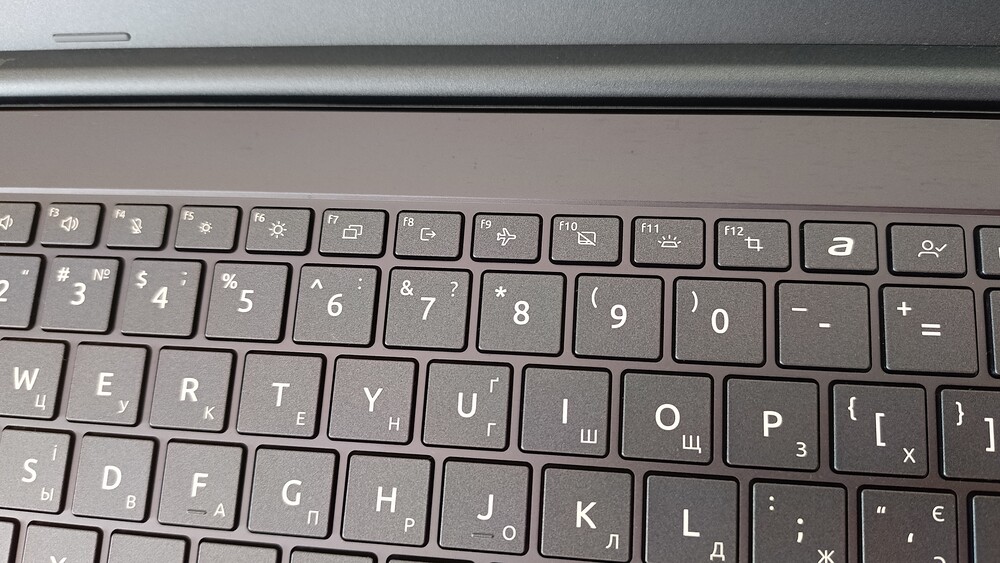
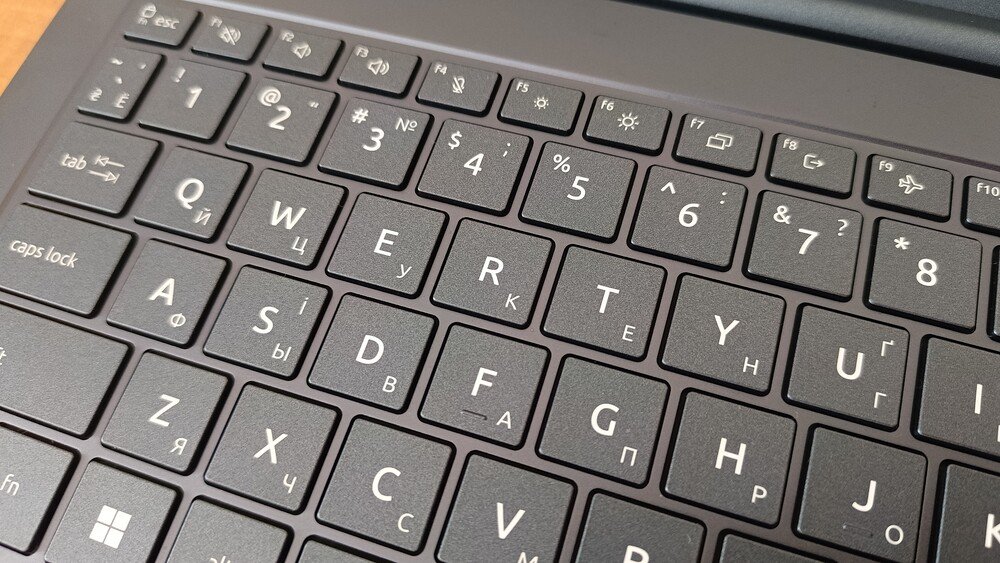
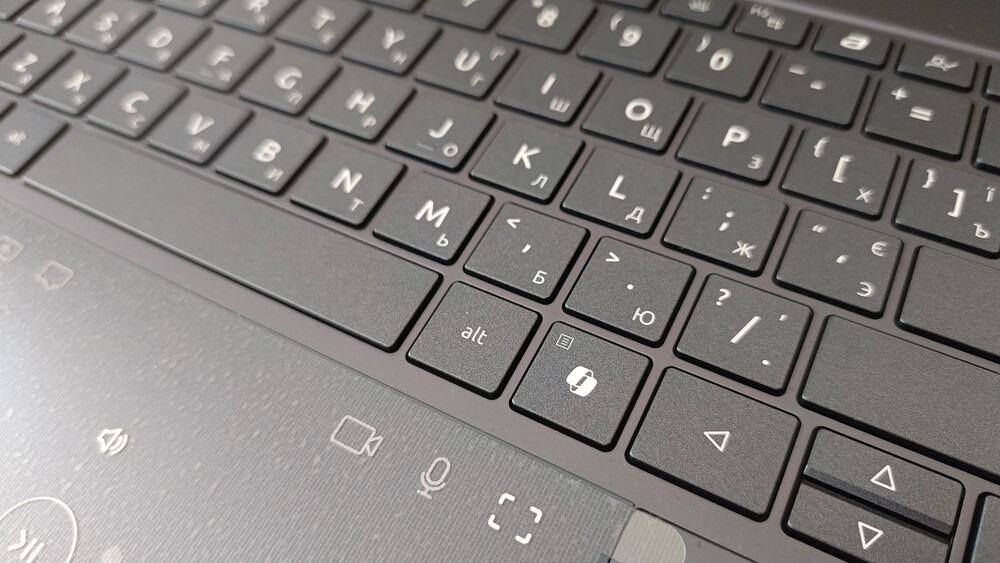
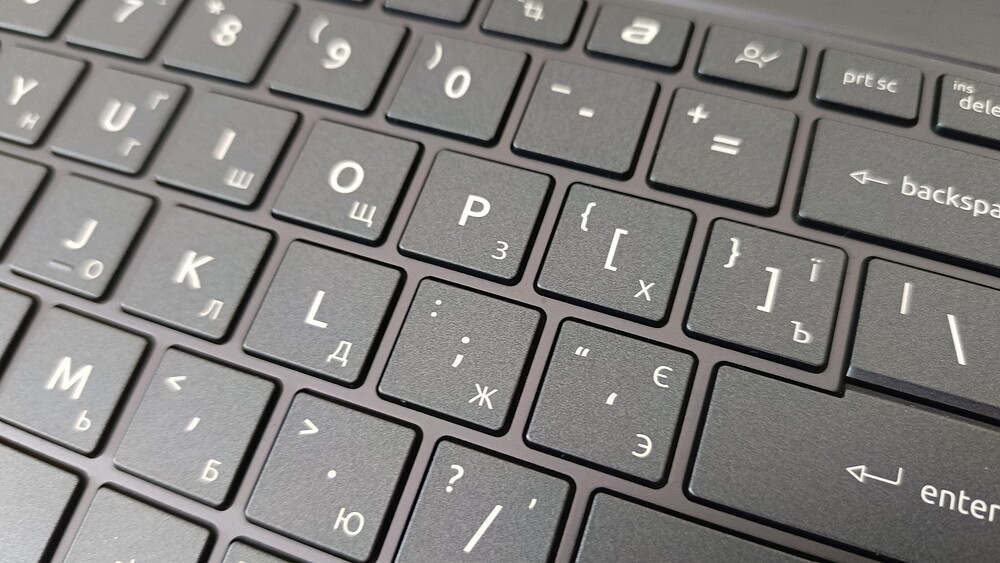
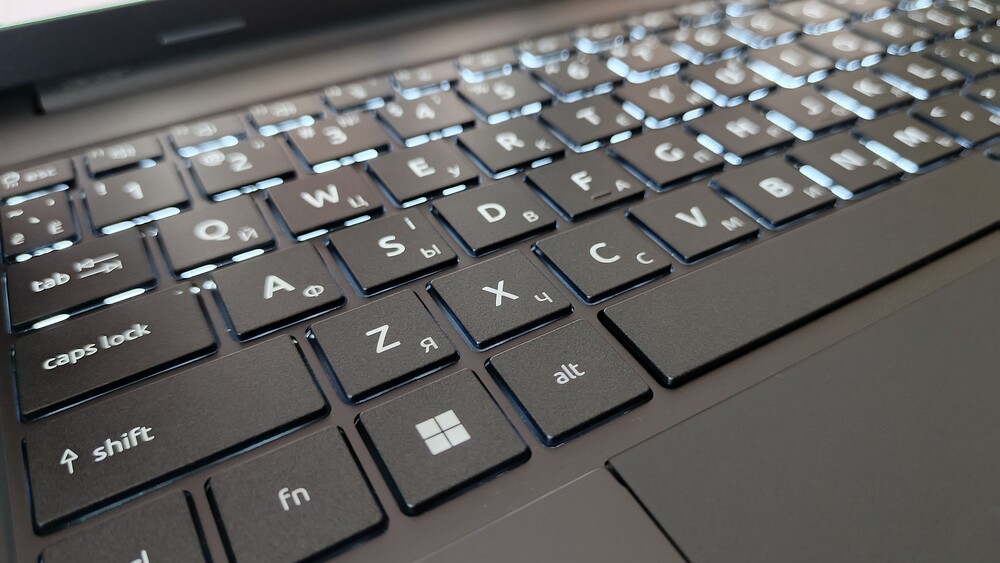
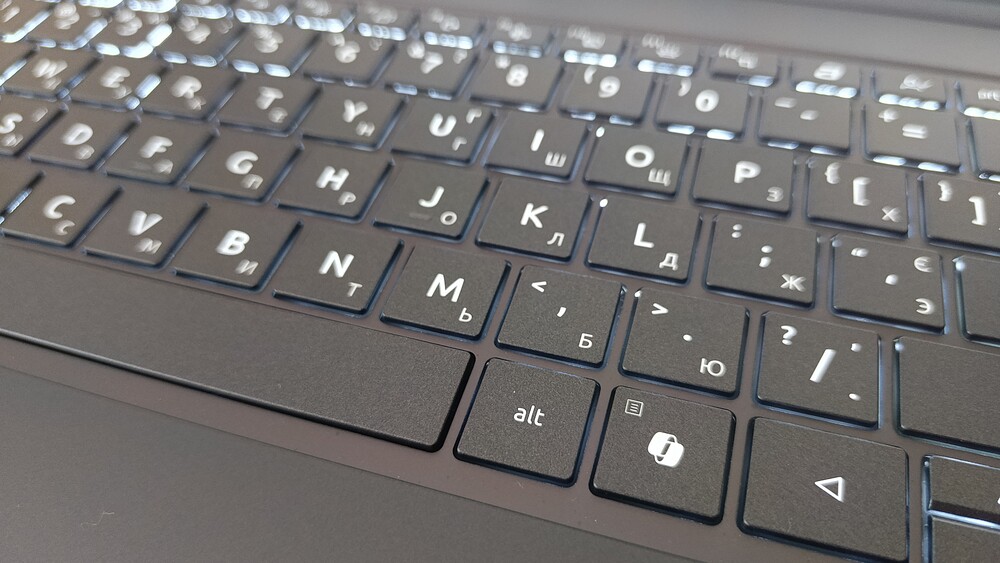
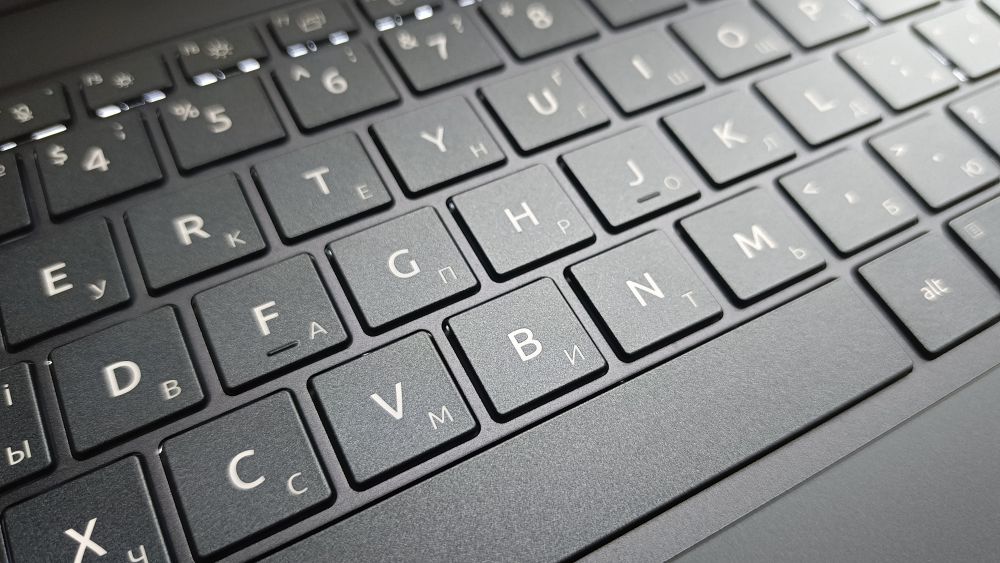
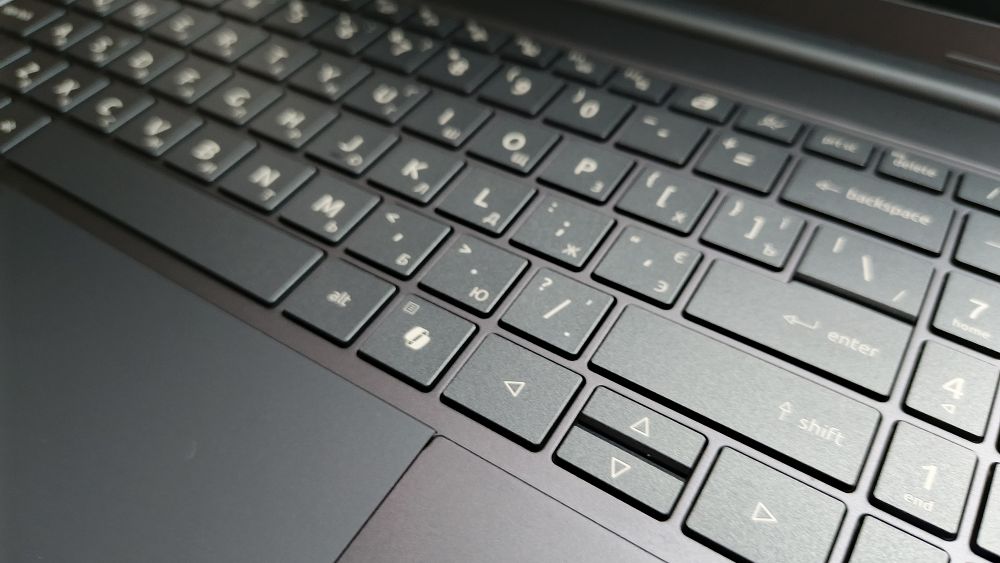
The keyboard features white backlighting, a dedicated AcerSense key, a Caps Lock indicator, and a microphone mute indicator. AcerSense serves as the system’s central management utility, allowing users to monitor system status, adjust performance profiles, and access a selection of Acer’s AI-powered features.

The touchpad is large, smooth, and supports the full range of Windows Precision gestures. This is particularly important in a laptop of this size, as the expansive display encourages users to work without an external mouse. A smaller touchpad would quickly become a limitation in everyday use.

One important detail is that this configuration does not include a fingerprint reader. Instead, it is equipped with a 5 MP infrared camera that supports Windows Hello facial recognition for secure sign-in. For many users, this is an even more convenient solution: simply open the lid, look at the display, and the system is ready to use.

Overall, the input experience is well balanced and well suited for working with text, documents, and other everyday tasks. Rather than emphasizing unnecessary features, the design focuses on the functionality users rely on most in daily use.
Read also: Acer Predator Helios Neo 18 AI PH18-72 Review: Desktop-Level Performance in a Laptop Form
OLED Display: The Swift Go 16 AI’s Strongest Selling Point
The display is undoubtedly the defining feature of this model. Its 16-inch OLED panel, with a resolution of 1920 × 1200 and a 16:10 aspect ratio, is well suited to everyday productivity. Compared with a traditional 16:9 Full HD display, the taller aspect ratio provides more vertical workspace, reducing the need for scrolling when browsing the web, working with documents, managing email, or editing spreadsheets.

The display offers a pixel density of approximately 141 ppi. While it does not match the sharpness of 3K or 4K panels, it is more than adequate for a 16-inch display. Text appears crisp, the interface remains clean and well defined, and the integrated graphics are not burdened with driving an unnecessarily high resolution.
As expected from OLED technology, the panel delivers its key strengths: true blacks, excellent contrast, vibrant colors, and wide viewing angles. With 100% coverage of the DCI-P3 color gamut, the display is well suited not only for media consumption but also for working with photographs, illustrations, and video content.
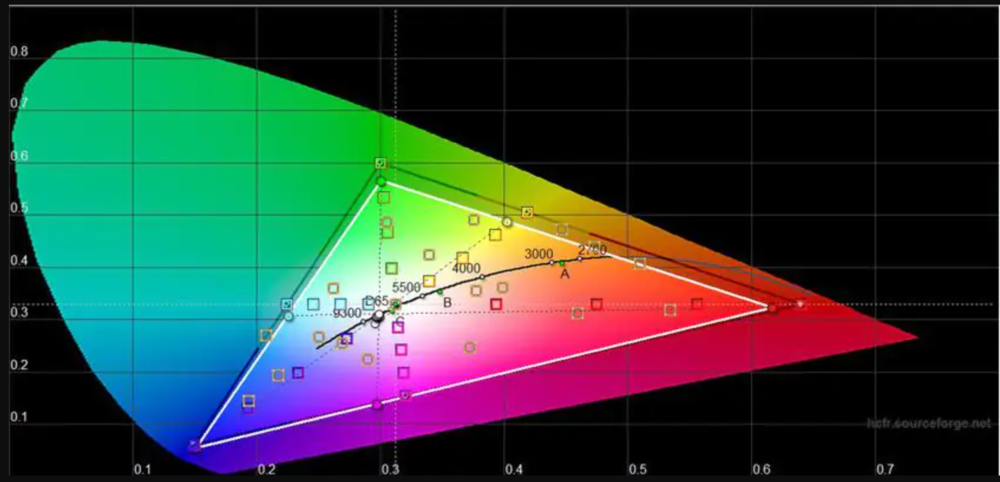




That said, it is important to keep expectations realistic. This is not a professional reference display with factory calibration to specific color standards, measured Delta E values, or hardware-level color profiling. Its capabilities are more than sufficient for enthusiast and semi-professional content creation, but photographers and designers preparing work for print should still perform their own calibration to ensure color accuracy.

The glossy finish enhances perceived contrast and color vibrancy, but it comes with a trade-off: increased reflections. Indoors or on overcast days, this is unlikely to be an issue. However, when working near a large window or outdoors, users may need to increase the display brightness and adjust the viewing angle to maintain comfortable visibility.

Another deliberate engineering compromise is the 60 Hz refresh rate. For office work, studying, video playback, and most productivity tasks, this is entirely sufficient. It is also worth noting that OLED panels offer an exceptionally fast pixel response time – typically under 0.2 ms – which makes the interface appear noticeably smoother than that of an IPS display running at the same refresh rate. In addition, opting for a 60 Hz panel helps maintain the laptop’s overall power efficiency.

Users who are sensitive to OLED display flicker should try the laptop in person before making a purchase. Without laboratory measurements of the specific panel, it is not possible to accurately assess the impact of PWM dimming, and individual sensitivity to this effect varies considerably.
Read also: Acer Nitro V15 (ANV15-41-R99Y) Gaming Laptop Review
Camera, Microphones, and Audio
The webcam is another strength of this model. Acer has equipped the laptop with a 5 MP infrared camera paired with a physical privacy shutter. For video conferencing, this represents a noticeable improvement over the 720p webcams that can still be found in many premium laptops. Beyond enabling Windows Hello facial recognition, the infrared camera also supports AI-powered features such as automatic framing and user presence detection.
The physical privacy shutter is a practical addition. With the camera mechanically covered, there is no need to wonder whether an application might be accessing the camera in the background.
The microphone array supports Acer’s PurifiedVoice AI technology, which can reduce background noise, isolate the speaker’s voice, and improve call quality in a variety of environments, including offices, cafés, and coworking spaces.

The dual-speaker system with DTS Ultra provides a solid foundation for video playback, podcasts, and conference calls. However, users should not expect deep bass or the richness of a dedicated speaker system. For music, movies, or gaming, headphones remain the better choice, particularly given the inclusion of a standard 3.5 mm audio jack.
Read also: Acer Chromebook 314 CB314-3HT Review
Ryzen AI 5 430: A New Platform, Without Chasing Maximum Performance
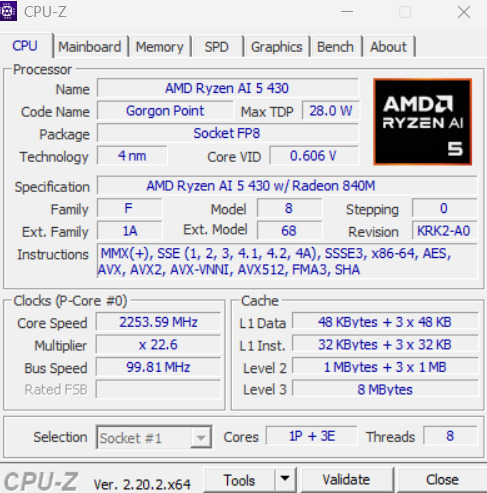
The Swift Go 16 AI SFG16-A71-R48W is powered by the AMD Ryzen AI 5 430, a processor based on the Zen 5 architecture and part of the Ryzen AI 400 series. It is important, however, to set expectations from the outset: this is neither an eight-core Ryzen AI 7 nor a flagship Ryzen AI 9.

The Ryzen AI 5 430 features four cores and eight threads. Its CPU combines one high-performance Zen 5 core with three more compact and power-efficient Zen 5c cores. The processor operates at a base frequency of 2.0 GHz and can boost up to 4.5 GHz, with a default TDP of 28 W.
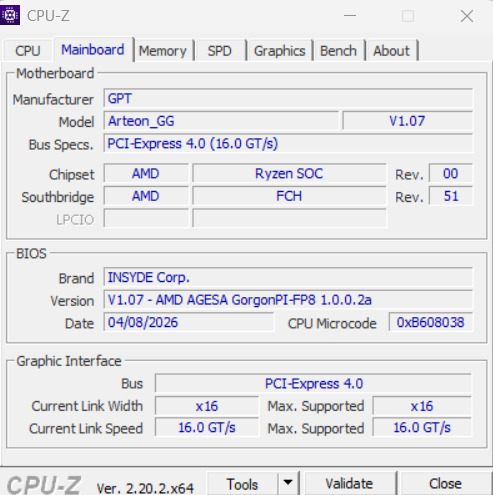
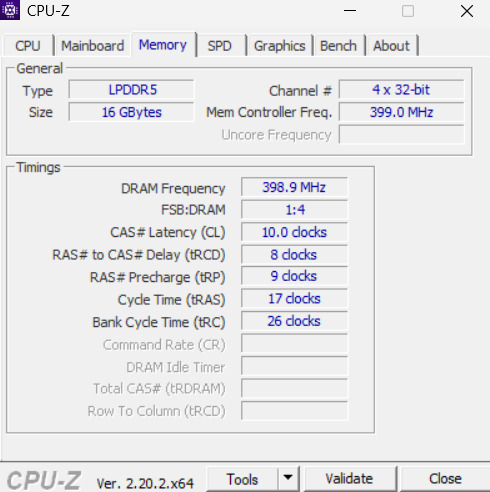
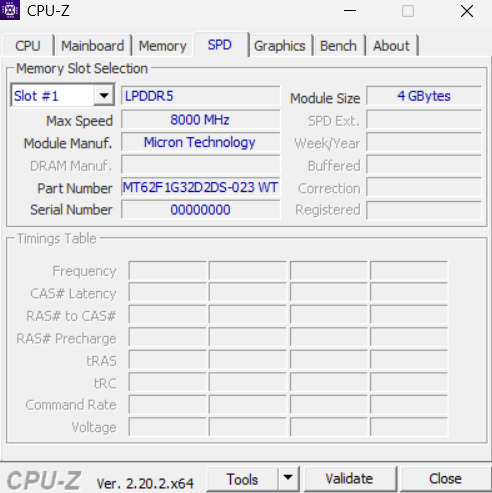
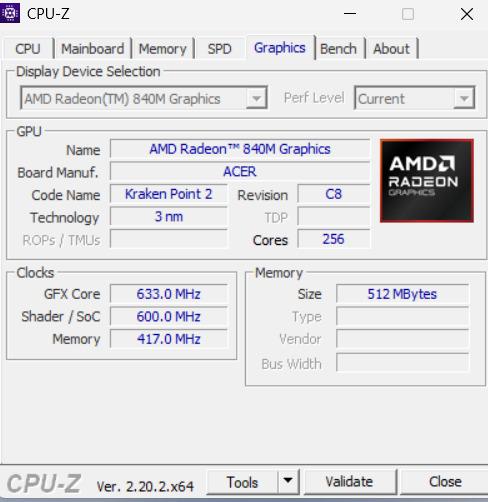
In everyday use, the Ryzen AI 5 430 should have no trouble handling typical productivity workloads. A web browser with numerous open tabs, Microsoft Office or Google Workspace, video conferencing, PDF editing, presentations, basic photo editing, multimedia playback, and running several applications simultaneously all fall comfortably within the capabilities of this configuration.
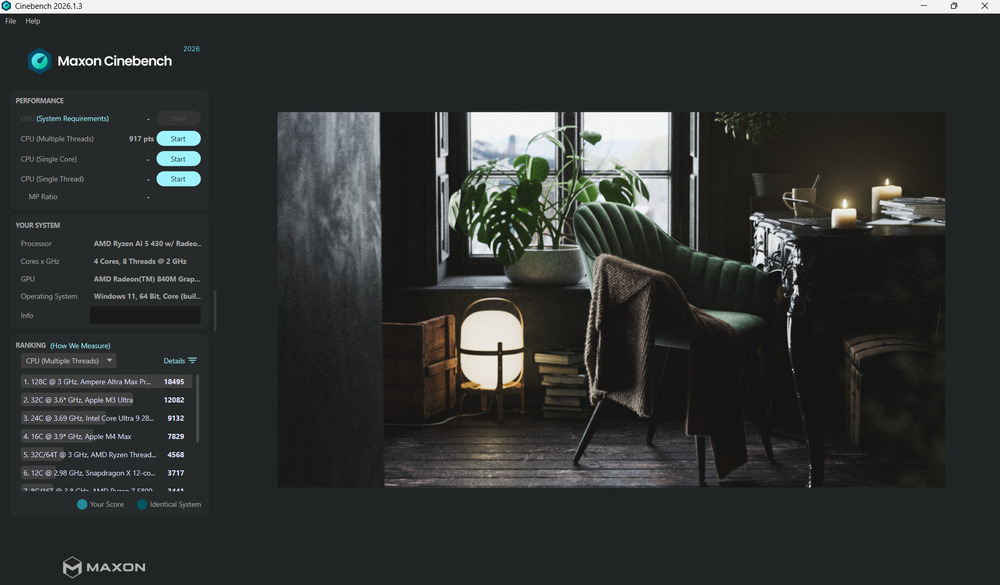
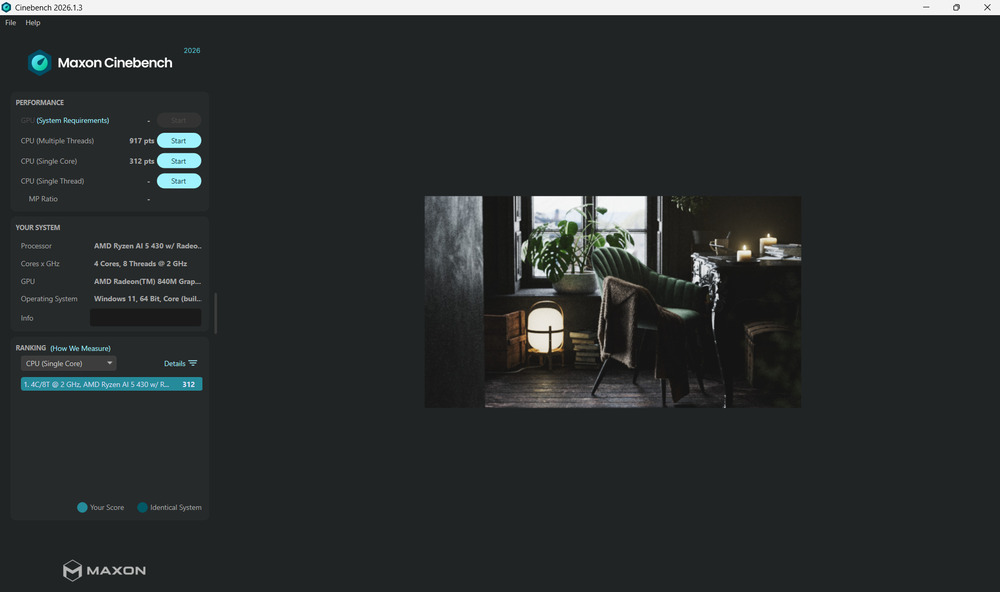
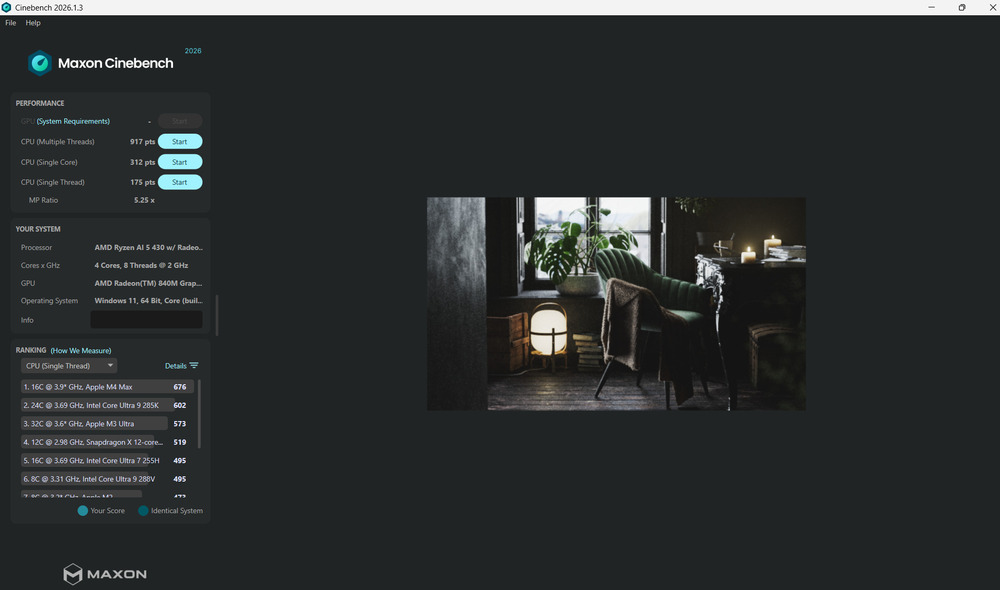
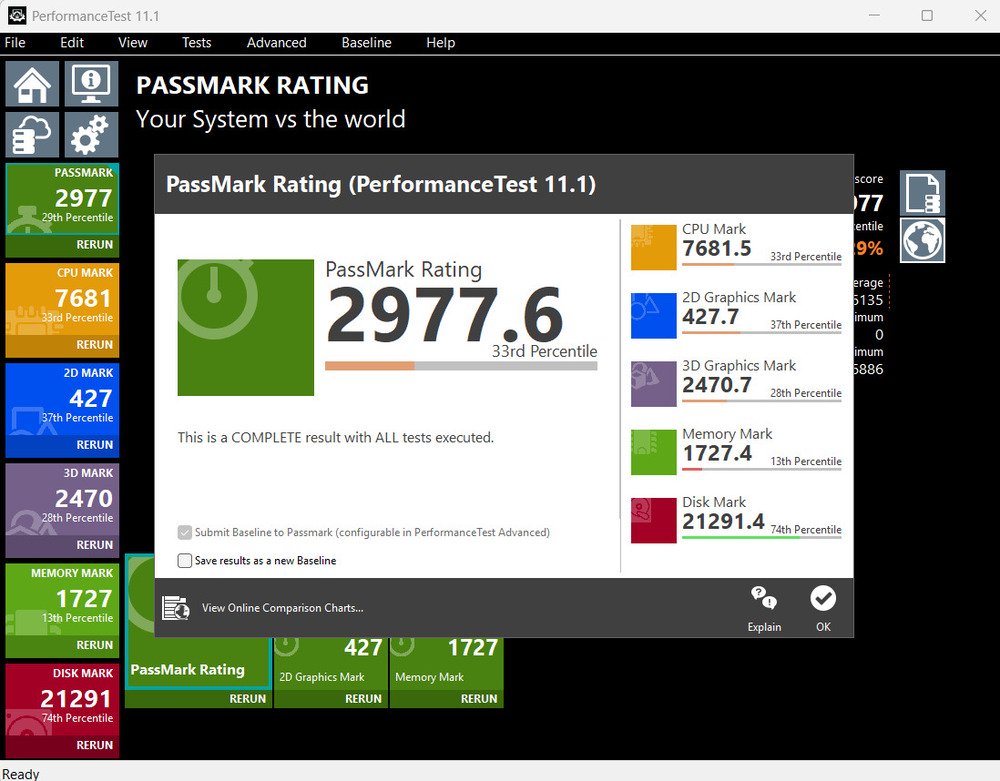
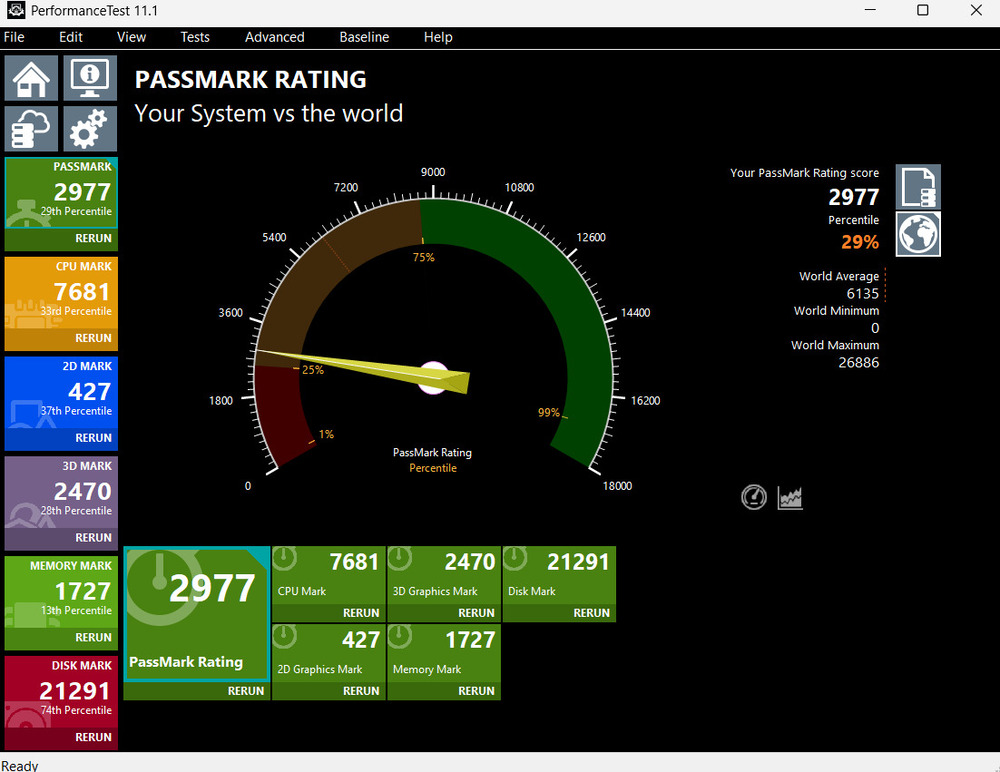
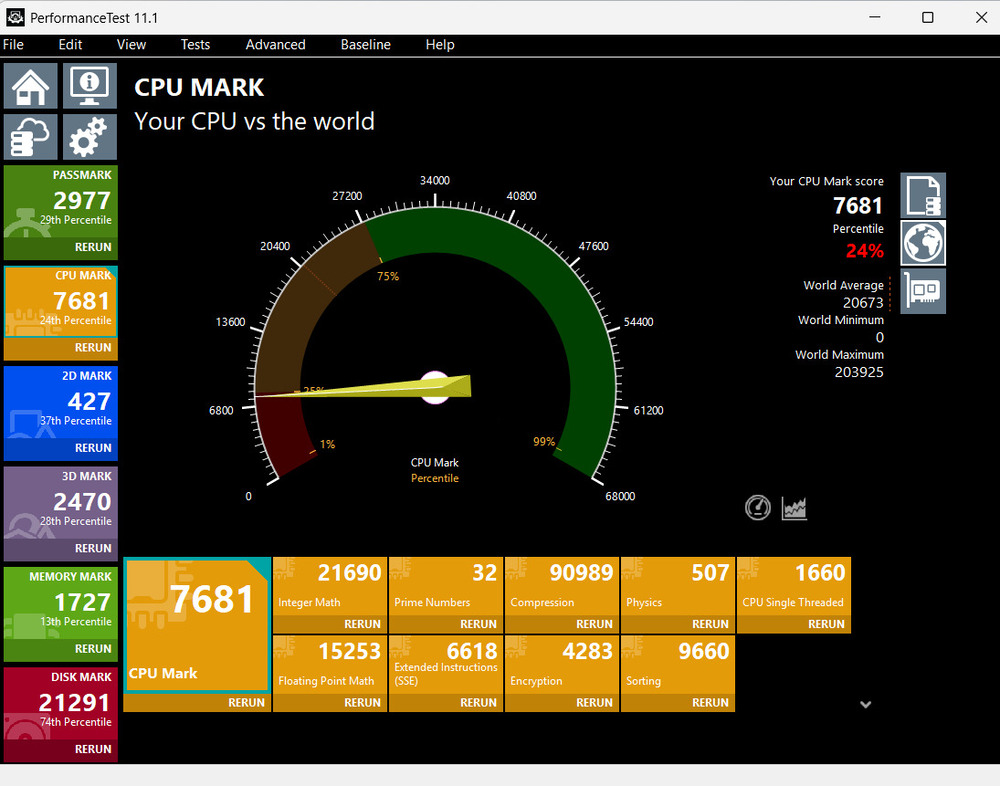
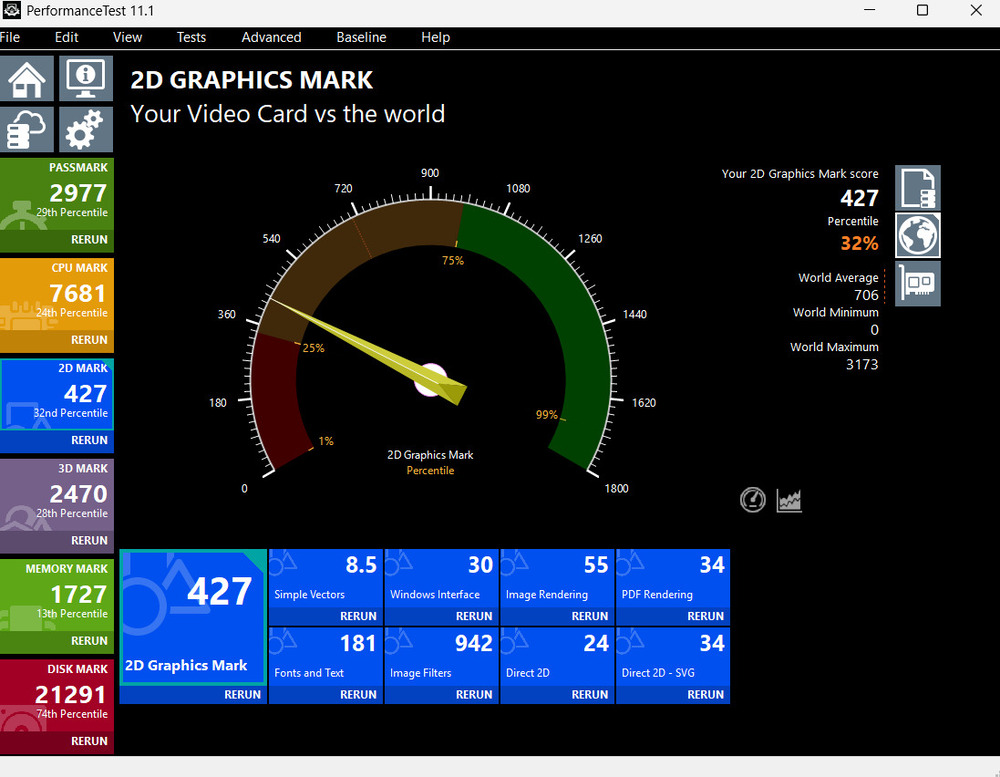
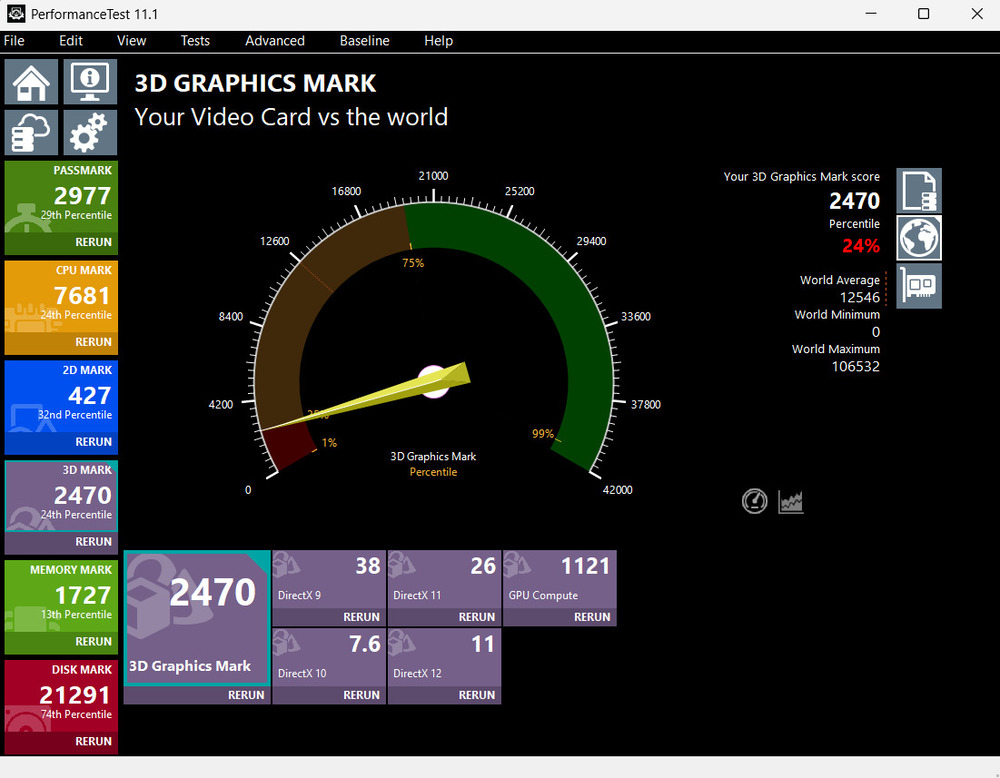
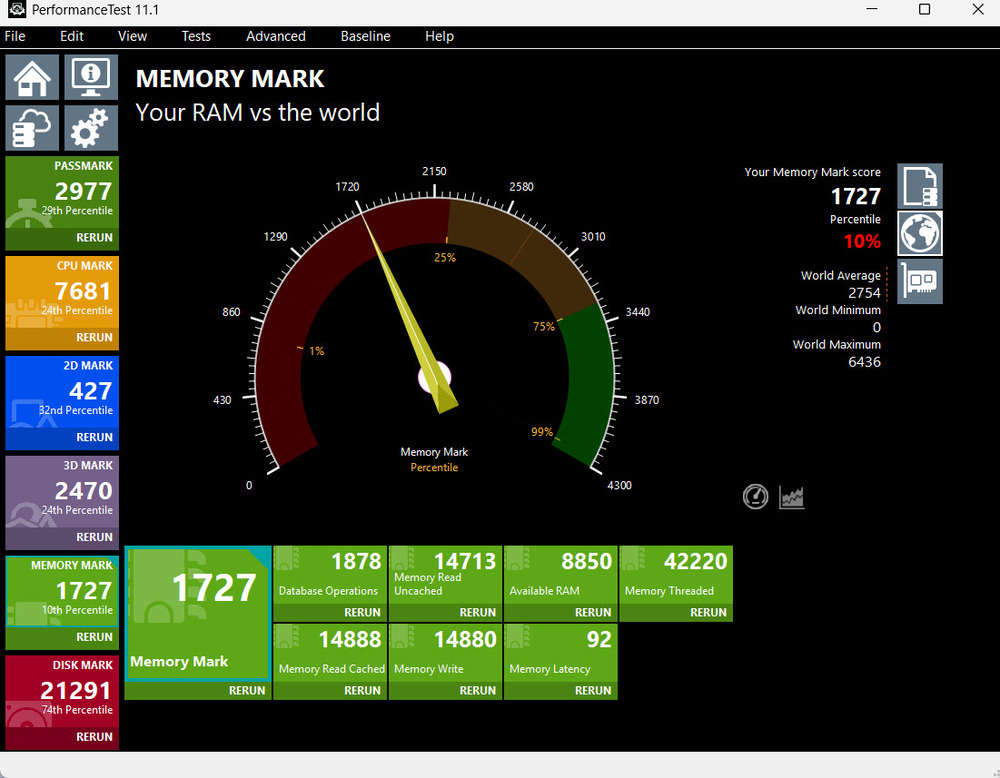
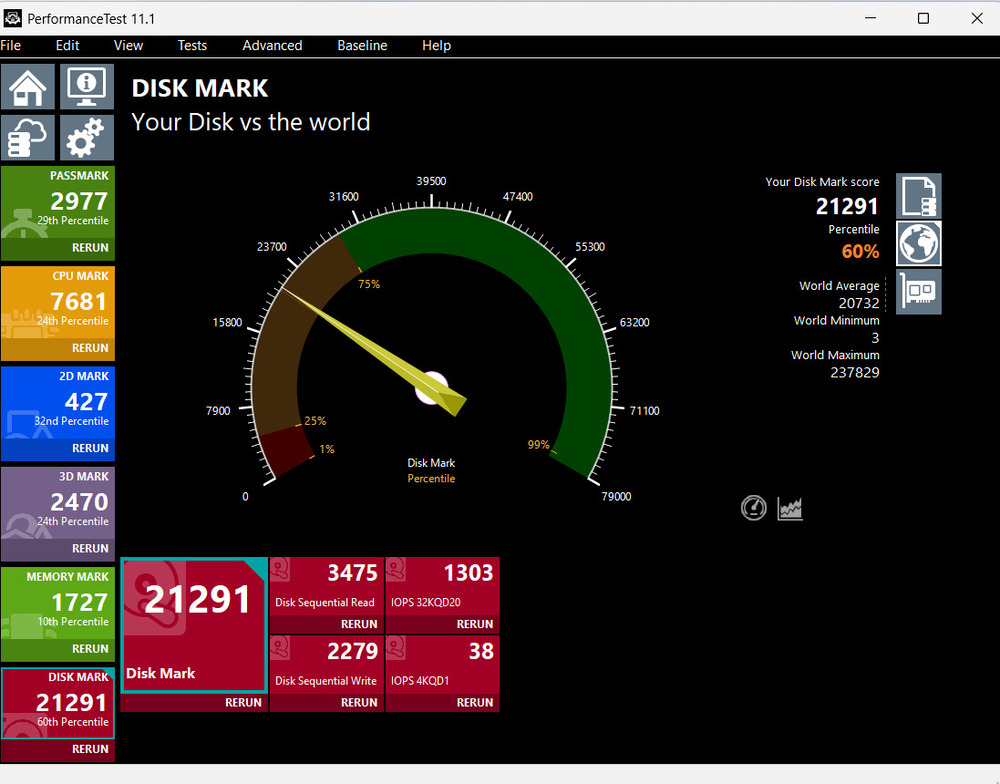
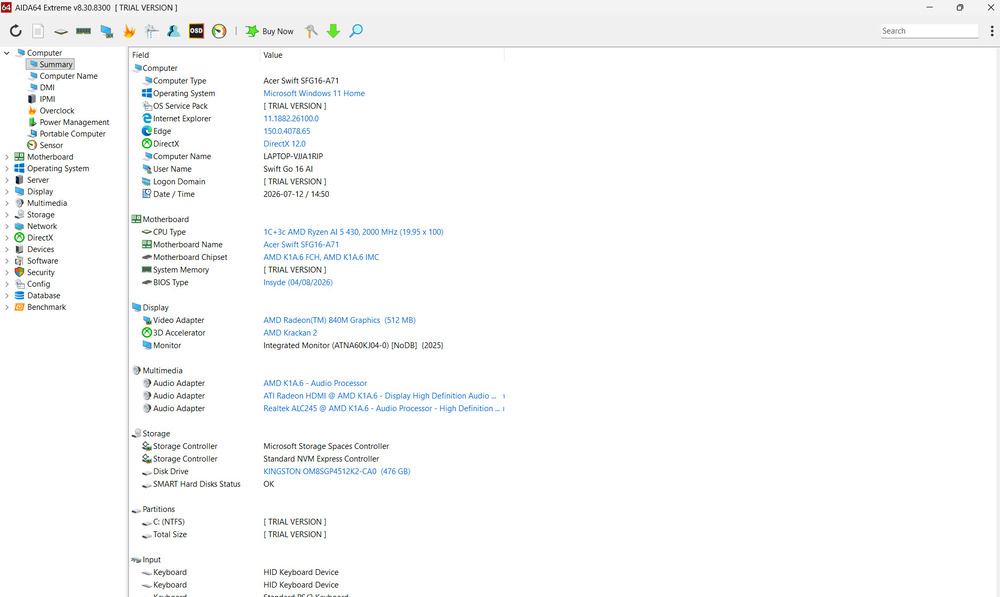
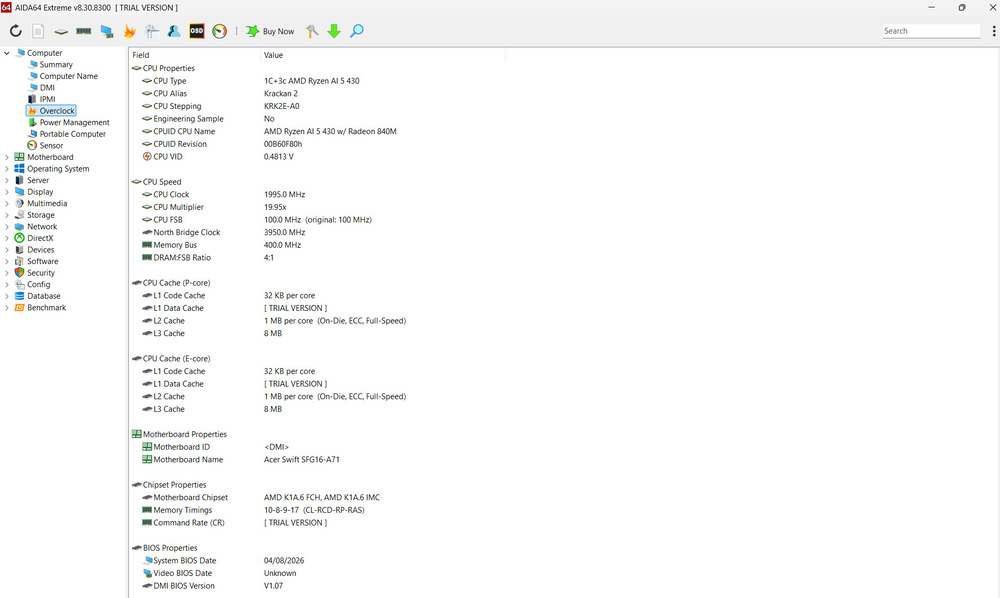
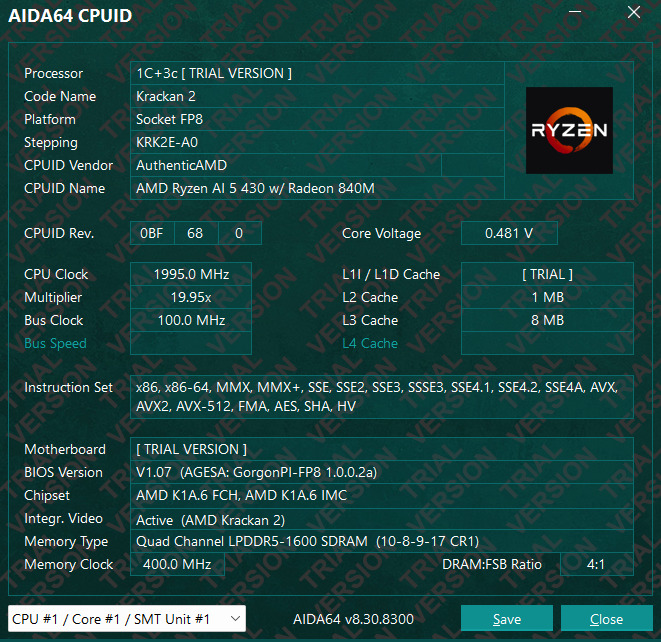
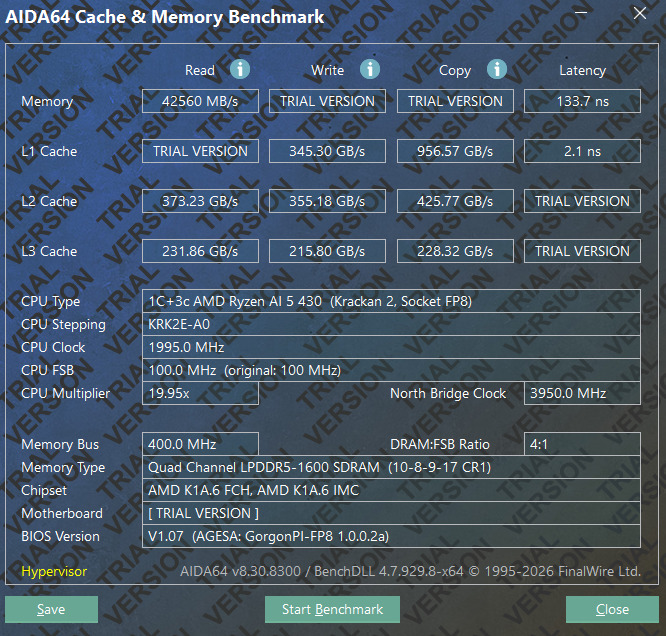
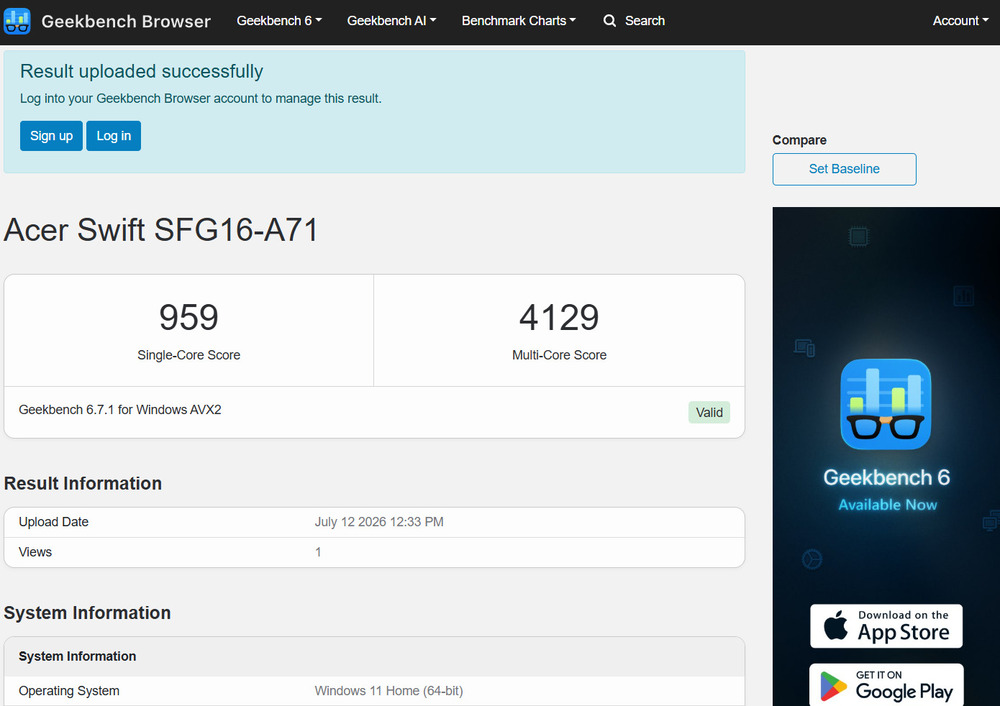
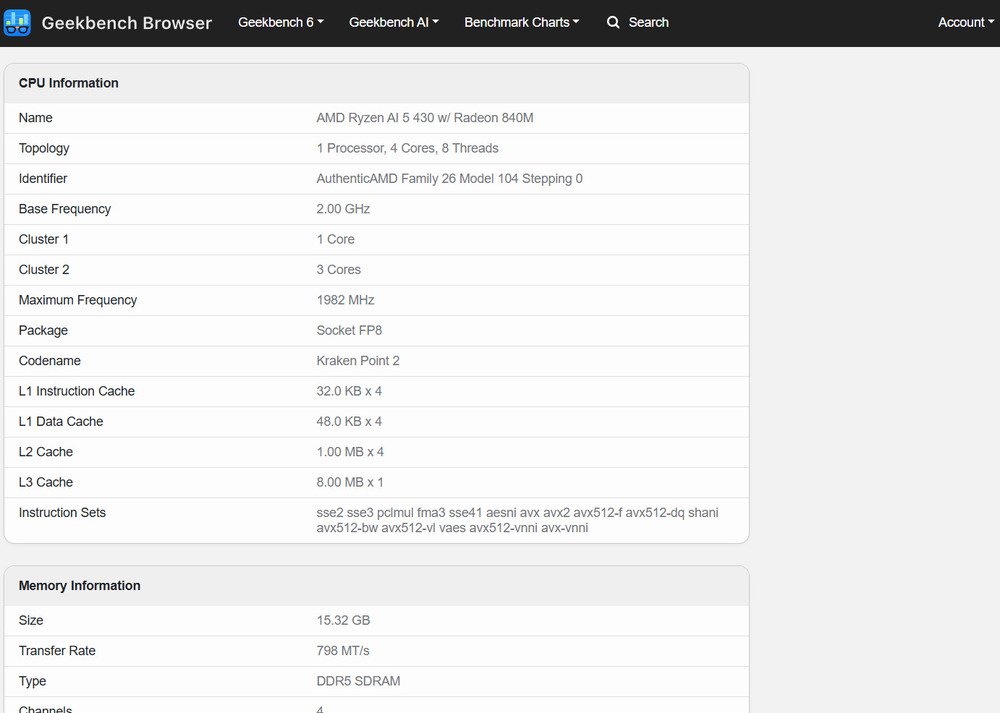
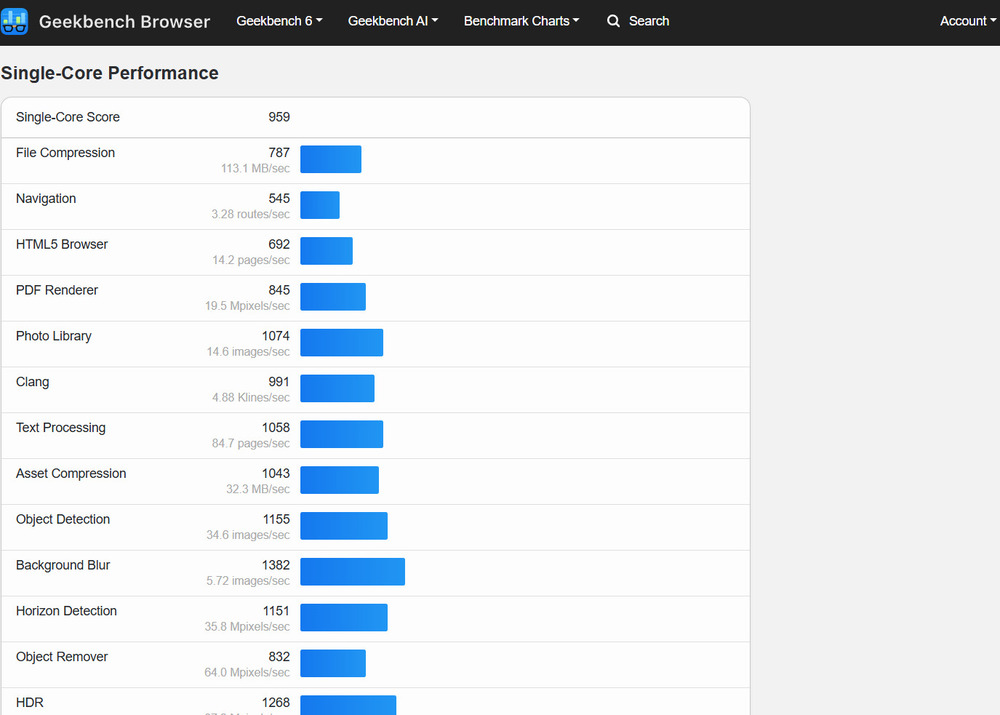
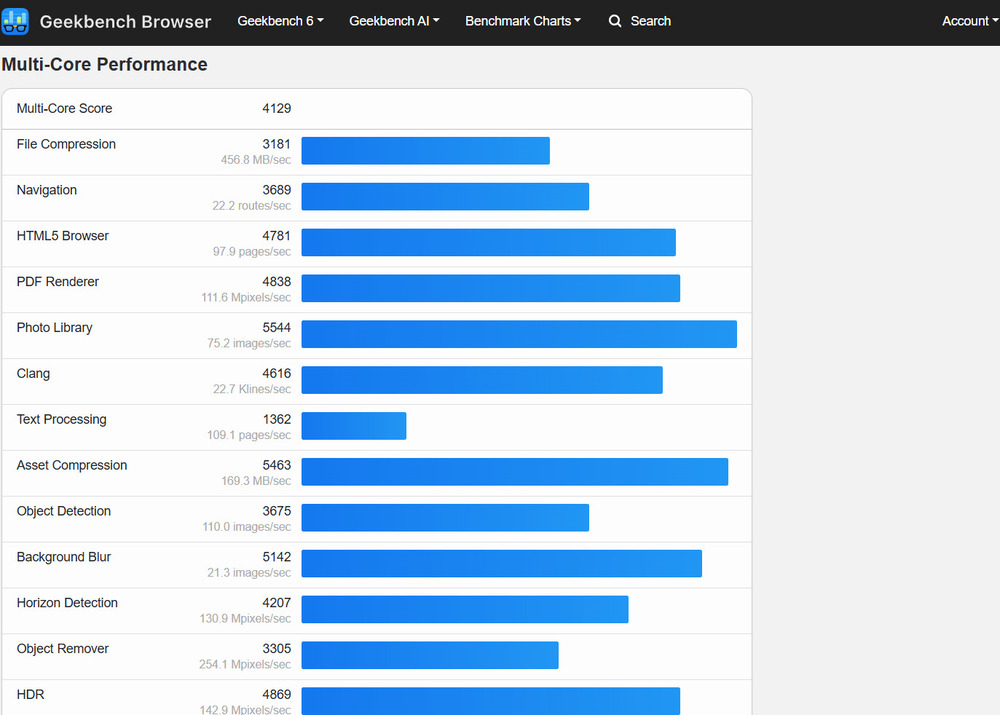
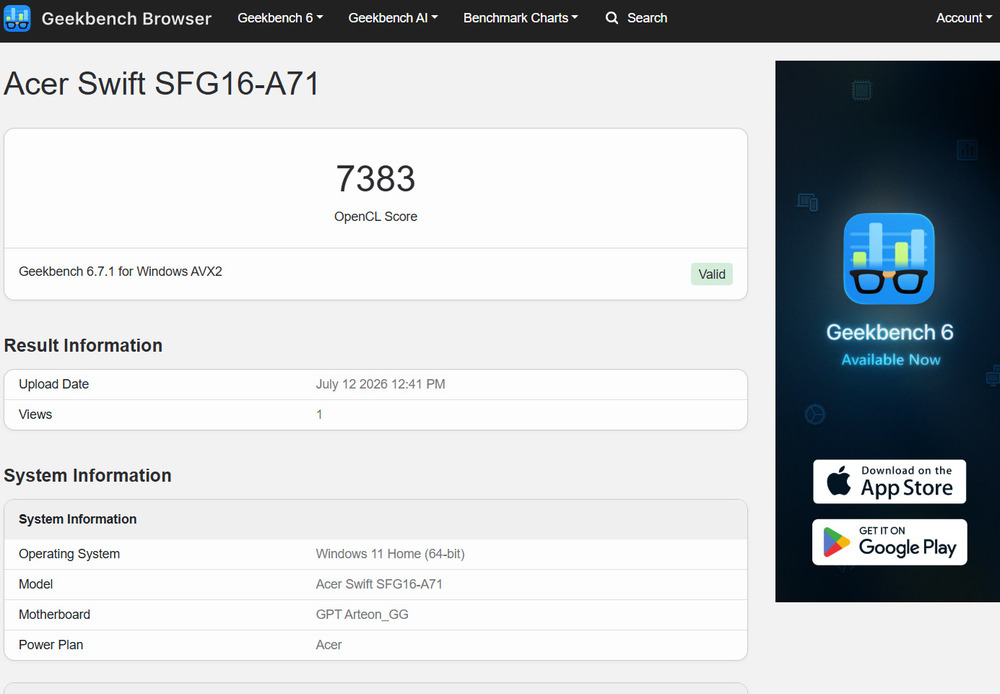
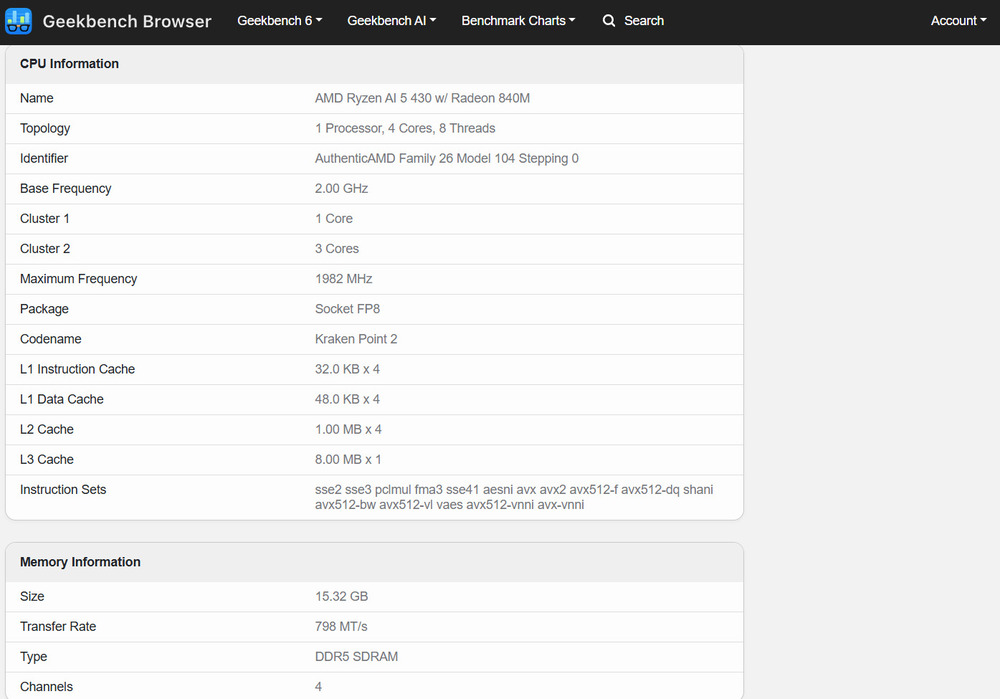
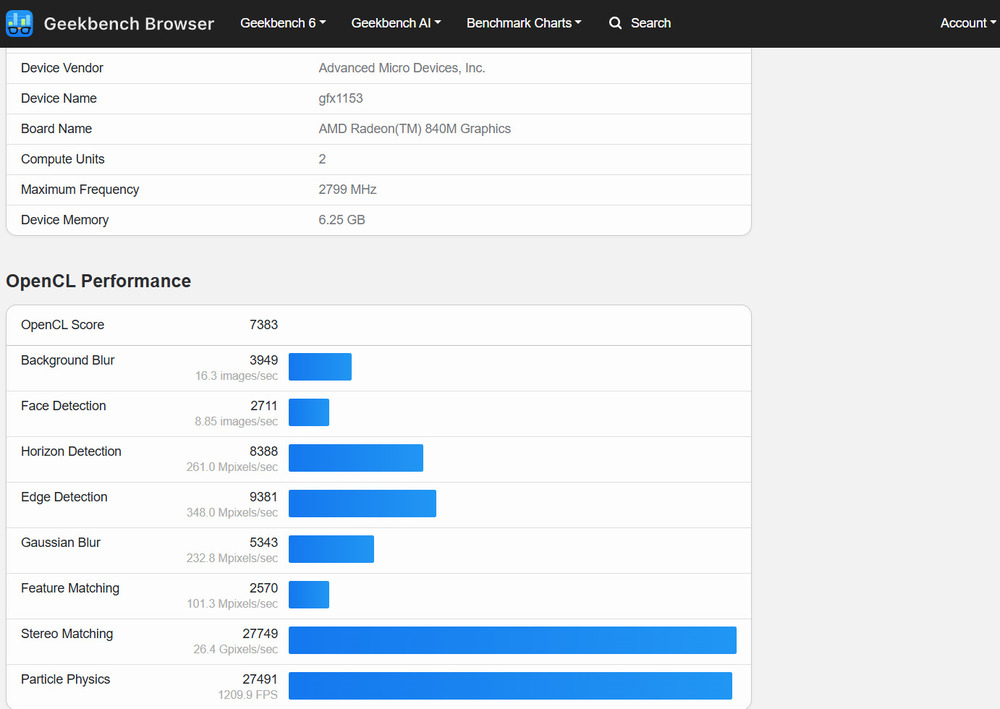
That said, four cores remain four cores, even when built on the advanced Zen 5 and Zen 5c architectures. Under sustained multi-threaded workloads, the processor will naturally fall behind higher-end models in the Ryzen AI lineup. At the same time, its hybrid design delivers excellent power efficiency during everyday computing. Tasks such as compiling large software projects, editing complex 4K video, batch photo exports, running virtual machines, or working with demanding local AI models are not the primary use cases for this particular Swift Go 16 AI configuration.
Read also: Lenovo ThinkBook 16 G4+ IAP review: a good multimedia laptop
Radeon 840M Integrated Graphics: Not for AAA Gaming, but Far from Basic
The integrated Radeon 840M features four compute units and shares system memory with the rest of the platform. While it sits at the entry level of AMD’s current integrated graphics lineup, it should not be mistaken for the low-performance integrated solutions of the past that struggled even with the Windows interface.

The Radeon 840M is more than capable of handling 4K video playback, hardware-accelerated decoding of modern codecs, everyday desktop graphics, image editing applications, web browsing, presentations, and basic media creation tasks. It can also run games such as Dota 2, League of Legends, Valorant, indie titles, and older releases, provided expectations remain realistic. Full HD or lower resolutions with low graphics settings are appropriate, rather than aiming for maximum visual quality.
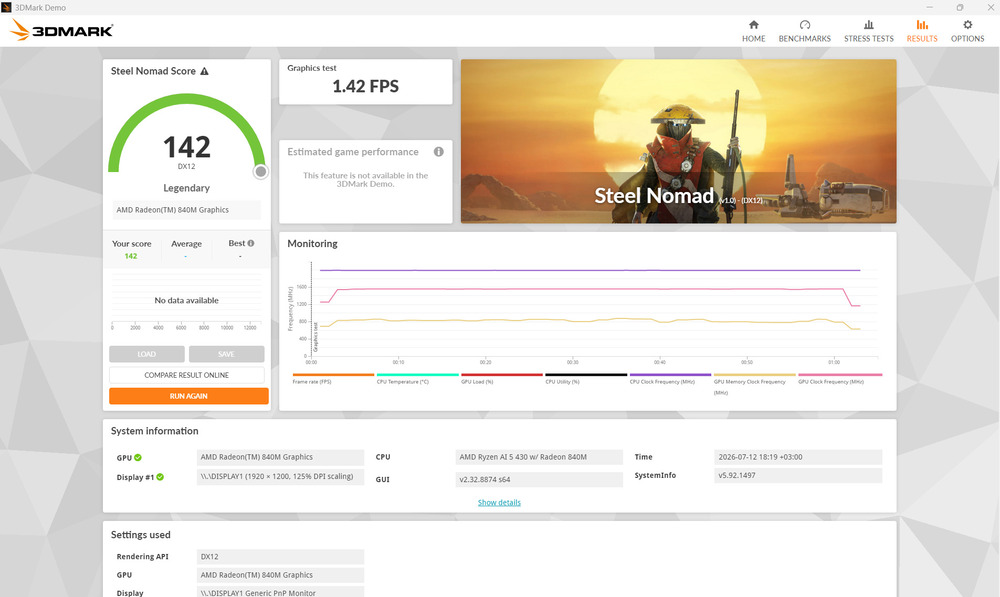
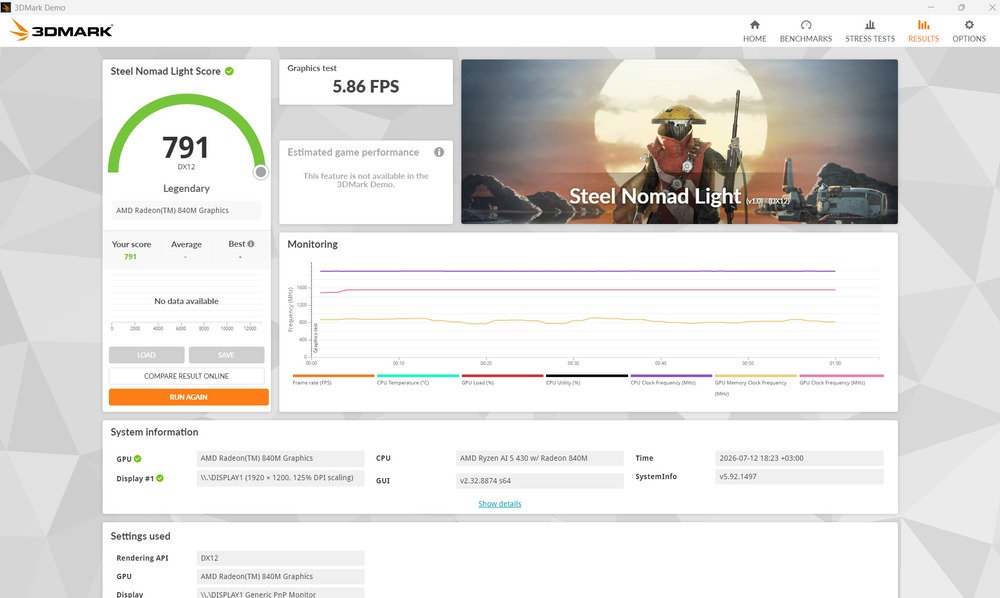
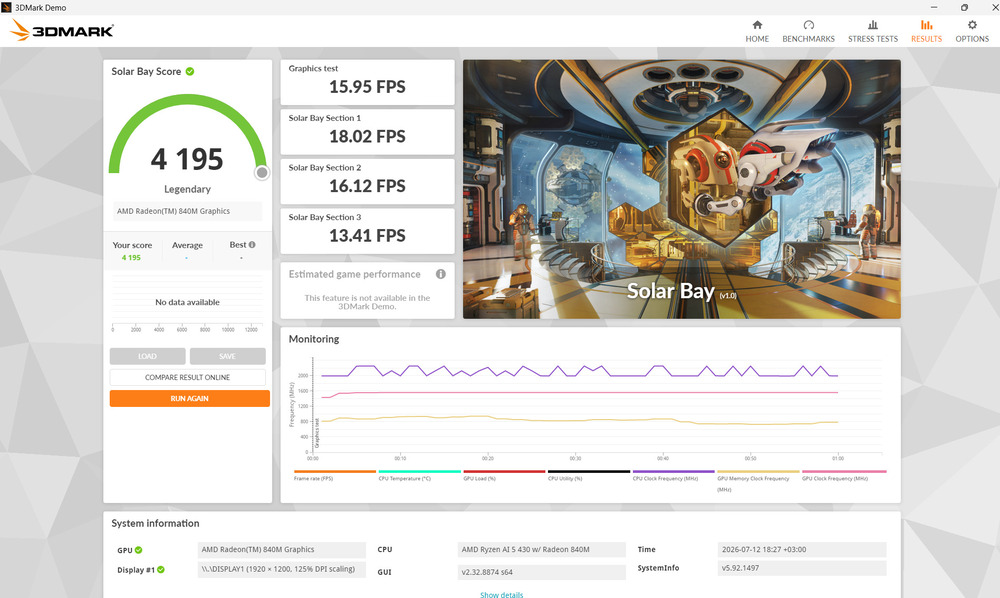
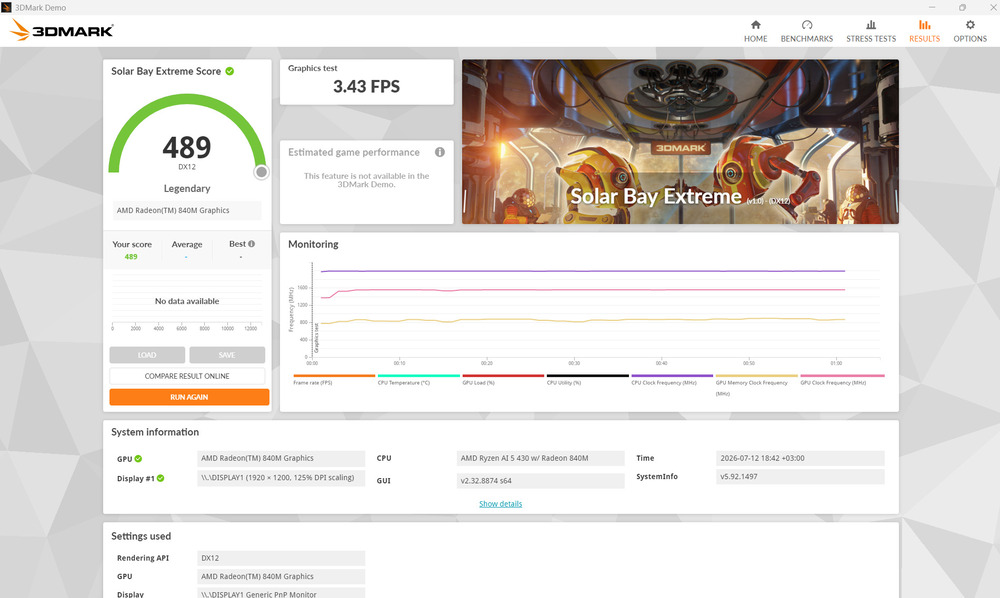
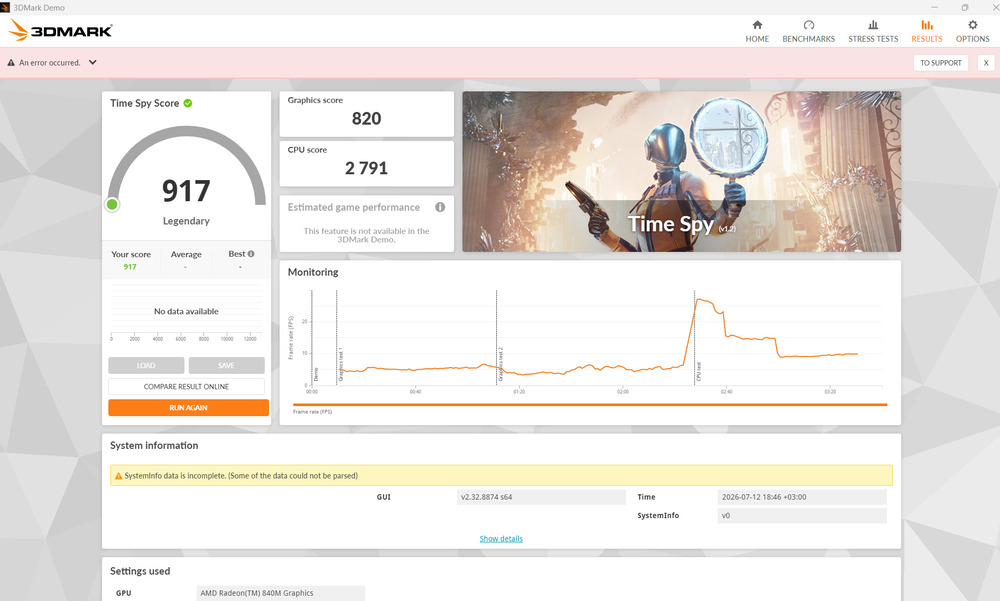
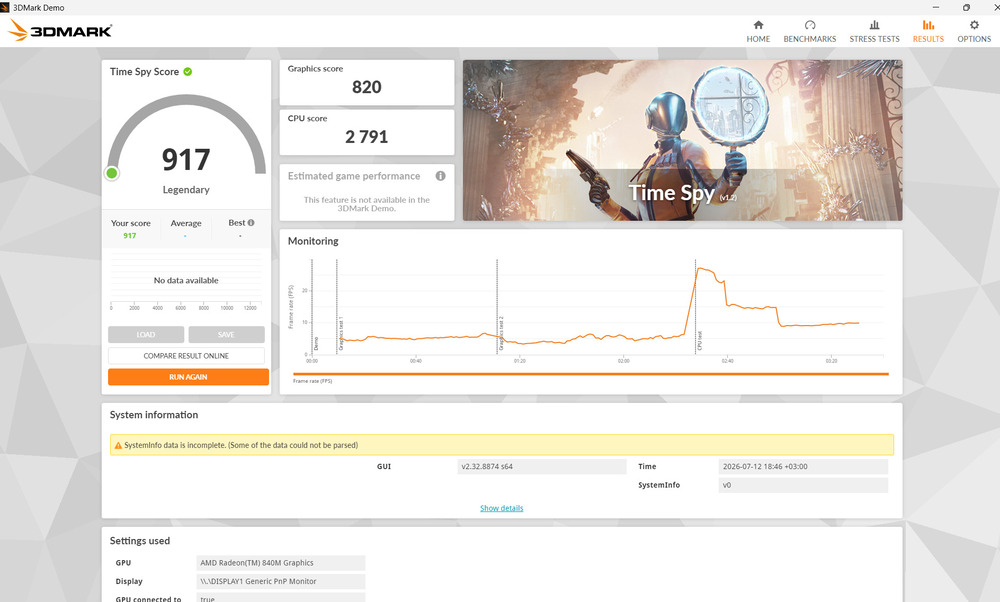
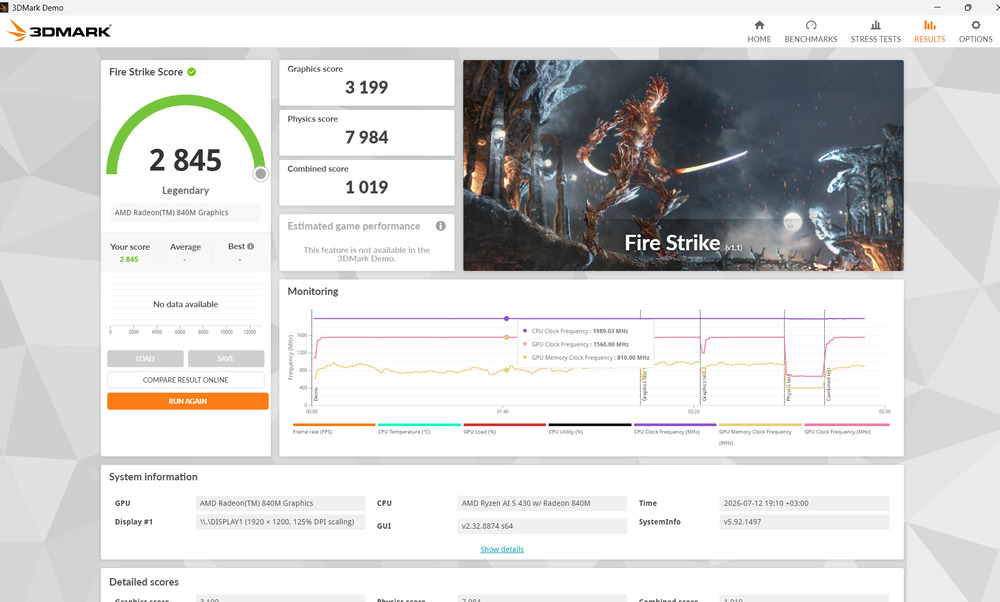
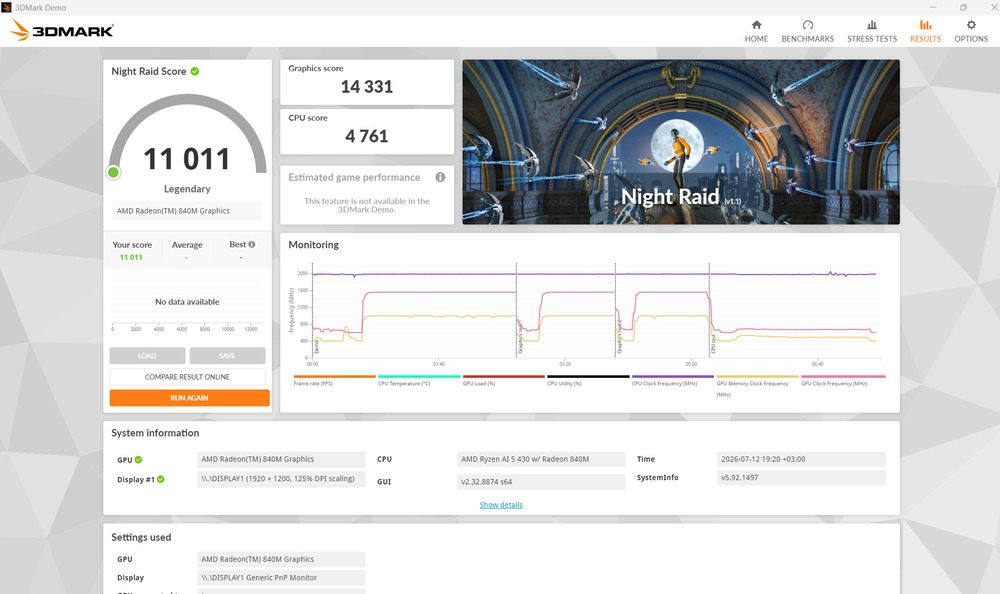
A 16-inch OLED ultrabook does not have to double as a gaming machine. The limitation is not the Radeon 840M itself, but rather the expectations that the “AI” branding and large display may create. The Swift Go 16 AI is designed primarily for productivity and multimedia workloads, not as a replacement for Acer’s Nitro or Predator gaming laptops.
Також цікаво: Lenovo Yoga Pro 9i Aura Edition (2025) Review: High-End Laptop for Creative Work
Memory: Sufficient for Today, but Without an Upgrade Path
The laptop is equipped with 16 GB of LPDDR5X-8533 memory. This high-speed RAM benefits both overall system responsiveness and the integrated graphics, which uses a portion of system memory as video memory.
In 2026, 16 GB of RAM represents a comfortable baseline for Windows 11. It is sufficient for office work, web browsing, studying, software development, light video editing, and everyday use of graphics applications. As is common with modern thin-and-light ultrabooks, however, the memory is soldered to the motherboard and cannot be upgraded – a design choice driven by the goal of maintaining the chassis’ slim 15.99 mm profile.
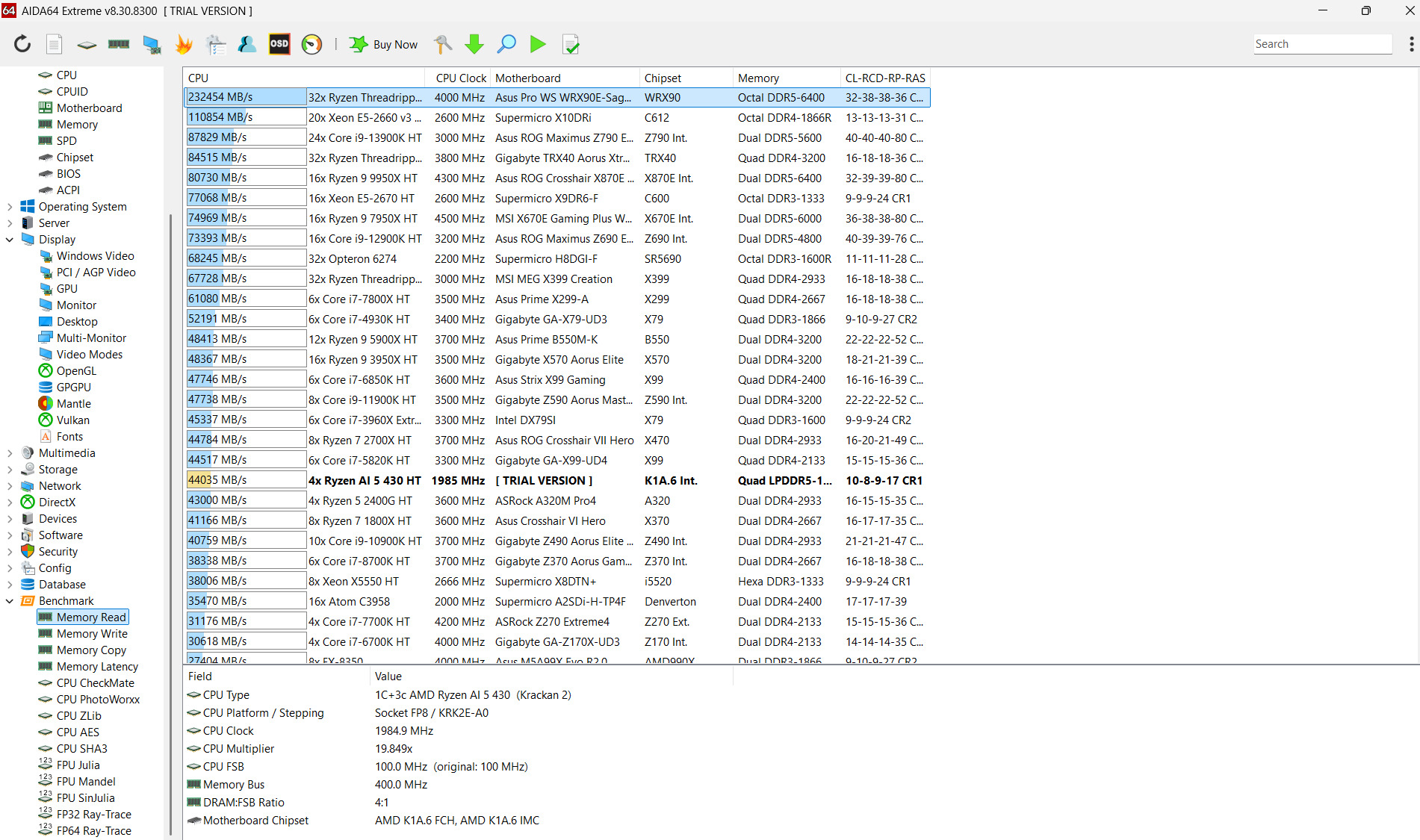
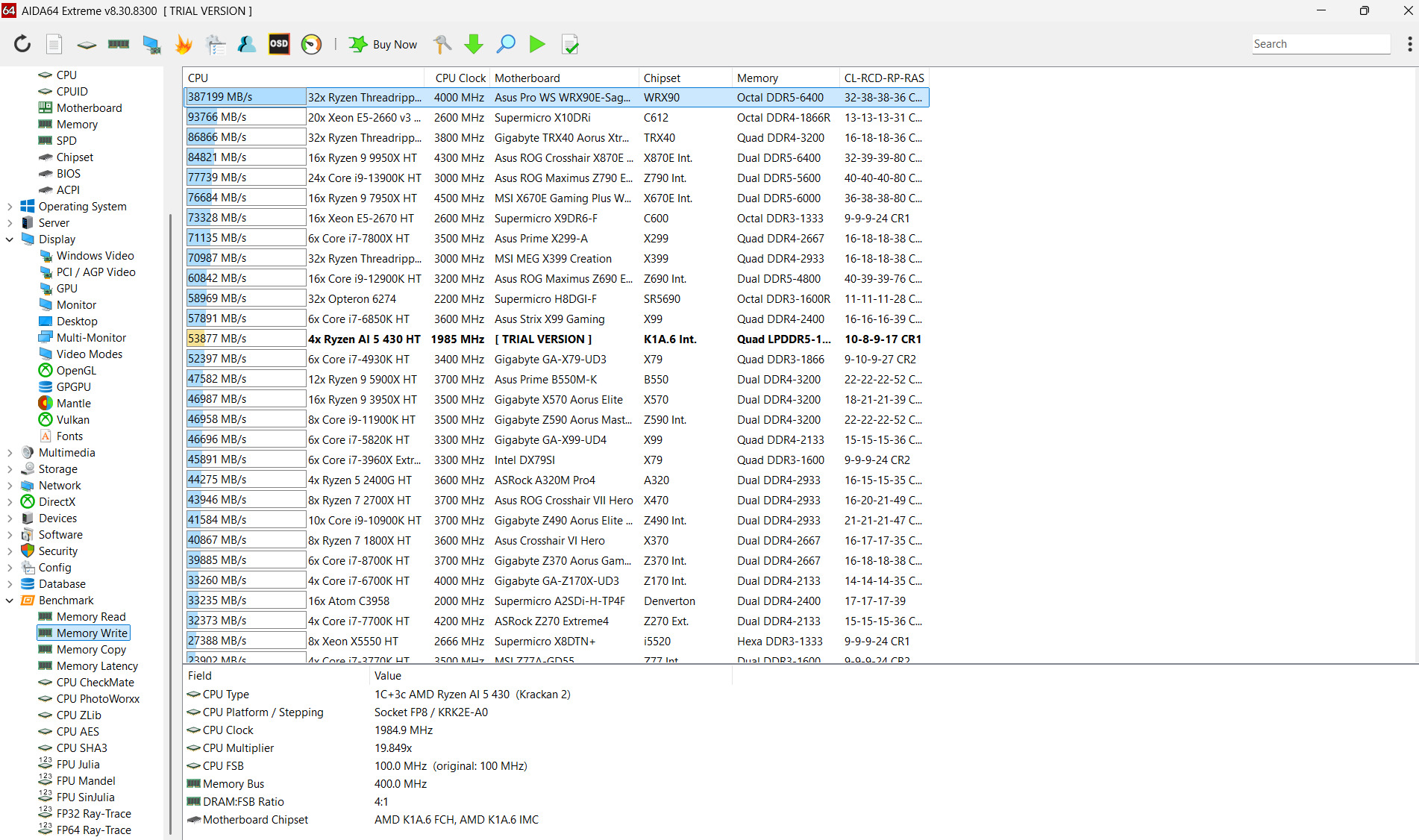
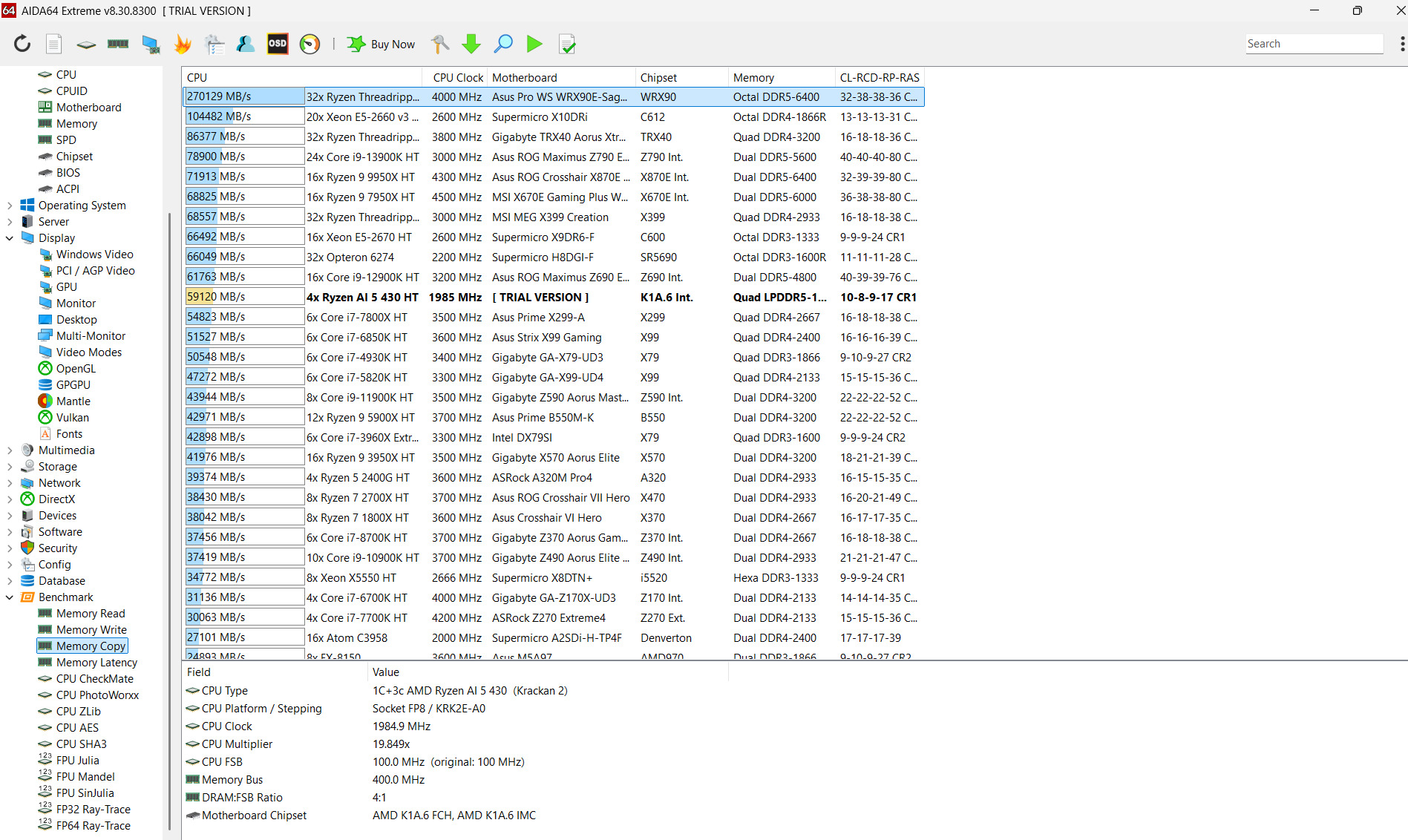
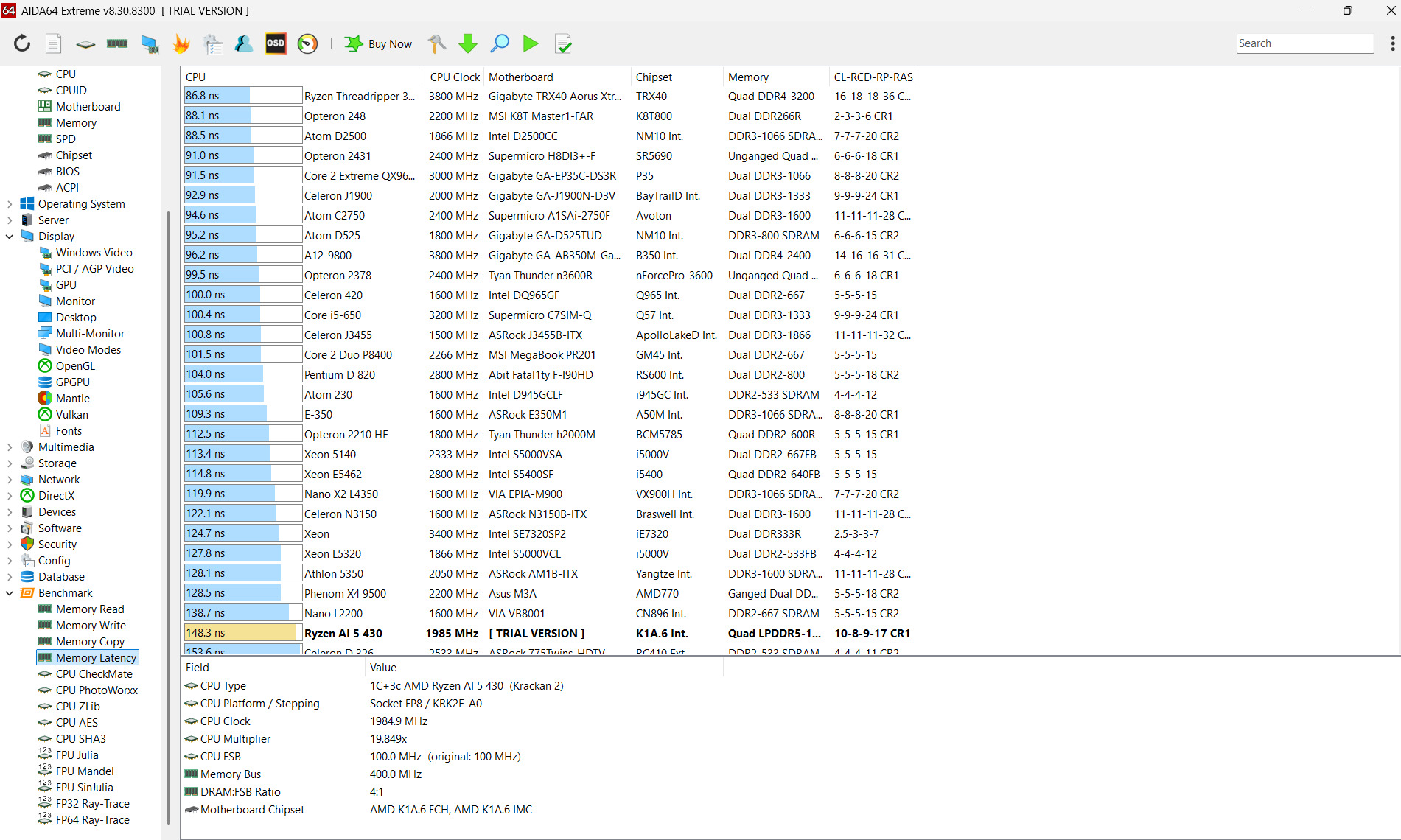
Users who routinely work with multiple demanding applications, virtual machines, large RAW image libraries, or professional video editing workflows should consider configurations equipped with 32 GB of memory instead.

The 512 GB PCIe 4.0 SSD delivers the level of performance expected from a modern NVMe drive, allowing Windows, applications, and files to load with minimal delay. By today’s standards, however, 512 GB should be viewed as a baseline storage capacity rather than a generous one.
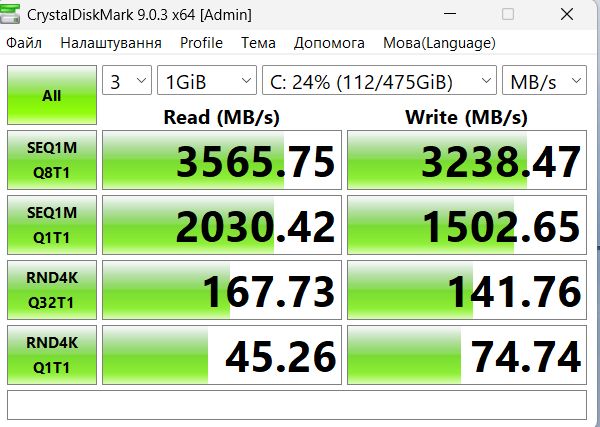
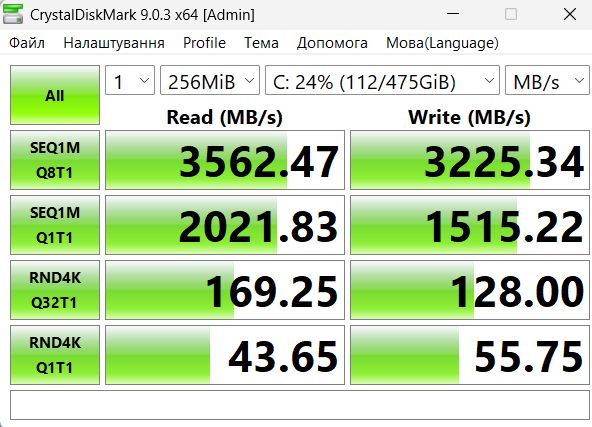
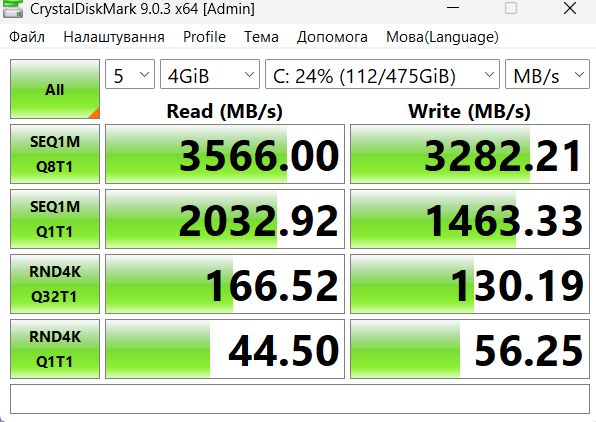
Once the operating system, office suite, productivity applications, several games, and a media library are installed, the available storage space can fill up quickly. The included capacity is adequate for study and office work, but users working with large photo or video libraries should consider supplementing it with an external SSD or cloud storage.
Read also: ASUS Zenbook A14 (UX3407) Review: Ultrabook on ARM Сhip
Copilot+ PC and AI Features: Practical Capabilities Rather Than Marketing Hype
The Ryzen AI 5 430 includes an NPU capable of delivering up to 50 TOPS of AI performance. This exceeds Microsoft’s Copilot+ PC requirement of a neural processor with more than 40 TOPS, allowing the Acer Swift Go 16 AI to run a range of new Windows AI features locally without placing a continuous workload on the CPU or GPU.

In practice, this enables access to a range of AI-powered capabilities, including:
- Windows Studio Effects, such as background blur, automatic framing, lighting correction, voice focus, and eye contact enhancement during video calls.
- Live Captions with real-time translation.
- Local Windows AI features for image, text, and voice processing.
- Acer PurifiedVoice and PurifiedView, which enhance audio and video quality during calls.
- Acer Intelligence Space, a centralized hub for discovering and managing compatible AI tools.
- Hardware acceleration for compatible applications that are capable of utilizing the NPU.
At the same time, the NPU should not be viewed as a magic solution. It does not transform a quad-core processor into a Ryzen AI 9, automatically accelerate every application, or eliminate the need for cloud-based AI services. Its benefits are realized only in features and software that are specifically designed to take advantage of dedicated neural processing hardware.

The availability of individual Copilot+ features depends on the Windows version, regional rollout, and future software updates. For that reason, this laptop is best viewed not as a purchase driven by any single AI capability, but as a platform that is already prepared for the next generation of Windows AI features as they become available.
Read also: Review of the ASUS ROG Zephyrus G16 2024 Gaming Laptop with AMD Ryzen AI 9 HX 370
Real-World Performance
In everyday use, the Acer Swift Go 16 AI performs confidently. A web browser with numerous open tabs, office documents, online learning platforms, email, and cloud-based services present no significant challenge for the system. The large 16-inch display is particularly beneficial for working with text, presentations, and multiple application windows simultaneously.
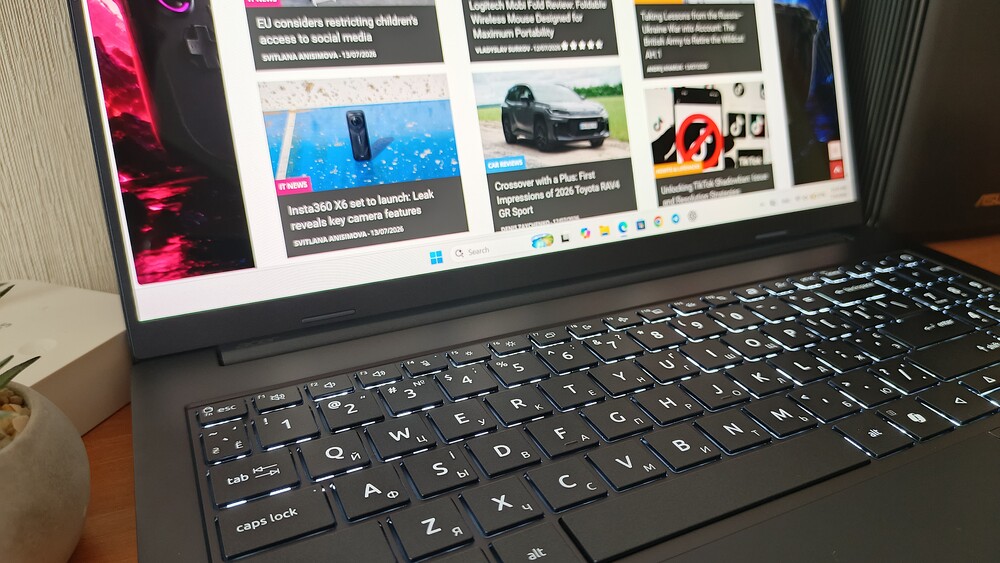

The laptop is also well suited to video conferencing, presentations, and cloud-based work environments. AI-powered camera and microphone enhancements provide an additional benefit by improving image and audio quality during online meetings. For spreadsheets, CRM platforms, accounting software, and other office applications, the combination of the spacious display and dedicated numeric keypad makes working with data noticeably more efficient.

In applications such as Photoshop, Lightroom, and Figma, the laptop provides a comfortable experience for most enthusiast and everyday professional workflows, from photo editing to interface and layout design. Basic video editing in Premiere Pro or DaVinci Resolve is also within its capabilities. However, demanding 4K projects involving extensive effects, multiple layers, and complex color grading are beyond the system’s primary strengths.

For software development, the Swift Go 16 AI is well suited to both learning and typical development workflows. Writing code, working in integrated development environments, running local servers, and compiling smaller projects are all well within its capabilities. Larger codebases and lengthy compilation tasks, however, will take noticeably longer than on systems equipped with more powerful 8- or 10-core processors.
Gaming should be viewed as a secondary capability rather than a primary use case. Less demanding titles, esports games, and older releases can be played at low graphics settings with acceptable performance. By contrast, 3D rendering, complex CAD visualization, and modern graphically intensive AAA games are not the workloads this configuration is designed to handle.
Read also: Acer Swift Go 16 SFG16-72 Laptop Review: Excellent Performance and Solid Battery Life
Battery Life and Charging
The Acer Swift Go 16 AI is equipped with a 65 Wh battery. For a 16-inch laptop with an OLED display, this is a respectable, though not class-leading, capacity. Acer rates the system for up to 12 hours of battery life under ideal testing conditions. In real-world use, endurance depends on factors such as OLED brightness, the number of open browser tabs, video conferencing, Wi-Fi 7 activity, the selected power profile, and workloads placed on the NPU or integrated graphics. In my testing, the laptop delivered up to eight hours of battery life on a single charge. For a 16-inch OLED notebook, that is a solid result.

During light workloads – such as working with documents, web browsing, email, and text editing – the laptop is capable of lasting through most of a workday away from a power outlet. More demanding scenarios, however, including high OLED brightness, frequent video calls, video editing, using an external monitor, or gaming, will reduce battery life noticeably.

USB-C charging is a significant advantage. There is no need to carry a proprietary power adapter, as the laptop can be charged using any compatible USB-C charger with sufficient power output at home or in the office. The included 100 W power adapter provides ample headroom for both charging the battery and maintaining full performance under load.
Read also: Acer Swift Go 14 (SFG14-71) review: laptop for life on the go
Is the Acer Swift Go 16 AI SFG16-A71-R48W Worth Buying?
This configuration is a strong choice for users who value a large OLED display, modern connectivity, solid portability, and readiness for Windows AI features. The Swift Go 16 AI is particularly well suited to studying, office productivity, data analysis, writing, presentations, spreadsheets, moderately demanding creative work, and multimedia consumption.
It is particularly well suited to:
- students looking for a laptop with a large display that will remain capable for several years;
- professionals who spend much of their time working with documents, web browsers, CRM platforms, and spreadsheets;
- marketers, editors, social media specialists, and content creators;
- enthusiast photographers and designers who value an OLED display with 100% DCI-P3 color coverage;
- users who frequently work on the move but prefer a 16-inch display over a more compact 14-inch form factor;
- anyone who appreciates a comprehensive selection of built-in ports without having to rely on USB hubs or adapters.
At the same time, this configuration is not the ideal choice for:
- hardcore gamers;
- 3D artists and CAD professionals working with demanding visualization workloads;
- video editors handling complex, multi-layered 4K projects;
- software developers who regularly work with large codebases, lengthy compilation tasks, or multiple virtual machines.
Read also: ASUS ROG Zephyrus Duo GX651 (2026) Review: Two 16-inch OLED displays are no joke anymore
Conclusion
The Acer Swift Go 16 AI SFG16-A71 is an attractive, well-equipped, and relatively uncommon option in the 16-inch ultrabook segment. It combines features that are often scattered across competing models: a large OLED display, a lightweight 1.6 kg chassis, Wi-Fi 7, USB4, HDMI 2.1, RJ-45 Ethernet, a microSD card reader, a high-quality 5 MP infrared camera, and full readiness for the Copilot+ PC platform.

The defining characteristic of this configuration is its focus on balanced performance and energy efficiency. The Ryzen AI 5 430 delivers responsive performance in everyday workloads, where its quad-core processor and entry-level integrated graphics are more than adequate. As a result, the Swift Go 16 AI is positioned as an ultrabook designed for productive work and multimedia rather than as an alternative to a gaming laptop or a mobile workstation.

Pros
- Large 16-inch OLED display with 100% DCI-P3 color coverage
- Slim aluminum chassis weighing just 1.6 kg
- Modern AMD Ryzen AI platform with an NPU delivering up to 50 TOPS
- Copilot+ PC certification
- 16 GB of high-speed LPDDR5X-8533 memory
- Two USB4 ports, HDMI 2.1, a microSD card reader, and two USB-A ports
- Wi-Fi 7 and Bluetooth 5.4 connectivity
- 5 MP infrared camera with a physical privacy shutter
- Full-size keyboard with a dedicated numeric keypad
- USB-C charging support
Cons
- The processor is limited to four cores and eight threads.
- The integrated Radeon 840M graphics are designed for everyday computing and multimedia workloads rather than demanding gaming.
- The display in this configuration is limited to a 60 Hz refresh rate.
If your typical workload revolves around productivity, studying, office tasks, intensive web browsing, content creation, video conferencing, and light creative work – and you value a large, high-quality display in a slim and portable chassis – the Acer Swift Go 16 AI SFG16-A71 makes a compelling case. This is not a laptop designed to deliver record-breaking benchmark scores. Instead, it is purpose-built to provide a comfortable, well-balanced everyday computing experience, and that is where it performs at its best.
Where to buy Acer Swift Go 16