





© ROOT-NATION.com - Use of content is permitted with a backlink.
Today’s review examines the Acer Swift Go 14 AI, a mid-range laptop positioned as a general-purpose device. Rather than prioritizing peak computational performance, this model focuses on a balanced user experience. Key design considerations include portability, battery life, and the integration of an OLED display intended to support comfortable everyday use. The Swift Go series has traditionally been equipped with Intel processors. Since 2024, however, the lineup has expanded to include configurations based on AMD Ryzen platforms. This review focuses on a more accessible configuration built around the AMD Ryzen AI 7 350. This option is positioned not only as an alternative to Intel-based models, but also as an attempt to balance cost, energy efficiency, and on-device AI capabilities for typical workloads.
This evaluation considers the Acer Swift Go 14 AI on the AMD platform across several aspects: design, build quality, observed performance, battery life, and behavior in common usage scenarios. The central question is whether this configuration can compete effectively with Intel-based variants within the same segment.
Read also: All Acer laptop reviews
TABLE OF CONTENTS:
What is notable about the Acer Swift Go 14 AI?
In current laptop design, a relevant consideration is how well a device aligns with typical usage patterns rather than simply maximizing raw performance. The Acer Swift Go 14 AI is not positioned as a top-tier performance system. Instead, it focuses on delivering a well-rounded user experience in a lightweight and portable form factor, without emphasizing unnecessary cost increases.

With a weight below 1.3 kg, the device is among the lighter 14-inch laptops in its class, which contributes to ease of transport. In typical use, it is unlikely to add noticeable bulk to a backpack or bag. The display is based on an OLED panel rather than a standard IPS solution. It supports a 120 Hz refresh rate and offers high contrast, deep black levels, and accurate color reproduction. In everyday tasks such as browsing, media consumption, and document work, the visual output appears consistent and well-defined. This places the device in a relatively small group of lightweight laptops that provide high-quality display characteristics.
The configuration includes an AMD Ryzen AI 7 350 processor, 32 GB of LPDDR5 memory, and a 1 TB SSD. This setup is sufficient for common workloads, including multitasking in a web browser, office applications, video conferencing, basic photo editing, and media playback. In these scenarios, the system operates responsively and with low acoustic output.
At the same time, the hardware is not intended for sustained high-load tasks such as complex 3D rendering or intensive video editing. The device is better suited to everyday productivity and general-purpose use, where it prioritizes efficiency and user comfort over maximum computational throughput.

The system includes more than a nominal NPU implementation. It supports the Copilot+ ecosystem and incorporates AI-assisted features in several routine scenarios, including power management optimization, video call image and audio enhancement, background noise reduction, and local file search. In practice, these functions operate in the background and aim to improve usability rather than serve as standalone features. The available ports and wireless interfaces align with current standards. The device includes USB-C with Thunderbolt 4 support, HDMI 2.1, and Wi-Fi 7. This selection reduces reliance on adapters and allows integration into a range of work environments, from fixed desktop setups to temporary workspaces.
In terms of target audience, the Swift Go 14 AI is suited to students, freelancers, and users who require a portable system for everyday tasks. The combination of a high-quality display, efficient processor, and lightweight chassis addresses typical productivity and study-related use cases without positioning the device as a premium-tier offering.
At the time of writing, the Acer Swift Go 14 AI is available in retail channels starting at approximately $1,400. Within its segment, it represents a configuration that prioritizes portability, display quality, and balanced performance over maximum processing capability.
Acer Swift Go 14 AI Specifications
- Type: Ultrabook
- Display: 14″, OLED, matte, 3K WUXGA+ 2880×1800 (16:10)
- Refresh rate: 120 Hz
- Brightness: 600 nits
- Colour gamut (sRGB): 100%
- Processor: AMD Ryzen AI 7 350 (8C/16T), Krackan Point APU, 3 Zen 5 + 5 Zen 5c (3C/6T + 5C/10T), Zen 5: 2000–5000 MHz, Zen 5c: 2000–3300 MHz, TSMC 4 nm (N4P)
- RAM: 32 GB, LPDDR5X memory type, memory frequency 8533 MHz, integrated
- Graphics card: integrated, AMD Radeon 860M / 8 CU RDNA 3.5 / 3000 MHz
- Storage type: M.2 NVMe SSD, M.2 PCIe 4.0 x4 interface
- Storage capacity: 1024 GB
- Ports and connections: 3.5 mm audio jack, HDMI v2.1, 2 x USB-A 5Gbps, 2 x USB-C 20G (USB4)
- Wi-Fi: Wi-Fi 7 (802.11be)
- Bluetooth: v 5.4
- Webcam: 2560×1440 (Quad HD), camera shutter
- Number of speakers: 2
- Audio decoders: DTS X Ultra
- Security: 3D facial scanner
- Keyboard backlight: white
- Touchpad: glass touchpad
- Battery capacity: 75 Wh
- Max. battery life: 20 hours
- USB-C power delivery (Power Delivery)
- Fast charging
- Included power adapter: 65 W
- Pre-installed OS: Windows 11 Home
- Chassis material: aluminium
- Dimensions (W×D×H): 312.9×222.8×16.4 mm
- Weight: 1.3 kg
Read also: Acer Swift Go 16 SFG16-72 Laptop Review: Excellent Performance and Solid Battery Life
Package contents
Acer follows a consistent approach to packaging with an emphasis on recyclability. The Swift Go 14 AI is shipped in a box made primarily from recyclable materials, with partial use of recycled content. The external design is minimal, featuring only essential product information and standard technical markings without additional visual elements.

In the reviewed unit, the package contents were minimal and included only the laptop and a 65 W USB-C power adapter. Retail versions are specified to include a broader set of items, such as a USB-C to HDMI adapter, a brief setup guide, and warranty documentation.

The practical value of printed manuals and accompanying booklets has decreased, as most users rely on digital documentation. In contrast, functional accessories such as a USB-C to HDMI adapter are generally more relevant in everyday use.
Read also: Acer Aspire Go 15 AG15-71P Review: Affordable Laptop for Study and Everyday Use
Design and ergonomics
The external design appears to be the result of a deliberate attempt to balance visual simplicity with practical considerations. The Acer Swift Go 14 AI follows a restrained aesthetic that avoids excessive styling elements, allowing it to fit into both professional and casual environments without drawing unnecessary attention.

The chassis is constructed primarily from aluminum. The lid, keyboard deck, touchpad area, and bottom panel are all metal, which contributes to a rigid structure and consistent build quality. The use of a single material across these surfaces also provides a uniform tactile feel.

The design follows a restrained minimalist approach, with clean lines and minimal external detailing. The only notable visual elements are subtle glossy accents on the lid, which reflect light at different angles. The Acer Swift logo is small and unobtrusive. The chassis corners are slightly rounded, adding a small degree of visual softness without affecting the overall geometric structure. The result remains functionally neutral in appearance, with a focus on simplicity rather than decorative elements.

With a weight of approximately 1.3 kg and dimensions of 312 × 227 mm, the laptop remains highly portable. The thickness, ranging from 9.7 to 15.9 mm, supports everyday transport without creating a significant physical burden. Overall, the form factor corresponds to a typical “urban” class device designed for frequent mobility.

Particular attention has been given to interaction details. The lid opens smoothly without lifting the base and locks into position without noticeable noise. A small cutout in the chassis allows one-handed opening, and the hinge maintains the selected viewing angle without visible instability.

The specified display opening angle is 180 degrees; however, in practice it appears to be slightly less. In everyday use, this deviation does not result in any noticeable limitations or inconvenience.

It is also worth noting the placement of the ventilation grilles between the display and the chassis. This design choice allows hot air to be directed away from the user area, reducing the likelihood of noticeable thermal impact during operation.

The next set of design details highlights the Acer Swift Go 14 AI as a device that prioritizes functional integration rather than purely aesthetic considerations. Starting with the display area, there is a glossy strip above the screen that houses the webcam and microphones. This section also includes a physical privacy shutter for the camera, providing a straightforward mechanical method of blocking the lens when it is not in use.

The implementation is straightforward in use. The shutter can be easily located by touch, and the slider moves clearly left and right with defined positions. The open and closed states are immediately distinguishable, without requiring visual confirmation or additional effort during operation.

The bottom panel includes ventilation cutouts and four rubber feet, which provide stable positioning on a flat surface and reduce sliding. The speaker grilles are located on both sides of the chassis, positioned to the left and right edges.
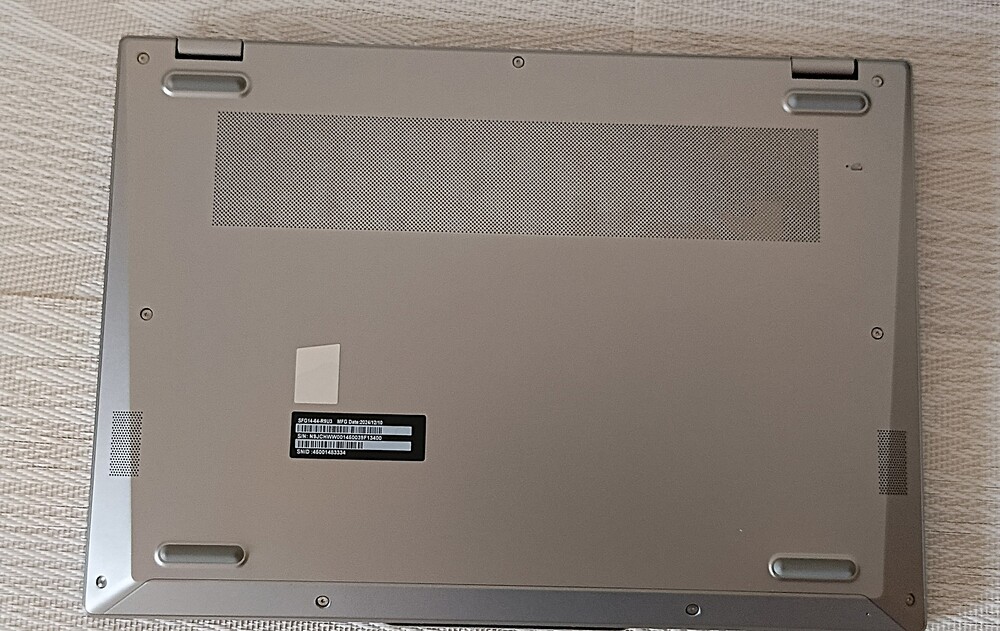
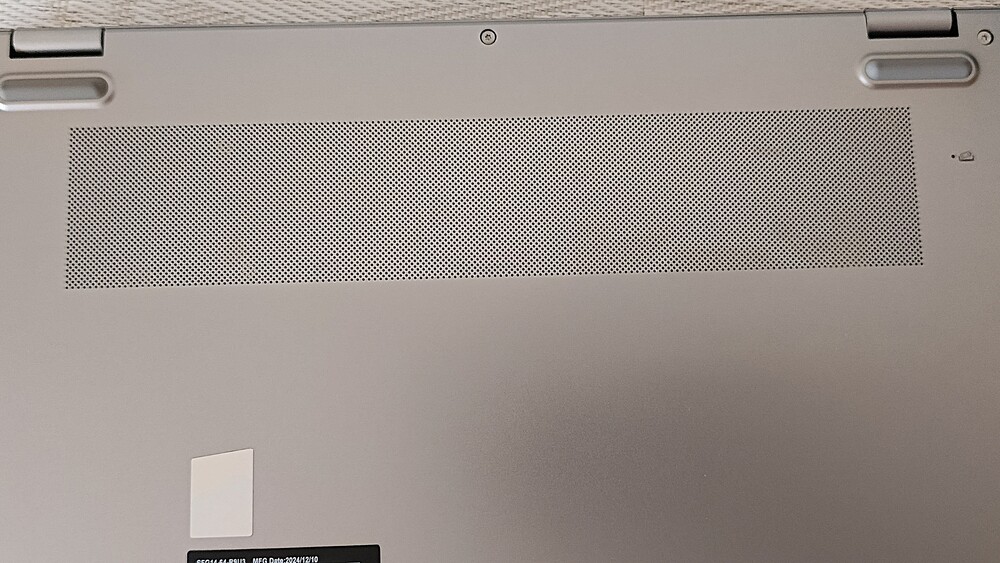
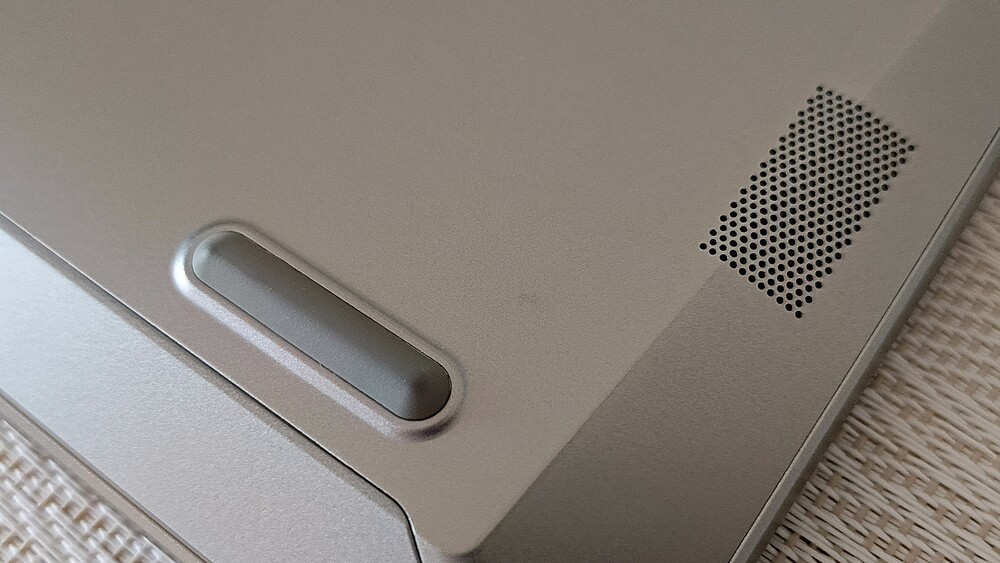
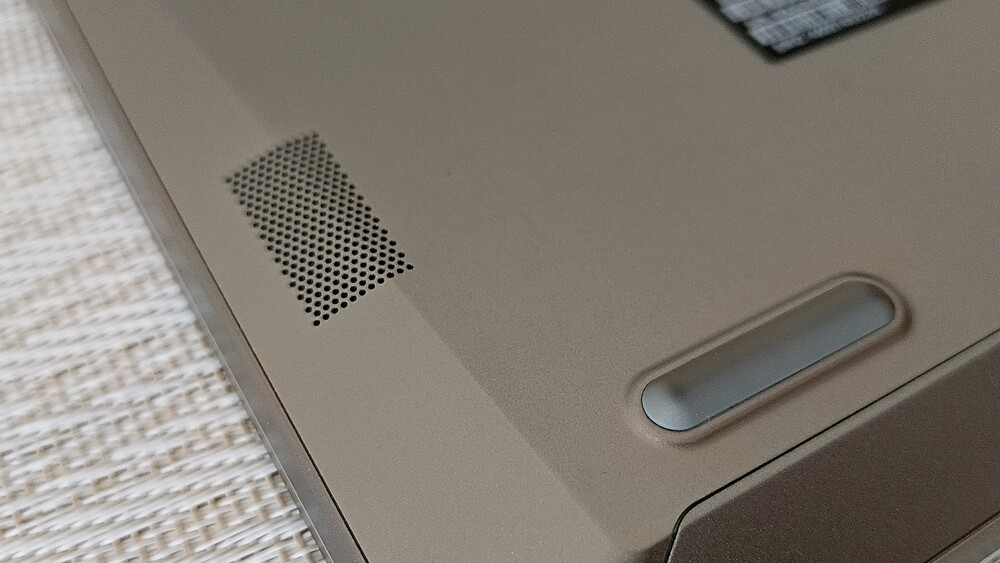
The model is available in a single color option, dark gray. The finish has a restrained appearance, but it is prone to collecting dust and minor surface marks, which requires periodic cleaning to maintain its condition.

Overall, the Acer Swift Go 14 AI is a device that is comfortable to use and handle. It has a refined appearance, solid build quality, and a consistent design approach, while remaining focused on portability. From a functional perspective, it is positioned as a general-purpose everyday laptop rather than a specialized high-performance system.
Read also: Acer Swift Go 14 Review: Affordable Laptop with Qualcomm Snapdragon X
Ports and connectors
The port selection is relatively extensive for its class, reducing the need for external hubs or adapters. On the left side, the device includes an HDMI output, allowing direct connection to an external display. There is also a standard USB Type-A port for legacy peripherals, as well as two USB Type-C ports with Thunderbolt 4 support.

A notable detail is that both USB Type-C ports support not only data transfer but also power delivery for charging. This allows the system to be powered via a more compact 65 W adapter instead of a larger high-wattage power supply, provided the charger meets the required USB-C power delivery specifications.

The right side is also straightforward in terms of layout. It includes an additional USB Type-A port and a 3.5 mm комбінований audio jack for headphones and microphones. There are also two small status indicators, which provide basic system feedback such as power and activity status.
Read also: Acer Nitro V 16 AI Gaming Laptop Review: Balanced, Stable, and Engaging
Keyboard and touchpad
The keyboard follows a compact layout without a numeric keypad, which is typical for the 14-inch form factor and allows for a more efficient use of available space. The visual design is restrained: the keys are color-matched to the chassis, and the legends are semi-translucent. Backlighting is implemented with a soft white illumination that evenly highlights the working area without excessive brightness. Multiple brightness levels are available, allowing adjustment for different lighting conditions, including low-light environments.

The layout is designed for readability and ease of use. The Latin characters are clearly legible, with no issues in visual recognition. Cyrillic characters were not present on the tested unit, although localized versions sold in Ukraine are expected to include them. The key travel is approximately 2 mm, which is within the typical range for this class of keyboard. Key presses are defined but relatively soft, without excessive resistance. This makes extended typing sessions more comfortable, as fatigue is not immediately noticeable during prolonged use. With continued use, the layout becomes familiar, and touch-typing can develop after a short adaptation period.


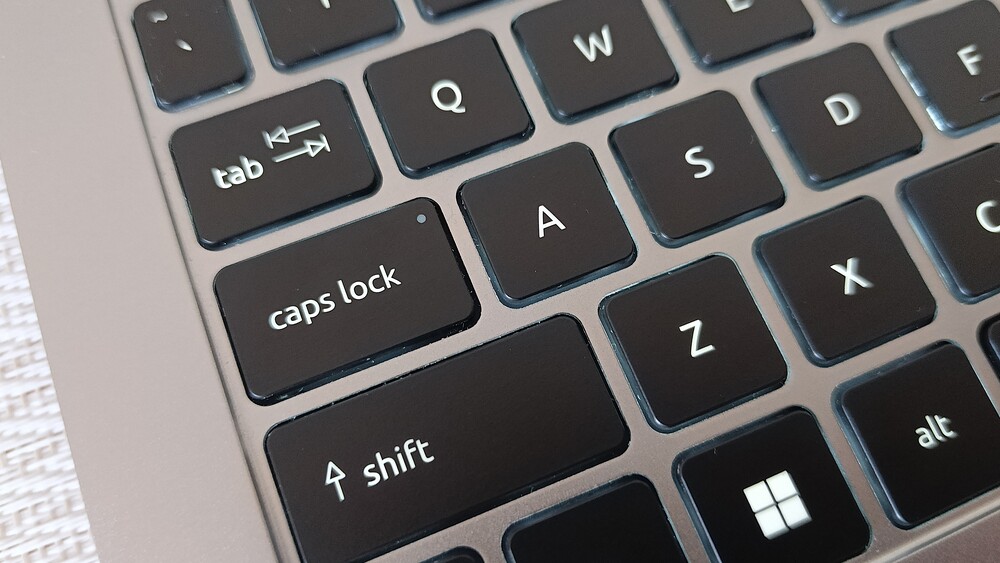

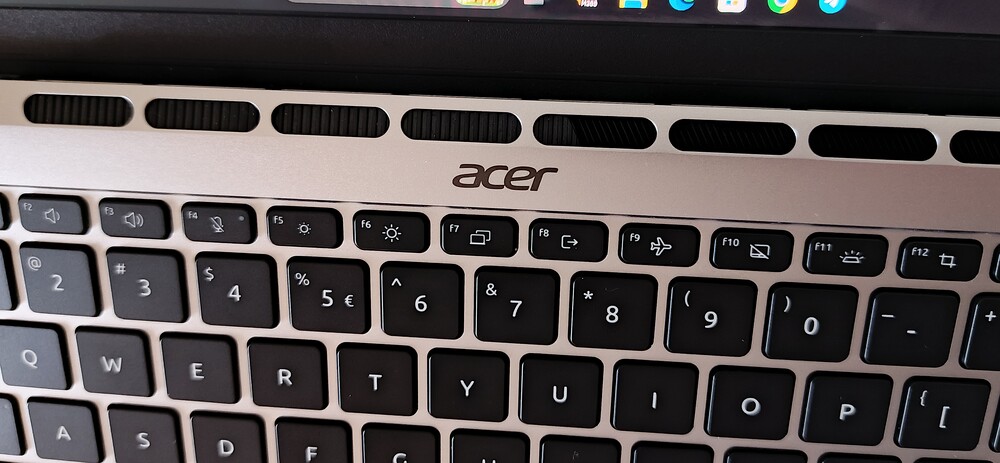
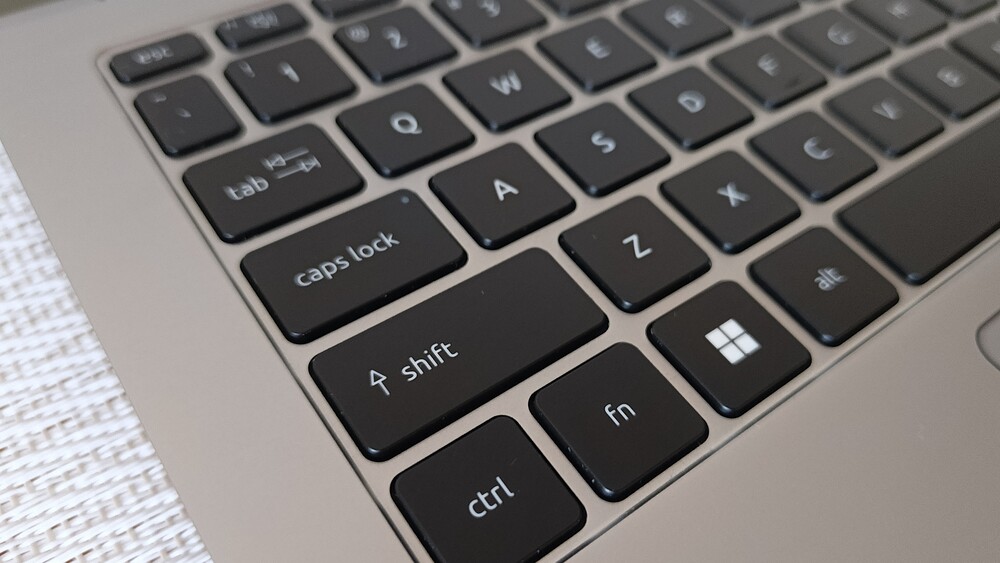
There are a few layout trade-offs. The Caps Lock key is slightly reduced in size, and the up/down arrow keys are more compact than on full-sized layouts. However, this is typical for a 14-inch chassis and not unusual for this category. At the same time, there are functional changes. The right Ctrl key is replaced with a dedicated Copilot key, providing direct access to Microsoft’s AI assistant. This serves as a shortcut into AI-assisted features such as system suggestions, content generation, and contextual help within the operating system.

The top row also includes a dedicated AcerSense key. It provides quick access to Acer’s system management utility, where users can adjust performance profiles, check battery status, and modify system settings. This reduces the need to navigate through multiple system menus for basic configuration tasks.

The power button is integrated with a fingerprint sensor. It provides fast and consistent authentication in typical use cases, without noticeable input delays or frequent recognition errors. This integration combines power control and biometric login into a single element, reducing the number of separate interaction points on the device.

The touchpad is designed for regular everyday use rather than as a secondary input element. It measures approximately 125 × 80 mm and provides a sufficiently large working area for gestures and cursor control. The surface is smooth, allowing consistent finger movement with minimal friction. Input responsiveness is high, and multi-touch gestures are registered reliably without noticeable cursor instability. The main drawback is the relatively deep click mechanism, which produces a clearly audible sound. This may be noticeable in quiet environments, although it is largely a matter of user preference and adaptation.

The device can be characterized as a balanced tool for working with text, documents, and related everyday tasks. It does not emphasize decorative or non-functional elements, instead focusing on core usability and typical user requirements in daily scenarios.
Read also: Acer Chromebook Plus 515: Is There Life on ChromeOS?
OLED display of the Acer Swift Go 14 AI
The display is one of the key hardware components of the Swift Go 14 AI and significantly influences the overall user experience. It uses a 14-inch OLED panel, which is not implemented as a secondary or entry-level feature, but as a core part of the device’s positioning. The panel is intended to emphasize visual quality as a primary design consideration.

Colors are saturated and deep, consistent with typical OLED characteristics, where black levels appear true black rather than elevated gray tones. Subjectively, the color gamut appears to slightly exceed DCI-P3 coverage, which is noticeable in photo and video content, where the image appears more vivid and three-dimensional. The factory color balance is close to the standard 6500K white point, without a pronounced shift toward warm or cool tones. As a result, the display does not require additional calibration for most common use cases, including content consumption, productivity tasks, and general web browsing.
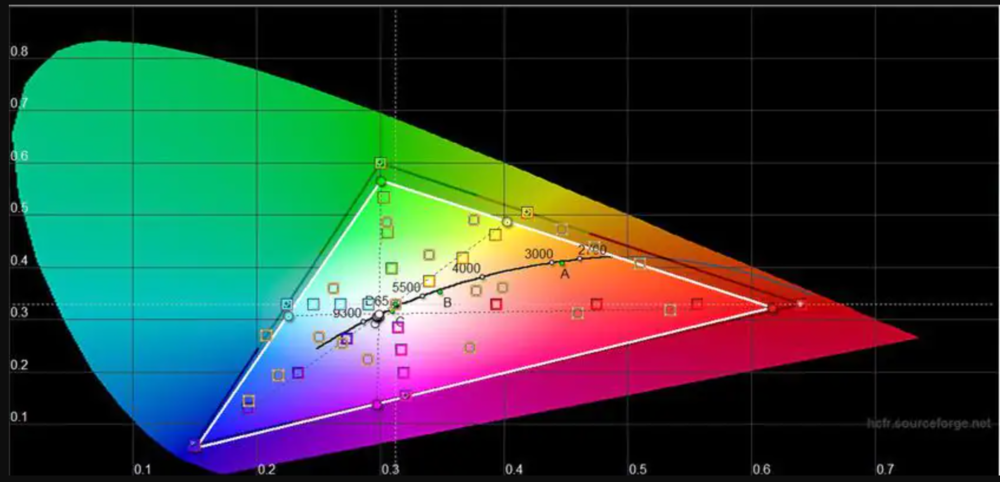

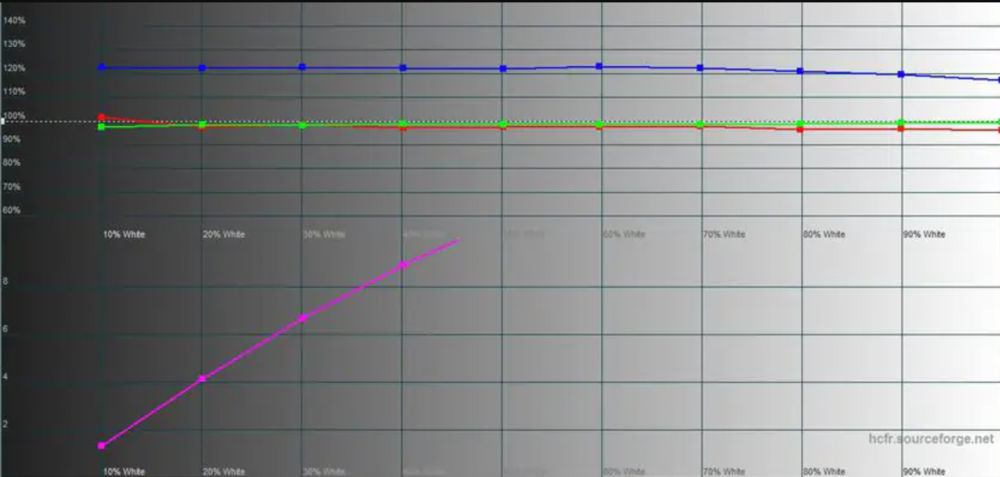
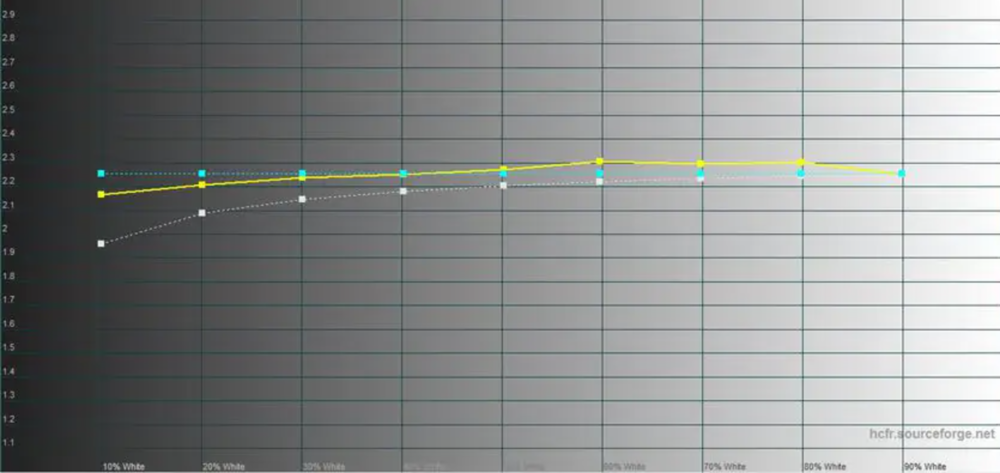

In numerical terms, the color accuracy is reported at approximately Delta E ≈ 2.8. This is slightly above the typical threshold used for professional-grade color-critical work, although the deviation is relatively small. For amateur and semi-professional photo and video tasks, this level of accuracy is generally adequate. One limitation is the absence of a quick switch to an sRGB mode. As a result, this should be taken into account when preparing content specifically for web-based workflows, where standardized color spaces are often required.

A resolution of 2880×1800 on a 14-inch panel results in a pixel density of approximately 150 PPI. In practical use, this provides a sharp and smooth image without visible pixelation at a normal viewing distance. At very close range, individual pixels may become distinguishable, but under typical working conditions the display appears clean and well-resolved. Compared to a standard Full HD panel of the same size, the difference in clarity is noticeable and results in a more refined visual output.

An additional advantage is the 120 Hz refresh rate. System interface animations, scrolling, and general navigation appear smooth, with reduced visual stuttering. This contributes to usability during extended work sessions, beyond visual perception alone. The impact on battery life is present but not described as significant in typical usage scenarios.
Brightness is another notable parameter. In SDR mode, sustained brightness is approximately 400 nits, while peak HDR levels reach around 600 nits, with support for VESA DisplayHDR True Black 500. This level is generally sufficient for indoor use, including environments with strong ambient light or nearby windows. The glossy screen coating can produce reflections under certain lighting conditions. However, the available brightness headroom is typically sufficient to maintain readability in most indoor scenarios.

In terms of eye comfort, the display behavior appears controlled. At higher brightness levels, PWM (pulse-width modulation) is reported to be minimal, and flicker is not subjectively noticeable during typical use. This makes it suitable for extended work sessions without immediate visual discomfort for most users.
Overall, the display can be described as a strong component of the device’s configuration. It is suitable both for content consumption and for basic to semi-professional work with visual content. Rather than representing a compromise, the screen is one of the primary functional elements that defines the positioning of this laptop.
Read also: Acer Aspire Go 15 AG15-71P Review: Affordable Laptop for Study and Everyday Use
Network and multimedia
The Acer Swift Go 14 AI is equipped with a 1440p (QHD) webcam that includes Temporal Noise Reduction (TNR) for improved image processing in low-light conditions. While the result is still limited by typical laptop camera hardware constraints, it provides a generally acceptable level of image quality for its category.
Color reproduction is reasonably accurate, and sharpness remains adequate under normal lighting. In reduced lighting conditions, the TNR processing helps reduce visible noise and preserves subject clarity, avoiding excessive image degradation. Overall, the webcam is sufficient for video conferencing and routine communication tasks, particularly within the constraints typical of integrated laptop camera systems.
The device uses a dual-microphone setup with integrated noise reduction. In practice, voice capture remains clear, with limited muffling or signal dropouts. The noise suppression system actively reduces background sounds, including environmental noise typical of public spaces such as cafés or transit environments. This improves speech intelligibility during calls, although the processing can be relatively aggressive depending on conditions.
The built-in speakers provide a more limited audio experience compared to other components of the system. They are bottom-firing, which affects sound dispersion and results in a relatively flat output with reduced spatial depth and limited detail separation.
For basic tasks such as system notifications, video calls, or background media playback, the performance is sufficient, but it does not deliver a particularly rich or immersive sound profile. Some improvement can be achieved through the included DTS software, which provides equalizer and sound profile adjustments. These settings can partially enhance perceived clarity and tonal balance, although the physical limitations of the speaker system remain.

In headphones, the audio experience is notably different. DTS:X support adds spatial processing and a sense of depth, resulting in a more expansive soundstage compared to the built-in speakers. The accompanying software provides multiple audio profiles as well as manual tuning options for further adjustment.
Wireless connectivity aligns with current standards, including Wi-Fi 7 and Bluetooth 5.4. In practical use, this provides stable connections and sufficient bandwidth for typical networking and peripheral tasks, with performance consistent with modern expectations for this class of device.
Read also: How to use Copilot to control your Windows 11 PC
Performance
Acer offers multiple hardware configurations for the Swift Go AI series, with an emphasis on balanced system design rather than peak performance. The tested configuration of the Acer Swift Go 14 AI includes an AMD Ryzen AI 7 350 processor, integrated Radeon 860M graphics, 32 GB of RAM, and a 1 TB SSD.
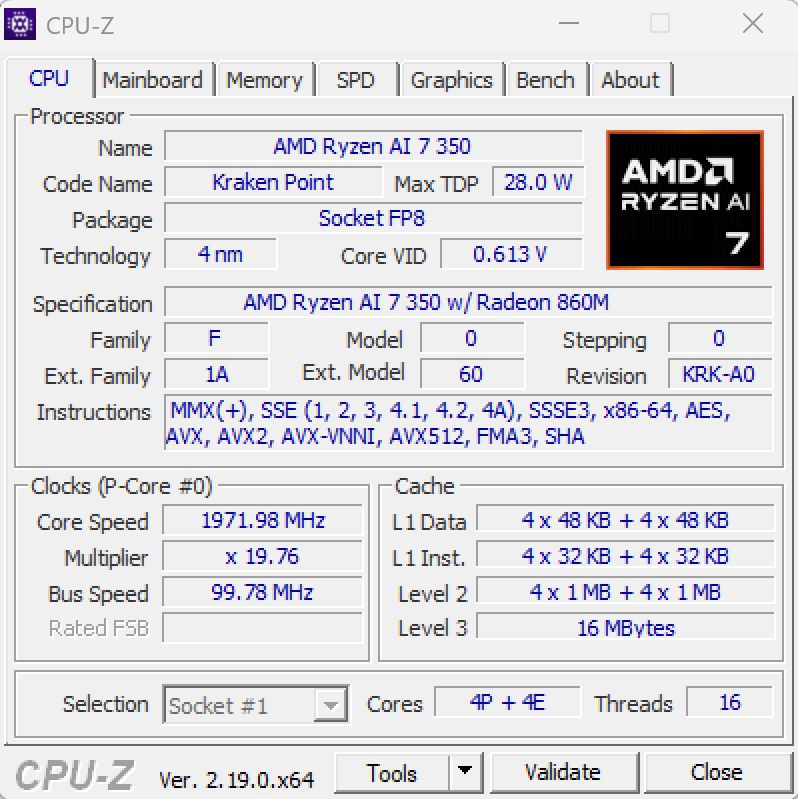
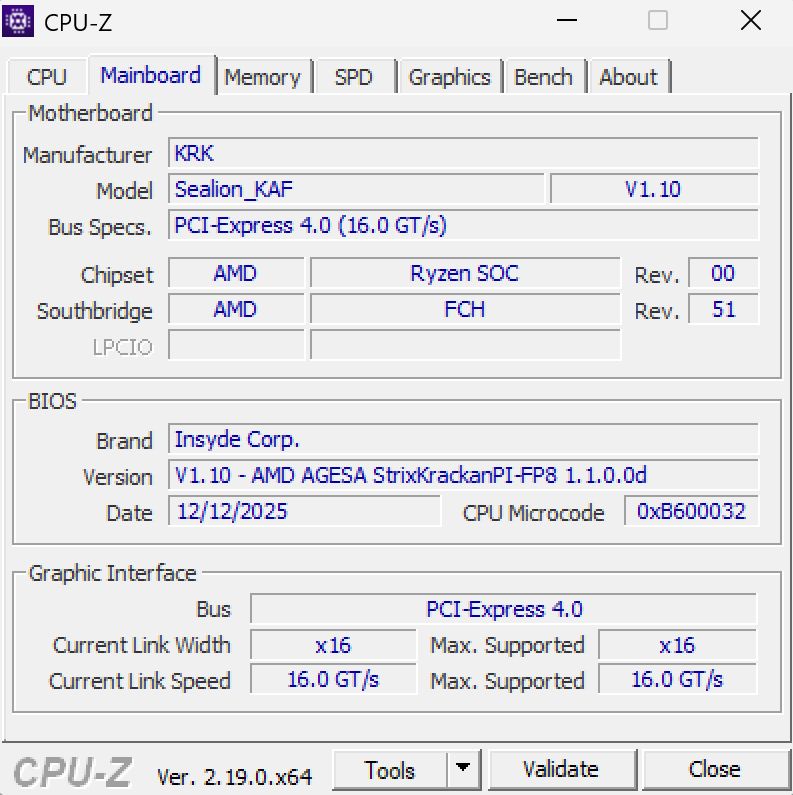
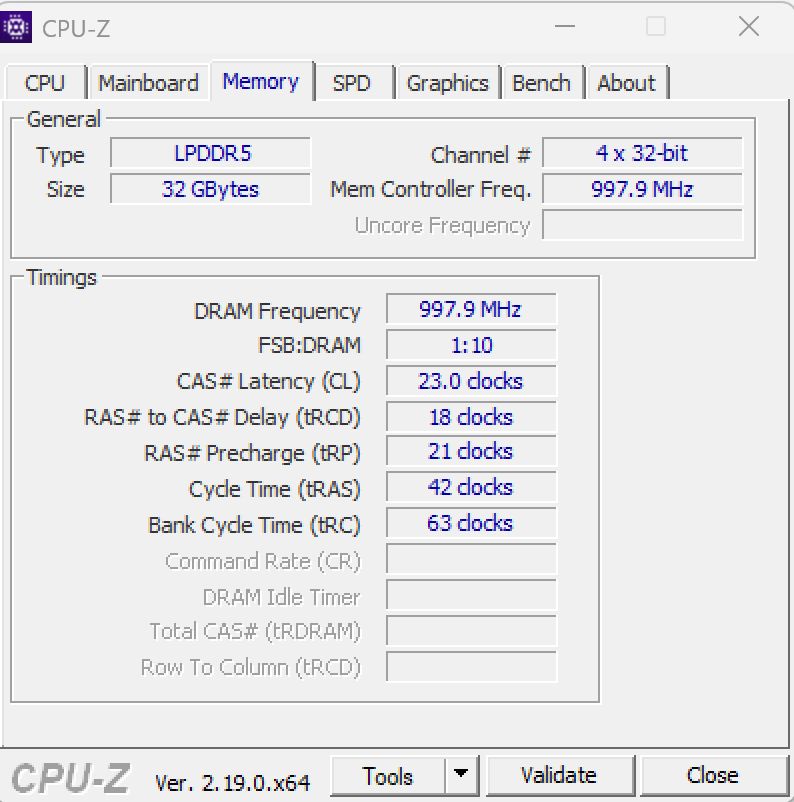
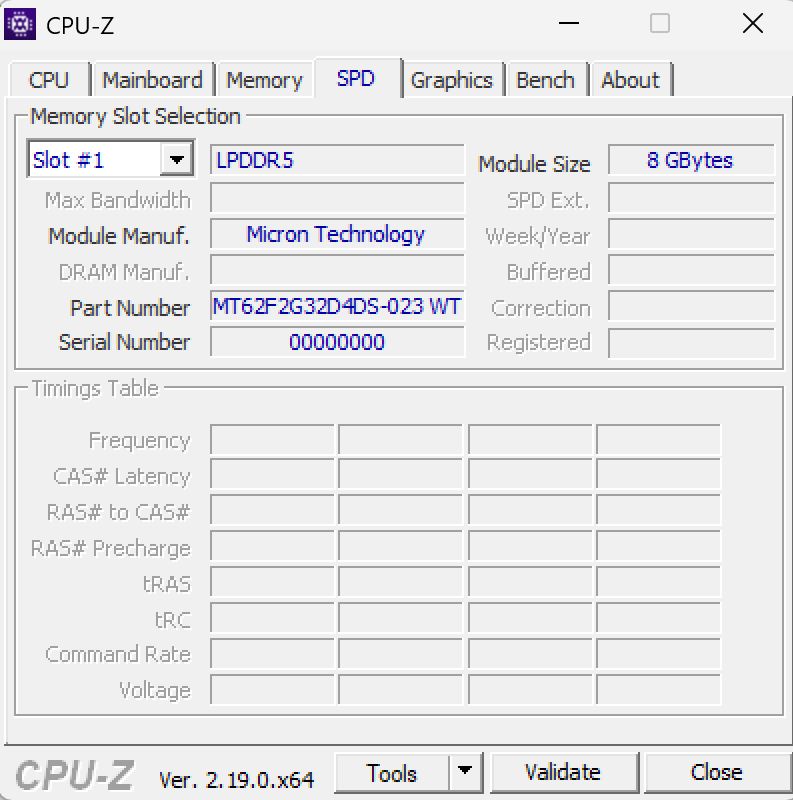
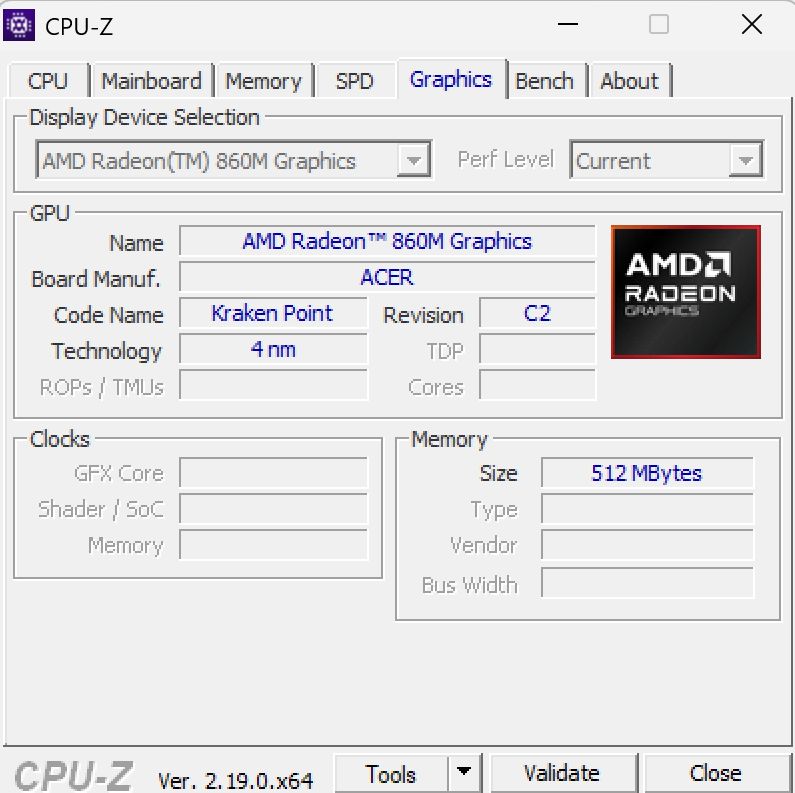
The configuration is representative of a relatively capable setup for the ultrabook segment, particularly in terms of memory capacity and storage.

Processor: hybrid architecture focused on efficiency
The system uses the AMD Ryzen AI 7 350, a hybrid processor design that combines two types of cores: Zen 5 performance cores and Zen 5c efficiency cores. The configuration consists of 4 performance cores and 4 efficiency cores.
The performance cores operate at a base frequency of around 2 GHz and can boost up to approximately 5 GHz under load. They are primarily responsible for compute-intensive tasks such as rendering, photo and video processing, and other demanding workloads.
The Zen 5c cores are optimized for energy efficiency, with boost frequencies up to around 3.5 GHz. They handle background activity and lighter workloads, including web browsing with multiple tabs, messaging applications, and system services running in parallel.
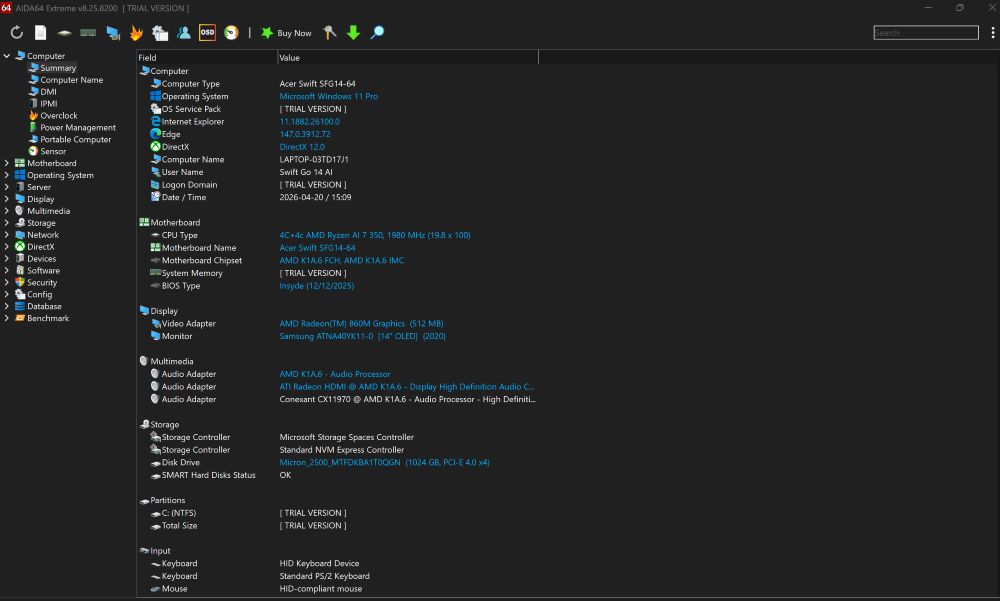
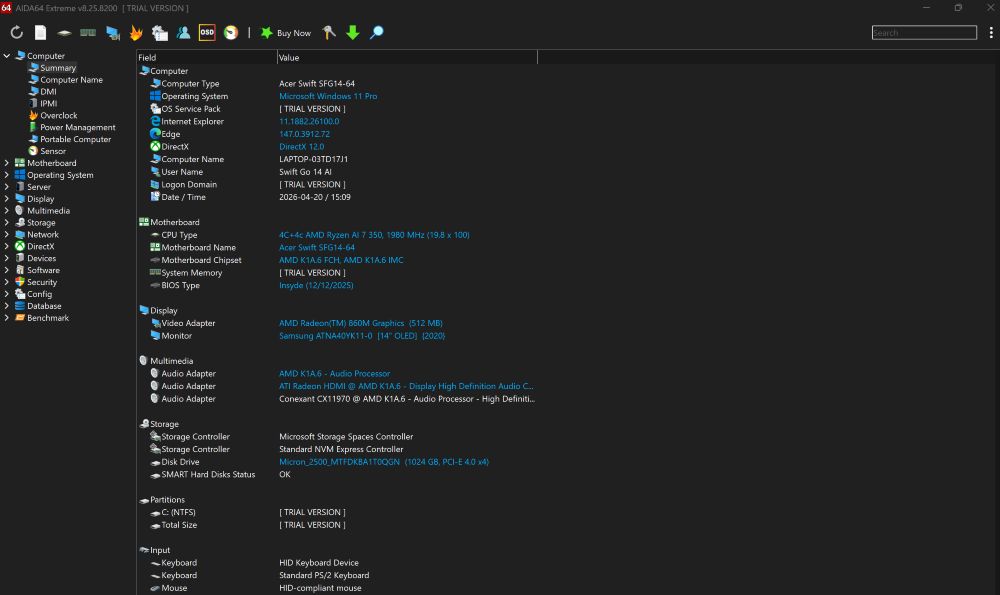
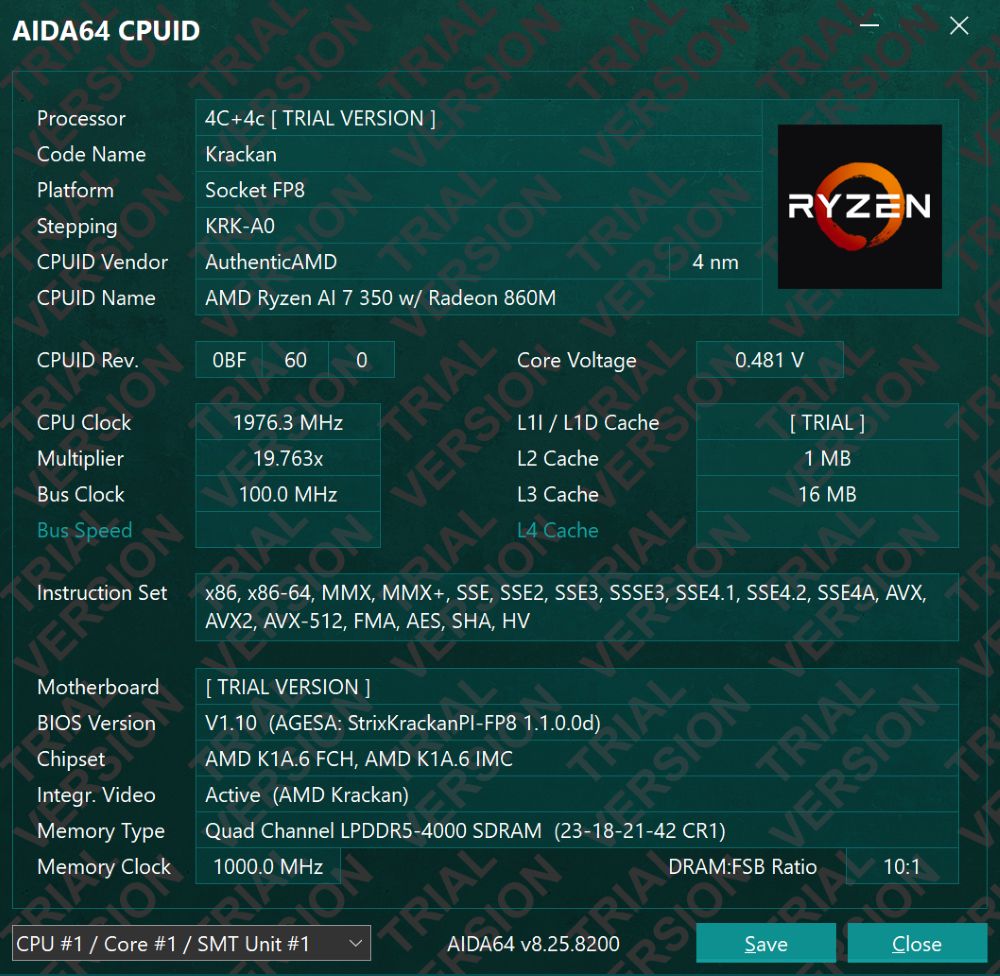
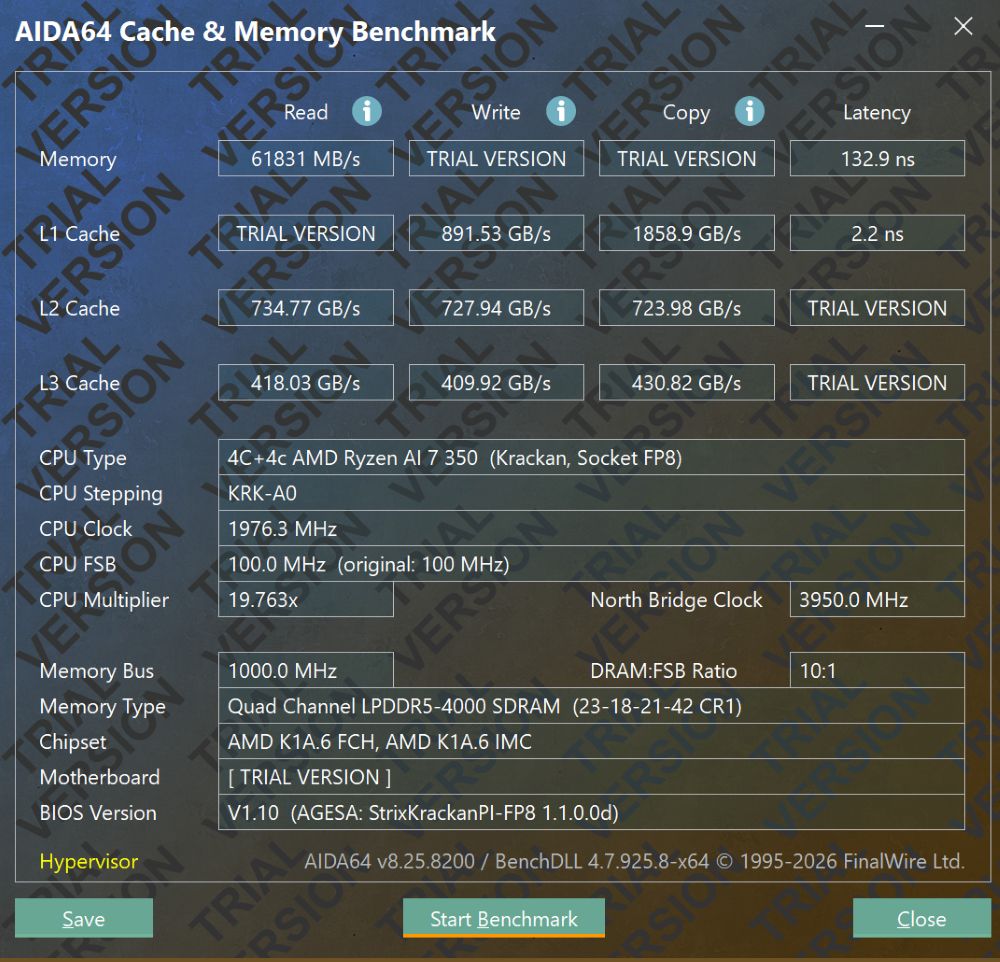
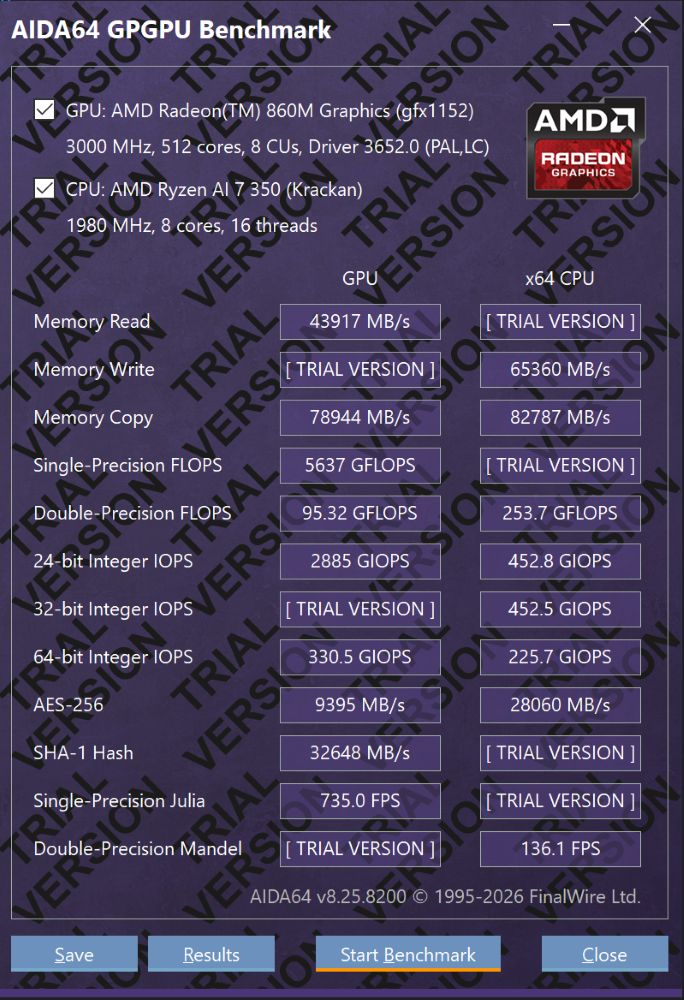
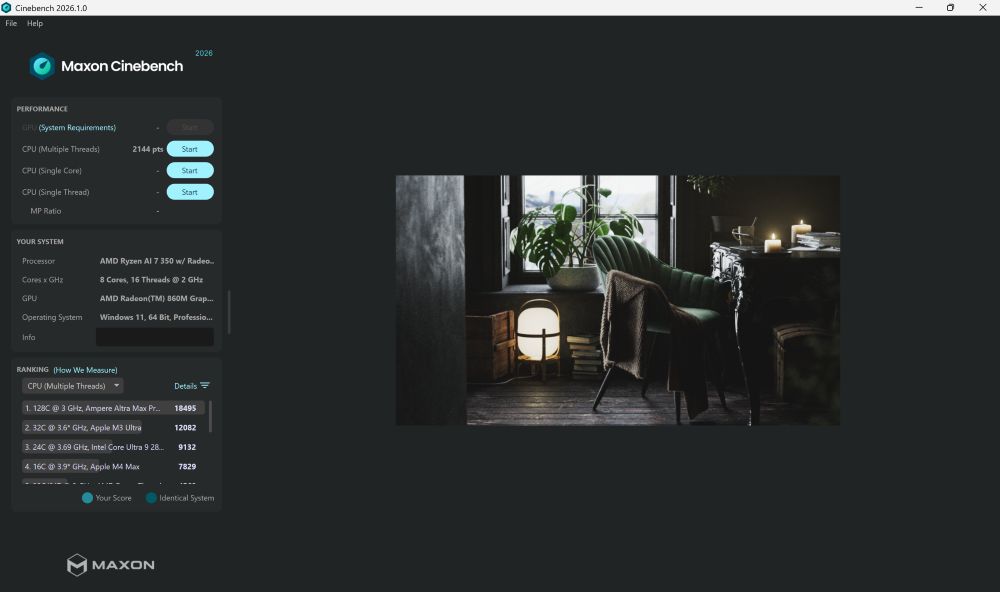
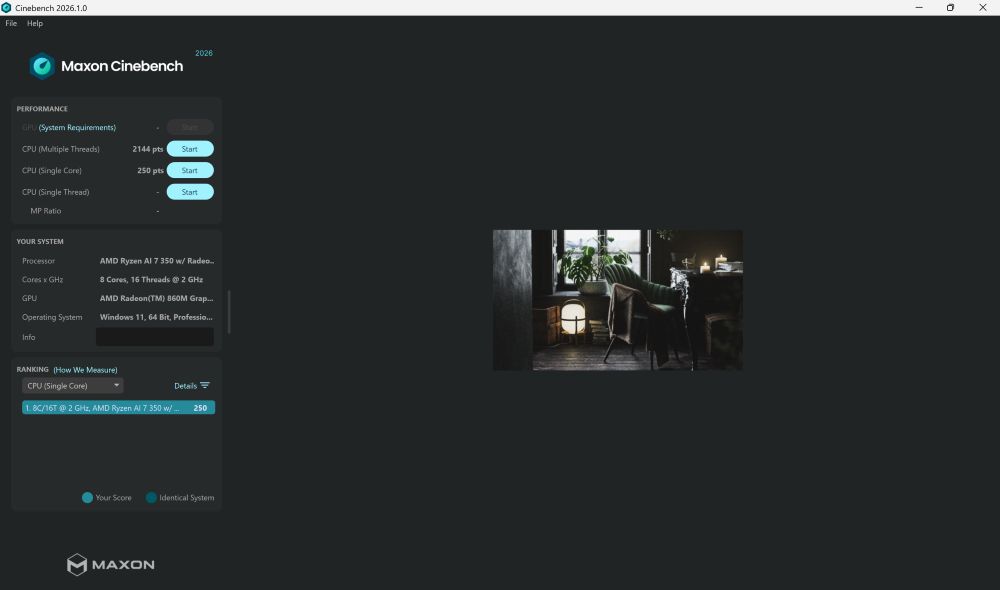
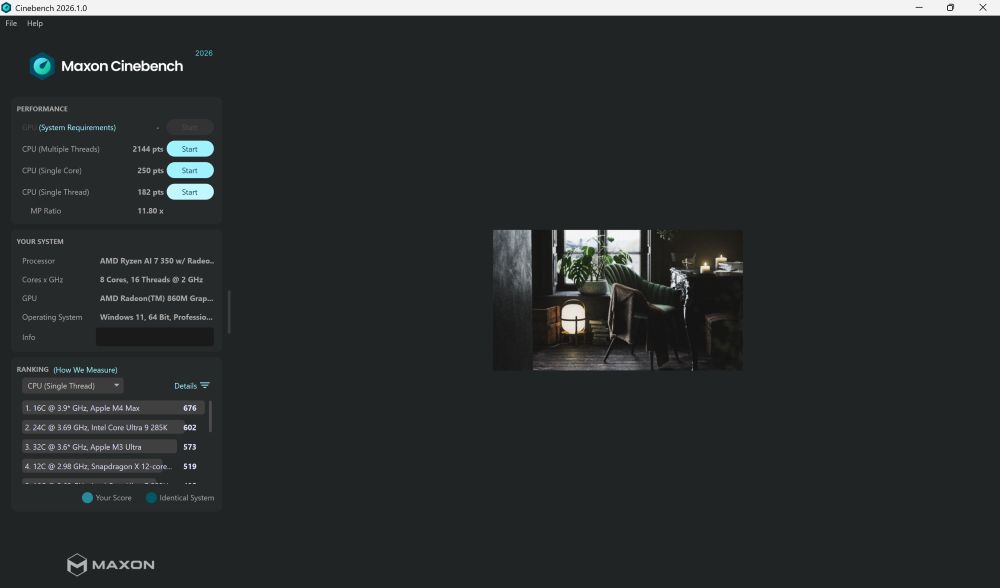
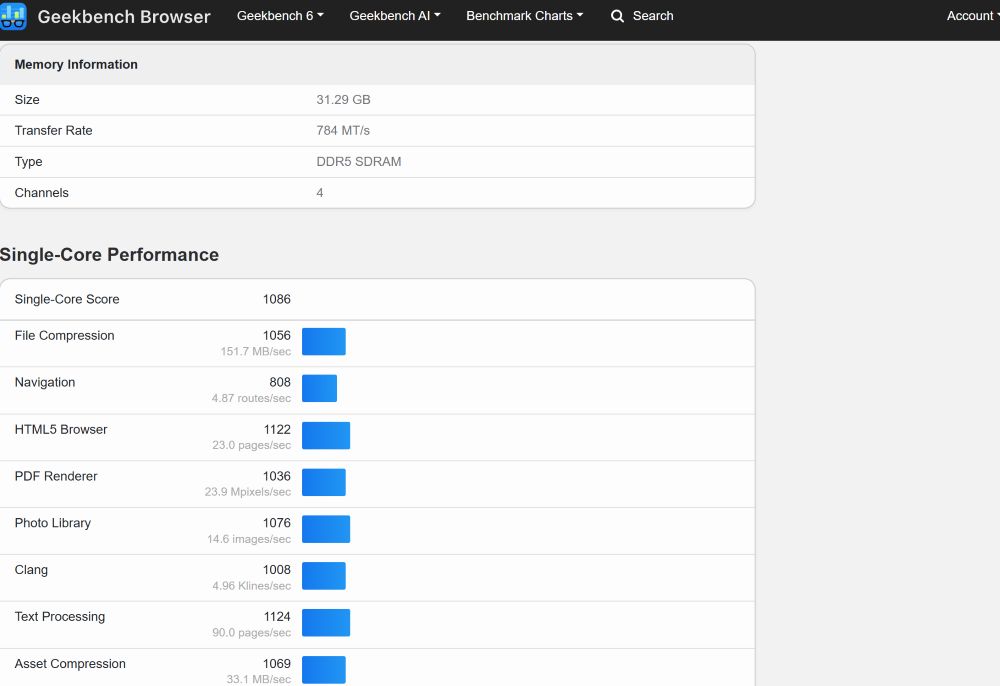
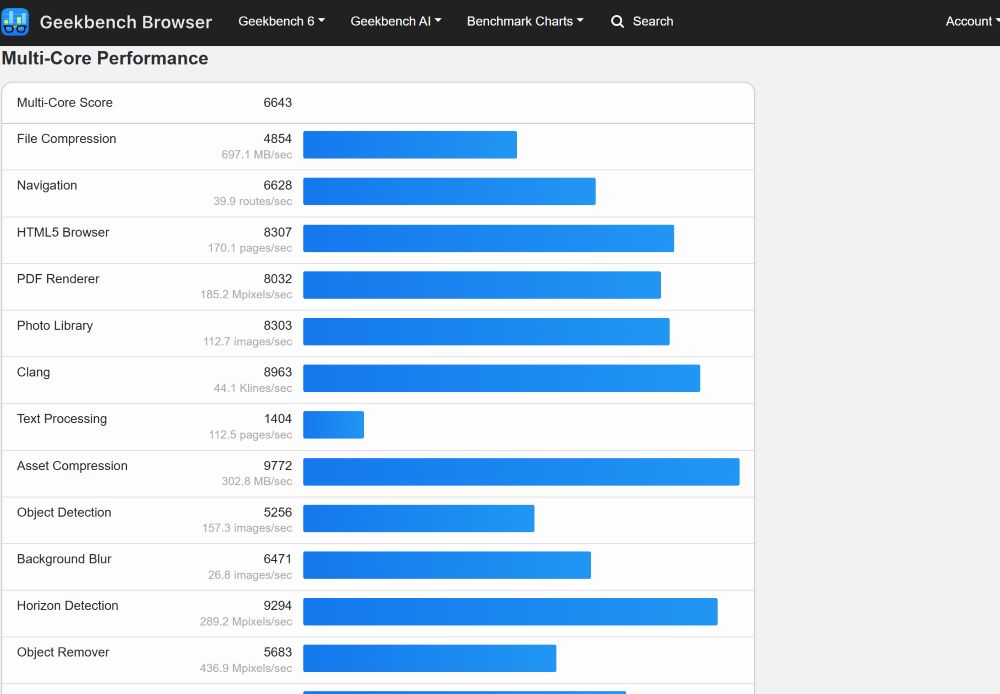
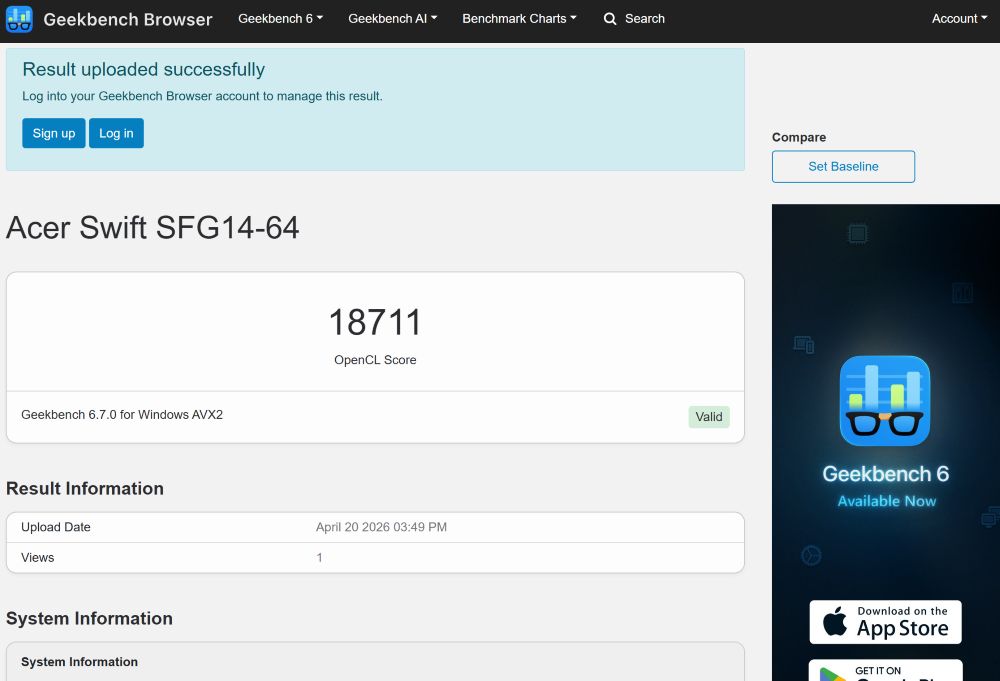
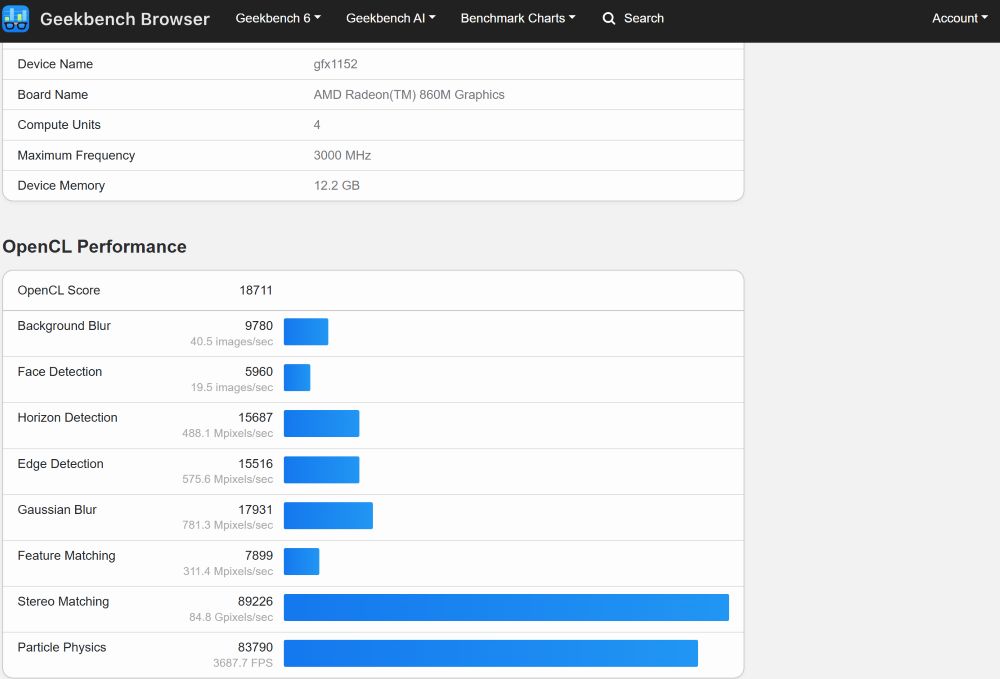
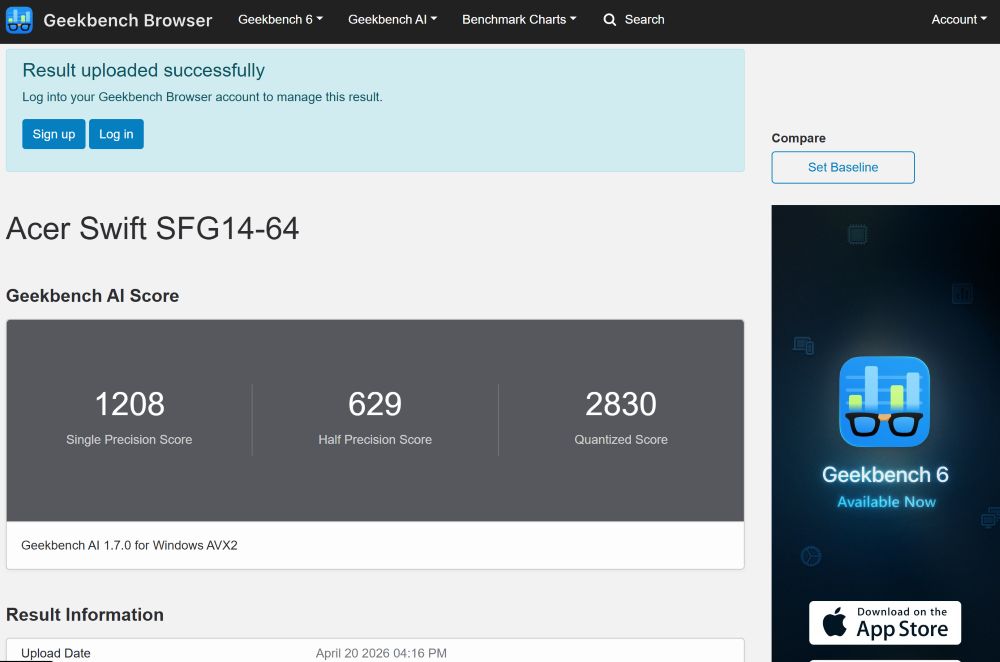
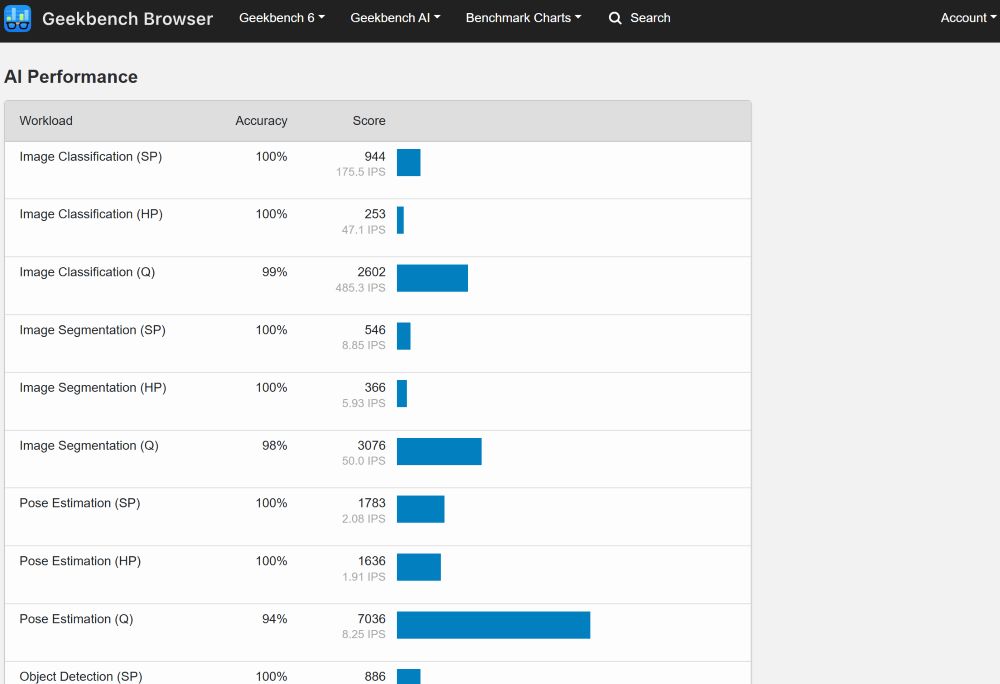
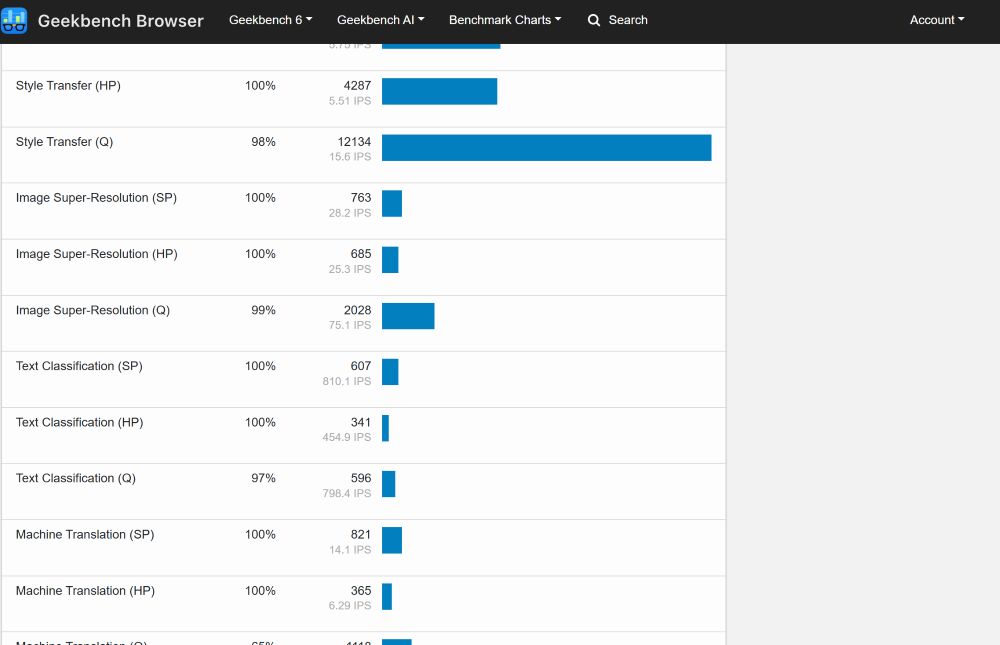
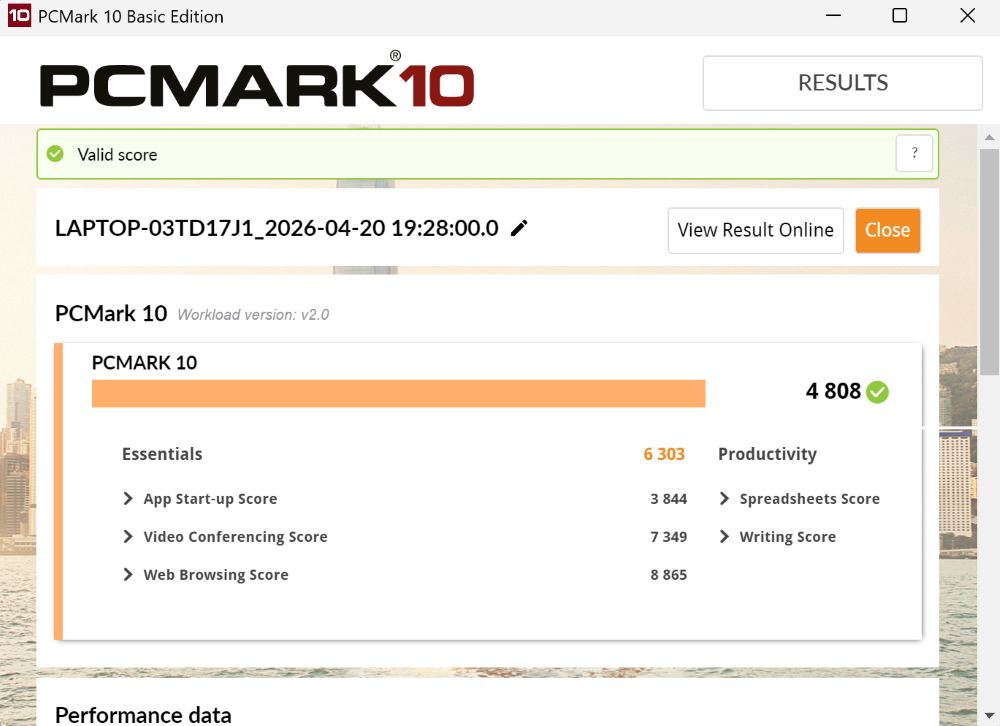
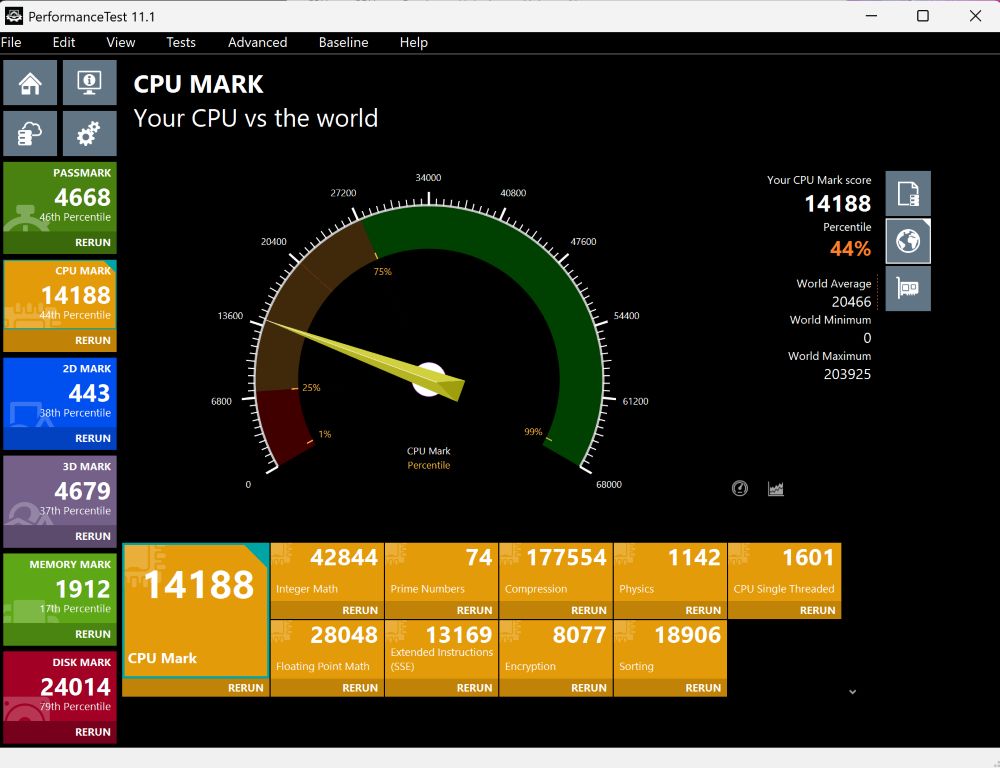
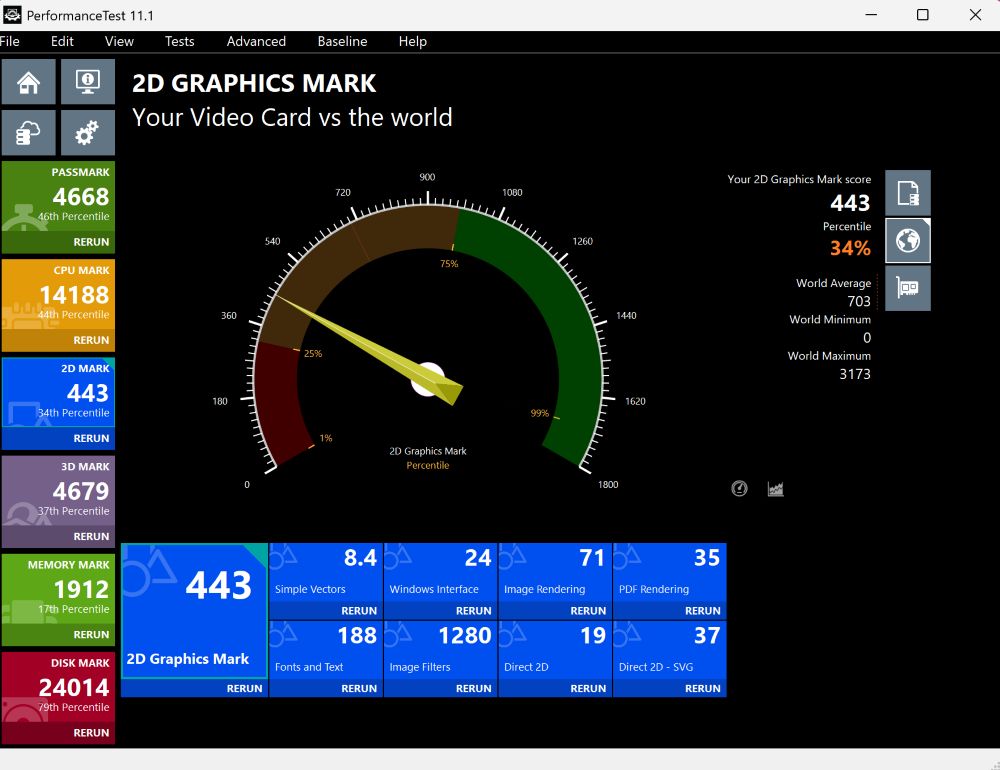
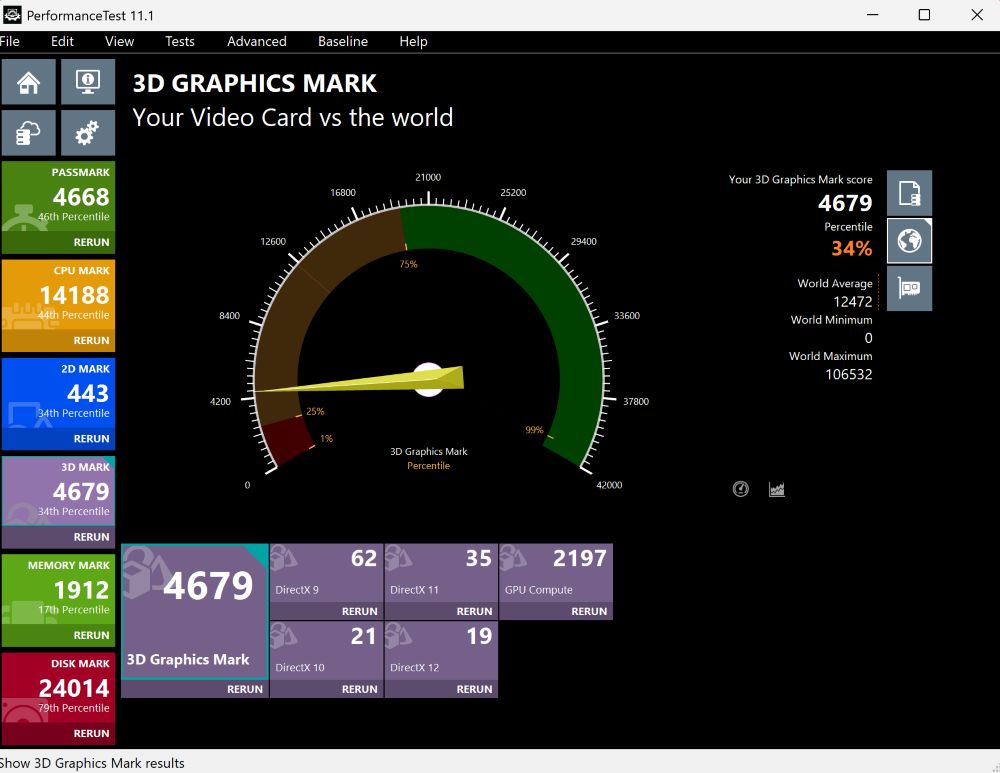
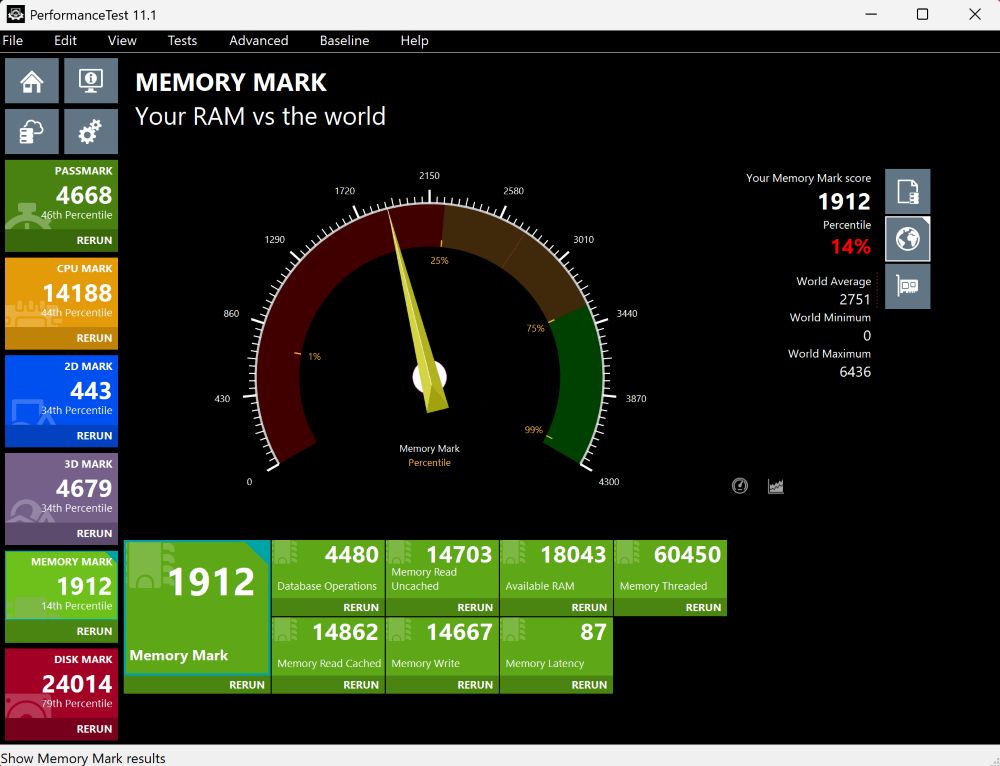
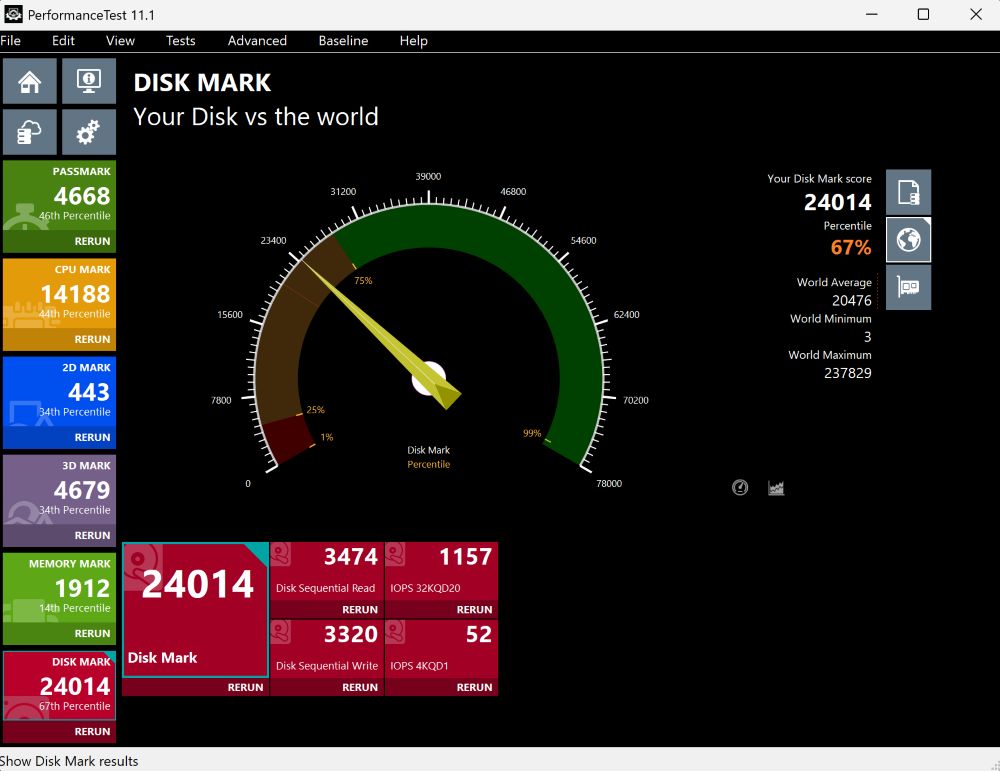
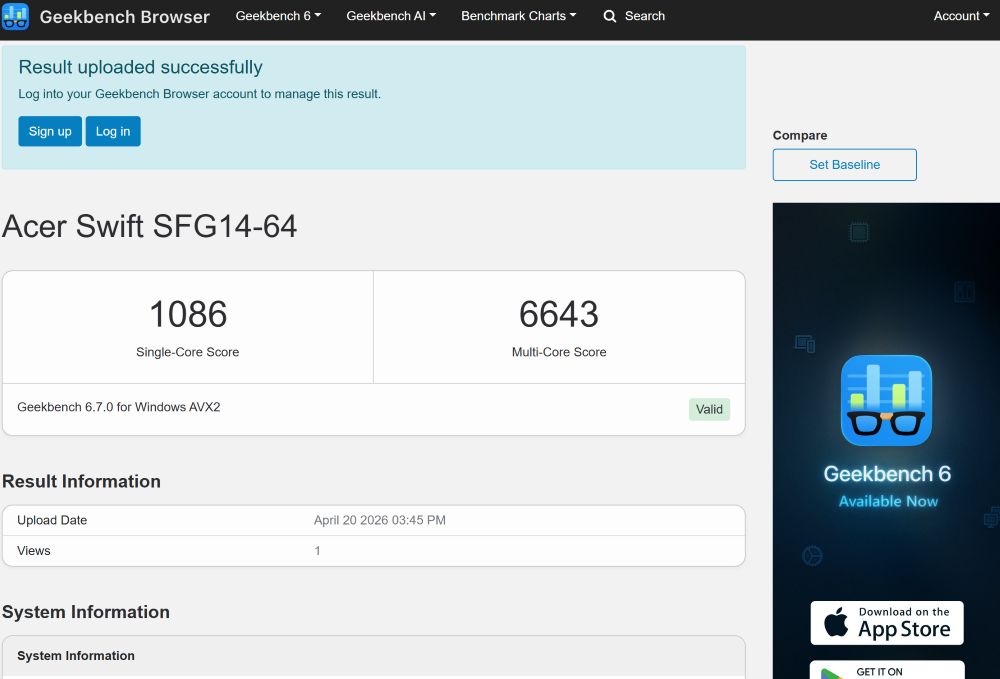
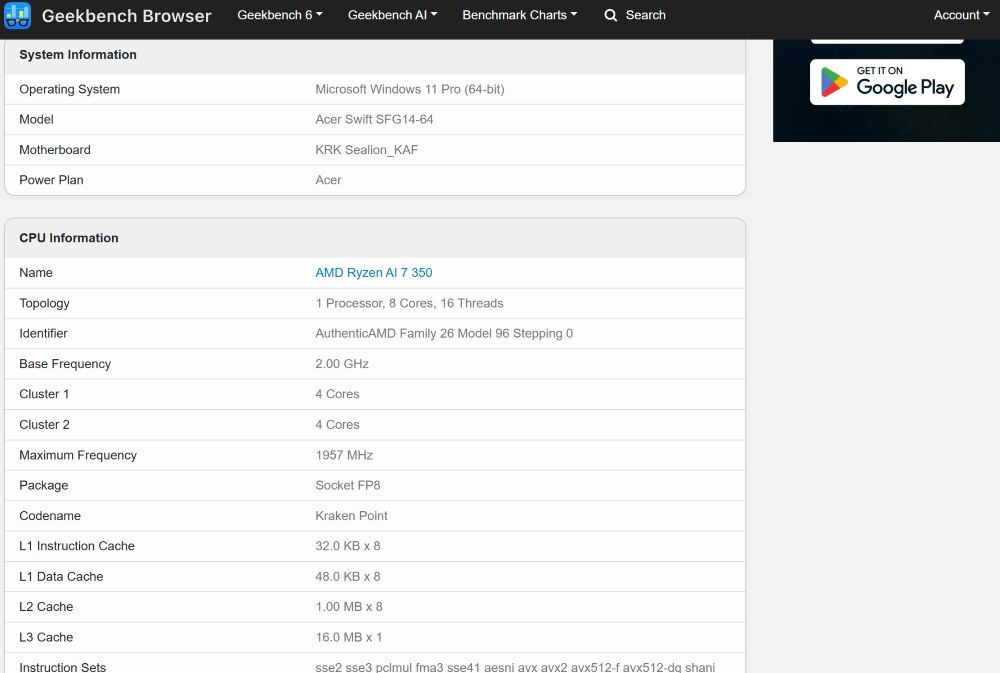
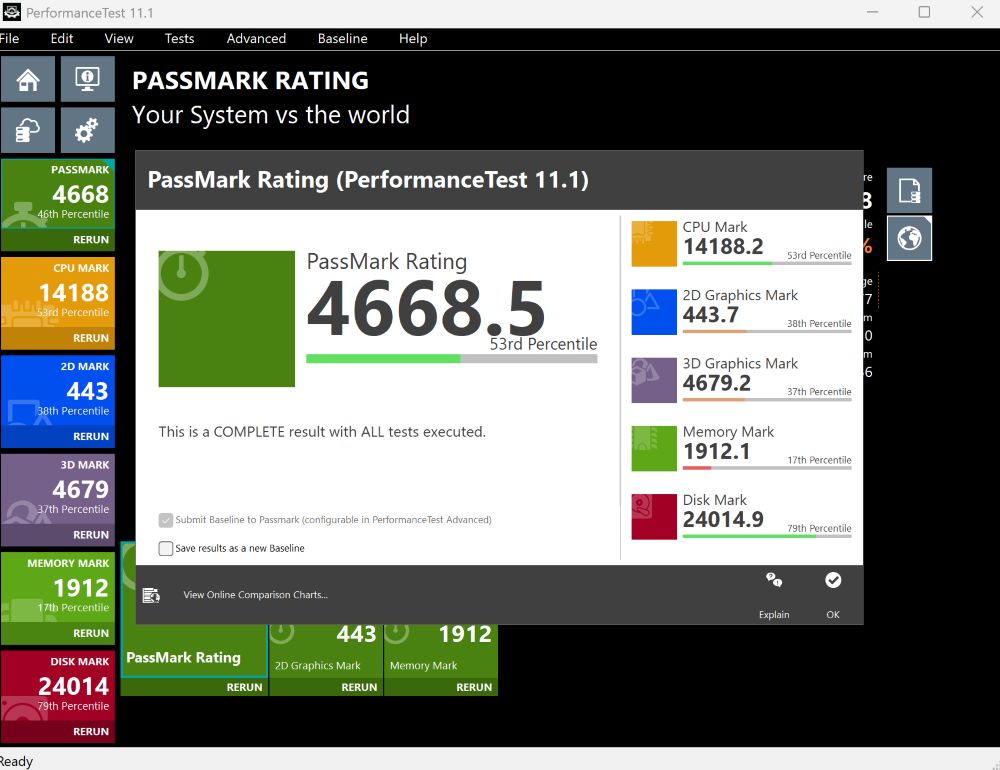
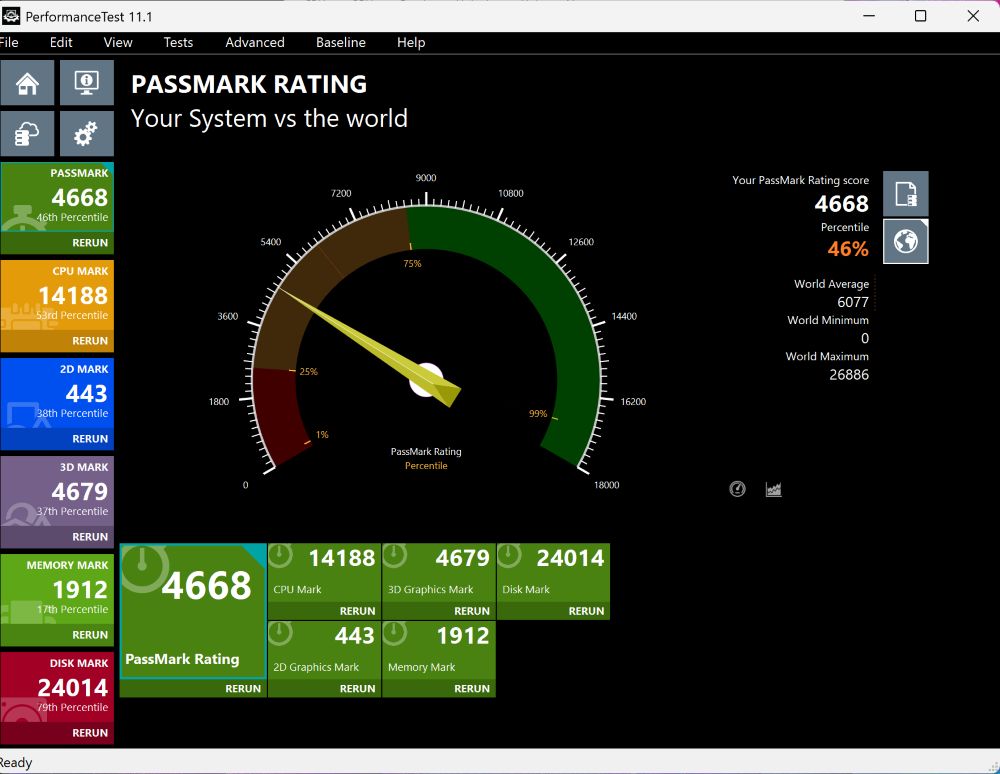
In total, the processor provides 8 cores and 16 threads, along with 16 MB of L3 cache. This configuration scales reasonably well across different workload types. In synthetic benchmarks and real-world applications, performance remains generally stable and predictable, without pronounced drops under typical operating conditions.
The base thermal design power is 28 W, which is standard for ultrathin laptops in this category. However, the system can temporarily increase power limits to approximately 45 W through its performance profiles
Under short burst workloads, the processor maintains high clock frequencies to complete tasks quickly and then returns to a lower power state. Under sustained load, performance remains relatively stable, with no pronounced throttling observed in typical scenarios such as video editing or code compilation.
In everyday use, multitasking performance is one of the stronger aspects of this chip. Handling dozens of browser tabs, multiple active applications, and background processes at the same time remains generally stable, without significant system slowdowns.
The processor also includes a dedicated AI engine (NPU), which is reflected in the “AI” designation. This unit is used for machine learning–related tasks such as image processing, noise reduction, video call enhancements, and other local AI workloads supported by compatible applications.
In practical terms, the NPU is intended to offload specific workloads from the CPU and GPU, improving efficiency as more software begins to incorporate AI-assisted features.
Read also: ASUS ROG Rapture GT6 review: Mesh system for gamers
Integrated graphics
Graphics processing is handled by the Radeon 860M integrated GPU. It is not positioned as a gaming-focused solution, but rather as a general-purpose graphics subsystem. The GPU includes 512 shader units and can operate at frequencies of up to approximately 3 GHz. In practical terms, this level of performance is sufficient not only for system interface rendering and video playback, but also for a broader range of everyday graphical workloads.

In everyday use, the integrated graphics operate smoothly. 4K video playback, hardware-accelerated decoding, and basic work in image editing applications are handled without noticeable stuttering. The 120 Hz system interface also benefits from this, appearing responsive and consistent during navigation.
In gaming scenarios, performance is realistically aligned with entry-level expectations. A typical configuration target is Full HD resolution with low to medium settings, delivering around 30 FPS in many modern titles. In less demanding games, such as Dota 2 or similar esports-oriented projects, frame rates can reach and maintain closer to 60 FPS depending on settings and workload conditions.
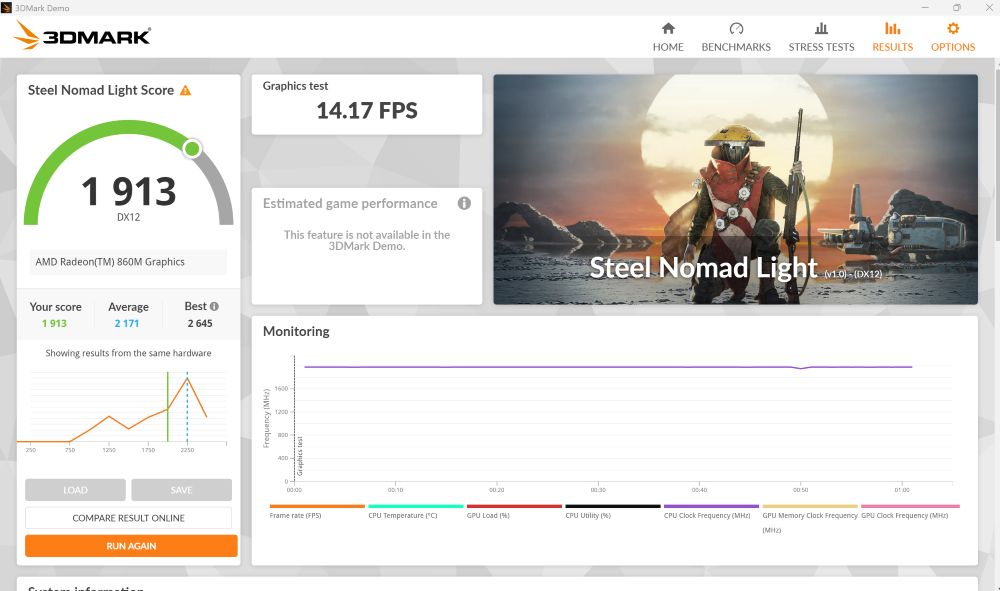
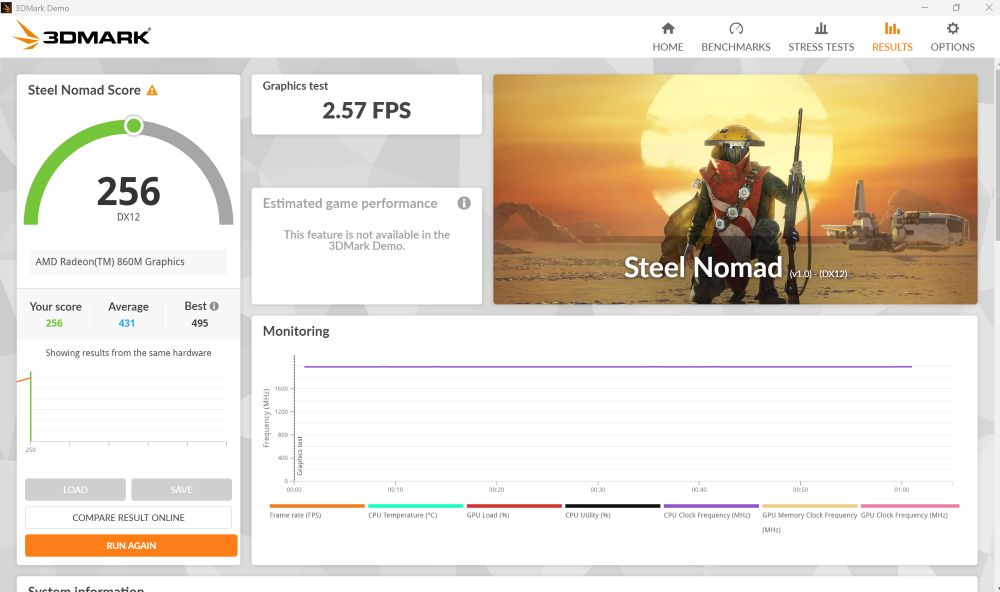
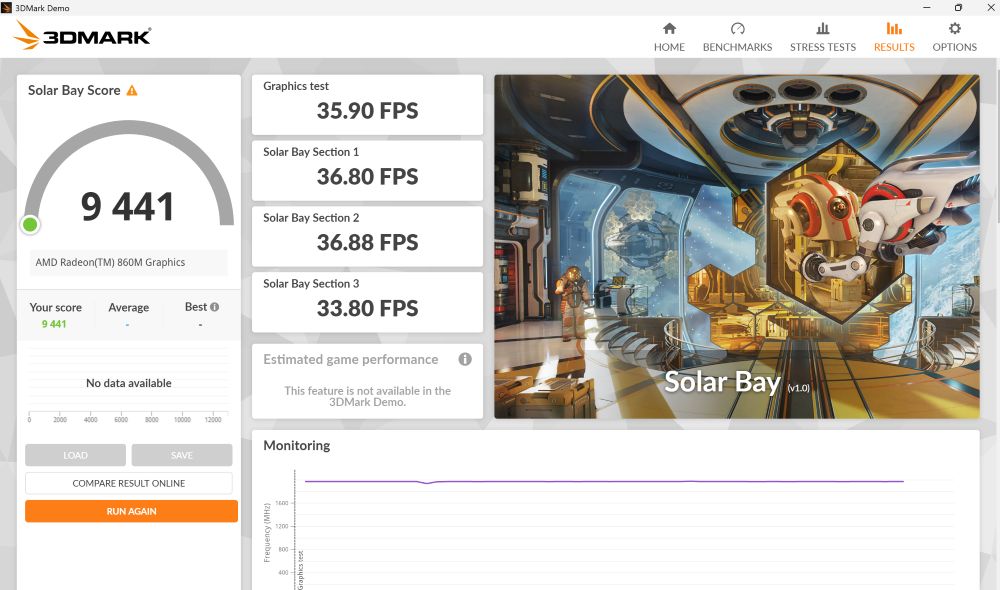
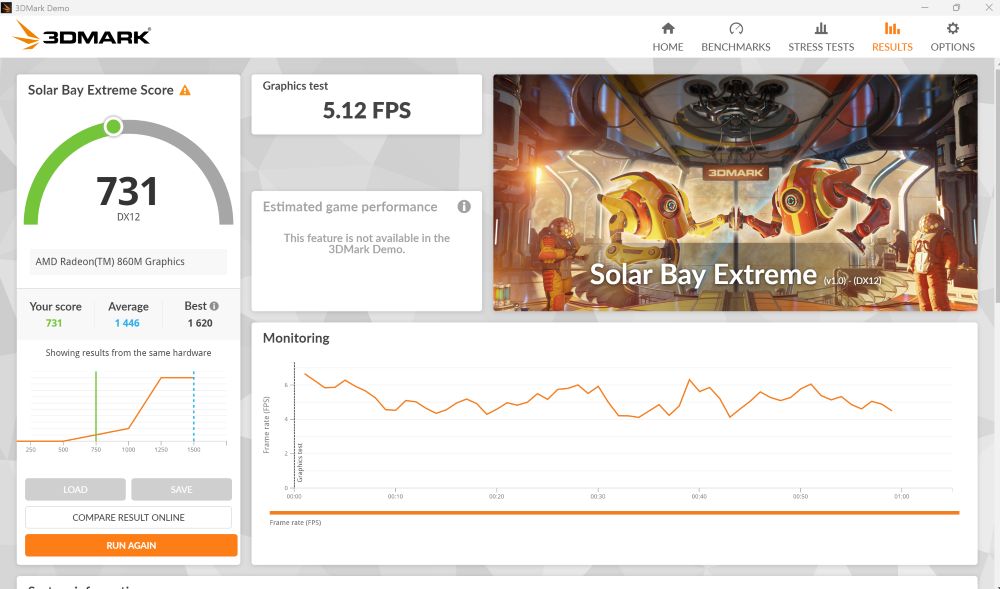
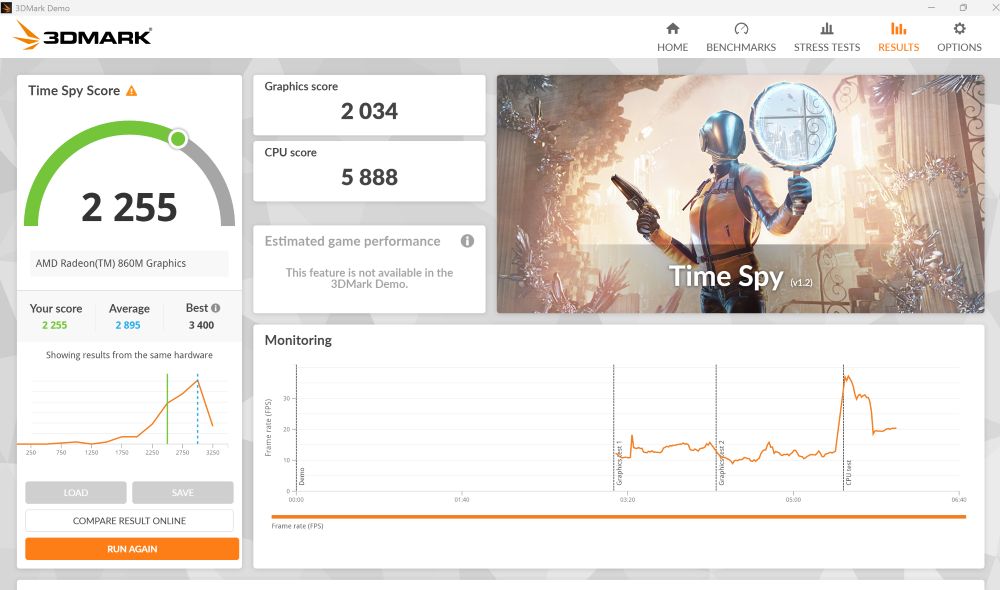
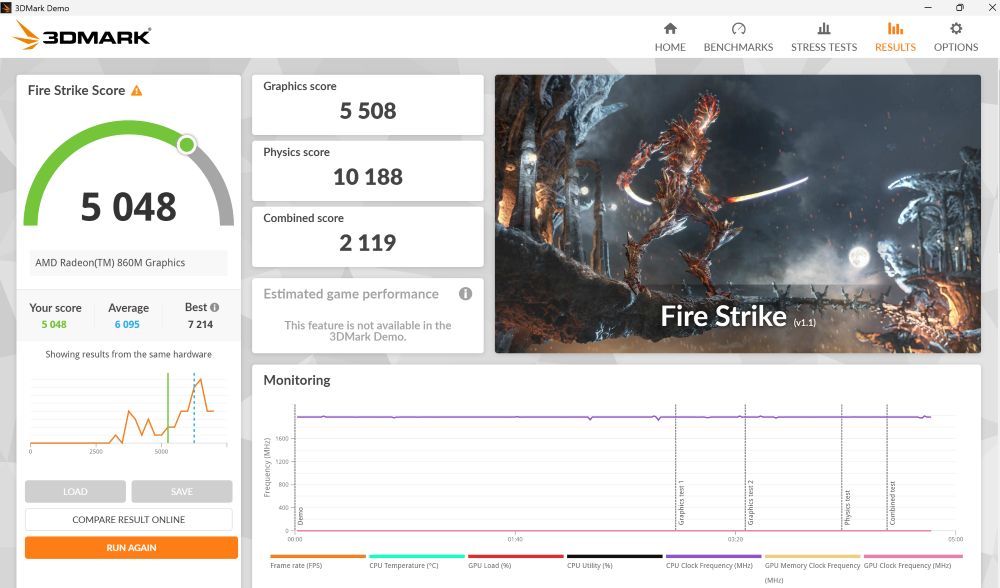
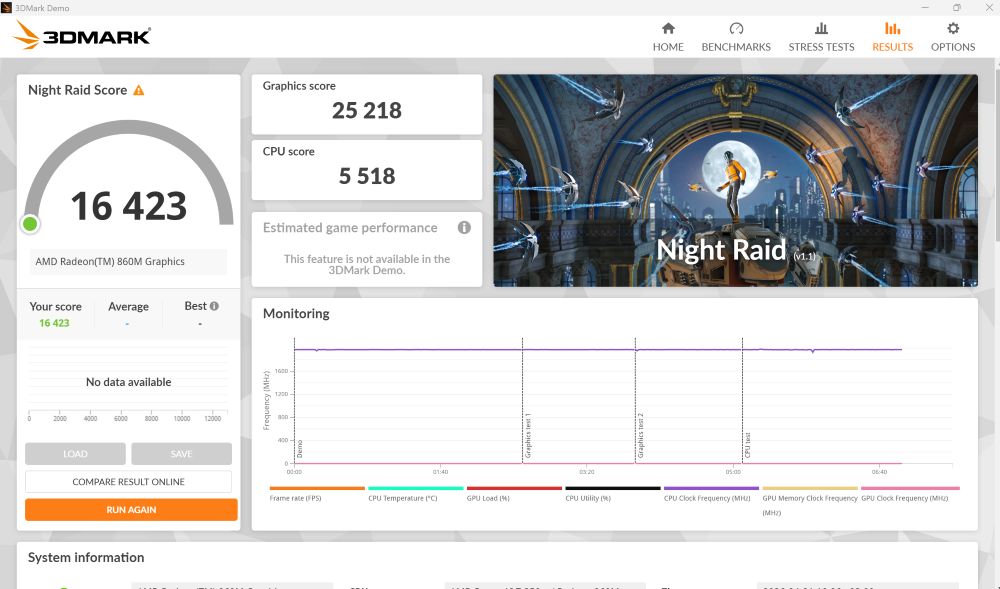
Upscaling technologies such as FSR can help increase frame rates, but their use requires moderation, as more aggressive settings can result in a noticeable reduction in image quality.
A key factor affecting performance is the memory subsystem. The use of high-speed LPDDR5X memory allows the integrated graphics to operate more effectively compared to configurations equipped with slower RAM, where memory bandwidth becomes a limiting factor.
32 GB LPDDR5X RAM
The memory subsystem consists of 32 GB of LPDDR5X operating at an effective data rate of 8533 MT/s. Beyond the capacity itself, the configuration is notable for its bandwidth characteristics, which are relevant for both CPU and integrated GPU performance. In practical use, this amount of fast memory provides stable operation across a range of workloads, including heavy browser usage with multiple active tabs, as well as photo and video processing tasks.
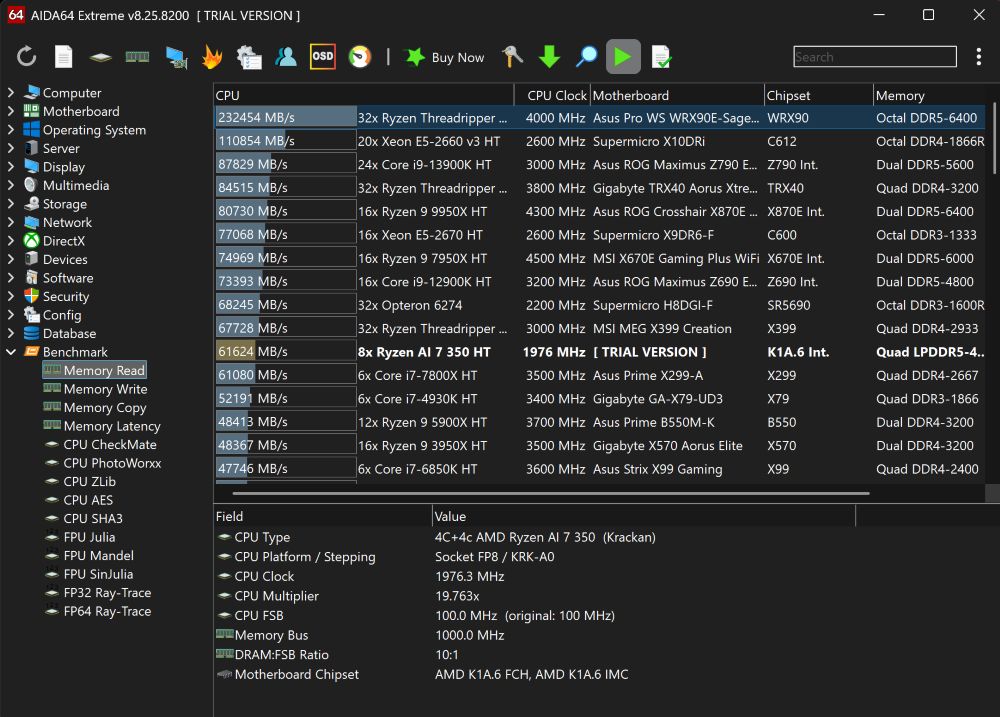
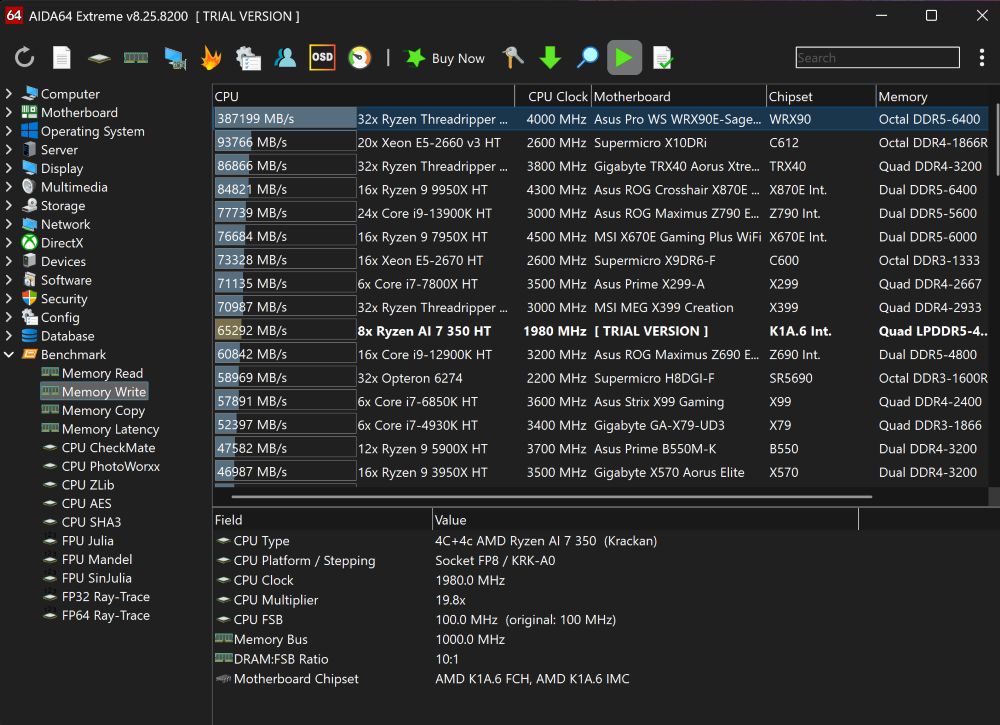
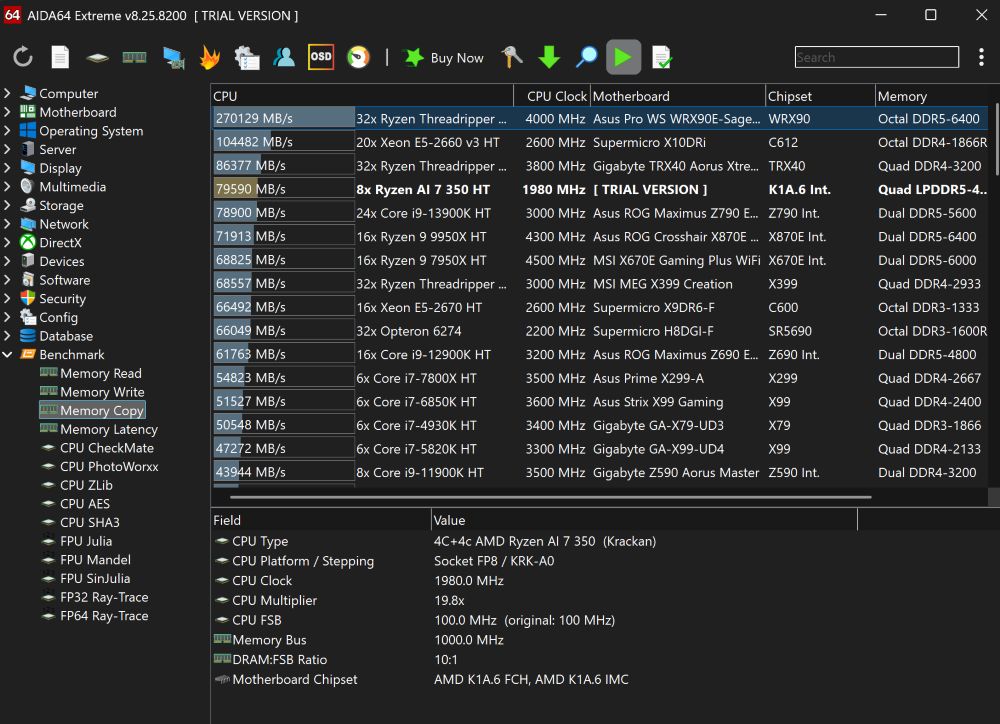
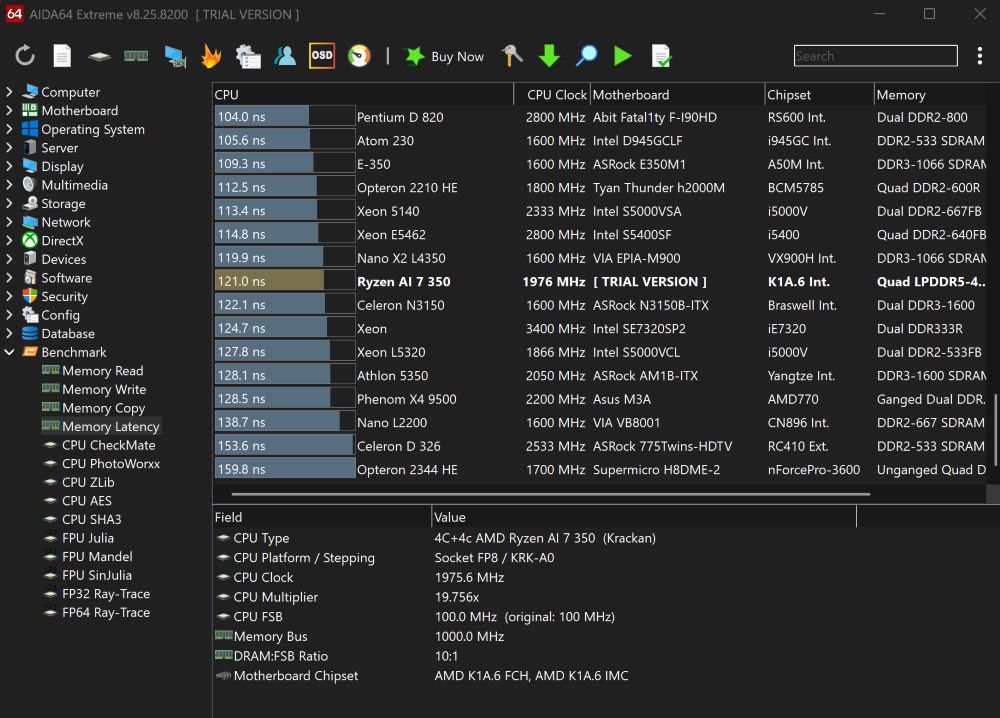
A key consideration is that the memory is soldered directly onto the motherboard. However, this is a common design choice in the ultrathin laptop segment and aligns with current industry practice. In return, the system benefits from high memory bandwidth, which is particularly important for integrated graphics performance. In effect, the fast LPDDR5X memory helps mitigate some limitations typically associated with the absence of a discrete GPU by improving data throughput between the CPU and GPU components.
SSD: fast, but not record-breaking
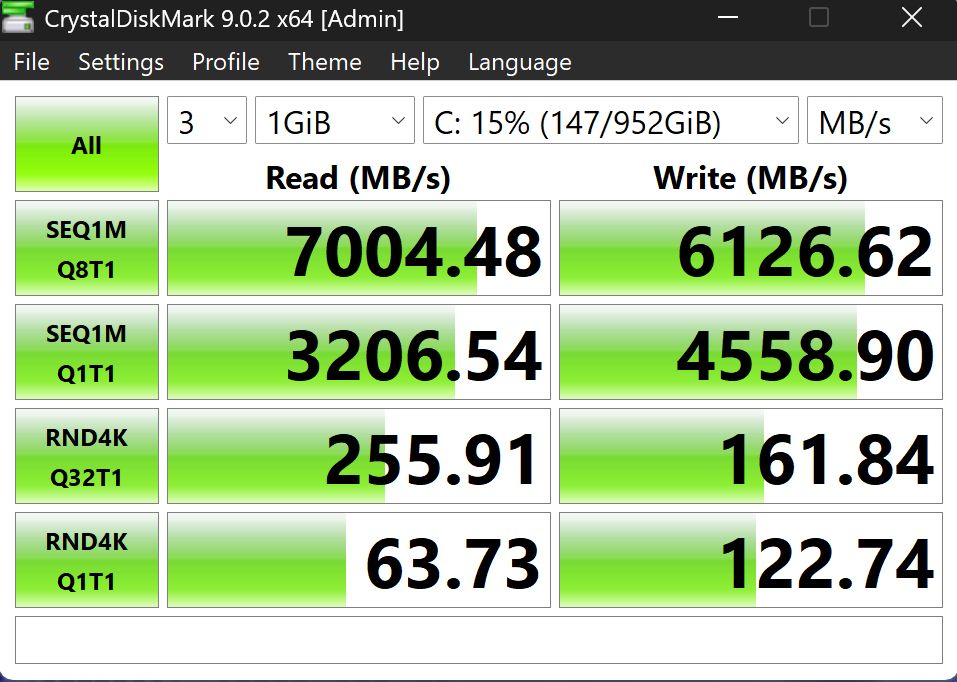
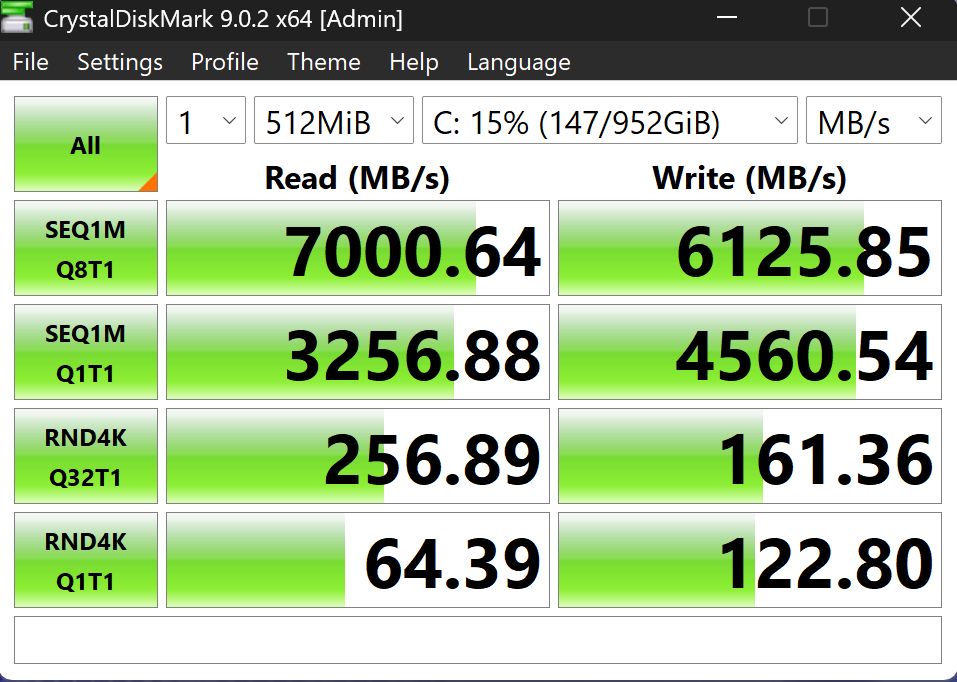
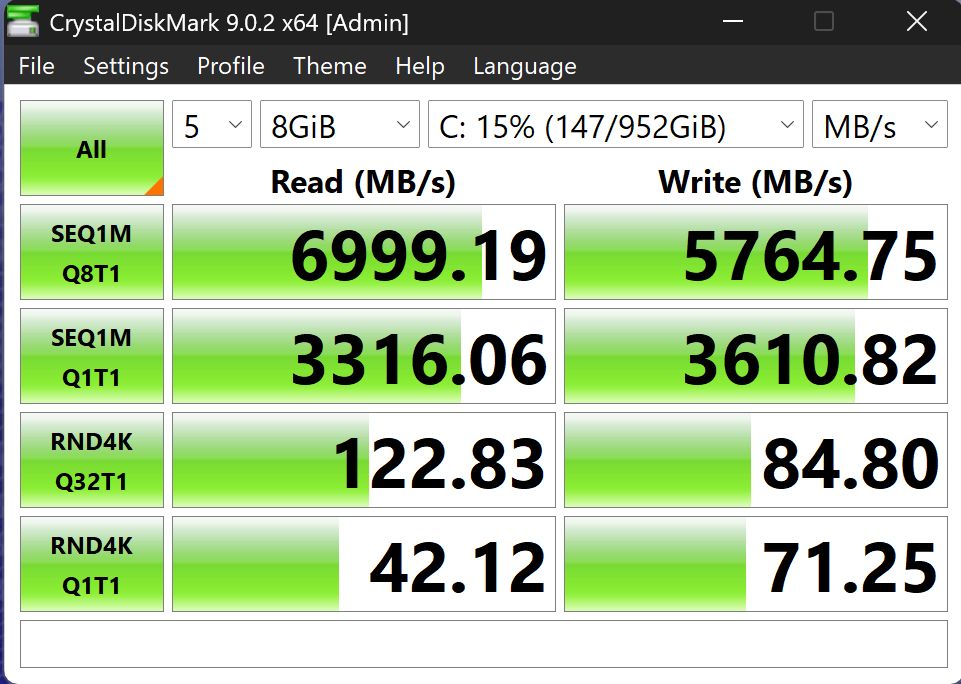
Storage is handled by a 1 TB PCIe 4.0 SSD. Measured performance is approximately 4800 MB/s for sequential reads and around 3900 MB/s for writes. While these values are not at the upper end of current PCIe 4.0 implementations, they are sufficient for everyday workloads. In practice, the system boots quickly, applications launch without noticeable delay, and file operations remain responsive. No significant performance issues were observed in typical usage scenarios.

The Acer Swift Go 14 AI is not positioned as a high-performance workstation, but it does not lag behind in its segment either. It represents a balanced configuration aimed at general productivity, everyday workloads, and limited gaming capability. Overall, the system prioritizes a compromise-free user experience within the constraints of the ultrabook class, without relying on significant cost-saving trade-offs that would noticeably affect core functionality.
Read also: MSI Raider GE78HX 13VI-209UA gaming notebook review: M-m-monster kill!
Cooling system, noise, and temperature
Access to the internal components is relatively straightforward, requiring only the removal of screws securing the bottom cover. The internal layout is typical for this class of device and includes a dual-fan cooling system paired with multiple heat pipes. The design does not include unusual or experimental thermal solutions, but it also does not appear to rely on visibly cost-reduced cooling hardware.

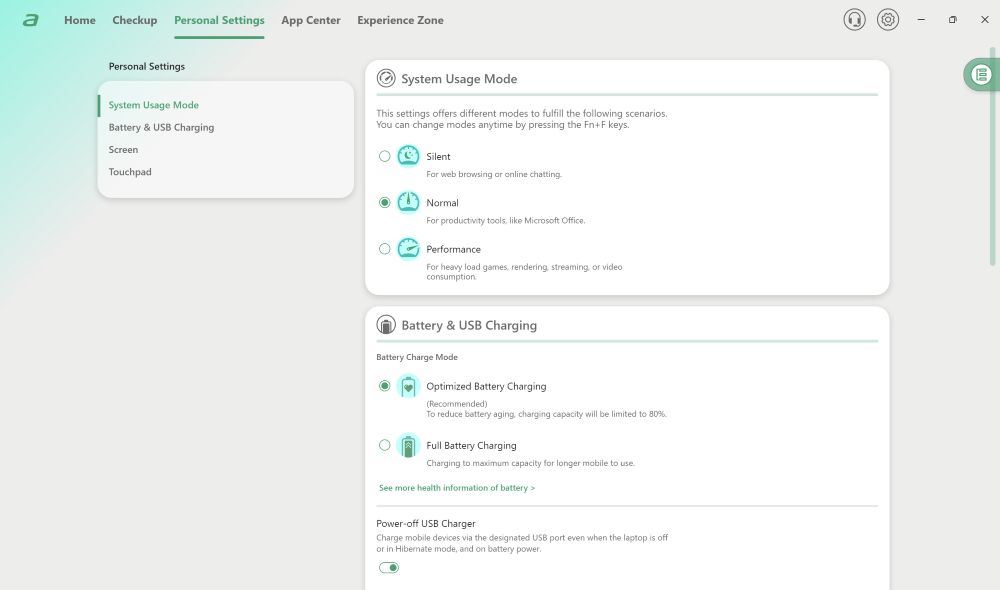
Control of operating modes is handled through the AcerSense application, which provides three predefined profiles: “Quiet,” “Balanced,” and “Performance.” Testing was primarily conducted using the highest performance mode, although differences between the profiles are clearly noticeable both in system responsiveness and overall behavior under load.

At idle, the laptop consumes around 10 W, while CPU and GPU temperatures remain at approximately 45°C with an ambient room temperature of 24°C. This is within a typical range for ultrathin systems. During light workloads such as web browsing or video playback, power consumption generally fluctuates between 20 and 30 W. Under heavier usage scenarios, including game installation or working with large files, consumption increases to approximately 30–45 W. These values are not optimized for maximum efficiency but remain acceptable for everyday use cases.
In terms of acoustics, the thermal system is managed in a controlled manner. Under basic workloads, the fans are either inactive or operate at very low audible levels. Even in the performance profile, the system avoids aggressive fan ramp-up when unnecessary. However, under load, fan noise becomes noticeable relatively quickly. As a result, the balanced mode appears to be the most practical option for regular use, as it provides a compromise between performance and acoustic comfort.
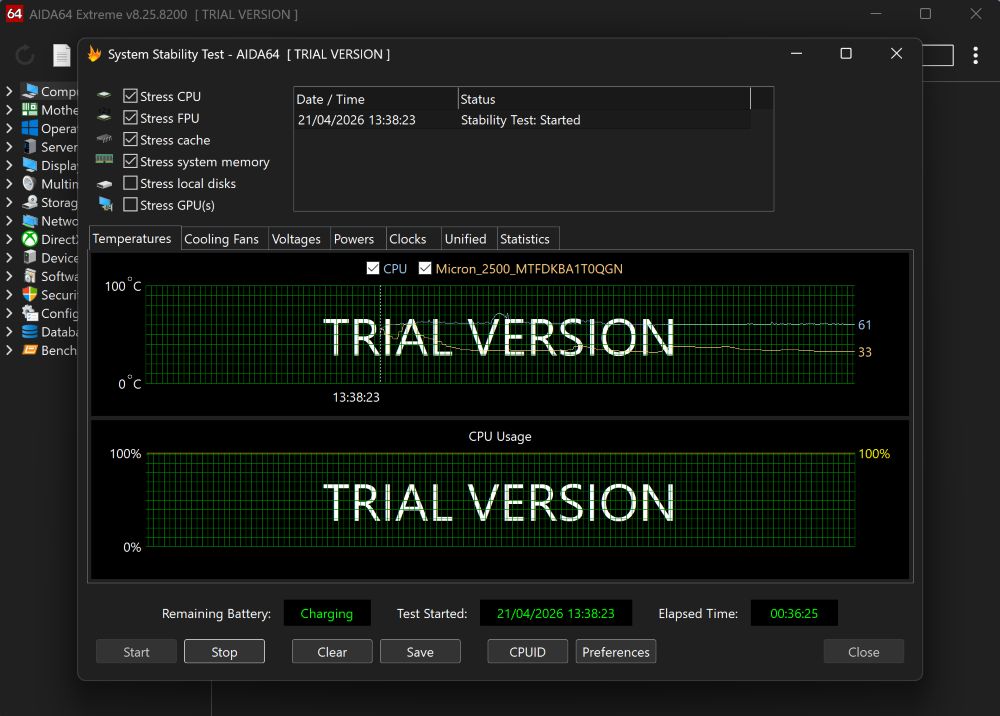
Under sustained load, the CPU consistently maintains around 39 W, while total system power consumption reaches approximately 55–60 W. In long-duration stress tests, short-lived boost behavior is observed, after which clock speeds stabilize. In the “quiet” mode, performance may decrease by roughly 10–15%, but the system becomes nearly inaudible. Depending on priorities, this trade-off may be acceptable.
In gaming scenarios, the difference between “balanced” and “performance” modes is not substantial. It typically remains within 3–10%, depending on the title. At the same time, the increase in noise is more noticeable, which makes the “balanced” profile a more practical default choice. Around 38 dB under load can be considered a moderate noise level that does not significantly interfere with extended gaming sessions, including titles such as Baldur’s Gate 3 or Dota 2.
In summary, the cooling system in the tested laptop is straightforward and contains no unexpected design choices. It is not exceptional in terms of either noise levels or thermal performance, but it is well-tuned. Overall behavior remains stable and predictable across different usage scenarios.
Read also: Acer Swift Go 14 (2024) Review: Laptop with an OLED Display
Battery life
The laptop is equipped with a 75 Wh battery, which is a solid capacity for an ultrathin and lightweight form factor. Combined with an energy-efficient platform, this provides a reasonable level of battery life without requiring constant access to a power outlet.
Charging is implemented via USB-C, and the included adapter is rated at 100 W. A practical advantage of this setup is that the device is not dependent on a proprietary charger. Any compatible USB-C power delivery charger with sufficient output can be used. This is particularly convenient for travel or office environments where universal charging solutions are already available.

Additionally, the port configuration is worth noting. The USB-C port is used for charging, data transfer, and video output. When paired with a monitor that supports USB-C input, this allows for a simplified workstation setup with minimal cabling.
In terms of battery life, the results are consistently stable and predictable. In a mixed usage scenario – web browsing, document editing, and light multitasking – the battery life is approximately 7–8 hours. This reflects a typical real-world workload for this type of device.
For video playback, performance is slightly better. With HDR disabled and screen brightness set to around 180 nits, battery life extends to approximately 10–11 hours. This type of test represents a low-power usage scenario and effectively illustrates the upper limit of battery endurance under light load.
Overall, the device is capable of handling a full workday under moderate usage without requiring frequent recharging. For an ultralight laptop category, this is an expected but important characteristic.
Read also: All about USB standards and specifications
Summary
The Acer Swift Go 14 AI is a balanced ultrabook in its class. It features a lightweight 1.3 kg aluminum chassis, a 14-inch 3K 120 Hz OLED display with high resolution and wide color coverage, and an AMD Ryzen AI 7 350 processor paired with 32 GB of RAM. It also includes current-generation Copilot+ features. Overall, the configuration positions it as a modern general-purpose laptop suitable for everyday productivity tasks.

In real-world usage, this is a fast, quiet, and predictable laptop intended for work, study, and media consumption. It handles multitasking without noticeable issues and does not require frequent attention to battery levels. At the same time, it remains portable and convenient for daily transport.

If a lightweight, modern-looking laptop with a premium OLED display is the priority, and there is no need to pay for excess performance headroom, the AMD-based Acer Swift Go 14 AI is a competitive option in its price segment. It represents a balanced configuration for everyday use.
Read also: Lenovo ThinkPad X1 Carbon Gen 11 Review: Classic of Genre
Advantages
- A restrained, thin chassis with a modern minimalist design, compact dimensions, and low weight
- A complete set of current ports and connectors, reducing the need for adapters in everyday use
- A comfortable keyboard with well-balanced key travel and two-level white backlighting
- Fast and reliable fingerprint sensor integrated into the power button
- Modern, energy-efficient platform based on an AMD processor
- 1440p webcam with a physical privacy shutter
- Support for current connectivity standards, including Wi-Fi 7 and Bluetooth 5.4
- Solid battery life, sufficient for a full workday under mixed usage scenarios
Disadvantages
- The cooling system is designed with limited thermal headroom, prioritizing compactness over sustained performance capacity
- Noticeable temperature increase under prolonged load, which is typical for an ultrathin form factor
Read also:
- Acer Nitro V 14 ANV14-61 Review: Pristine White Gift for Gamer
- Lenovo Yoga Pro 9i Aura Edition (2025) Review: High-End Laptop for Creative Work
- Acer Predator Helios Neo 18 AI PH18-72 Review: Desktop-Level Performance in a Laptop Form

