© ROOT-NATION.com - Use of content is permitted with a backlink.
Today, I’ll share my detailed experience with the 15.6-inch Acer Aspire Go 15 AG15-71P, a versatile laptop that is well-suited for everyday work and study.
The 15.6-inch laptop segment has long been both the most versatile and the most conservative within the personal computer ecosystem. This category is driven less by trends and more by practical needs. Users in this segment are generally less interested in design experiments, ultra-thin chassis, or flashy technological features. Instead, they seek a reliable tool that performs consistently every day, without surprises.
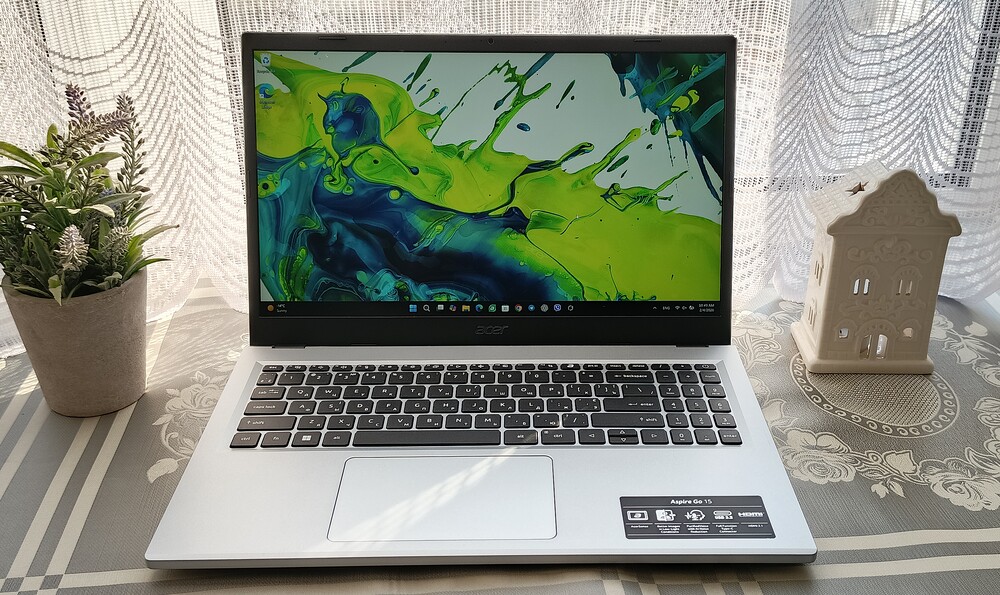
TABLE OF CONTENTS:
Positioning and Price
The Acer Aspire Go 15 AG15-71P exemplifies this philosophy. It is a laptop that does not aim to impress with style or flair but clearly understands its role: to serve as a reliable “workhorse” for users who value battery life, adequate performance, and predictable behavior across a variety of everyday tasks.
Acer does not position the Aspire Go 15 as an ultrabook, gaming station, or creative tool. Instead, the company carefully balances specifications, pricing, and capabilities to deliver a device that does not promise more than it can provide. This pragmatic approach is a key appeal of the Acer model.
The Aspire Go 15 AG15-71P is aimed at the mainstream segment of users who need a reliable tool rather than a status device. It is designed for study, office work, and everyday tasks, where stability, battery life, and sufficient performance take priority.
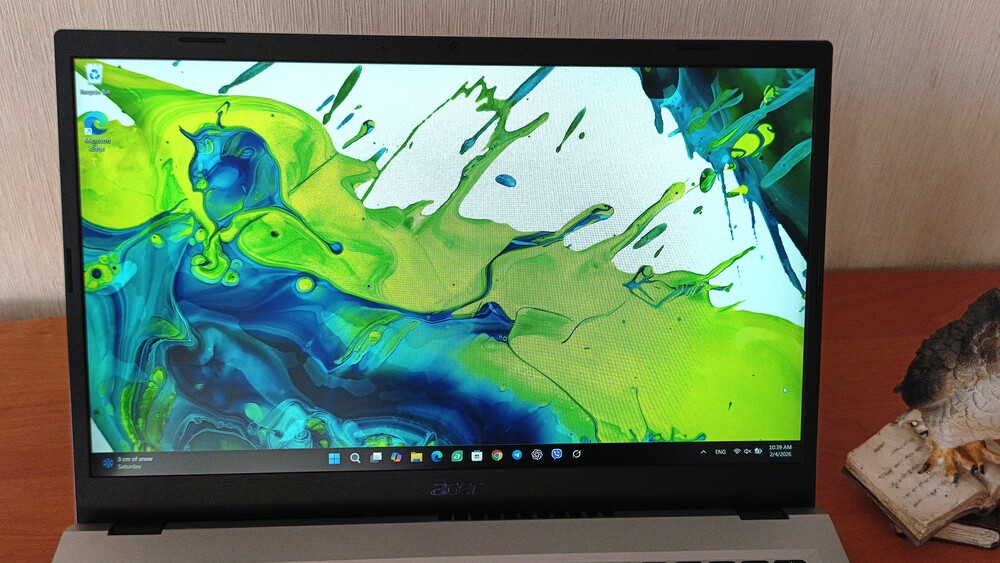
The Acer model is well-suited for educational tasks, such as working with text documents, presentations, spreadsheets, online classes, and web browsing. Its large screen and full-size keyboard with a numeric keypad make handling large amounts of information easier. The laptop is also designed for everyday office routines, including document management, email, video conferences, analytics, and browser-based multitasking. It represents a classic “work laptop” without unnecessary extras. It is suitable for basic multimedia, video playback, and general tasks that do not demand high-end graphics performance.
At the same time, the device is not intended for gamers, designers, or users working with color-critical applications or intensive video editing.

The Acer Aspire Go 15 AG15-71P offers balanced performance for its users. The Intel Core i5-1334U processor paired with 16 GB of RAM ensures smooth operation with office applications, web browsing, and multitasking without noticeable delays. Its connectivity options – including USB-C with Power Delivery and DisplayPort, HDMI, and USB-A – make the laptop versatile for connecting peripherals and external displays.
The 53 Wh battery provides around 8–9 hours of real-world usage, which is sufficient for study sessions and work trips. Combined with USB-C charging, this makes the Aspire Go 15 a convenient tool for working outside the office.
In summary, the Acer Aspire Go 15 does not focus on design flair or emotional impact, but it reliably performs its intended function. It is meant to be a dependable everyday tool – unassuming, yet consistent, which is its main strength.
The laptop is already available in electronics stores, with prices ranging from $490 to $870 depending on the selected configuration.
Acer Aspire Go 15 AG15-71P Specifications
- Display: 15.6″ IPS panel, 1920×1080 resolution, 16:9 aspect ratio, 60 Hz refresh rate
- Processor: Intel Core i5-1334U, 10 cores, up to 4.6 GHz
- RAM: 16 GB LPDDR5, 4800 MHz
- Storage: 512 GB, PCIe 3.0 x4
- Graphics: Intel UHD Graphics
- Wireless Connectivity: Wi-Fi 802.11a/b/g/n/ac/ax, Bluetooth 5.1
- Card Reader: None
- USB ports: 2×USB-C 3.2 Gen 2 (Power Delivery, DisplayPort), 2×USB 3.2 Gen 1 Type-A, Kensington Lock
- Video port: HDMI 2.1
- Audio port: 3.5 mm jack
- Camera: HD 720p
- Audio: Built-in stereo speakers and microphone
- Keyboard: Non-backlit island-style keys
- Power supply: 65 W
- Battery: 53 Wh, up to 11.5 hours
- Body material: matte plastic
- Weight: 1.8 kg
- Dimensions: 362.90 × 239.70 × 19.95 mm
- Operating system: no OS
Package contents
Acer has long emphasized sustainability, and the Aspire Go 15 AG15-71P reflects this right from the packaging. The box is made from recycled cardboard and avoids any design flourishes – minimal text, minimal printing, and minimal focus on aesthetics. This minimalist approach continues inside, with everything kept as simple and functional as possible.

Inside the box, you’ll find the laptop itself, a 65 W USB-C charger, and paper documentation – nothing more. For a device in this class, this approach makes sense. Acer intentionally sacrifices the unboxing experience in favor of straightforward, no-frills practicality.

It’s also important to note that the laptop does not come with an operating system pre-installed. After unboxing, the user will need to install one themselves, which is at best a mixed decision. On one hand, it provides a minor cost saving; on the other, it adds an extra step for the user. This is a detail worth considering before making a purchase.
Read also: Acer Chromebook Plus 515: Is There Life on ChromeOS?
Design of the Acer Aspire Go 15 AG15-71P
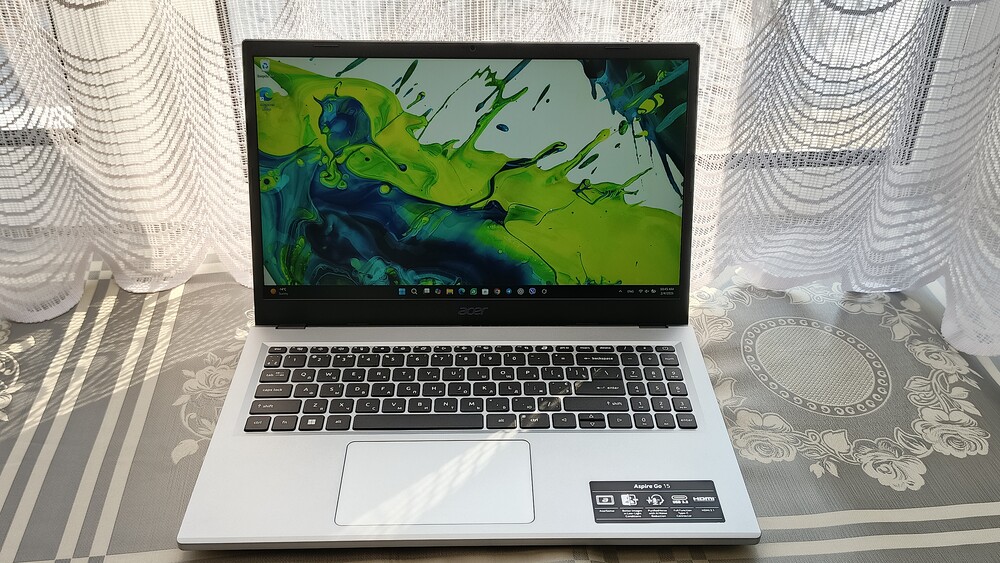
Honestly, at this price point, I expected a more compromised appearance. However, the Acer Aspire Go 15 AG15-71P makes a better impression than its positioning might suggest. The design is simple and understated, yet it does not feel outright cheap.
Acer has long emphasized sustainability, and in this case, it’s more than just a claim. Up to 30% of the laptop’s chassis is made from recycled plastic, certified by Energy Star and EPEAT Silver. For the budget segment, this is a noteworthy and unexpected bonus.

The laptop’s size and weight are immediately noticeable. Measuring 362.9 × 239.7 × 19.95 mm and weighing 1.8 kg, it is convenient for daily portability.

The Aspire Go 15 fits easily into a backpack or bag and does not create a noticeable burden when traveling. However, it’s worth noting that no case or sleeve is included in the package.


The chassis is entirely made of plastic – the lid, the palm rest area, and the bottom panel – with differences only in texture and color. The lid and the area surrounding the keyboard feature a silver-white finish with a subtle metallic sheen.
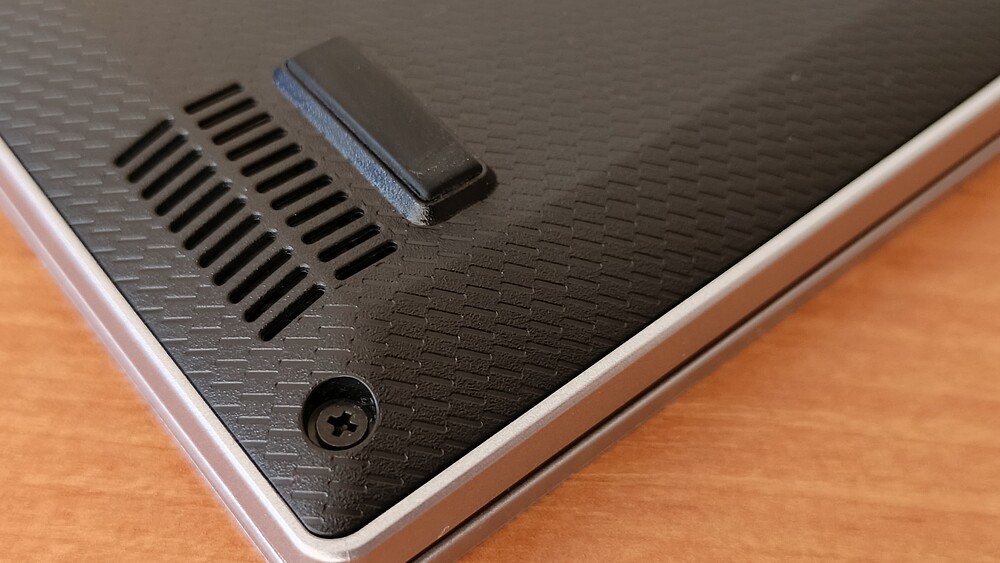
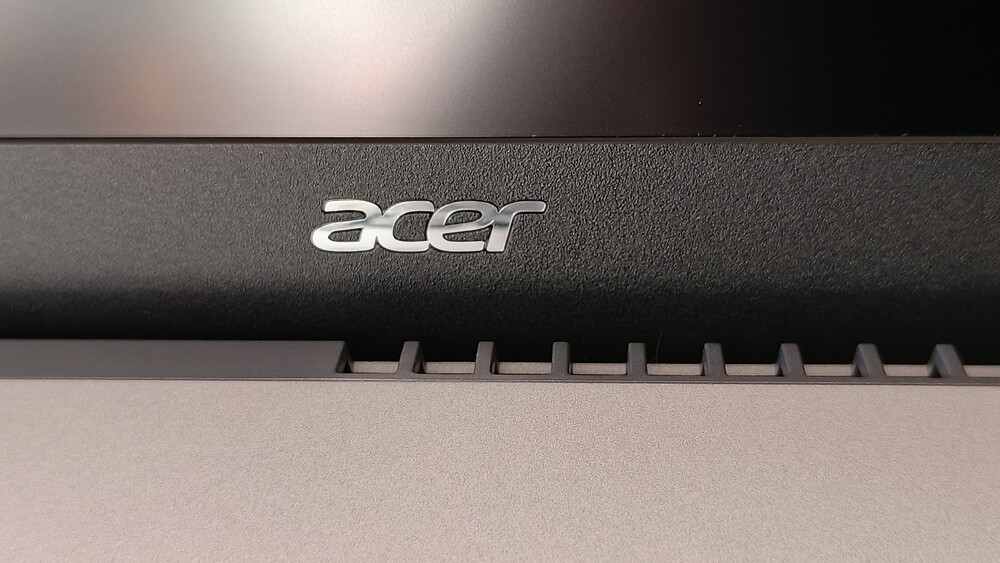

The keyboard, display bezels, and bottom panel are made of black matte plastic. The silver-and-black color scheme is classic and generally looks neat, although the black plastic around the display and keyboard has a slightly rougher texture and appears simpler visually.

At the same time, the build quality is pleasantly solid. The chassis does not creak, flex, or wobble during everyday use. The only minor concerns are the area beneath the keyboard and the display bezel, but given the budget segment, expecting metal components in these areas would be unrealistic.

The laptop lid looks tidy. The silver-white plastic hardly attracts fingerprints or dust, and the glossy Acer logo and Aspire branding add a polished finishing touch.

The minimalist design approach is evident overall, although the thick black bezels around the display immediately signal the laptop’s budget segment. They were likely left in place to accommodate the webcam, indicators, and microphones.

The laptop features a standard HD camera with two microphones. The camera performance is expectedly average and suitable only for basic video calls – a typical solution for this class of device.

The display hinges are fairly tight and reliable. The screen is securely held in place and barely wobbles during use. Opening the laptop with one hand is not possible, as the base needs to be supported.

The maximum opening angle is 145°, and the Acer Aspire Go 15 is not a convertible or 2-in-1 device.

The bottom panel is made of black plastic with a textured finish. The cooling vents, located toward the rear, are clearly visible. The laptop sits securely on a surface thanks to four rubber feet.


When open, the laptop rests on its rear feet, slightly elevating the chassis. This improves typing ergonomics and enhances airflow to the cooling system.

An interesting feature is the large ventilation gap between the display panel and the main body of the laptop. It is clearly visible whether the laptop is open or closed and helps with the exhaust of hot air.

The Acer Aspire Go 15 AG15-31P is a traditional-form-factor laptop with a chassis sturdy enough to be carried easily with one hand. Its design gives mixed impressions: the silver-and-black color scheme looks appealing, but the black plastic around the keyboard and display feels cheaper, and the thick bezels do little for aesthetics. At the same time, the device does not appear bulky or heavy, which is an advantage for a 15.6-inch laptop. Within its segment, it makes a more solid impression than many competitors.
Read also: Acer Aspire 7 A715-76G Laptop Review
Ports and Connectivity
The Acer Aspire Go 15 is impressive in terms of its port selection, especially considering its budget positioning. There’s no sense of skimping on connectivity; on the contrary, the manufacturer has equipped the laptop with all the essentials needed for work or study.

On the left side, there are two USB-C 3.2 ports supporting Power Delivery and DisplayPort. This allows not only charging the laptop but also connecting an external monitor or docking station, minimizing cable clutter on the desk. For a budget laptop, having two fully functional USB-C ports is more the exception than the rule, making this a notable advantage.
Next is an HDMI 2.1 port, enabling easy connection to an external monitor or TV without adapters. Even if most users won’t fully utilize its capabilities, the inclusion of a current-generation interface is a welcome bonus. The left side is rounded out by a USB-A 3.2 Gen 1 port for flash drives, mice, and other standard peripherals.

On the right edge, there is another USB 3.2 Gen 1 Type-A port, a combined 3.5 mm audio jack for headphones or a headset, and a Kensington lock slot. This is a standard setup without obvious gaps, providing everything needed for basic security, audio connectivity, and compatibility with older peripherals.
Wireless connectivity is also solid. Bluetooth 5.1 and Wi-Fi 6 have become standard even for budget laptops.
Overall, the Acer Aspire Go 15 offers a balanced and functional selection of ports, eliminating the immediate need for hubs or adapters. For office or study use, this is more than sufficient. You can connect an external monitor, keyboard, and mouse, charge the laptop via USB-C, and work without any daily limitations.
Read also: Acer Nitro V 16 AI Gaming Laptop Review: Balanced, Stable, and Engaging
Keyboard and Touchpad
The Aspire Go 15 AG15-31P features a full-size island-style keyboard measuring 321 × 100 mm, following the ANSI layout standard. The inclusion of a dedicated numeric keypad is a clear advantage for users who frequently work with spreadsheets, financial reports, or other office applications like Microsoft Excel.

The keyboard is slightly recessed relative to the chassis, which adds typing comfort, though it does not offer any water resistance. Latin characters are engraved in the center of the keys, while Cyrillic characters are positioned in the lower-right corner. Caps Lock and microphone activity indicators are integrated directly into the corresponding keys and illuminate in white.

The keys feature flat caps with a short but clearly noticeable travel. They do not bottom out abruptly or feel “hollow,” which contributes to comfortable typing over long periods. Overall, the keyboard is convenient and predictable in use. Minor drawbacks include the somewhat awkward shape of the arrow key cluster and the placement of the power button within the main key row, which could theoretically lead to accidental presses.




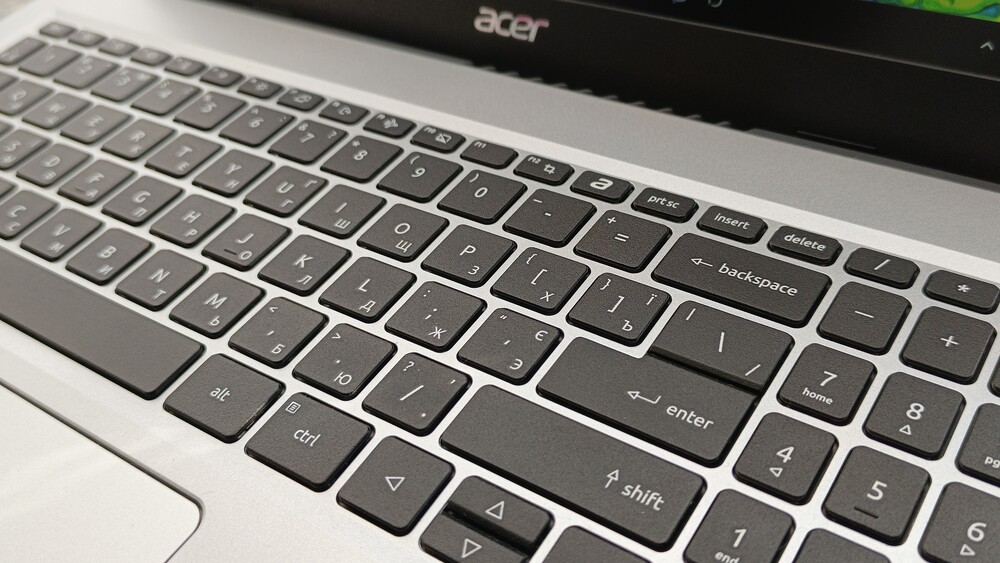

The main drawback of the keyboard is the complete lack of backlighting. Even for a budget laptop in 2026, this feels unusual. At this price point, at least a basic white backlight would be expected, as typing in low-light conditions is noticeably more difficult without it.
Below the keyboard is a traditional touchpad measuring 12.6 × 7.8 cm. The buttons are integrated into the pad’s surface without physical separation, which may occasionally cause less experienced users to confuse the left and right clicks. The touchpad surface is smooth and pleasant to the touch, allowing fingers to glide easily.

The touchpad buttons feature a flat travel with clear tactile and audible feedback. The actuation force is well-balanced, providing a comfortable click. The panel supports Microsoft Precision Touchpad, ensuring accurate recognition of Windows gestures.
The only drawback is the glossy surface, which quickly collects fingerprints and minor smudges, requiring regular cleaning.
Read also:Acer Predator Helios Neo 18 AI PH18-72 Review: Desktop-Level Performance in a Laptop Form
Acer Aspire Go 15 AG15-71P Display

The laptop is equipped with a 15.6-inch IPS panel from AU Optronics (B156HAN02.1) with a Full HD resolution of 1920×1080, a standard 60 Hz refresh rate, and a 16:9 aspect ratio.

The display’s format may no longer feel modern, but it remains practical for working with documents, browsing, and video content. The panel has a response time of around 30 ms, which is perfectly acceptable for office use.

The screen features a matte ComfyView coating that effectively reduces glare, while the IPS technology provides stable images with wide viewing angles. The display shows minimal distortion even when the lid is opened to around 145°, which is uncommon for a budget laptop.
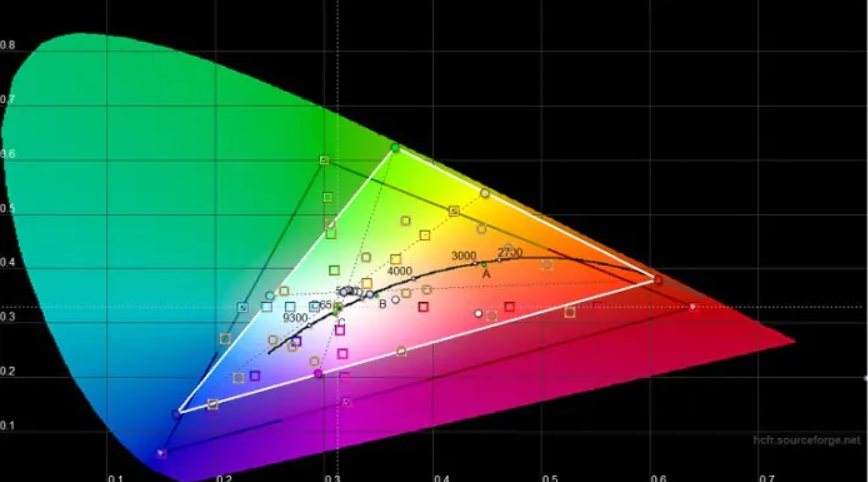




The maximum brightness reaches approximately 300 nits, which is sufficient for indoor use but may be inadequate outdoors or in bright lighting conditions. Color coverage is modest: around 56.5% sRGB, 39.9% Adobe RGB, and 40.9% DCI-P3.

The manufacturer also specifies 45% NTSC at a typical brightness of 250 cd/m². All of this clearly indicates that the display is not intended for graphics, photo editing, or design work.

At the same time, the screen is more than adequate for studying, office tasks, web browsing, and video playback. An additional benefit is support for Acer BlueLightShield technology, which helps keep eye strain moderate even after several hours of use – an important feature for daily work.
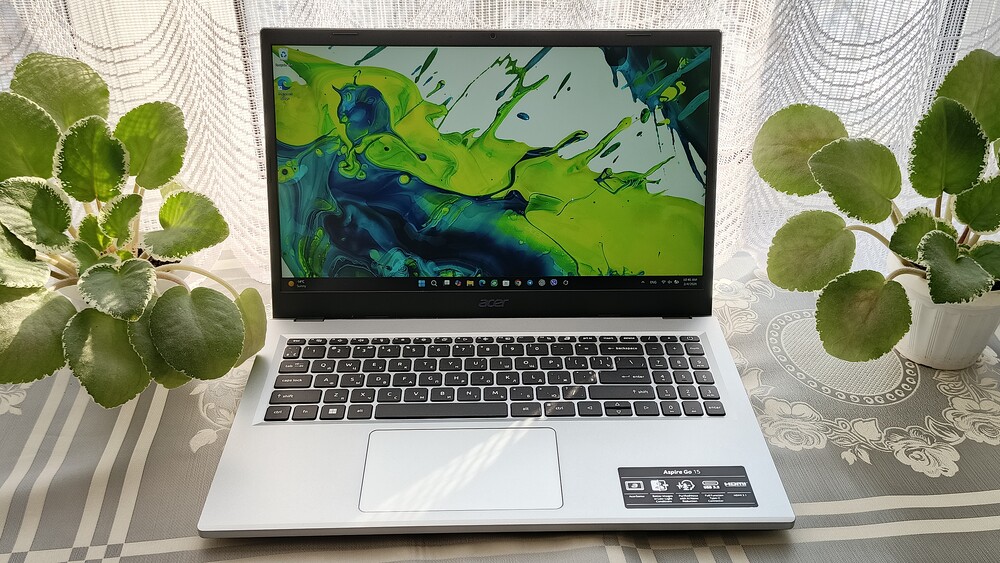
Overall, the display of the Acer Aspire Go 15 AG15-71P is typical for its price segment: it does not aim for color accuracy or high brightness, but offers a comfortable IPS panel with adequate ergonomics for extended use.
Read also: ASUS Zenbook A14 (UX3407) Review: Ultrabook on ARM Сhip
Hardware platform and performance

At the core of the Acer Aspire Go 15 AG15-71P is an Intel Core i5-1334U processor with a hybrid architecture: two performance cores and eight efficiency cores, reaching up to 4.6 GHz. This is a typical chip for thin and affordable laptops, designed for stable daily performance rather than benchmark-breaking speeds.
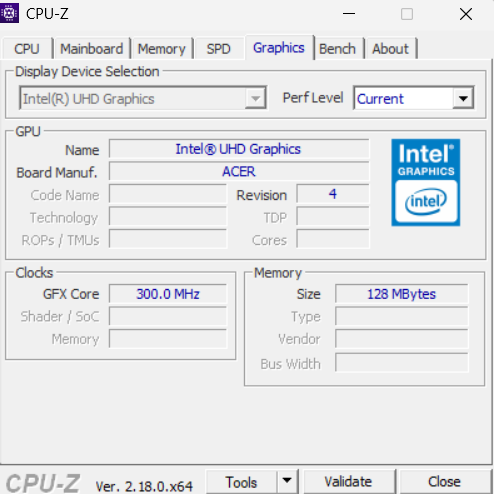
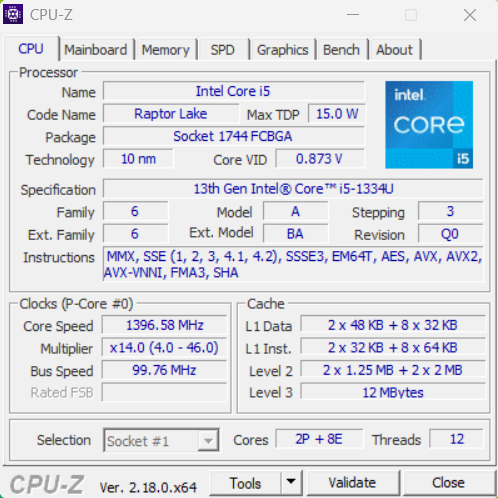
Graphics are handled by the integrated Intel UHD Graphics core, running up to 1250 MHz with 32 execution units. It uses the system’s RAM, so high graphical performance should not be expected. This solution is suitable only for basic tasks and light gaming.

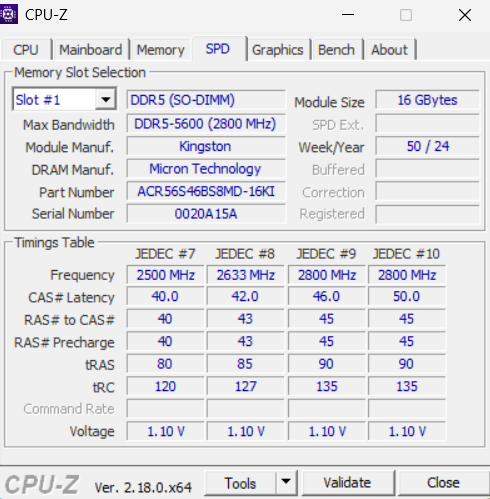
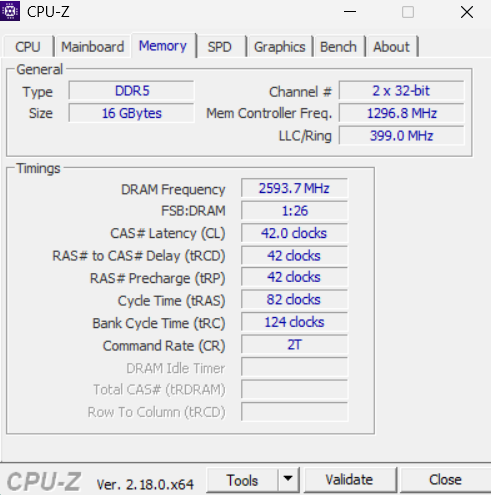
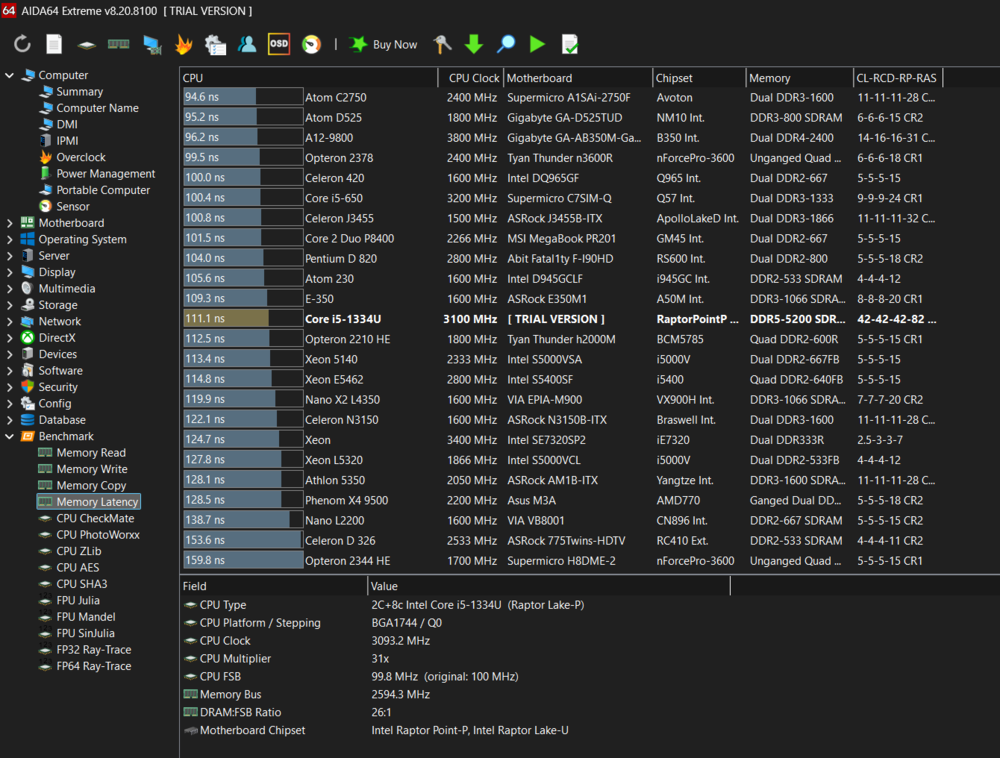
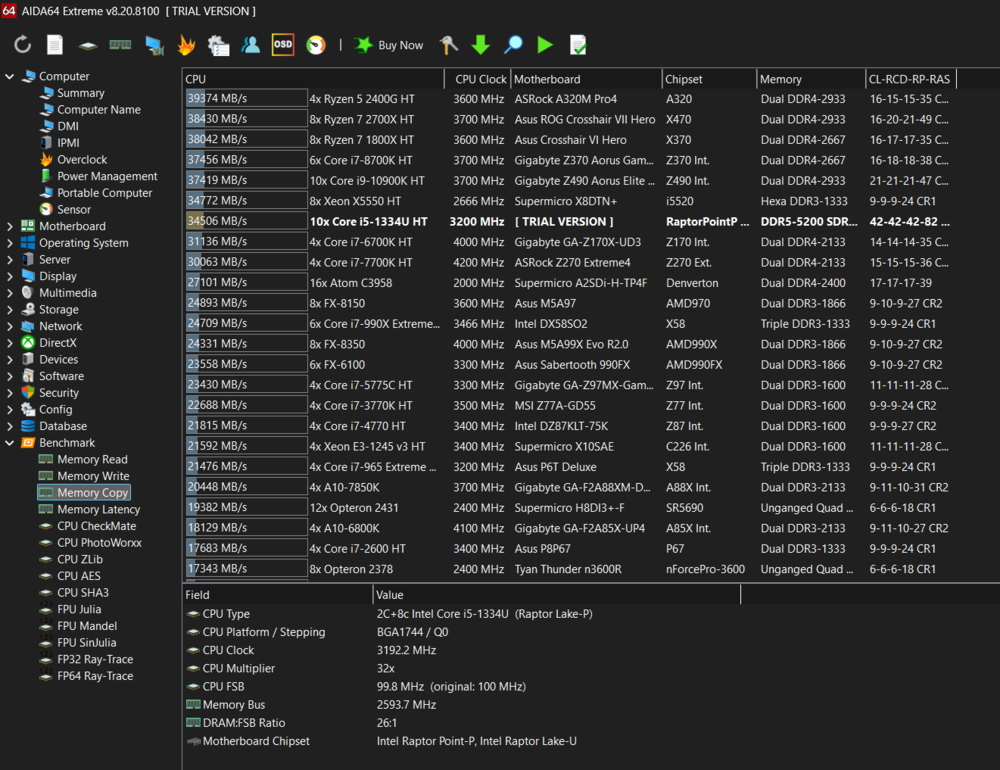
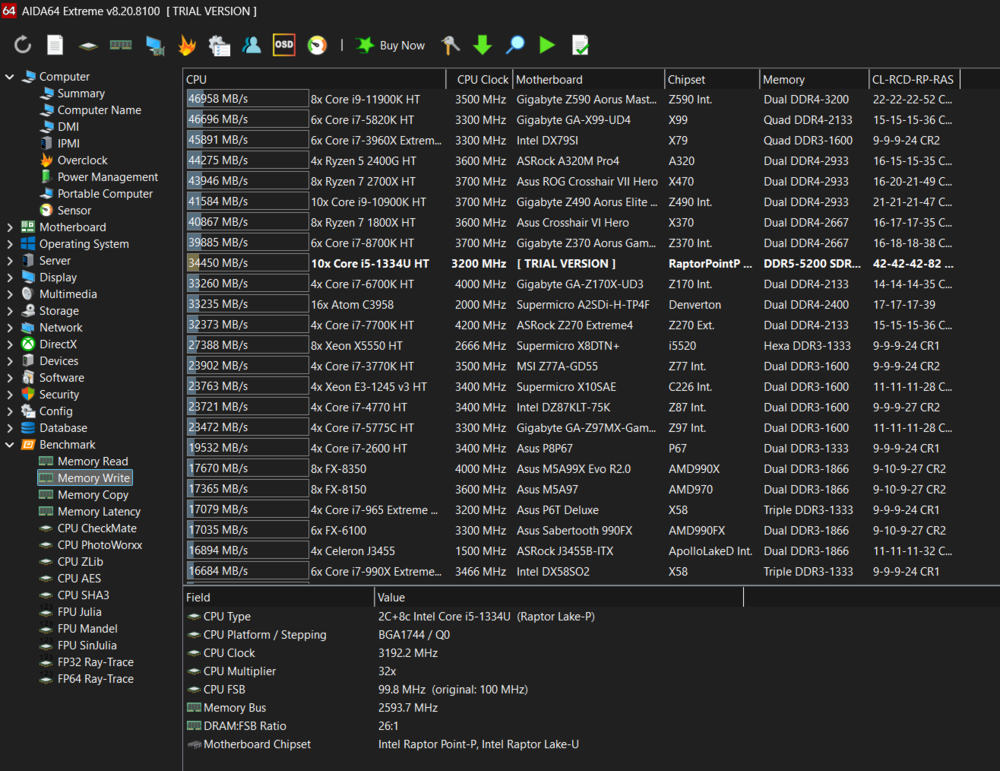
The laptop comes with 16 GB of DDR5-5600 RAM operating in single-channel mode. There is an available slot for expanding up to 32 GB, and even in its base configuration, the memory is more than sufficient for everyday tasks.
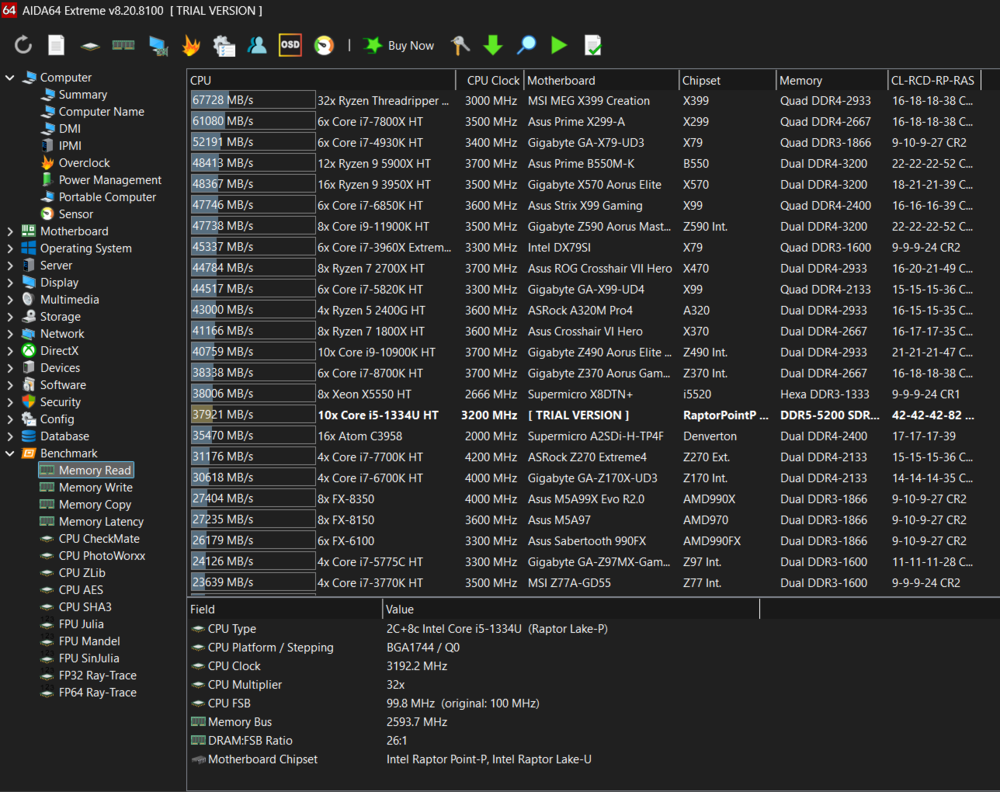
Data storage is handled by a 512 GB Kingston SSD, offering high read and write speeds. It is a modern and appropriate solution for this price segment.

In real-world usage, the platform performs confidently: a browser with dozens of tabs, office applications, large Excel spreadsheets, or running multiple apps simultaneously do not cause noticeable slowdowns. Overall, the laptop noticeably outperforms last year’s Aspire Go models with lower-tier processors.


It’s important to clearly understand the device’s positioning. The Acer Aspire Go 15 AG15-71P is a laptop intended for studying, work, and basic multimedia tasks. Its price of around $500 sets clear expectations, and it shouldn’t be pushed beyond them. That said, within this segment, the model pleasantly surprises by avoiding any critical compromises.
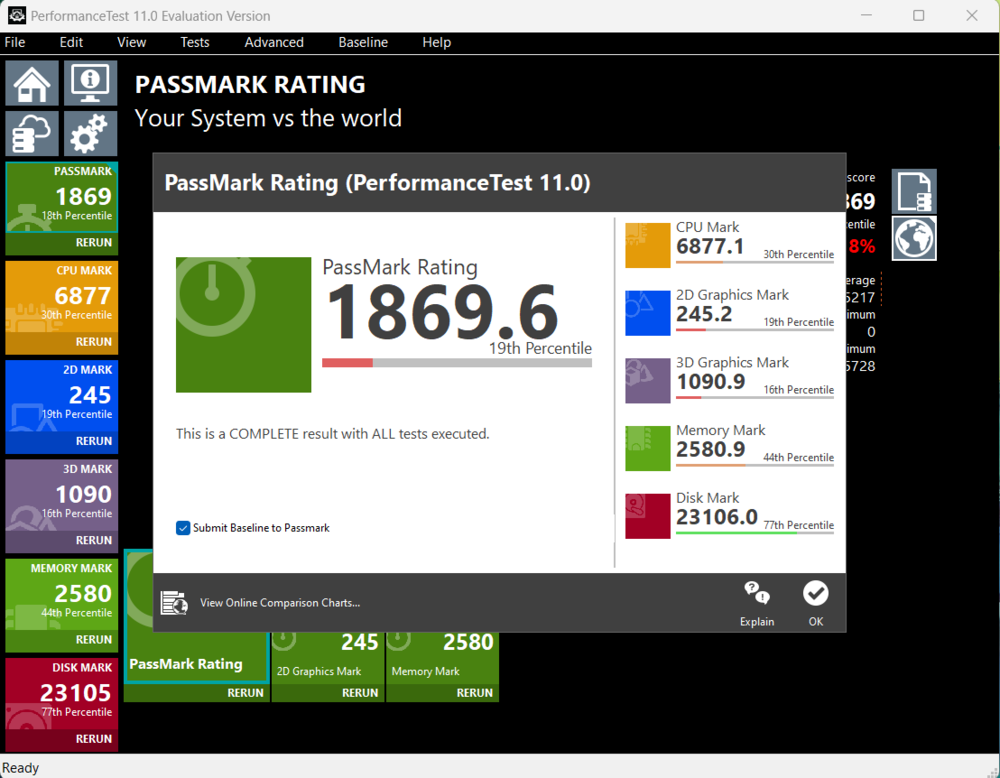
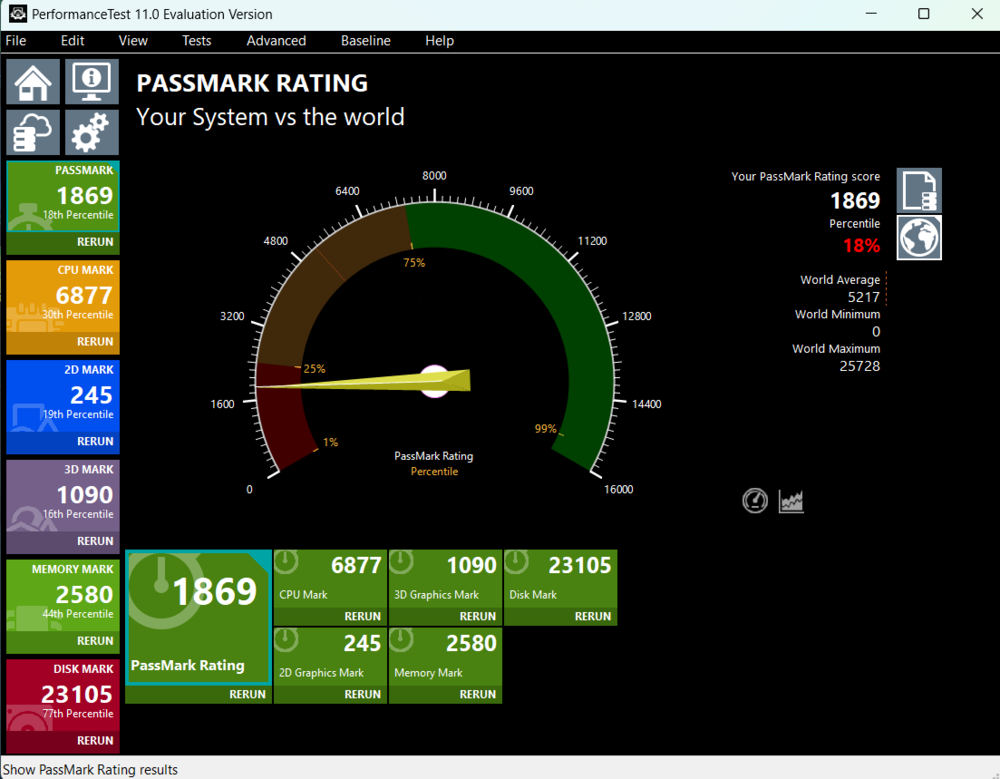
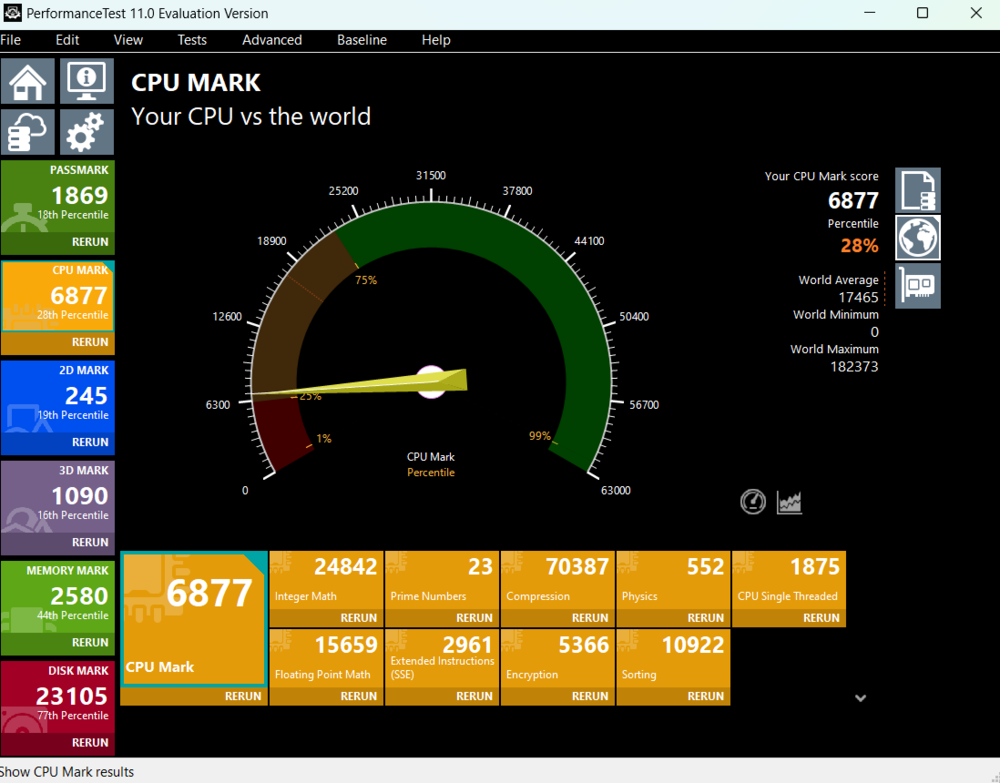
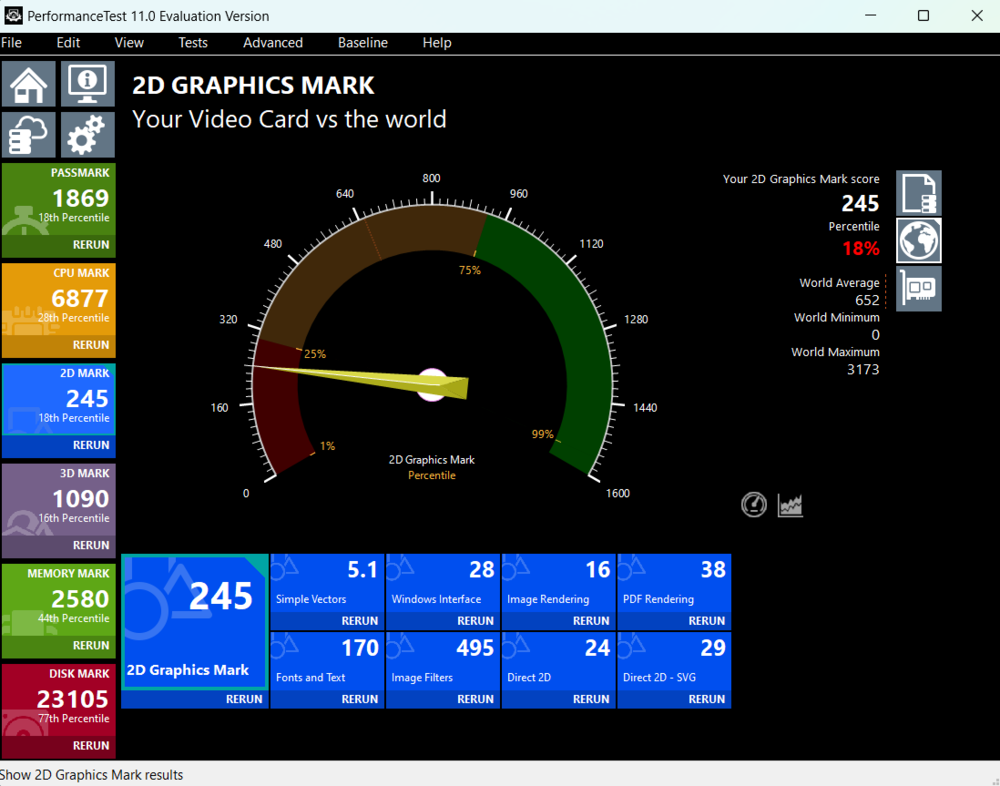
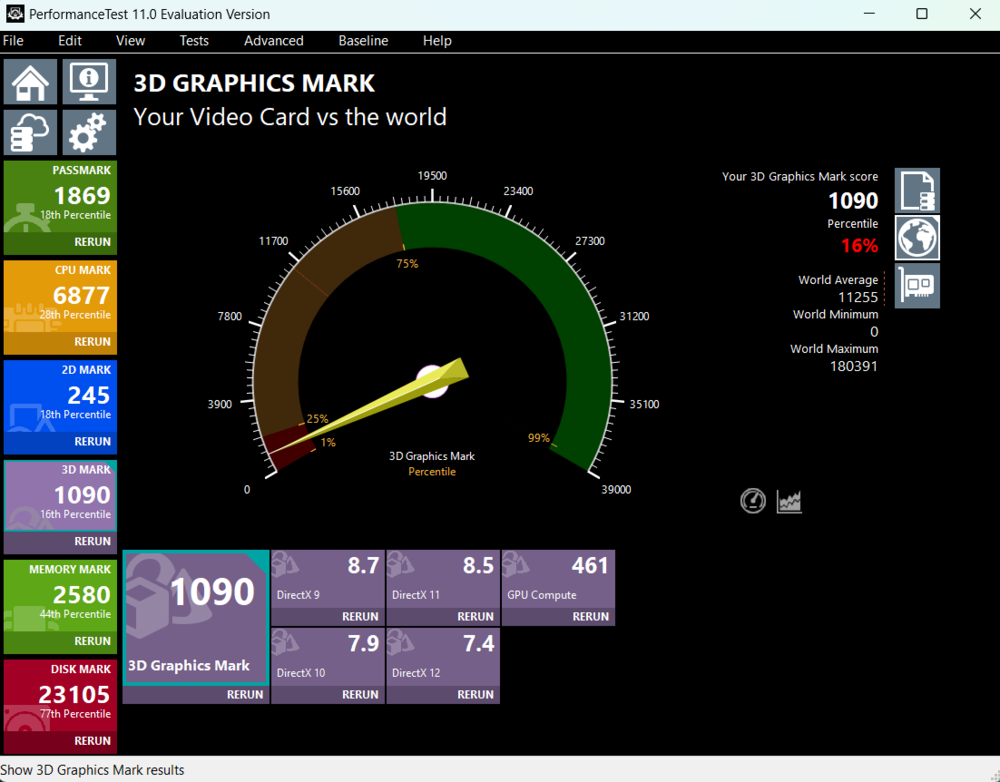
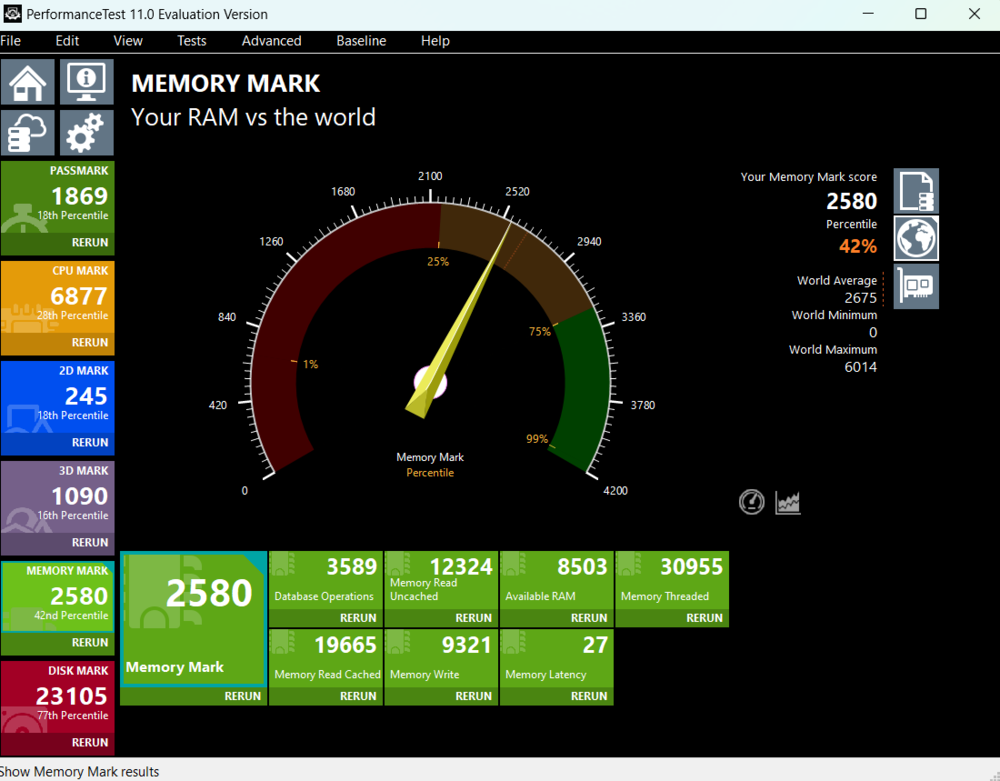
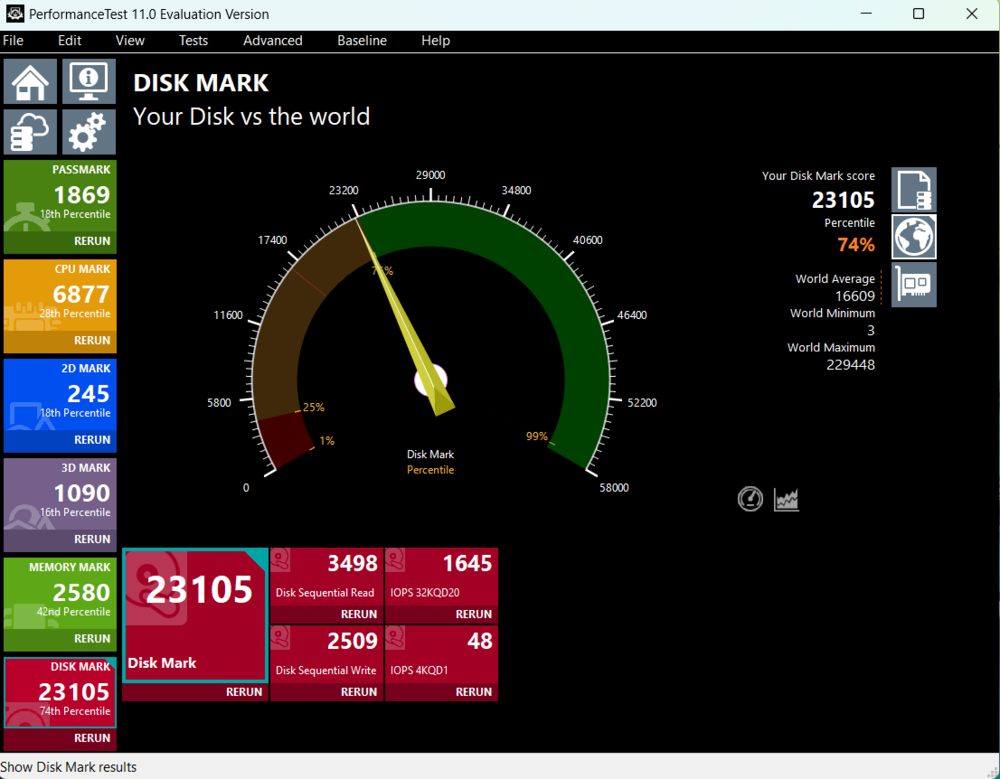
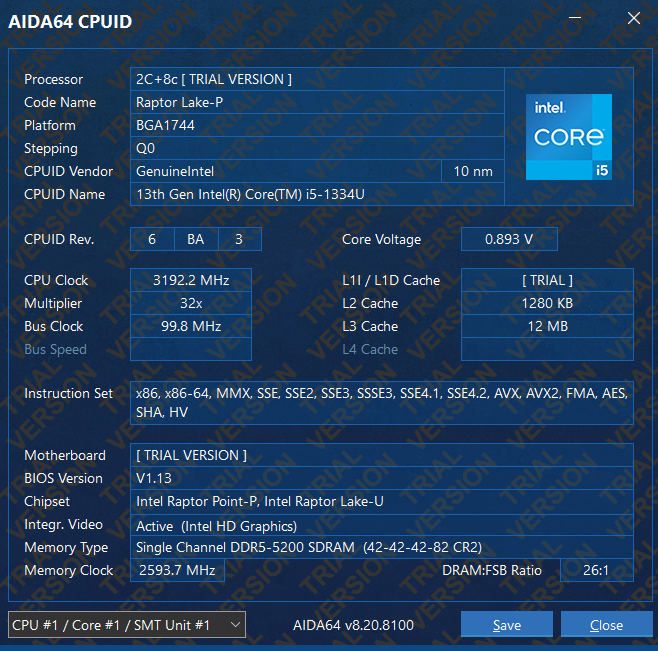
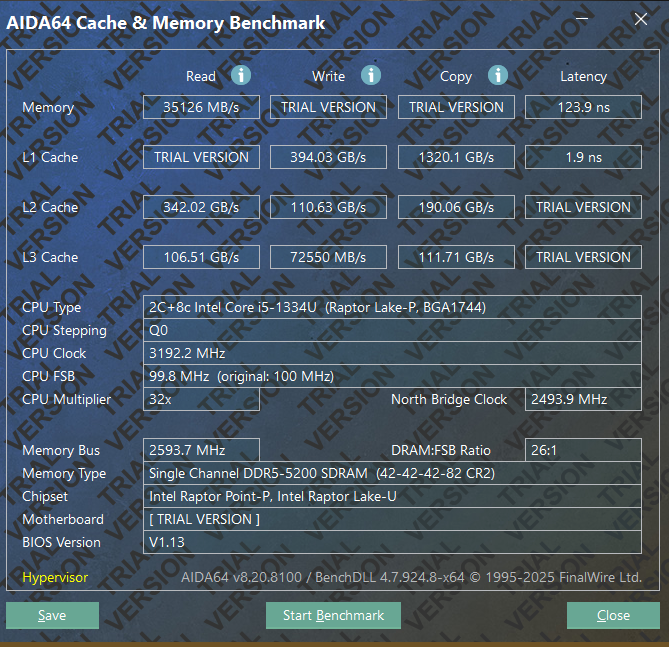
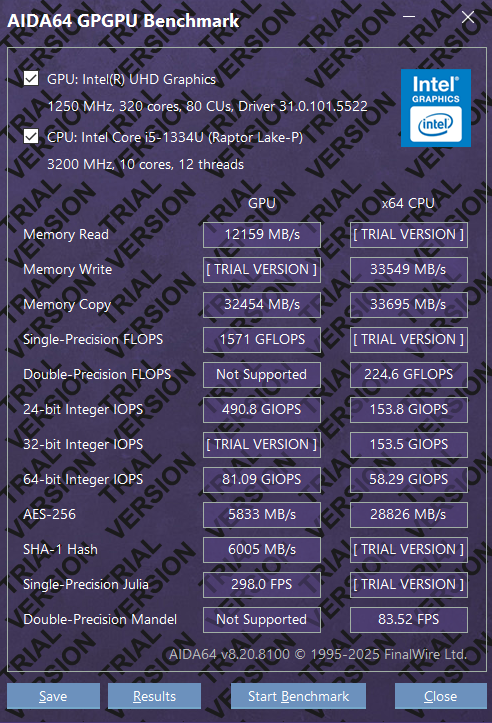

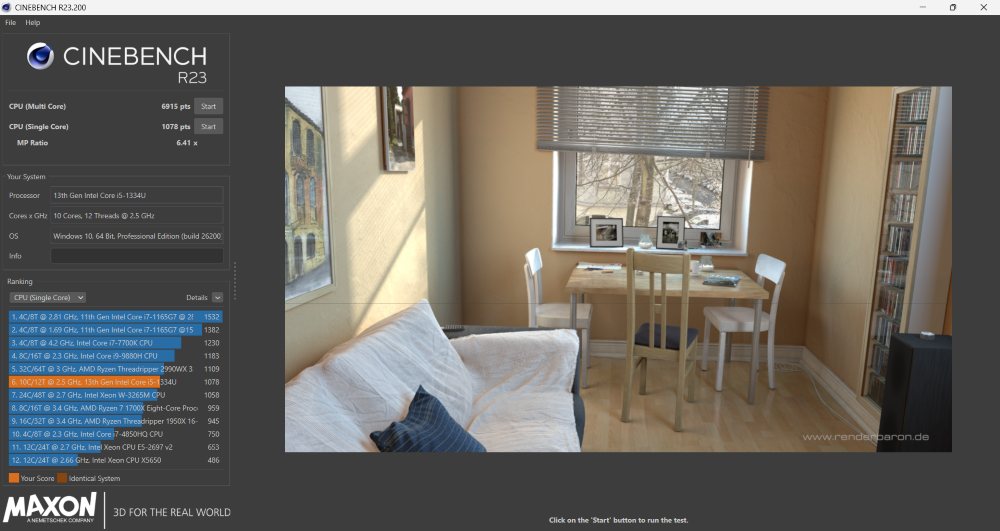
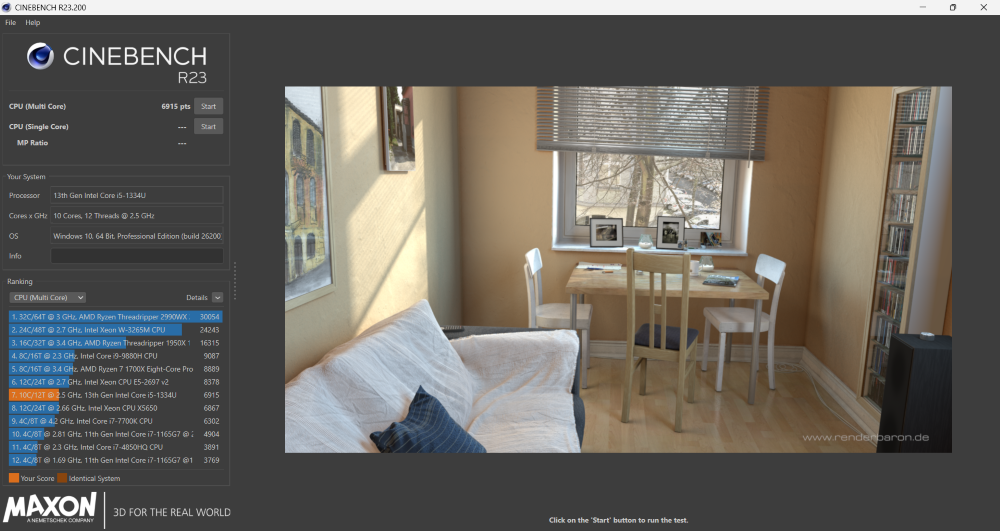

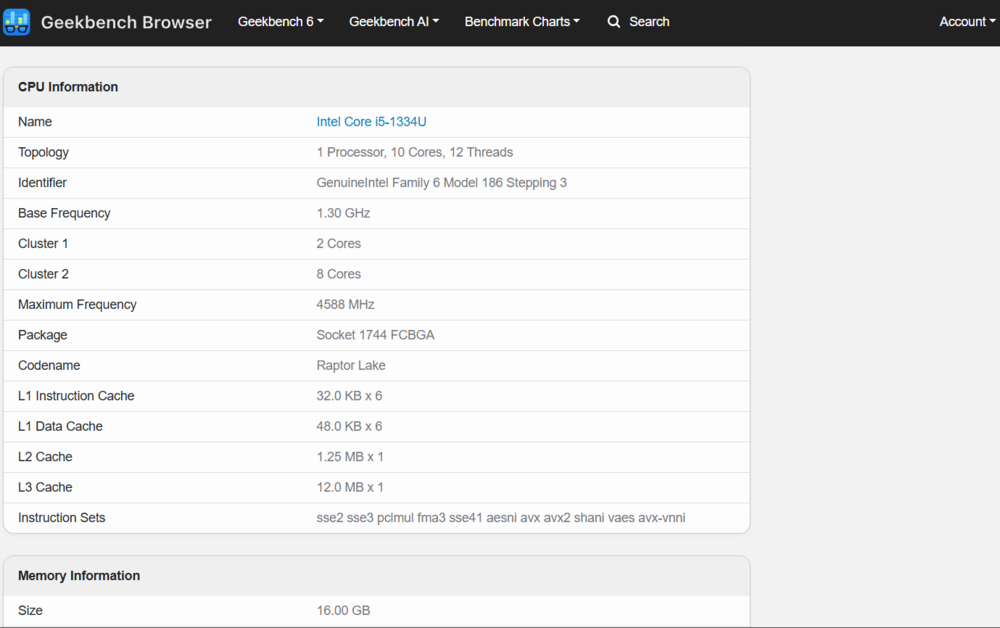
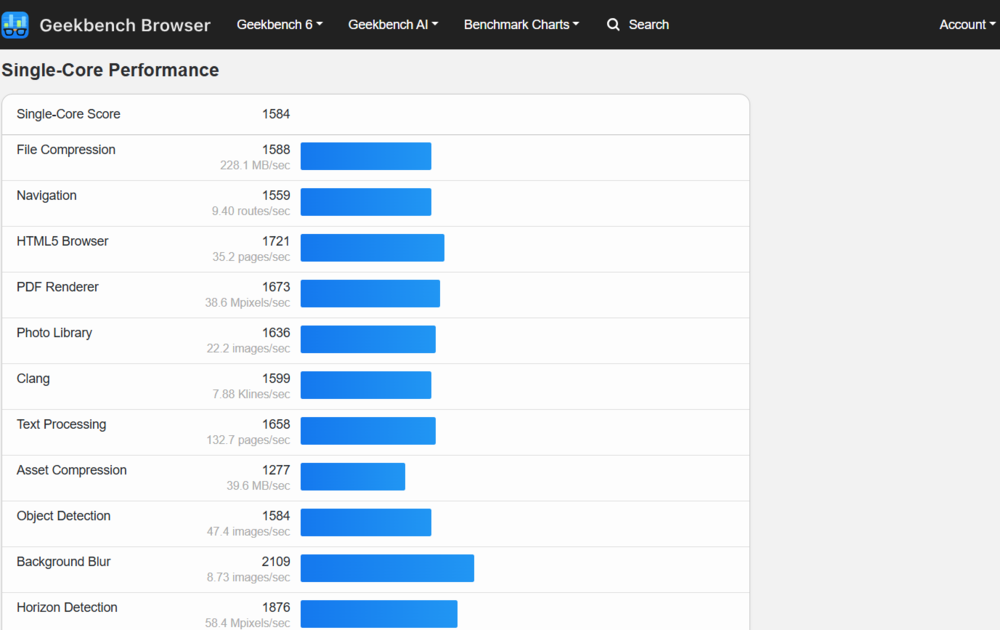
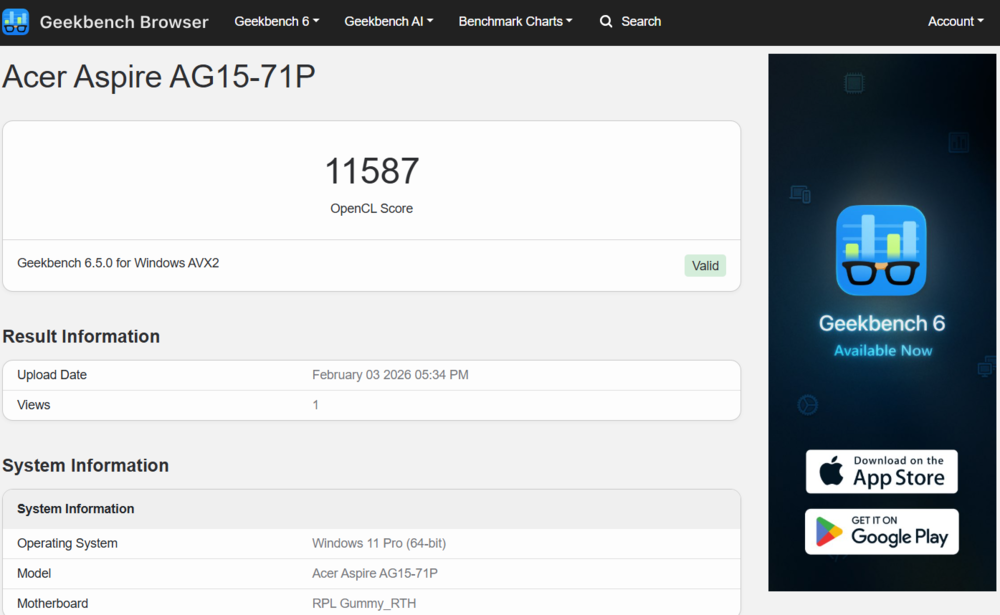
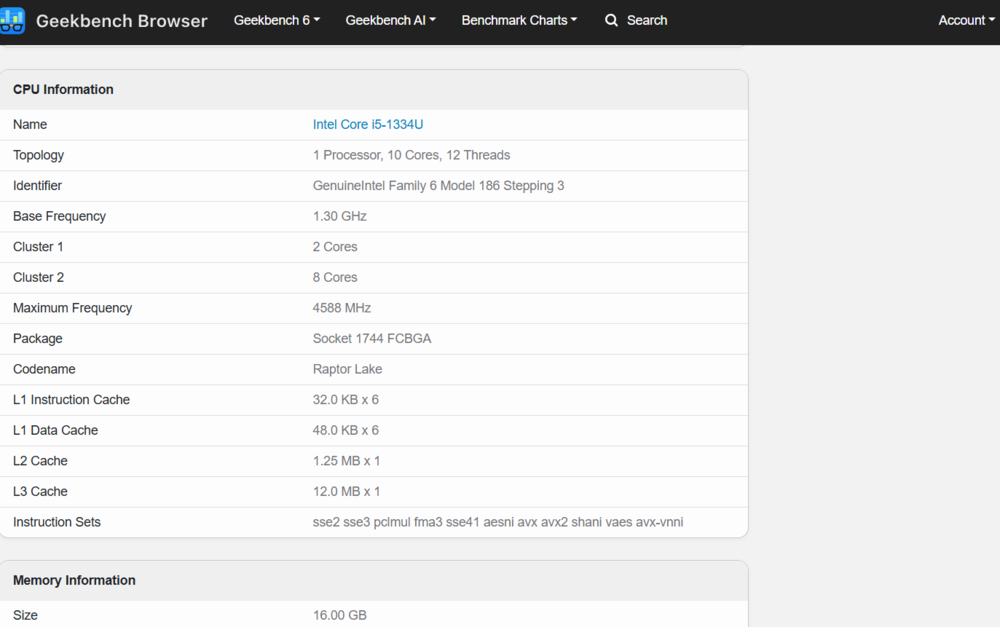
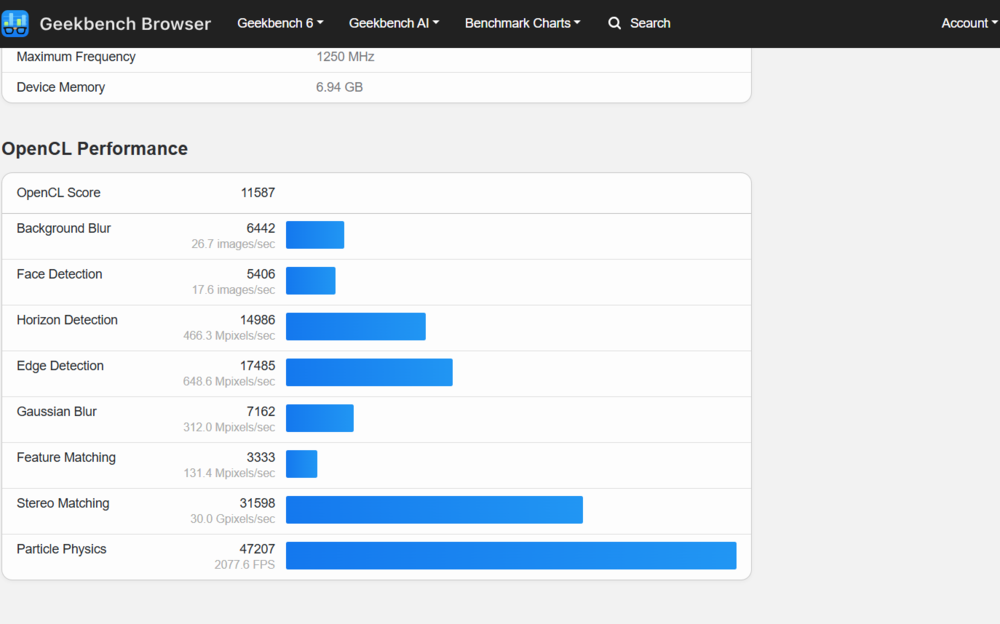
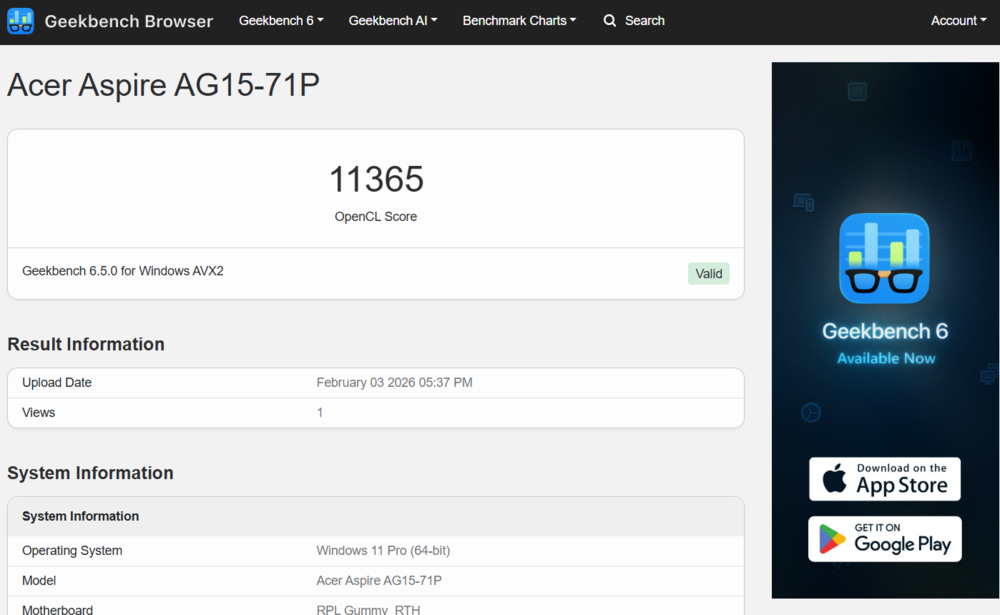
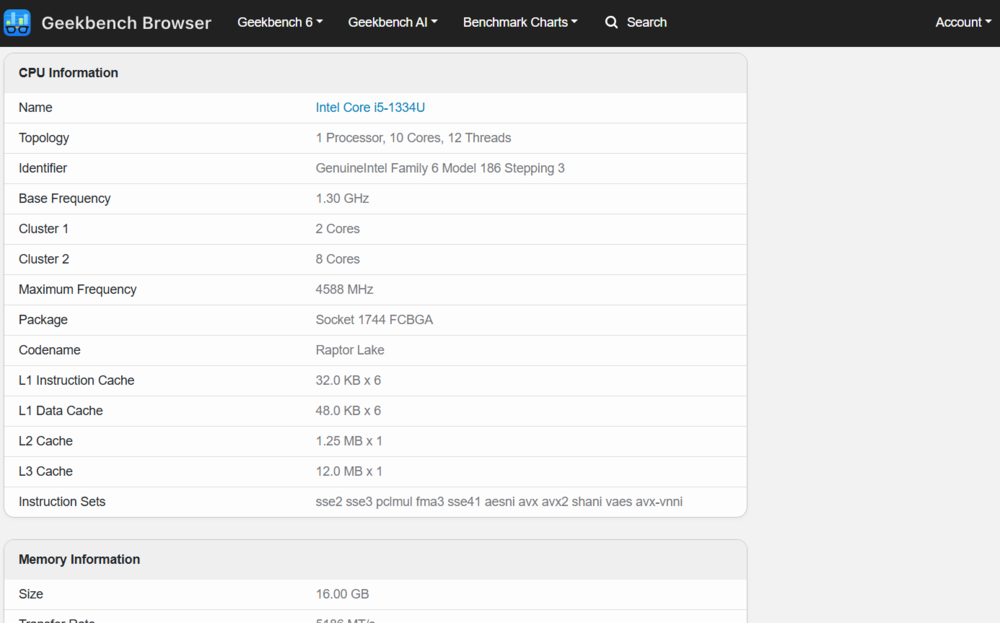
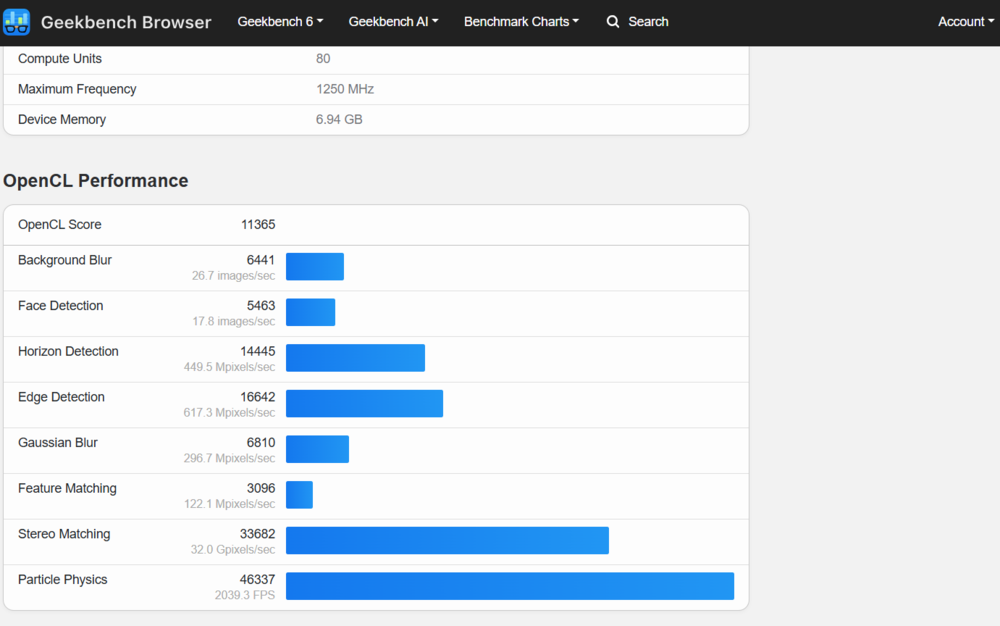
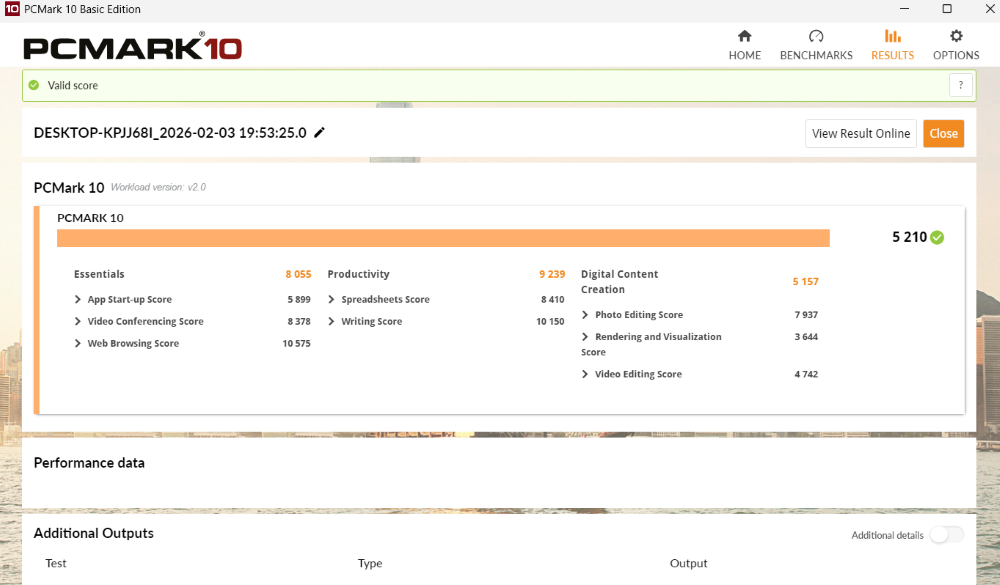
After more than two weeks of active use, there were no stability issues or performance drops, even under significant background load. As an entry-level multimedia device, the laptop feels well-balanced and fully meets the basic needs of an average user.
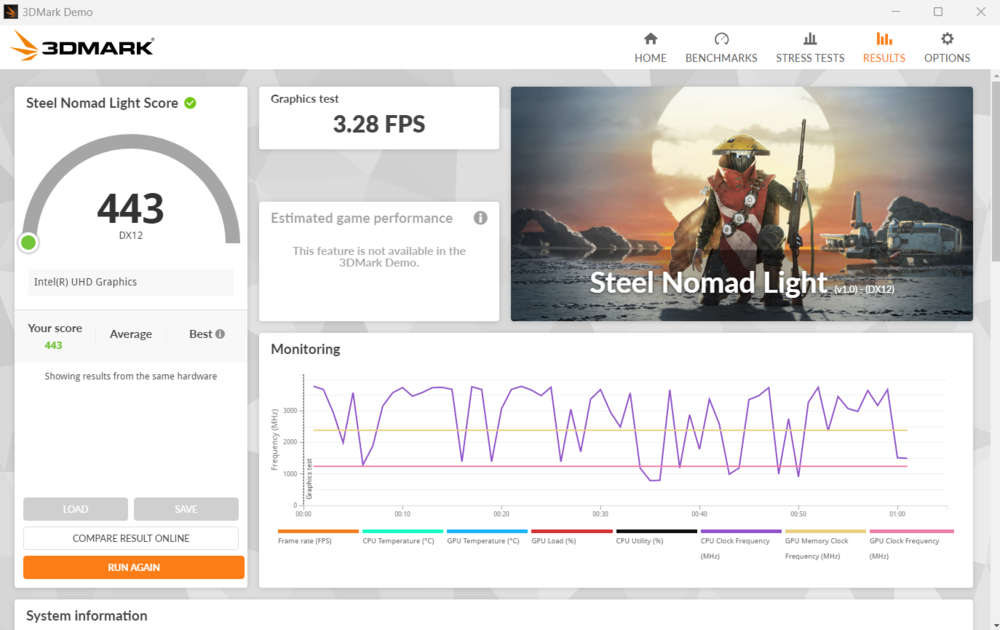
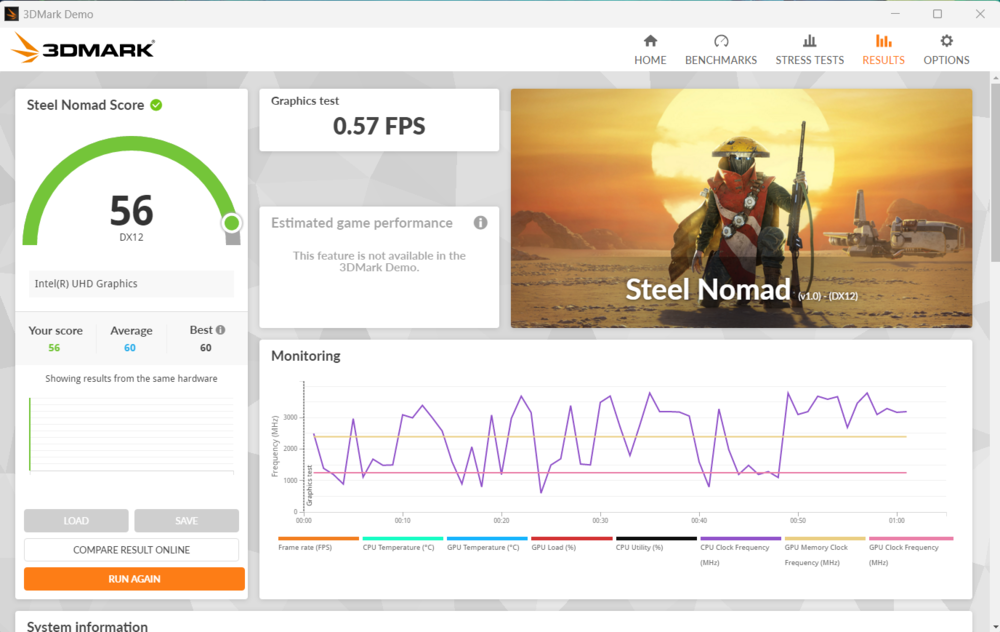
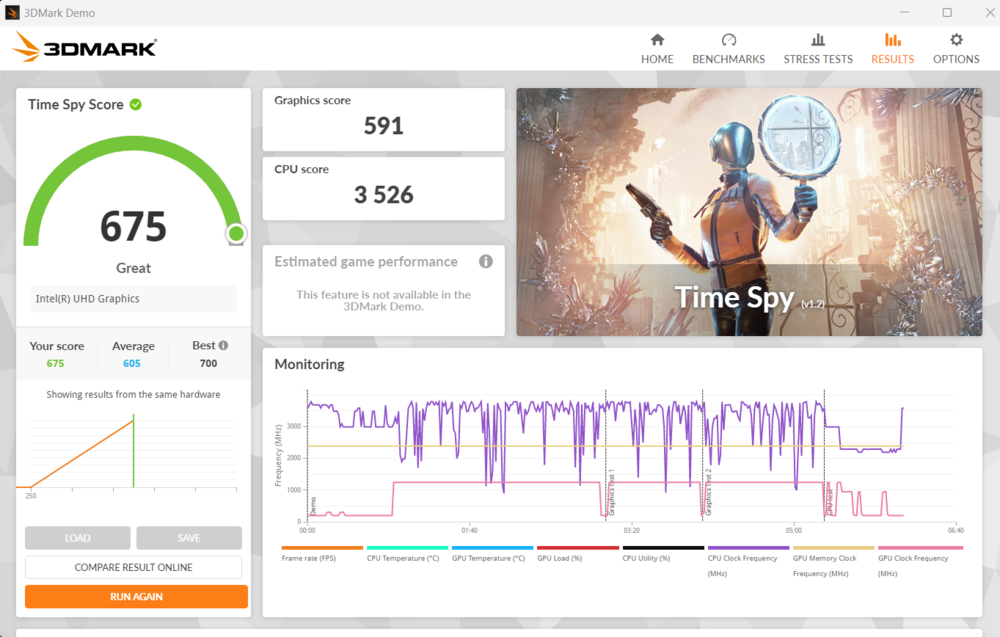
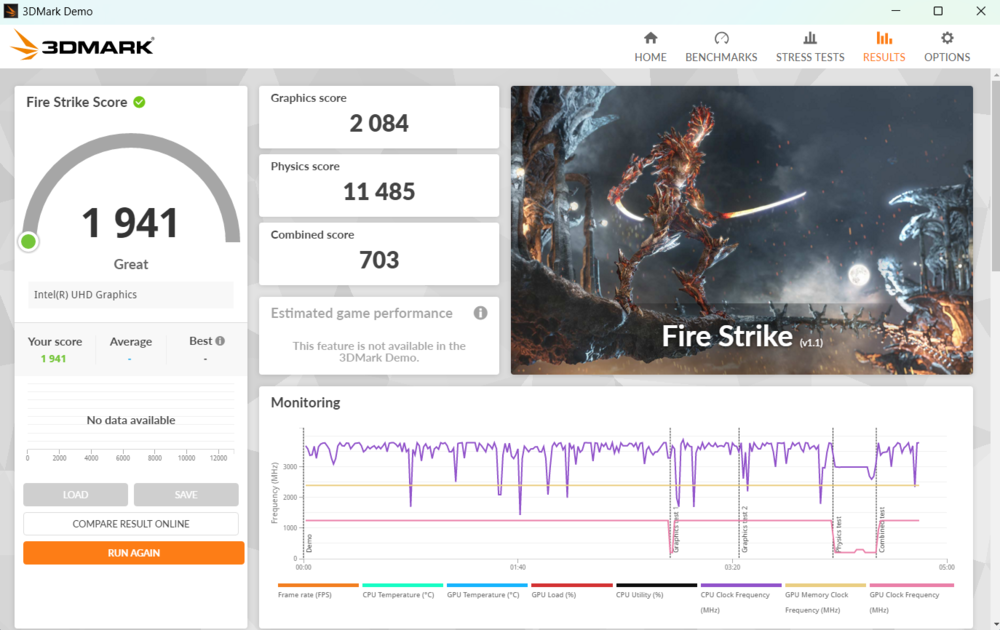
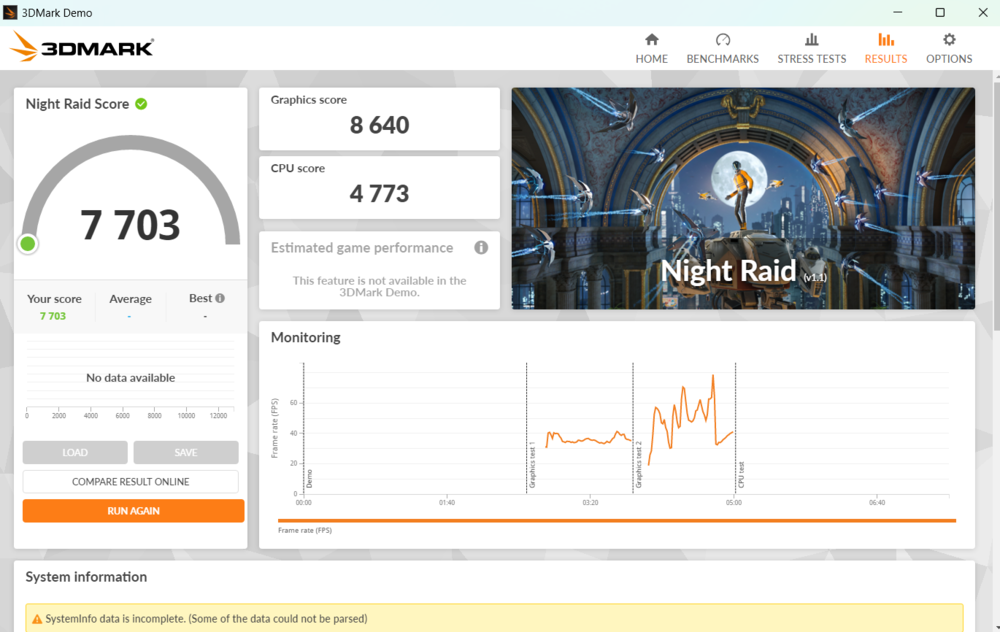
Gaming capabilities are limited by the integrated graphics. Only undemanding or older titles can run at medium or low settings – games like Civilization VI, Asphalt 9: Legends, CS:GO, or Dota 2 are playable, but don’t expect high-quality visuals. The Acer Aspire Go 15 AG15-71P is definitely not a gaming laptop and was never positioned as one.
Read also: Microsoft and BitLocker: When Convenience Comes at the Expense of Privacy
Cooling and Stability
The cooling system is active and built on a simple but logical design. It uses a single fan without any “exotic” solutions. In everyday light-use scenarios – such as working with a browser, documents, messaging apps, or multimedia – the fan either doesn’t turn on at all or runs at minimal speed, becoming virtually inaudible against ambient noise.

Under sustained load, the fan becomes audible, but the sound is steady, without sharp fluctuations or the high-pitched whine typical of some laptops, so it doesn’t cause discomfort.

In synthetic stress tests, the cooling system behaves predictably. At the start, a brief CPU throttling may occur as the system quickly responds to a sudden increase in heat output. After that, clock speeds stabilize, and temperatures settle into a working plateau without further performance drops. The CPU’s maximum temperature under these conditions does not exceed approximately 62 °C, which is very good for a compact device with a single fan.
The chassis warms noticeably under load, especially near the heat exhaust area, but never becomes “hot.” This means it remains comfortable to use on your lap or type on the keyboard even during extended sessions. Overall, the cooling system handles its task confidently: no overheating, no aggressive noise, and no noticeable impact on stability.
Read also: Lenovo ThinkPad X9 14 Gen 1 Aura Edition Laptop Review – Familiar Design, Minus the TrackPoint
Camera and Audio
The 720p webcam is a standard, basic solution without any pleasant surprises. It is sufficient for video calls on Zoom, Teams, or Google Meet, but you shouldn’t expect anything beyond that.
The image is soft, with low detail and limited dynamic range. Under normal lighting, the picture still looks acceptable, but as light decreases, the quality noticeably drops – though not dramatically.
The audio system consists of two speakers, traditionally placed on the bottom of the chassis. This placement is practical from a design standpoint but comes with obvious compromises in sound quality.

The volume is sufficient for watching YouTube videos, attending online lectures, or participating in video conferences, but there’s little headroom. Sound quality is mediocre: almost no low frequencies, a simplified midrange, and sharp, occasionally “flat” highs. For background tasks, this is acceptable, but for music listening or watching movies with any expectation of dynamic atmosphere, the built-in speakers fall short. In such cases, headphones or external speakers aren’t just recommended – they’re practically necessary.
Read also:
- Review of ASUS Zenbook Duo (2025) UX8406CA: Two Screens Are Definitely Not Overkill
- Acer Nitro V15 (ANV15-41-R99Y) Gaming Laptop Review
Battery Life
The laptop is equipped with a 53 Wh battery. While not record-breaking, it is entirely adequate for a device of this size. In real-world use, the Acer Aspire Go 15 delivers predictable and quite pleasant battery life. In mixed scenarios – browsing, document editing, messaging, and occasional video playback – the laptop easily lasts around 8–9 hours. For most users, this is enough for a full workday without constantly hunting for a power outlet.

In synthetic tests, battery life is predictably somewhat lower, since these scenarios intentionally create a heavier load far beyond everyday use. Even under such conditions, the results remain respectable – especially considering the 15.6-inch screen and the laptop’s class. There’s no sense that the battery is a weak point or significantly limits mobility.

A notable advantage of this model is USB-C charging support. This adds versatility, allowing the laptop to be powered not only with the included adapter but also via a compatible power bank or third-party charger. A full charge takes roughly an hour and a half, which is a good result and lets you quickly get back to work even during a short break. Overall, the Aspire Go 15’s battery life feels balanced and fits logically within the concept of a practical everyday laptop.
Read also: Review of the ASUS ROG Zephyrus G16 2024 Gaming Laptop with AMD Ryzen AI 9 HX 370
Conclusions
The Acer Aspire Go 15 AG15-71P is a predictable – and importantly, honest – laptop for work and study, without any marketing frills. It doesn’t try to masquerade as a premium device, play the “ultrabook” card, or promise versatility where it simply can’t deliver. Instead, it clearly fulfills its role, offering stable performance for everyday tasks, solid battery life, and a practical, convenient set of ports without painful compromises.
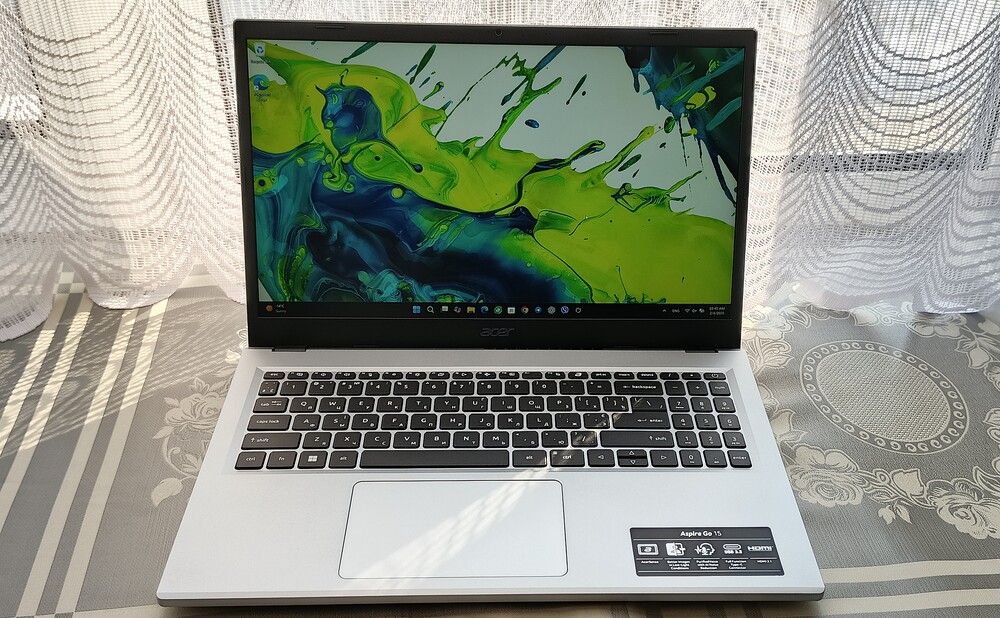
This is a laptop for users who value results over flashy looks. It handles work scenarios, studying, remote tasks, multitabbing in a browser, documents, and video playback with ease. The system runs stably, without overheating or excessive noise, and the battery lasts a full day under moderate use.
At the same time, its weaknesses are completely transparent and not hidden. The display is mediocre and unsuitable for graphics work or demanding multimedia. The keyboard lacks backlighting, which may be important for some users, and the speakers provide only basic sound – enough for calls and videos, but nothing more. These are expected compromises for a device in this class.

That’s why the Acer Aspire Go 15 is a logical choice for anyone looking for a reliable work tool without overpaying for design, gaming features, or marketing gimmicks. It’s not a laptop meant to impress at first glance, but one that quietly gets the job done day after day – and that is its main strength.
Advantages
- Understated, versatile design without unnecessary visual experiments
- Compact dimensions and light weight, convenient for everyday carrying
- A sufficient set of relevant input/output ports, taking into account the budget segment
- IPS display with acceptable image quality for everyday tasks
- Sufficiently powerful mobile processor that runs cool
- Quiet cooling system with no noticeable throttling under load
- Excellent battery life in mixed usage scenarios
Disadvantages
- Keyboard without backlighting
- No biometric identification features.
Read also:
- Acer Swift Go 16 SFG16-72 Laptop Review: Excellent Performance and Solid Battery Life
- Lenovo ThinkPad Z13 Gen 2 Review: Reliable Business Ultrabook