© ROOT-NATION.com - Use of content is permitted with a backlink.
Today I’ll share my experience with the Acer Aspire 17 A17-51M-52RX, a versatile 17.3-inch laptop that combines a large display with well-balanced hardware.
The 17-inch laptop segment has long occupied a unique position in the PC market. On one hand, it remains one of the most versatile categories; on the other, it is among the most conservative. Development here is driven less by short-lived trends than by the practical needs and everyday workflows of real users. There is little room for ultra-thin designs, bold styling experiments, or headline-grabbing technologies, as such compromises often come at the expense of usability, thermal performance, or battery life.
Instead, buyers in this category consistently prioritize a different set of qualities: a spacious display for multitasking, solid performance without unnecessary excess, predictable system behavior, and sensible pricing. These machines are designed primarily as everyday productivity tools rather than showcases for the latest technology. Users expect reliability, ease of use, and dependable performance across common workloads – not innovation for its own sake.
The Acer Aspire 17 A17-51M-52RX fits squarely into this category. After spending time testing the laptop, I found it to be a well-rounded and thoughtfully designed device. In this review, I’ll take a closer look at its strengths, discuss where it performs particularly well, and share my overall impressions.
Read alsо: All Acer laptop reviews

TABLE OF CONTENTS:
Positioning and Price
It is worth noting that the Aspire series sits one tier above Acer’s entry-level Go lineup. It offers a more capable and feature-rich platform, with improved cooling, more powerful hardware, and a premium aluminum lid that enhances both durability and aesthetics.
The target audience is also considerably broader. The Aspire family is designed for users who regularly work in multitasking environments, including students, content creators, bloggers, office professionals, and anyone who relies on modern digital tools throughout the day. As a result, versatility remains the defining characteristic of the series. Whether used for studying, productivity, creative work, or everyday computing, the Aspire 17 is intended to deliver a balanced and dependable experience across a wide range of workloads.

Before diving into the hardware, it is worth considering the broader context: who actually chooses a 17-inch laptop today, and why. This is far from the most popular form factor, and its appeal is limited by practical considerations. Portability is only relative – at 2.09 kg and measuring 402 × 257 mm, carrying it in a backpack every day is more of a compromise than a convenience. Even so, the segment continues to attract a well-defined audience: users looking to replace a desktop PC with a single device, as well as those who simply prefer the comfort and productivity of a larger display. The Acer Aspire 17 A17-51M-52RX is clearly designed with these use cases in mind. Rather than competing with ultrabooks on portability or gaming laptops on raw performance, it occupies a focused and well-defined niche.
The Aspire 17 is an affordable 17-inch laptop that combines a spacious display with respectable battery life, making it a practical desktop replacement for users who do not require workstation-class performance. Its energy-efficient Intel Core 5 120U processor is not intended for demanding computational workloads, but it delivers more than enough performance for everyday productivity, web browsing, office applications, and media consumption. The integrated Intel Xe Graphics can comfortably handle older games and lightweight graphics workloads, although it is not designed for modern AAA gaming.
One of the laptop’s stronger selling points is its 16 GB of LPDDR5 memory. Given the current state of the memory market and the device’s price segment, this feels like a generous configuration rather than the bare minimum. The inclusion of a 512 GB SSD is equally welcome, providing sufficient storage for most users without requiring an immediate upgrade.

As mentioned earlier, the review unit I tested – the Acer Aspire 17 A17-51M-52RX – is configured with an Intel Core 5 120U processor, 16 GB of dual-channel LPDDR5 memory, a 512 GB NVMe SSD, and a 17.3-inch Full HD IPS display. Overall, the hardware configuration appears well balanced for the workloads it is intended to handle. At approximately $600, the laptop sits squarely in the mid-range segment, where competition is particularly strong. That naturally raises two important questions: does it justify its asking price, and is a 17-inch laptop still a compelling choice in 2026? Those are the questions this review aims to answer.
Acer Aspire 17 A17-51M-52RX Specifications
- Model: Acer Aspire 17 A17-51M-52RX
- Display: IPS, 17.3”, 1920×1080, 16:9 aspect ratio, 60 Hz refresh rate
- Processor: Intel Core 5 120U
- RAM: 16 GB LPDDR5
- Storage: 512 GB
- Graphics: Intel Xe Graphics
- Ports: HDMI, 1×USB-C 4, 2×USB-A 3.2 Gen1, 3.5 mm combo jack
- Wireless: Wi-Fi 6E + Bluetooth 5.1
- Camera: Full HD
- Audio: 2-speaker sound system and microphone
- Keyboard: Island-style keys with white backlighting
- Battery and charging: 50 Wh, 65 W power adaptor
- Dimensions: 402×257×18 mm
- Weight: 2.09 kg
What’s in the Box?
The packaging of the Acer Aspire 17 makes no attempt to impress before the laptop is even powered on. Instead, it follows a purely functional approach. The box is made from recyclable cardboard, features minimal printing, and avoids unnecessary plastic or decorative elements that would only increase its environmental footprint. It is a good example of modern, sustainability-focused packaging – simple, practical, and designed to protect the device during transport rather than serve as a marketing statement.

Inside the box, the laptop is securely held in place by molded cardboard inserts made from recyclable materials, while the power adapter and charging cable are stored in a separate compartment. Everything is tightly packed with virtually no unnecessary empty space, minimizing the risk of damage during shipping and reflecting a well-thought-out, practical packaging design.

The package contents are equally straightforward: the laptop itself, a 65 W power adapter, and a standard AC power cable. There are no unnecessary plastic adapters, bundled accessories, or superfluous extras – just the essentials required to get the device up and running.

The power adapter itself is relatively compact for a 17-inch laptop, making it easy to carry without taking up much space in a backpack. That said, the power cable could have been a bit longer. In situations where the nearest outlet is some distance from the workspace, its limited length can occasionally be inconvenient.
Another point worth noting is the absence of a USB-C charger in the box, despite the laptop featuring a USB-C port. In practice, this leaves users with two options: continue using the bundled power adapter or purchase a compatible USB-C charger separately. Acer has clearly chosen to keep the standard package simple, avoiding additional cost or complexity while leaving the flexibility of USB-C charging as an optional convenience.
Read also: Acer Aspire Go 15 AG15-71P Review: Affordable Laptop for Study and Everyday Use
Chassis and Ergonomics: An Aluminum Lid with Practical Compromises
The design of the Acer Aspire 17 A17-51M-52RX follows what can best be described as classic business minimalism. There are no flashy accents, aggressive styling cues, or attempts to stand out through bold aesthetics. Finished in a muted metallic gray with clean lines and understated proportions, the laptop immediately conveys its purpose: this is a productivity-focused machine rather than a showcase of industrial design.

Surprisingly, that restraint is one of the laptop’s strengths. Rather than trying to imitate a premium device with glossy accents, decorative lighting, or gaming-inspired styling, the Aspire 17 is honest about what it is. Its design reflects its intended purpose: a practical, dependable laptop built for everyday productivity rather than visual spectacle.

The display lid is made of aluminum, which contributes both to the chassis rigidity and to the overall perception of quality. It exhibits very little flex under pressure and gives the impression of being solid and durable. In contrast, the keyboard deck and bottom panel are constructed from plastic. This is a common compromise in the mid-range segment, allowing Acer to keep the price competitive without significantly affecting the laptop’s everyday durability or user experience.

The quality of the plastic components deserves positive recognition. The surfaces feel well finished and practical, the materials meet the expectations for this class of device, and the individual chassis elements are fitted together with precision. As a result, the laptop never gives the impression of being flimsy or poorly built during everyday use. There are no noticeable creaks, excessive flex, or panel gaps, and the overall build quality is fully in line with the standards expected from a well-made mainstream notebook.

One of the most notable aspects of the chassis is its thickness. For a 17.3-inch laptop, the Aspire 17 remains surprisingly slim at just 18 mm. Considering the size class, this is a genuinely restrained profile, and it helps the device feel less bulky than many traditional desktop-replacement laptops.

Achieving such performance figures with such a large display diagonal is no mean feat, so this can be seen as a particular achievement on the part of Acer’s engineers.

As a result, the laptop appears more modern and less bulky than many competing large workstation-class machines.

The display hinges provide sufficient rigidity and keep the screen securely positioned. Even during active typing or incidental bumps, the lid does not exhibit excessive wobble.

At the same time, opening the laptop with one hand is not possible – the base tends to lift together with the display. This is not a critical drawback, but it does to some extent indicate compromises in the design of the hinge mechanism.

The maximum opening angle is approximately 150°. For most working scenarios, this is more than sufficient, although models with full 180° opening are gradually becoming the new standard even in the mid-range segment.

The display bezels cannot be described as ultra-thin, but they do not look outdated either. At around 9 mm on the sides and 13 mm at the top, these are quite acceptable figures for a large laptop.

The display does not give the impression of being “embedded within a thick frame,” as was typical of models from several years ago, when large black borders around the panel visually increased the device’s overall footprint.

The cooling system design is also worth noting. Vent openings are located on the bottom panel and in the area above the keyboard. Hot air is exhausted to the rear and partially upward, rather than to the sides or directly toward the user’s hands.

This type of layout has long become a standard for quality office and multimedia laptops, as it helps maintain comfort during extended working sessions.
Overall, the chassis of the Acer Aspire 17 A17-51M-52RX leaves a positive impression. It does not rely on premium materials across the entire surface, but it combines an aluminum lid, quality plastics, solid structural rigidity, and relatively compact dimensions for a 17-inch form factor. This is a case where the manufacturer has set priorities wisely, avoiding spending the budget on decorative elements and instead focusing on practicality and everyday comfort.
Read also:Acer Aspire 7 A715-76G Laptop Review
Ports and connectivity
One of the traditional advantages of large multimedia laptops is their range of interfaces. Unlike many modern ultrabooks, where manufacturers often sacrifice ports in favor of extreme thinness, the Acer Aspire 17 A17-51M-52RX takes a more practical approach. Here, there is no constant need to rely on adapters or docking stations for connecting peripherals.

On the left side panel, there is a power connector, a full-size HDMI 2.1 port for connecting external monitors or TVs, a USB Type-A 3.2 Gen 1 port, as well as a USB Type-C port. The latter is particularly noteworthy, as it supports the USB4 standard and is compatible with Thunderbolt 4. For a mid-range laptop, this is a welcome addition, enabling the connection of high-speed external storage devices, docking stations, or additional displays via a single cable.

The right side of the chassis appears somewhat more modest, but it still includes all the essential interfaces. Users get a combined 3.5 mm audio jack for headphones or a headset, another USB Type-A 3.2 Gen 1 port, a pair of system status LED indicators, and a Kensington lock slot, which is useful in offices, educational settings, or public spaces.
Overall, the port selection can be described as well balanced. While modern premium ultrabooks are increasingly moving toward USB Type-C as a universal standard, with some models even eliminating traditional interfaces entirely, the Aspire 17 targets a different audience. It is a versatile laptop for work, study, multimedia tasks, and occasional entertainment, so the presence of full-size ports here is a logical and practical design choice.
As a result, the user gets exactly the set of interfaces that allows for comfortable use without additional adapters – which can already be considered a distinct advantage today.
Read also: Lenovo ThinkPad Z13 Gen 2 Review: Reliable Business Ultrabook
Keyboard and touchpad
One of the main advantages of a 17-inch laptop has traditionally been the space for a full-sized keyboard. The Acer Aspire 17 A17-51M-52RX fully takes advantage of this, offering not only a comfortable main key layout but also a dedicated numeric keypad (NumPad). For users who regularly work with spreadsheets, financial data, or large volumes of numerical input, this feature can be significantly more valuable than additional CPU clock speed or a few extra gigabytes of RAM.

The keys are sufficiently large and well-spaced, so switching from a desktop keyboard does not require a long adaptation period. The key travel is typical for modern laptops: presses are firm, with moderate tactile feedback and no sense of excessive softness. During extended typing sessions, the keyboard performs well – it remains comfortable, reduces hand fatigue, and keeps accidental keystrokes to a minimum even after several hours of continuous use.
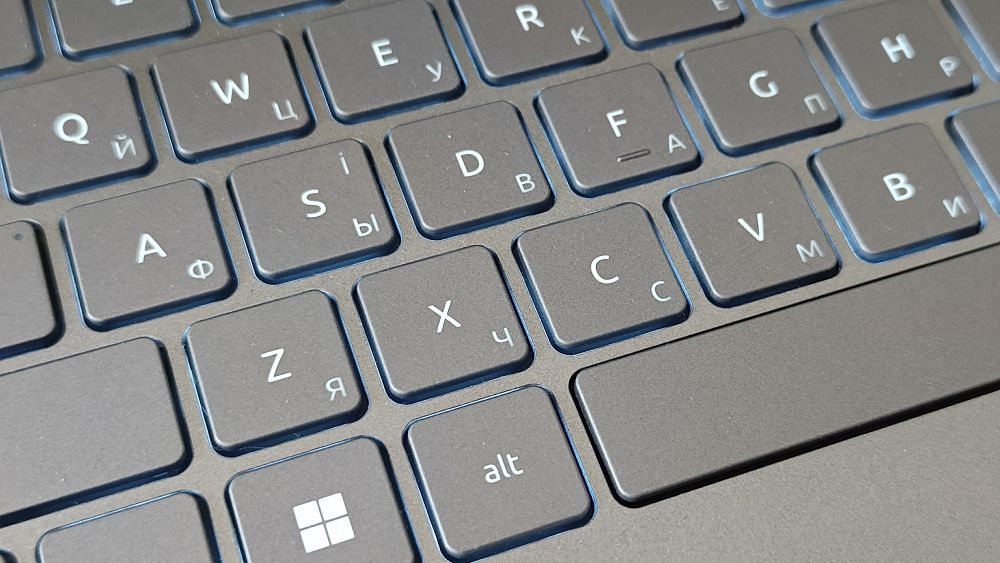
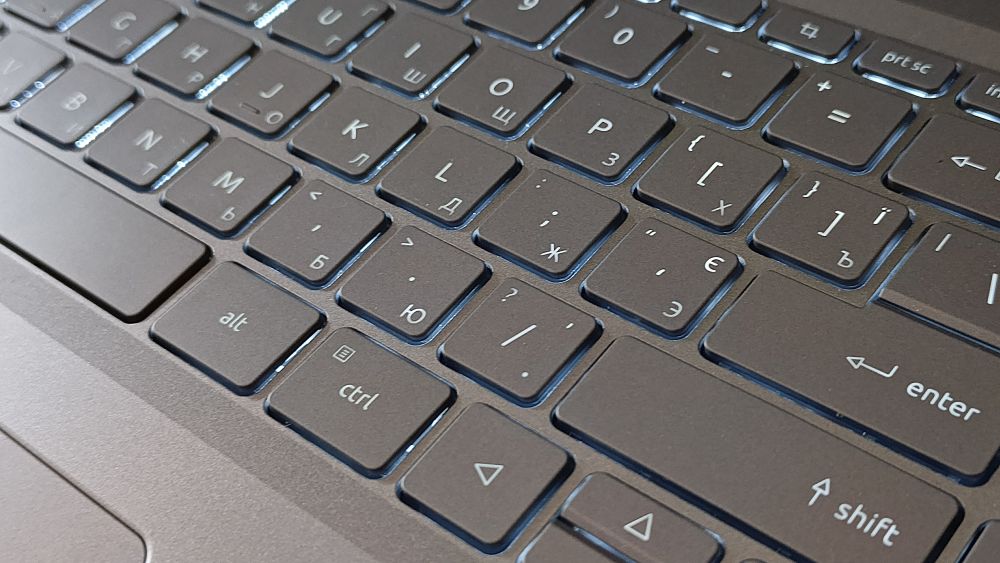
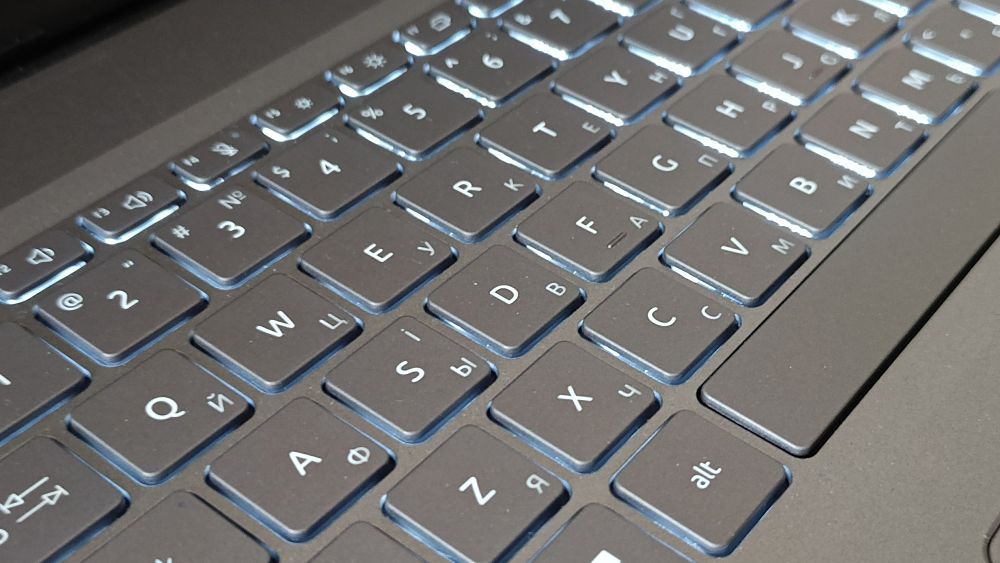
A keyboard backlight is also provided. It uses a restrained white color scheme and offers two brightness levels. There are no RGB effects or decorative elements, but for evening work or environments with limited lighting, this solution is more than sufficient.
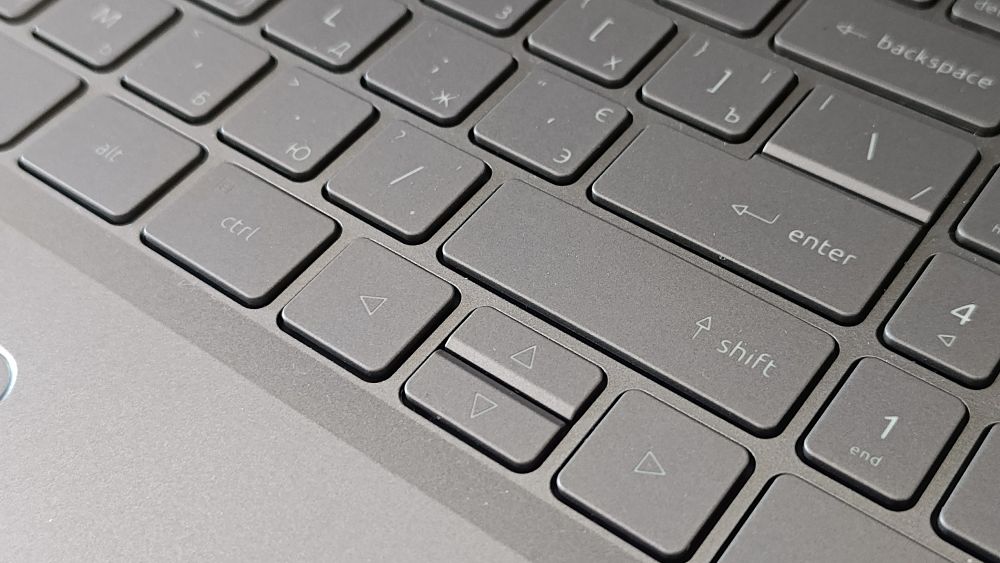
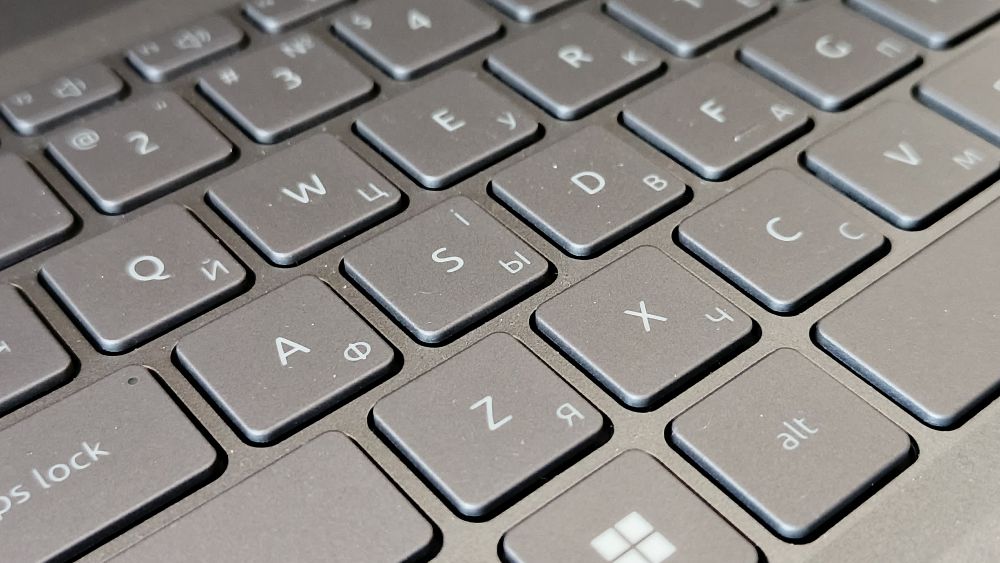

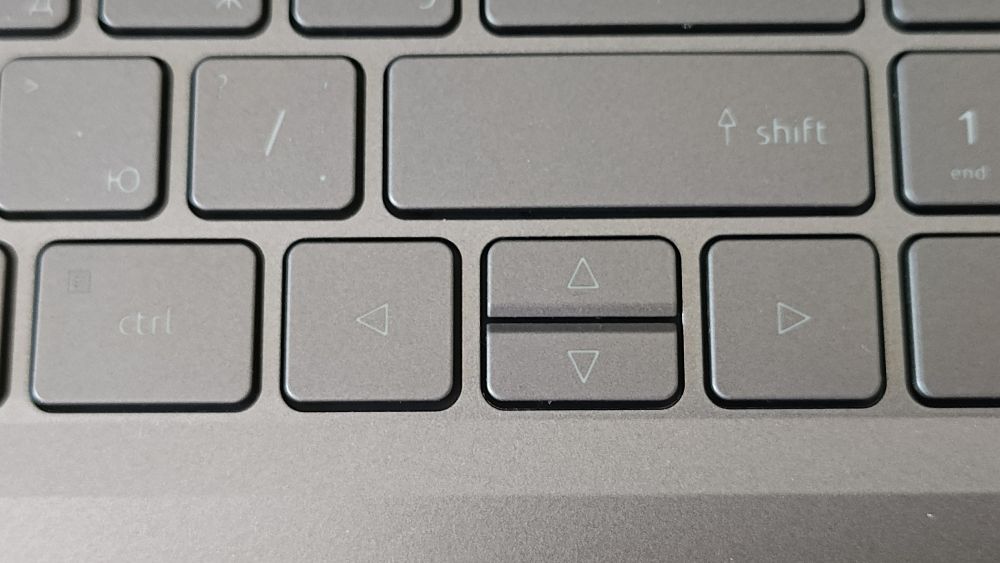
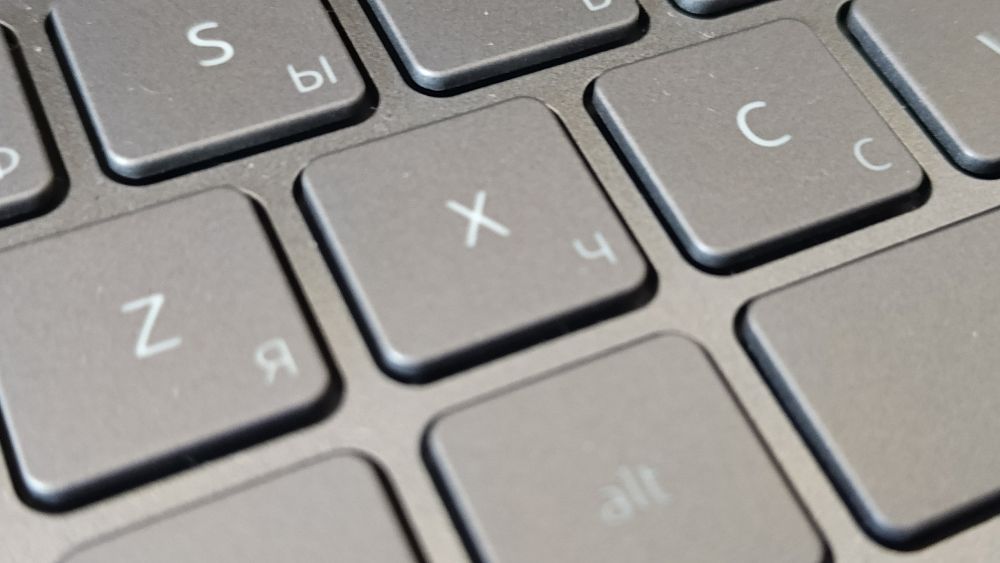
The laptop uses an ANSI layout with a long left Shift key and a single-row Enter key. This arrangement has its advantages, but it also involves certain compromises. In particular, the arrow key block is partially integrated into the main keyboard layout, and the right Shift key is somewhat shorter than ideal. For most users, this requires only a few days of adaptation, although those accustomed to a more traditional isolated navigation cluster may notice this characteristic immediately.

The power button is located in the upper-right corner of the keyboard area, next to the function keys. It is sufficiently separated from the main control elements, so accidental presses should be rare. However, this possibility cannot be completely ruled out, especially during the first days of use.

The touchpad is also well matched to the laptop’s overall dimensions. Its size is 12.7 × 7.7 cm, providing enough space for comfortable use of Windows gesture controls. The surface is smooth with good finger glide, and multitouch gestures are handled correctly. Clicks are accompanied by a clear mechanical feedback without excessive stiffness.
In everyday use, the touchpad performs reliably, although in terms of pointing precision it still falls behind a quality external mouse. This is not a critical drawback, but rather a typical characteristic of most laptops in this class.
A fingerprint scanner integrated into the upper-left corner of the touchpad also deserves attention. Its mere presence is a welcome addition for a mid-range device, as it enables quick access to Windows Hello. However, its placement raises some concerns. During use, it can be accidentally touched by the palm, while deliberate authentication sometimes requires fairly precise finger placement on the relatively small sensing area. Overall recognition accuracy is good, although in terms of speed and consistency the sensor does not match the best solutions found in higher-end business laptops.

Overall, the keyboard and touchpad leave a positive impression. The large 17-inch form factor is what enables Acer to offer a comfortable workspace for typing, document editing, and working with spreadsheets, which for many users will become one of the key arguments in favor of this model.
Read also: Dream Machines RG4050-17UA29 Laptop Review
Display
The Acer Aspire 17 A17-51M-52RX is equipped with a 17.3-inch IPS panel featuring a matte finish and Full HD resolution (1920×1080 pixels). The display uses a panel from BOE – one of the world’s largest LCD panel producers. In this particular configuration, it is the BOE-Hydis NV173FHM-N49. The matrix supports the proprietary ComfyView technology, which helps reduce reflections and improves usability in well-lit environments, making long work sessions more comfortable in typical indoor lighting conditions.

However, it is important to keep the device’s positioning in mind. This is a laptop in the pragmatic segment, so the installed panel is clearly focused on comfort in everyday tasks rather than on professional-grade graphics work. It delivers stable and well-balanced performance characteristics. Overall, this is a reliable everyday display for general use.
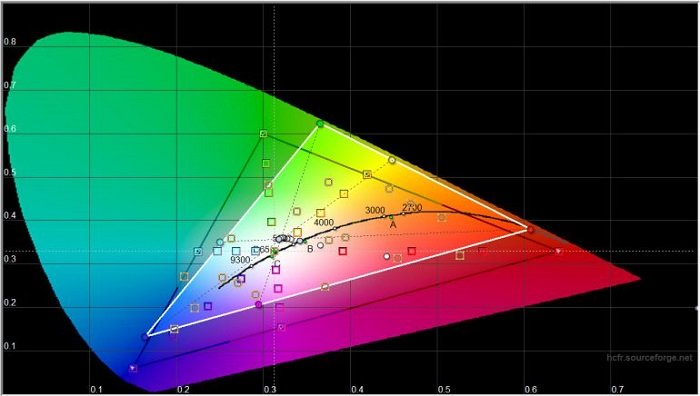
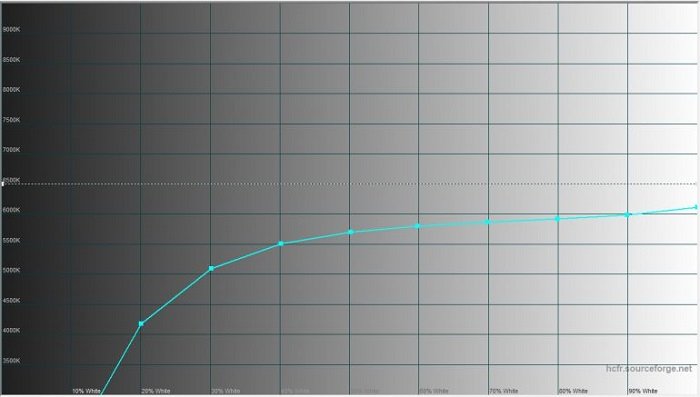
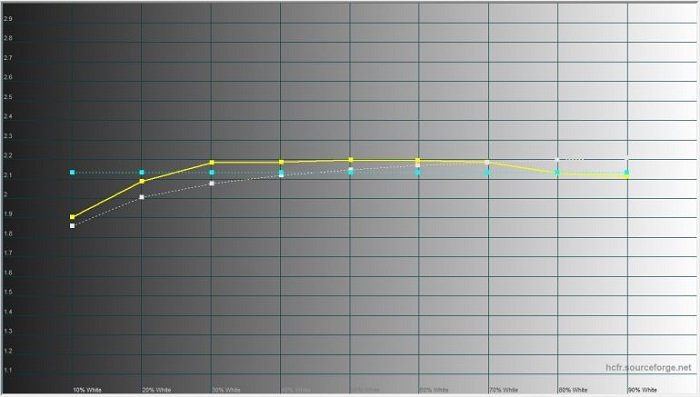
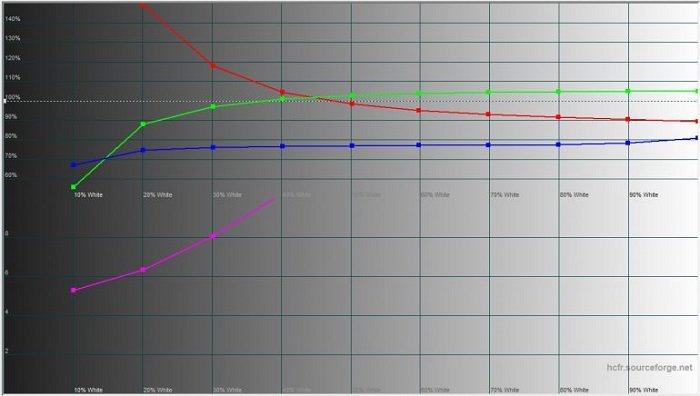
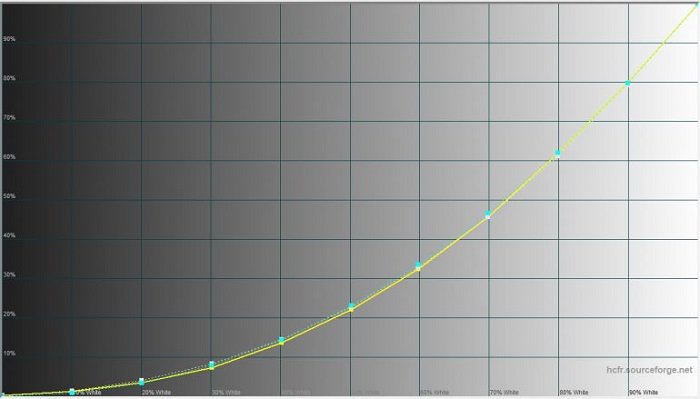
Based on subjective impressions and measurement results, the display shows a slightly warm color reproduction. The color temperature is around 6400 K, which is slightly below the reference 6500 K. As a result, the image has a mild shift toward warmer tones, with the palette noticeably leaning toward yellow, red, and green hues. For office tasks, web browsing, or video playback, this does not present any issues. However, users involved in photo editing or graphic design are unlikely to be fully satisfied with this level of color accuracy.

The maximum display brightness, according to measurements, is 208 cd/m². This is fully sufficient for indoor use. The laptop remains comfortable to work with at home, in the office, in classrooms, or in co-working spaces. However, under direct sunlight the brightness headroom becomes insufficient, and readability noticeably degrades despite the matte coating.
Contrast is also not among the display’s strong points, at around 1:475. This is adequate for everyday tasks, watching movies, series, and general video content, but not for professional image work. Black levels do not appear particularly deep, and shadow detail is less refined compared to more expensive IPS panels and modern OLED displays.

However, for its class, the display leaves a generally positive impression. Thanks to IPS technology, users benefit from good viewing angles without noticeable color distortion, while the matte coating effectively reduces most reflections.
After extended use of the Aspire 17, the display evokes somewhat mixed impressions. On one hand, it is a solid IPS panel without critical drawbacks, well suited for document work, web browsing, multimedia consumption, and light gaming. On the other hand, brightness, contrast, and color accuracy remain average even by the standards of its segment.

It is also worth mentioning the use of PWM (pulse-width modulation) for brightness control. For most users, this will not be an issue; however, individuals sensitive to flicker may experience eye strain during prolonged use at low brightness levels.
Overall, the display of the Acer Aspire 17 A17-51M-52RX can be described as a solid compromise solution. It does not offer outstanding specifications and is unlikely to be a deciding factor in purchasing the laptop, but it is fully adequate for the vast majority of everyday tasks. At the same time, it is important not to expect the level of brightness and color reproduction offered by more expensive models or laptops aimed at creative professionals.
Read also: Lenovo ThinkBook 16 G4+ IAP review: a good multimedia laptop
Multimedia capabilities
It is important to understand that this laptop clearly belongs to the multimedia segment, and from such devices users expect not only performance and ease of use for work tasks, but also good sound quality from the built-in speakers.

The sound performance of the Acer Aspire 17 A17-51M-52RX is generally at a good level. The laptop is equipped with a pair of speakers positioned at the corners of the bottom panel closest to the user. This layout allows the distance to the surface to act as a kind of acoustic chamber, adding a certain sense of volume to the sound.

The speakers operate at a fairly high volume and without noticeable artifacts. At maximum volume, I did not observe distortion, the chassis does not resonate or vibrate, and the sound is directed toward the user rather than downward or to the sides. At the same time, the overall audio quality remains average: it lacks depth, and the presentation is somewhat flat and slightly muffled. Nevertheless, for watching online movies or YouTube content, this level is more than sufficient.

As for the webcam, this is a standard solution for its class. It is clear that most users do not plan to record video blogs with it, and achieving a good image quality requires proper lighting. Even for basic Zoom video calls, users often need to adjust their lighting setup; otherwise, the image becomes practically unsuitable for comfortable communication. It is difficult to say when manufacturers will finally start paying more attention to this aspect, but the issue has consistently persisted across generations of devices.

Regarding wireless connectivity, the laptop is equipped with Bluetooth 5.1 and Wi‑Fi 6E, with support for the 2.4 GHz and 5 GHz bands, delivering high speed and stable performance when paired with a compatible router. In everyday use, there are no particular issues. Wi-Fi maintains a stable connection without dropouts and connects quickly, while Bluetooth operates predictably and without noticeable faults. Overall, the wireless experience is consistent and does not introduce any practical inconvenience during typical usage.
Read also: Acer Swift Go 14 AI Review: General-purpose laptop with OLED display
Performance

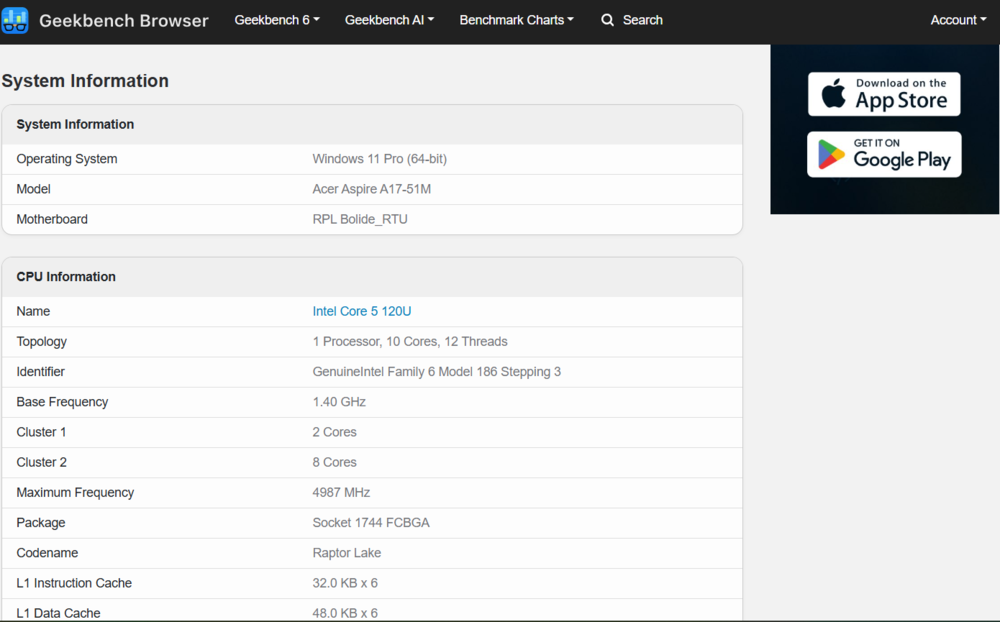
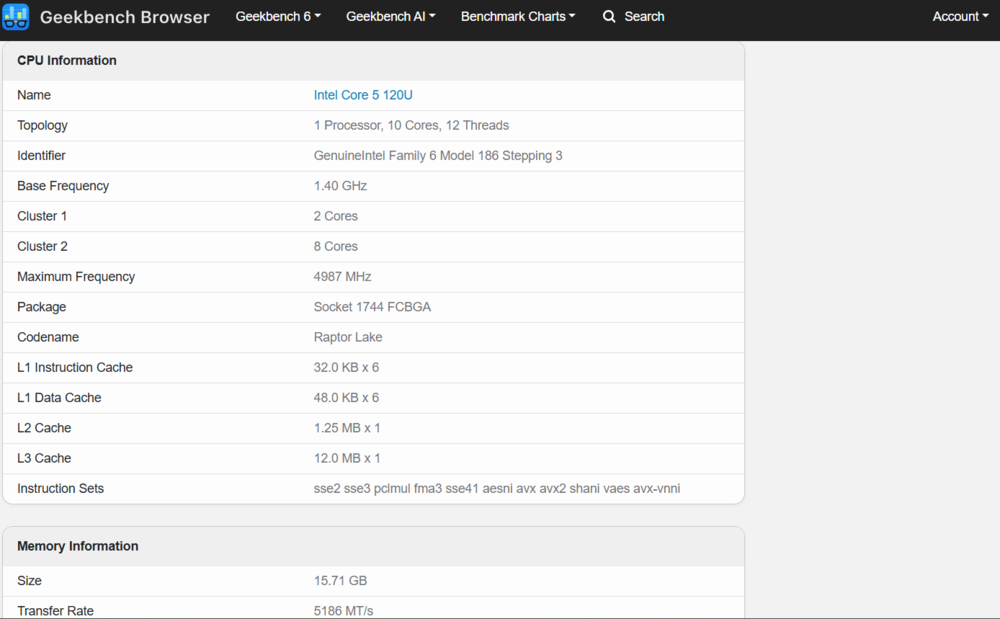
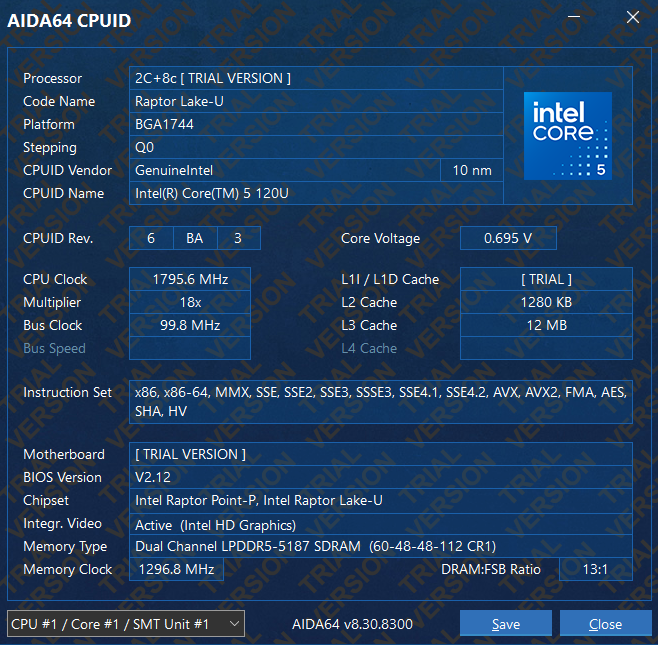
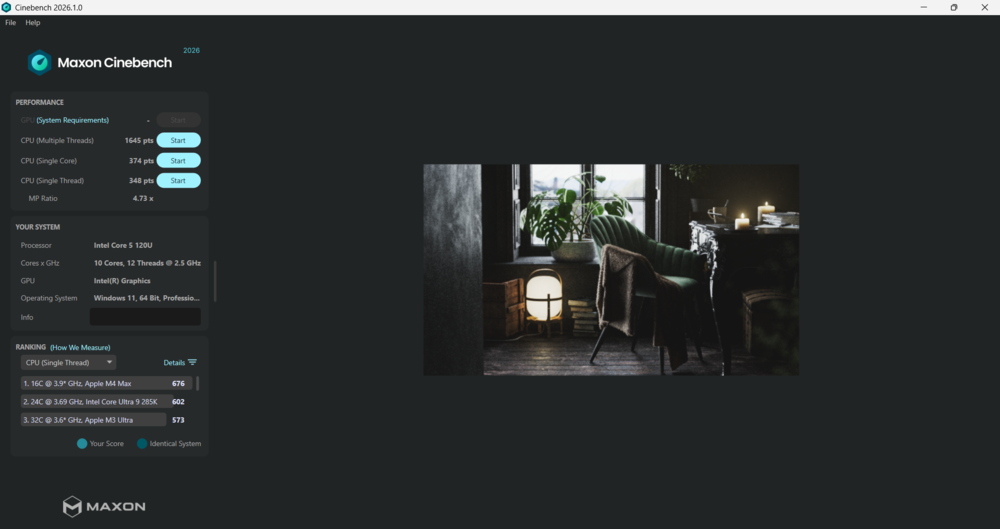
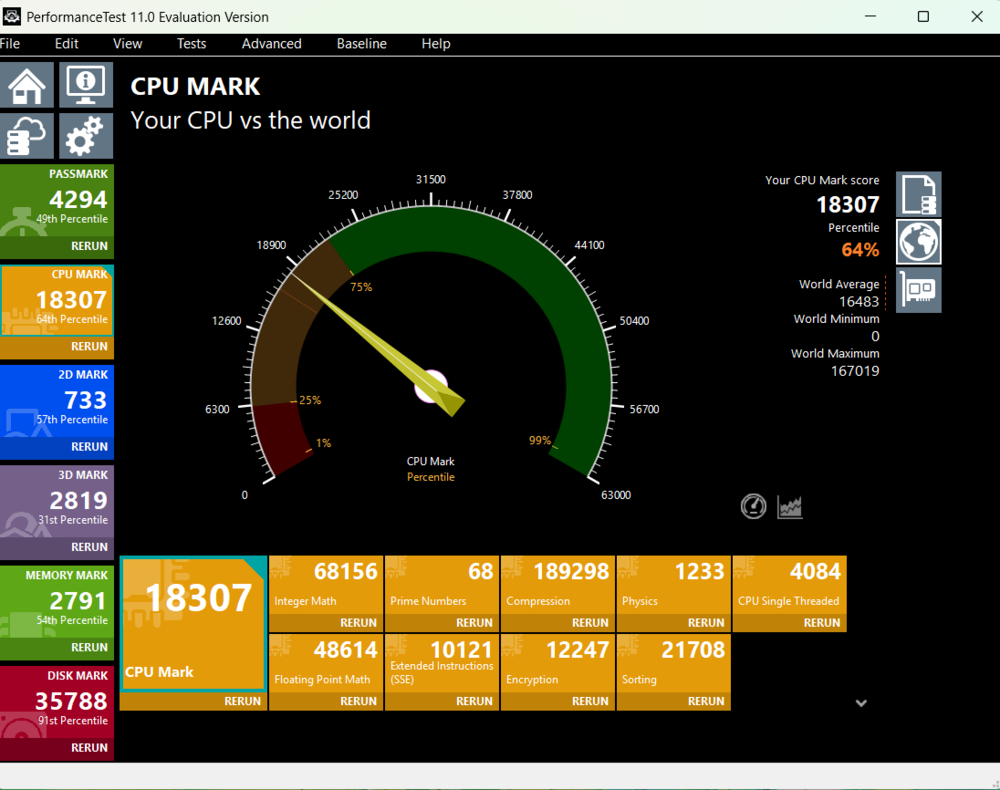
The Intel Core 5 120U is a U-series mobile processor primarily designed for energy efficiency and stable performance in thin and light systems. It features a hybrid configuration with 10 cores (2 performance cores and 8 efficient cores) and 12 threads, with a maximum turbo frequency of up to 5 GHz. This architecture is not aimed at peak performance, but rather at balancing responsiveness with power consumption.
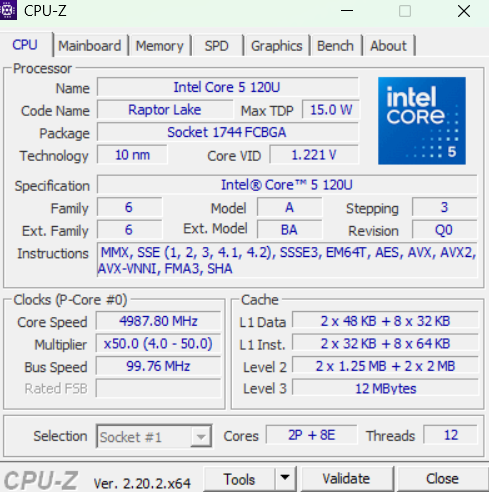
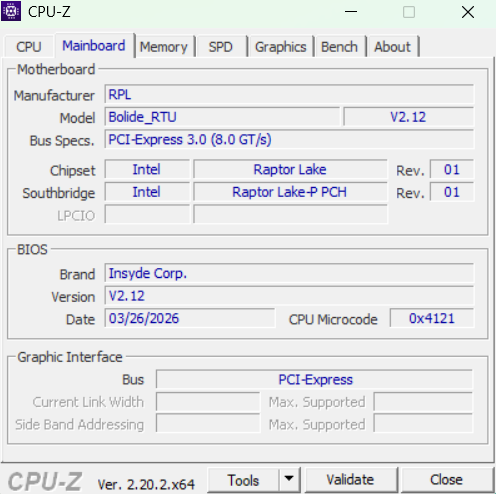
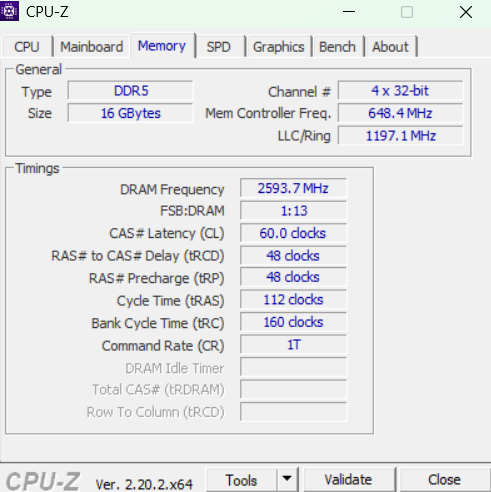
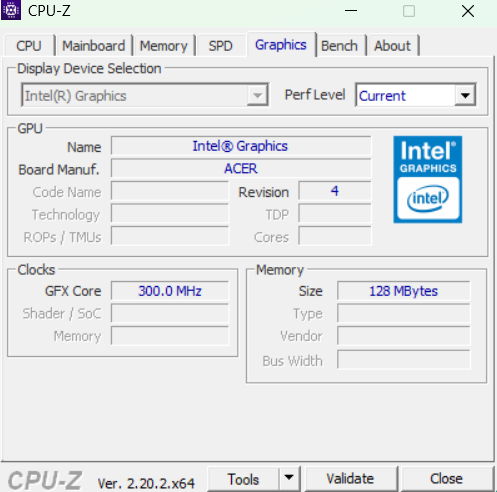
The stated maximum turbo TDP can reach up to 55 W, however in real-world usage on the Acer Aspire 17 A17-51M-52RX the processor quickly stabilizes at around 25–28 W, depending on the selected power profile. The difference between performance modes in everyday scenarios is minimal, so constantly switching profiles does not provide any noticeable improvement in speed.
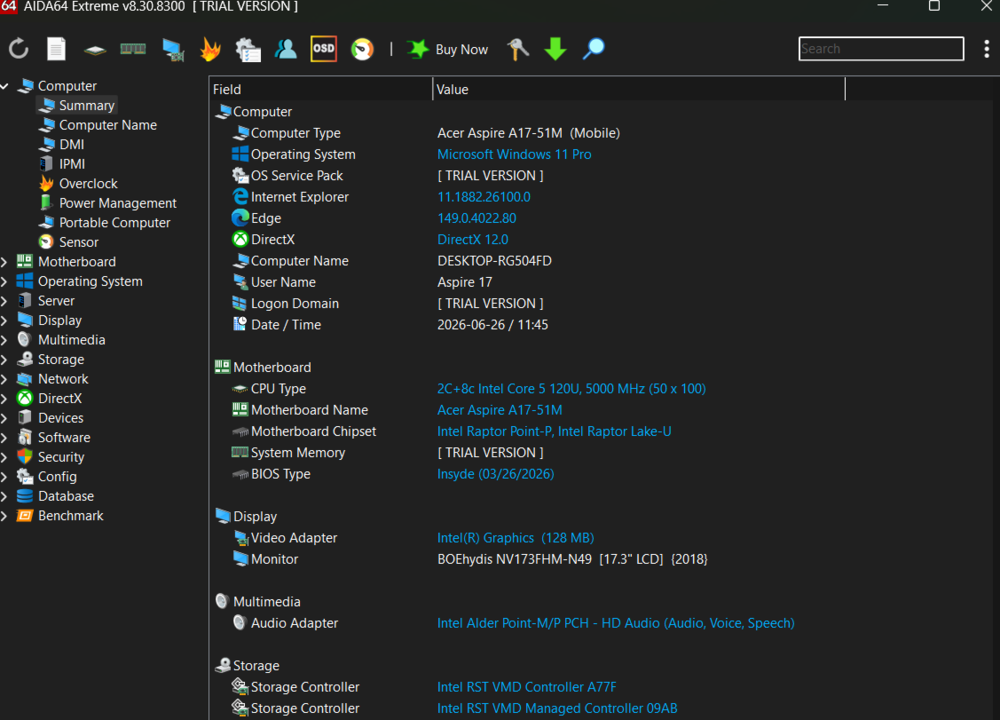
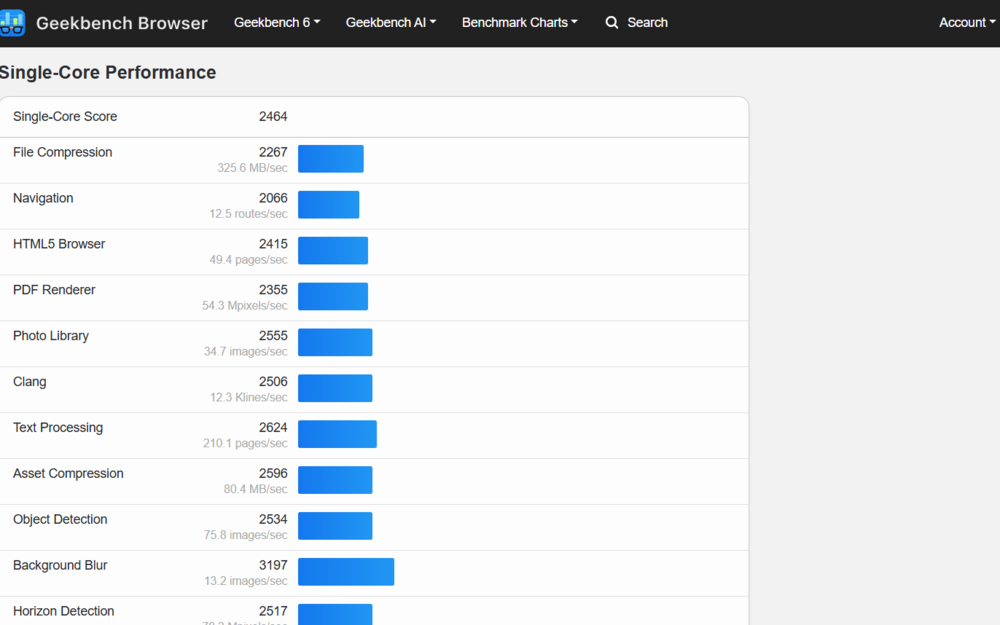
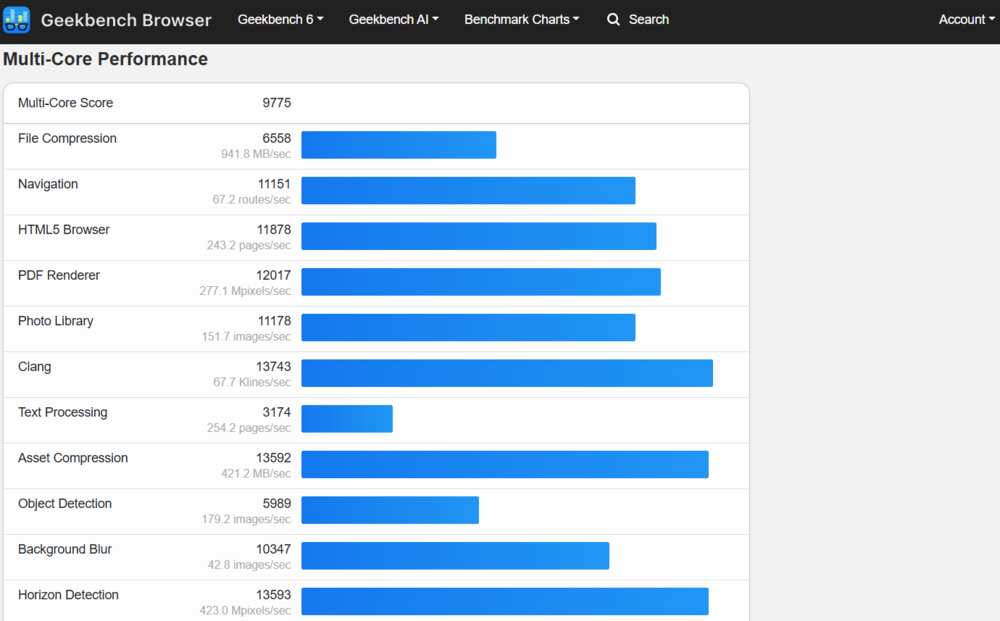
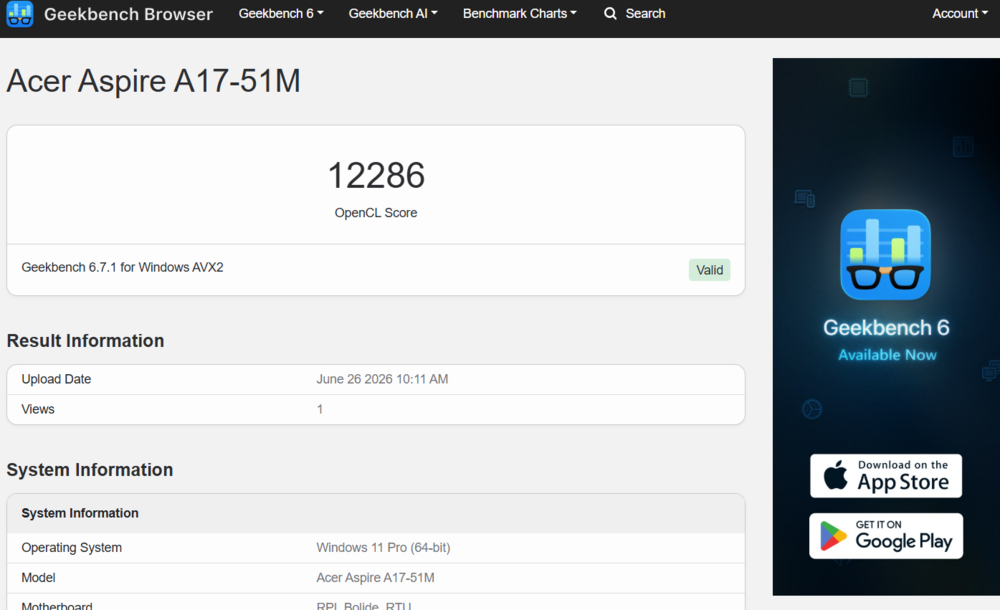
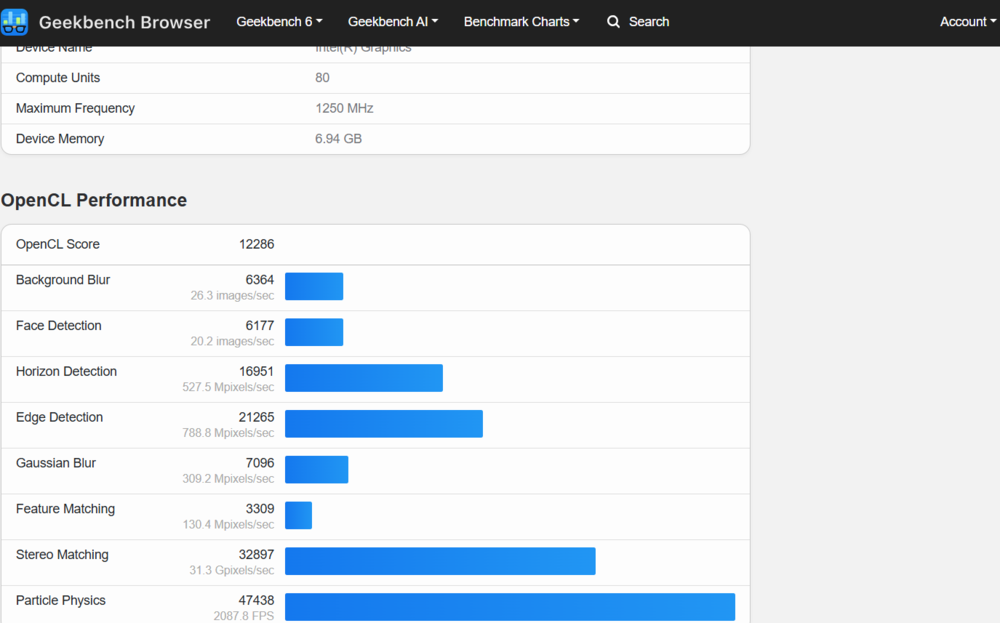
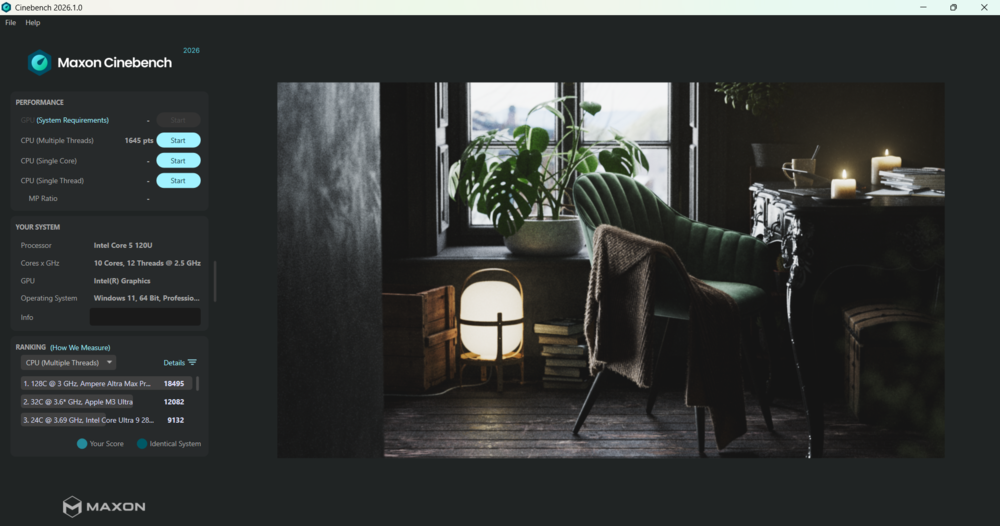
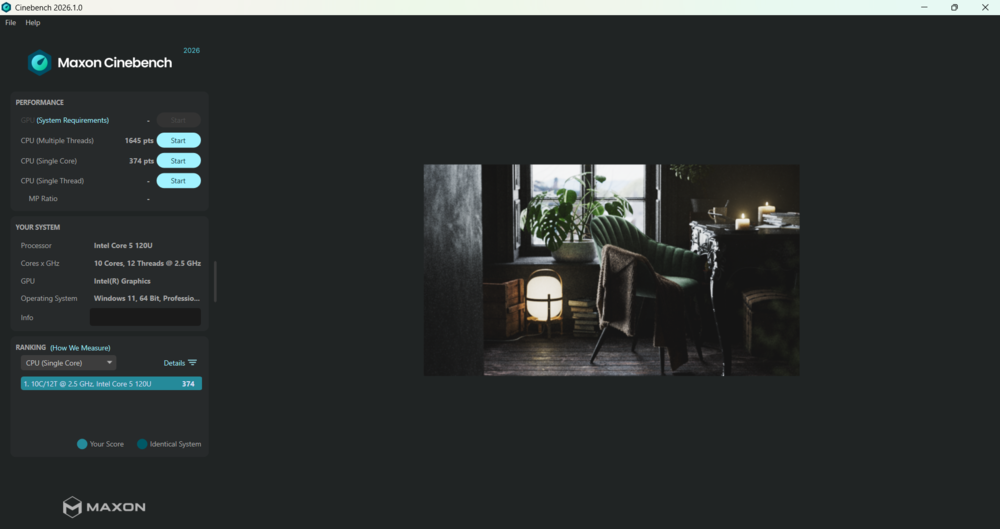
In synthetic benchmarks, the processor delivers results that are expected for its class: Cinebench 2026 shows 1,645 points in single-core mode and 7,468 in multi-core, while GeekBench 6 reports 2,464 and 9,775 points respectively. Overall, the figures indicate that the CPU handles typical office workloads, web browsing, multimedia tasks, and moderate multitasking without issues. At the same time, under sustained multi-threaded loads, a predictable drop in performance can be observed due to thermal and power constraints of the platform.

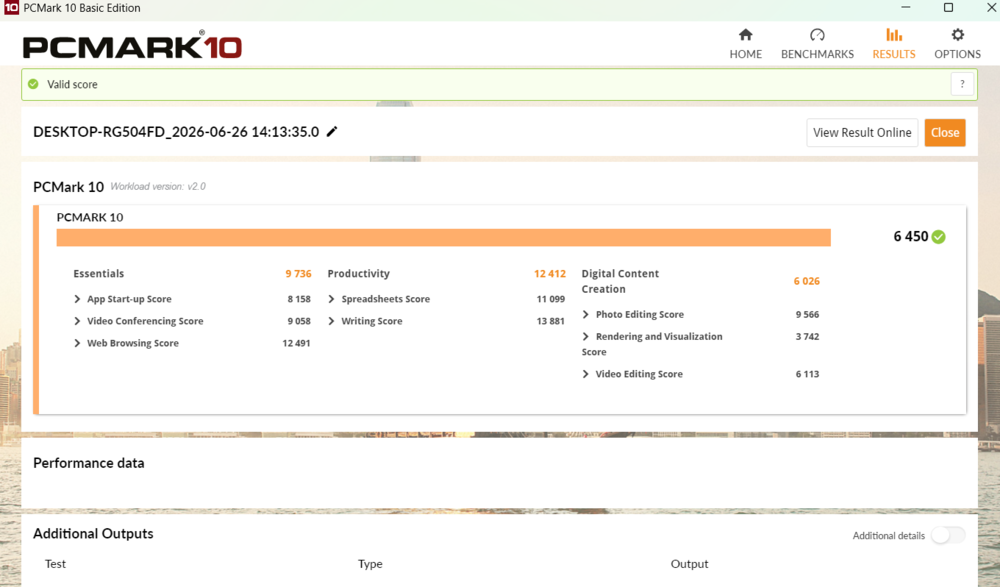
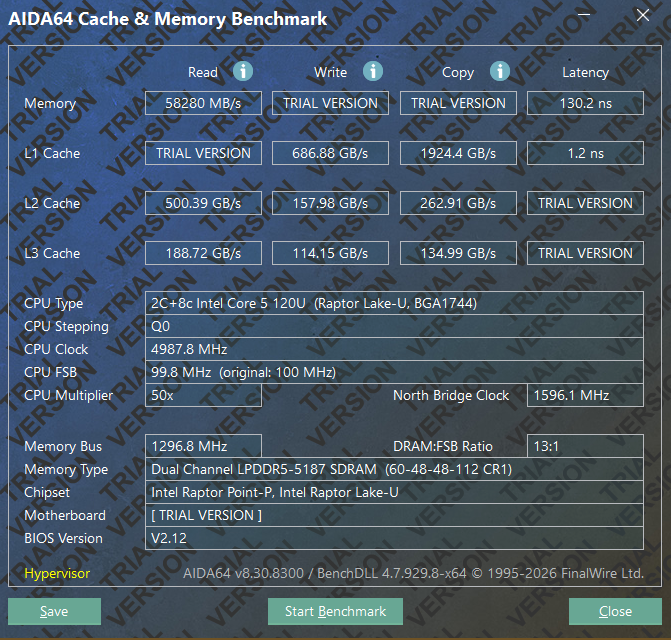
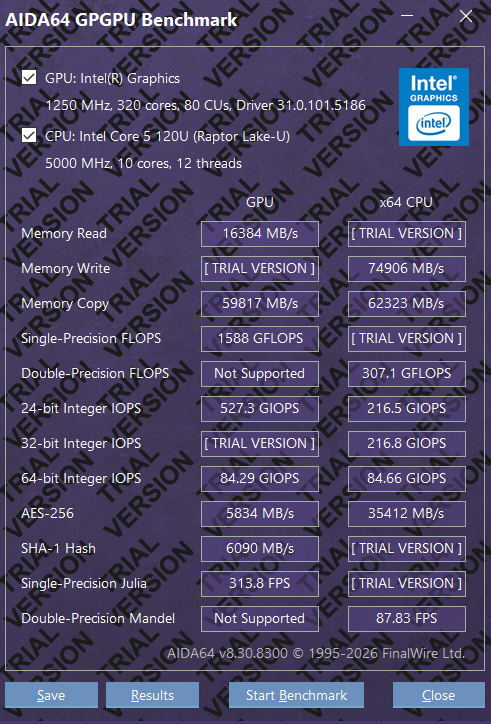
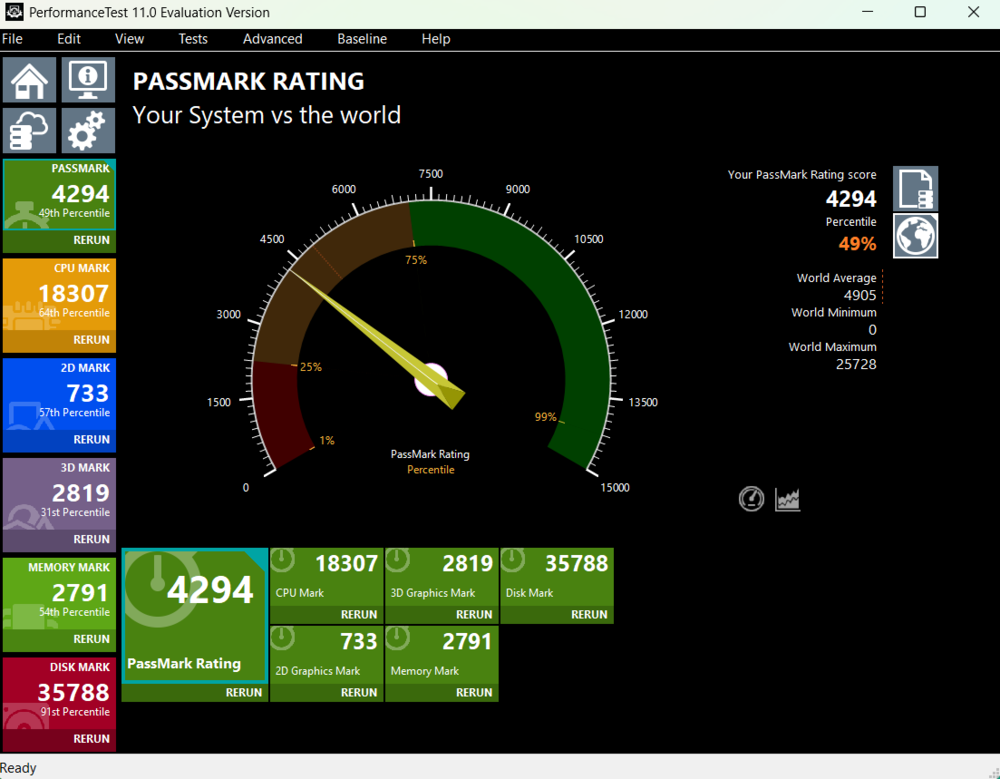
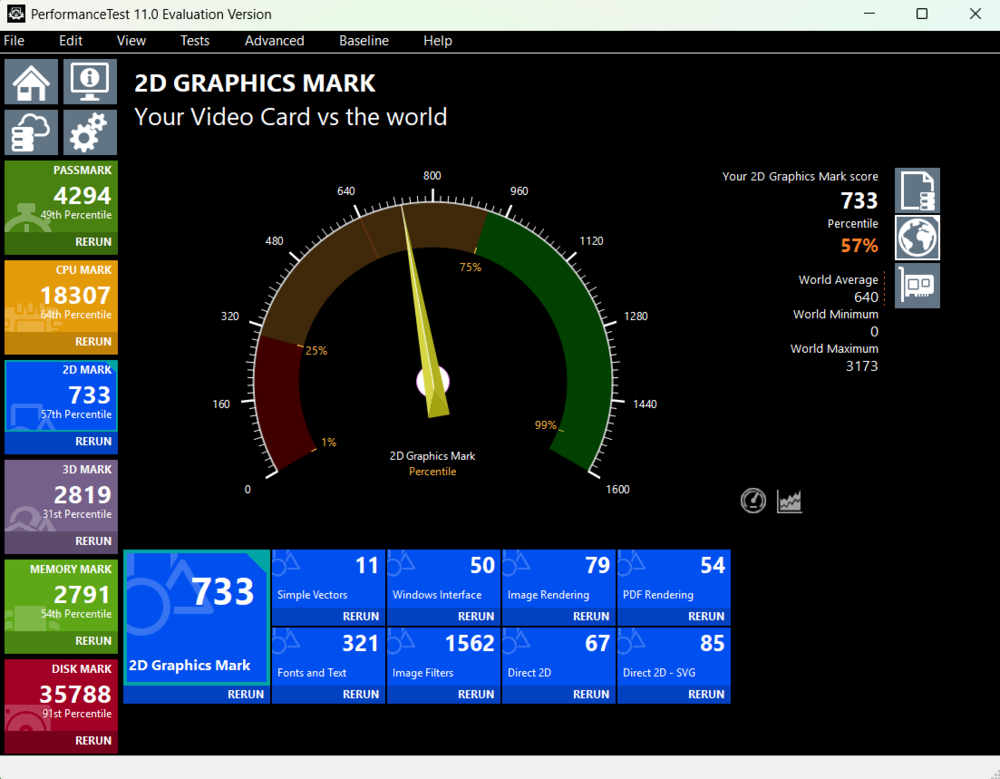
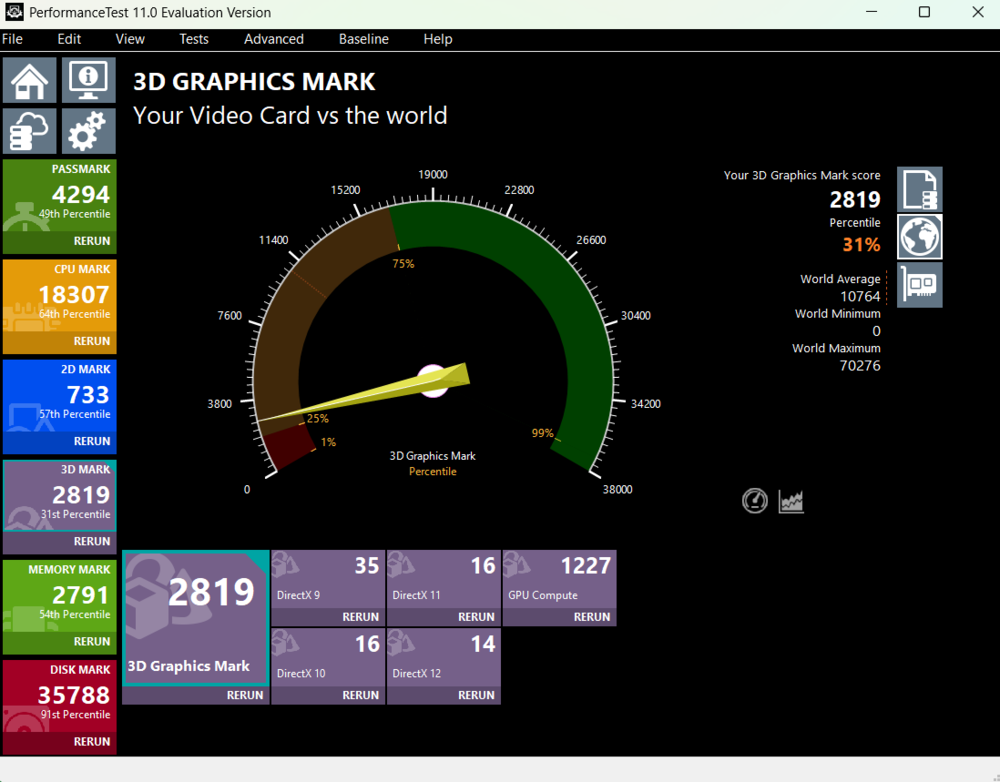
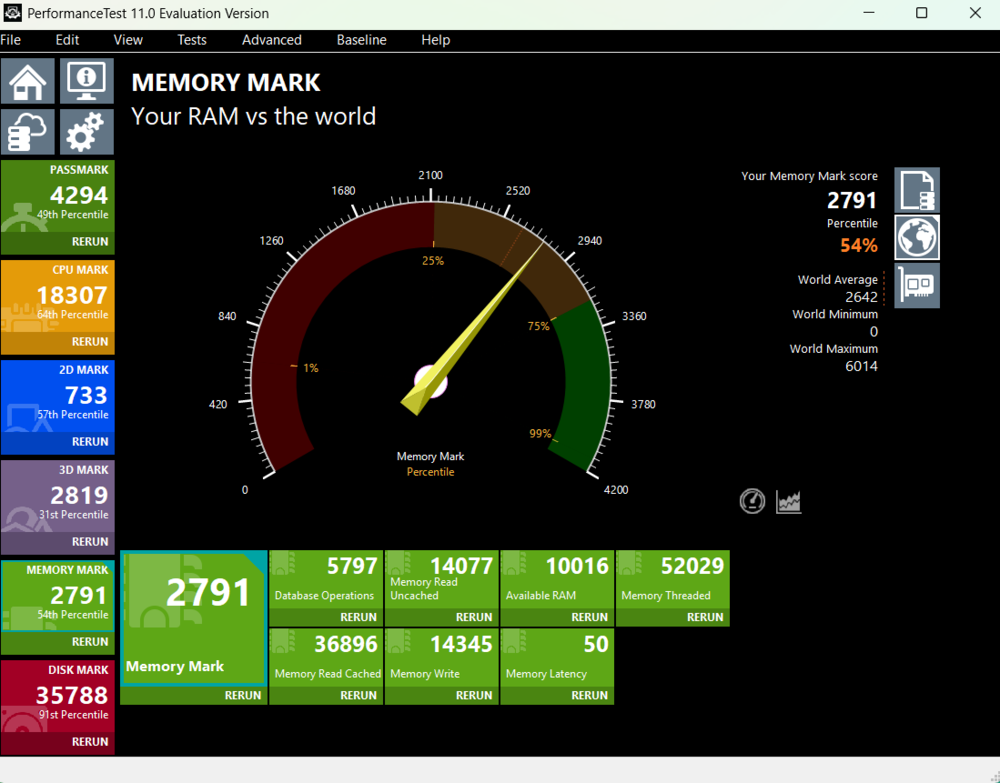
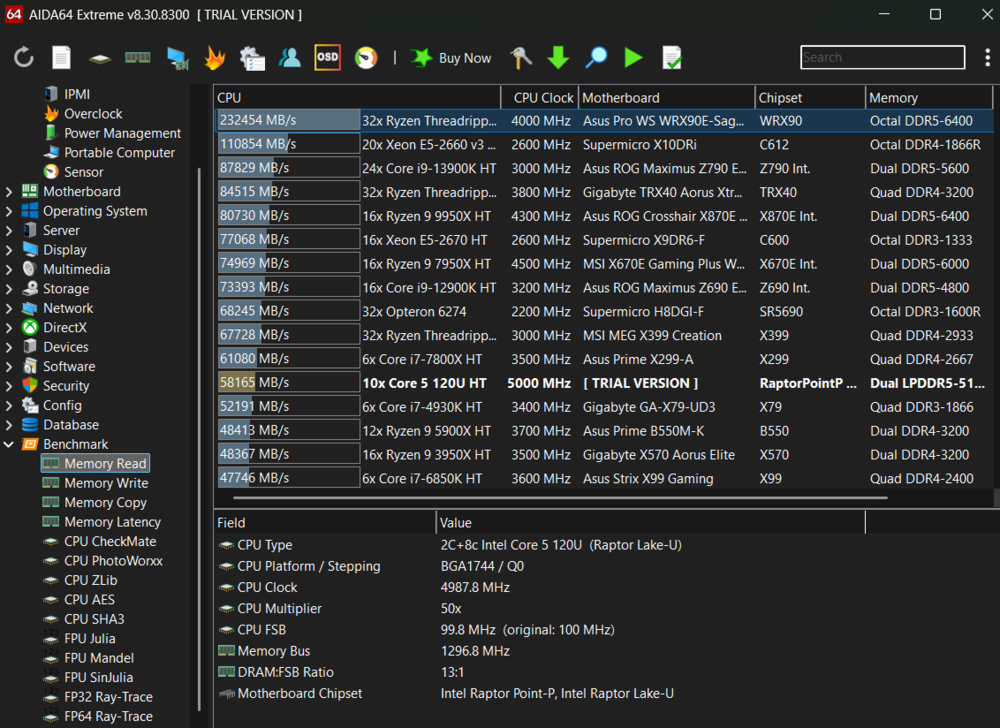
Separately, it is worth noting the stability of performance when switching between AC power and battery operation. In most scenarios, the drop in performance is minimal – around 3–5%. This applies to everyday tasks such as web browsing, office applications, and video conferencing, where no noticeable difference between power modes can be observed. For an Intel platform in this segment, this can be considered a positive characteristic, as many comparable systems show a more significant performance reduction in battery mode. The memory subsystem and storage also do not demonstrate any dependency on the power source.

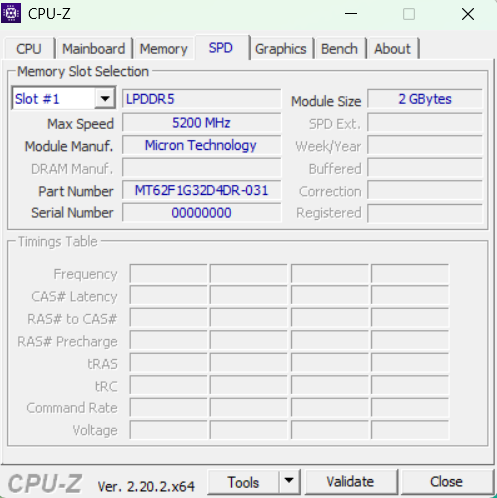
Graphics are handled by integrated Intel Xe Graphics. This is complemented by 16 GB of LPDDR5 RAM, which can be expanded up to a maximum of 32 GB. In practice, this configuration is sufficient for comfortable operation in most typical usage scenarios, including multitasking, office workloads, and multimedia tasks.
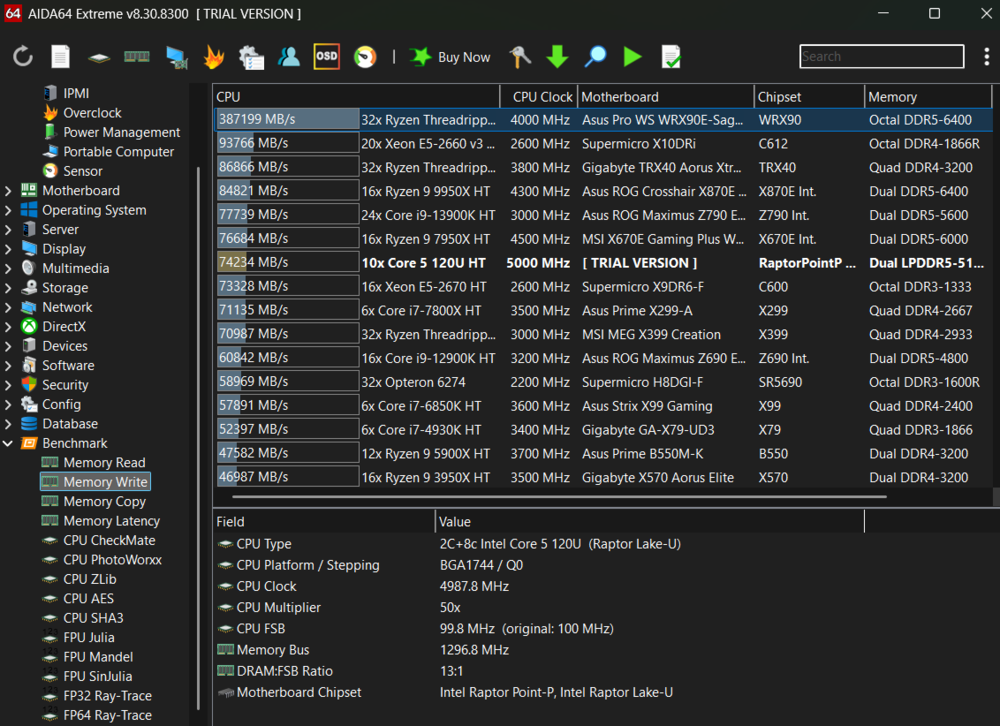
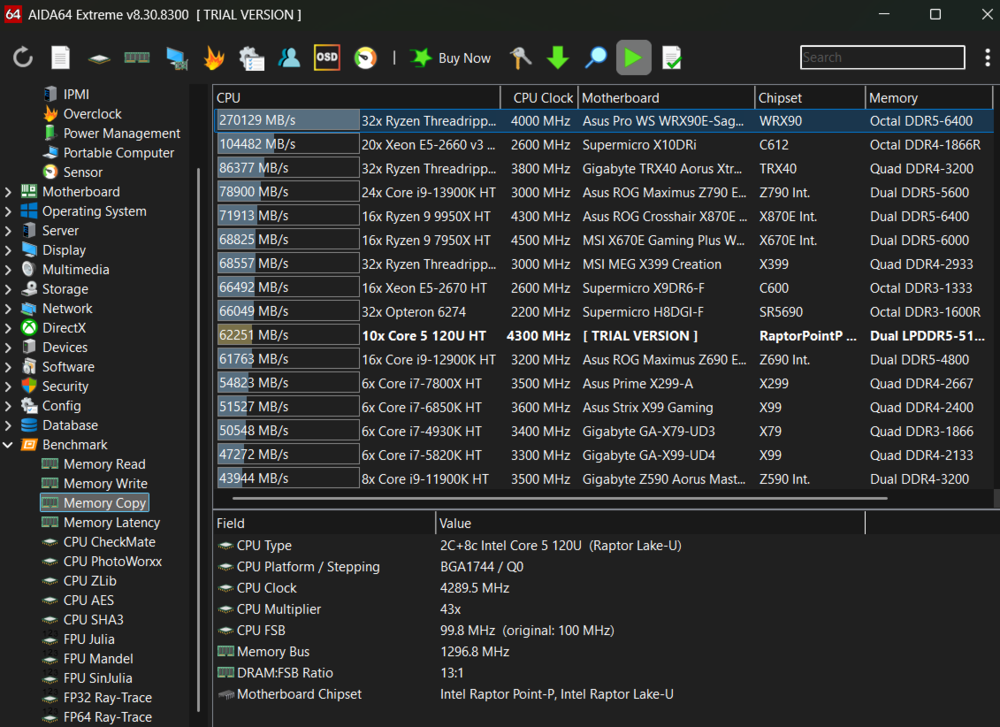
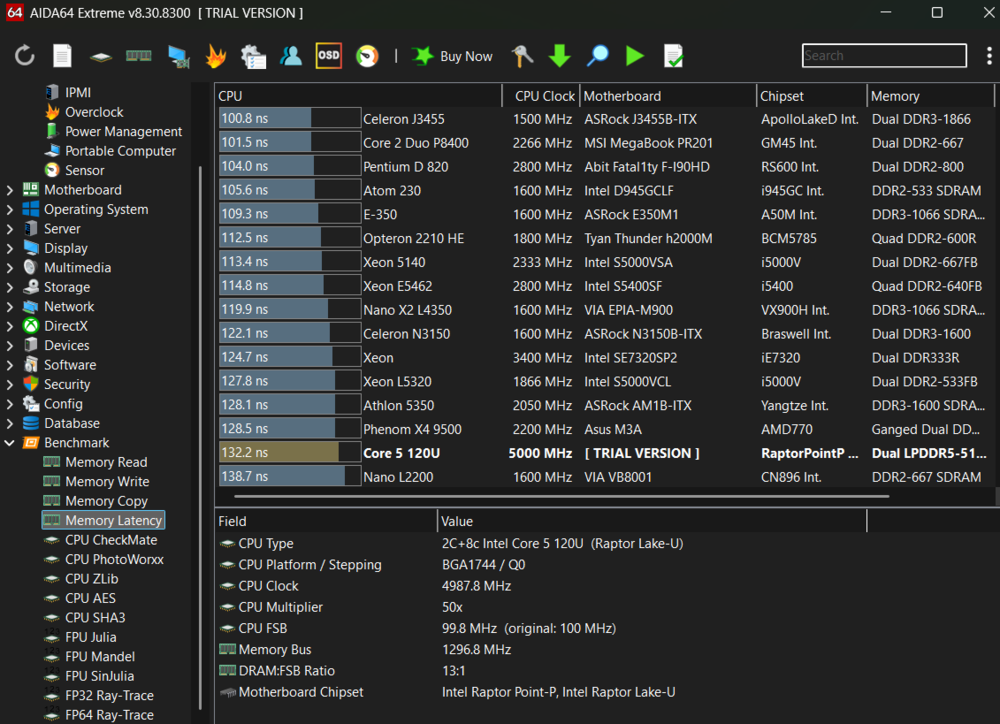
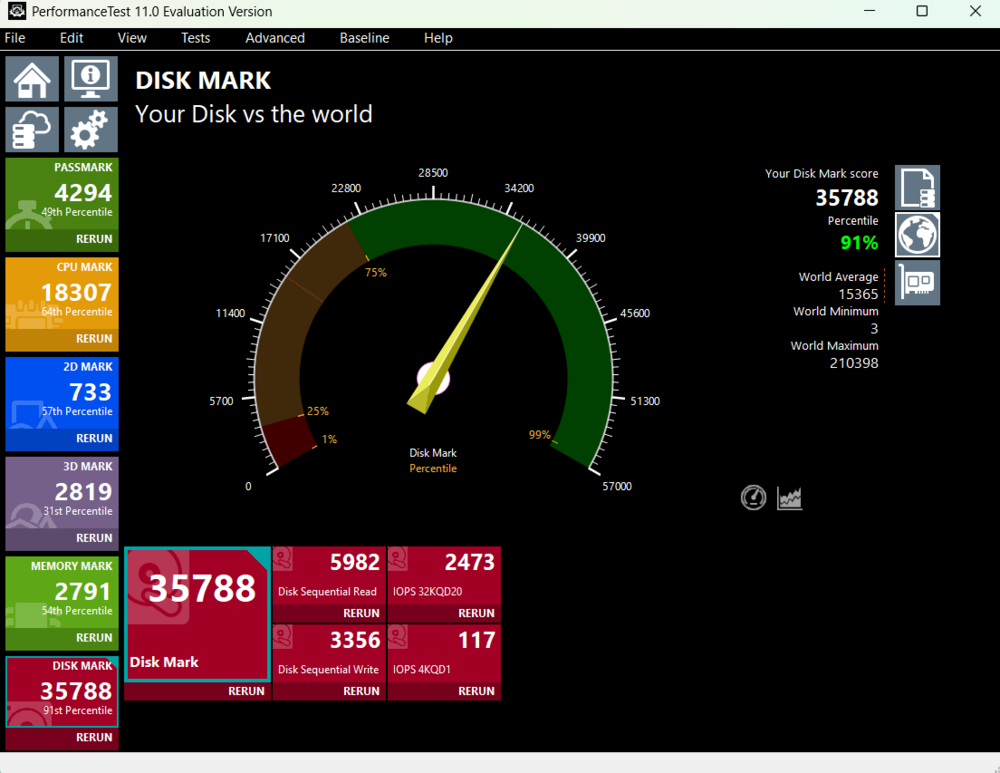
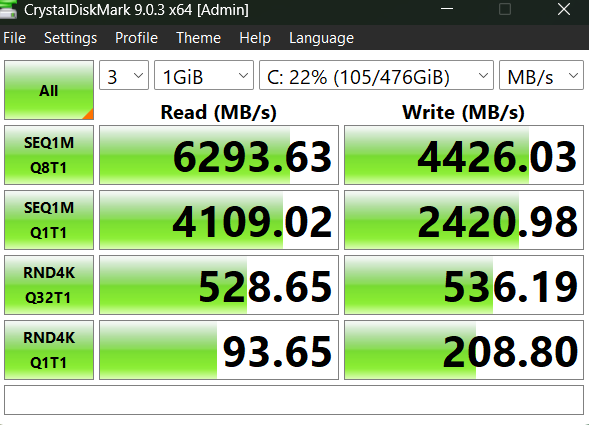
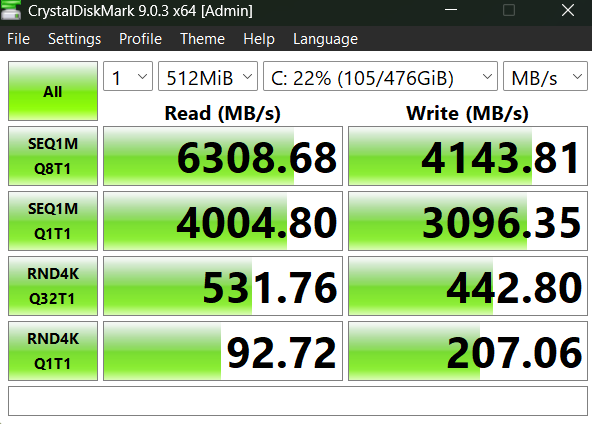
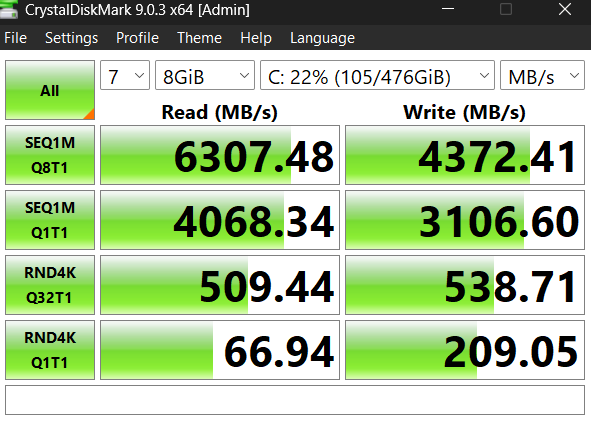
The storage subsystem is represented by a 512 GB WD PC SN5000S SSD with a PCIe 4.0 interface.

The storage system is represented by a WD PC SN5000S SSD with a PCIe 4.0 interface and 512 GB capacity. Sequential read speeds reach approximately 6,293 MB/s, while write speeds are around 4,426 MB/s. This level of performance significantly exceeds entry-level SSDs and effectively eliminates storage as a potential system bottleneck. As a result, operating system boot times, application launches, and large file operations are fast and free of noticeable delays.
As mentioned above, graphics processing is handled by integrated Intel Xe Graphics, without a discrete GPU. Accordingly, its gaming capabilities should be assessed in the context of the device’s class. This solution is suitable for light and casual gaming, including older or less demanding titles, as well as esports games at reduced settings. More graphically intensive modern AAA projects will require significantly lowered quality settings and will still not always deliver a consistently smooth experience. Overall, the graphics subsystem is clearly positioned for everyday multimedia use rather than dedicated gaming performance.
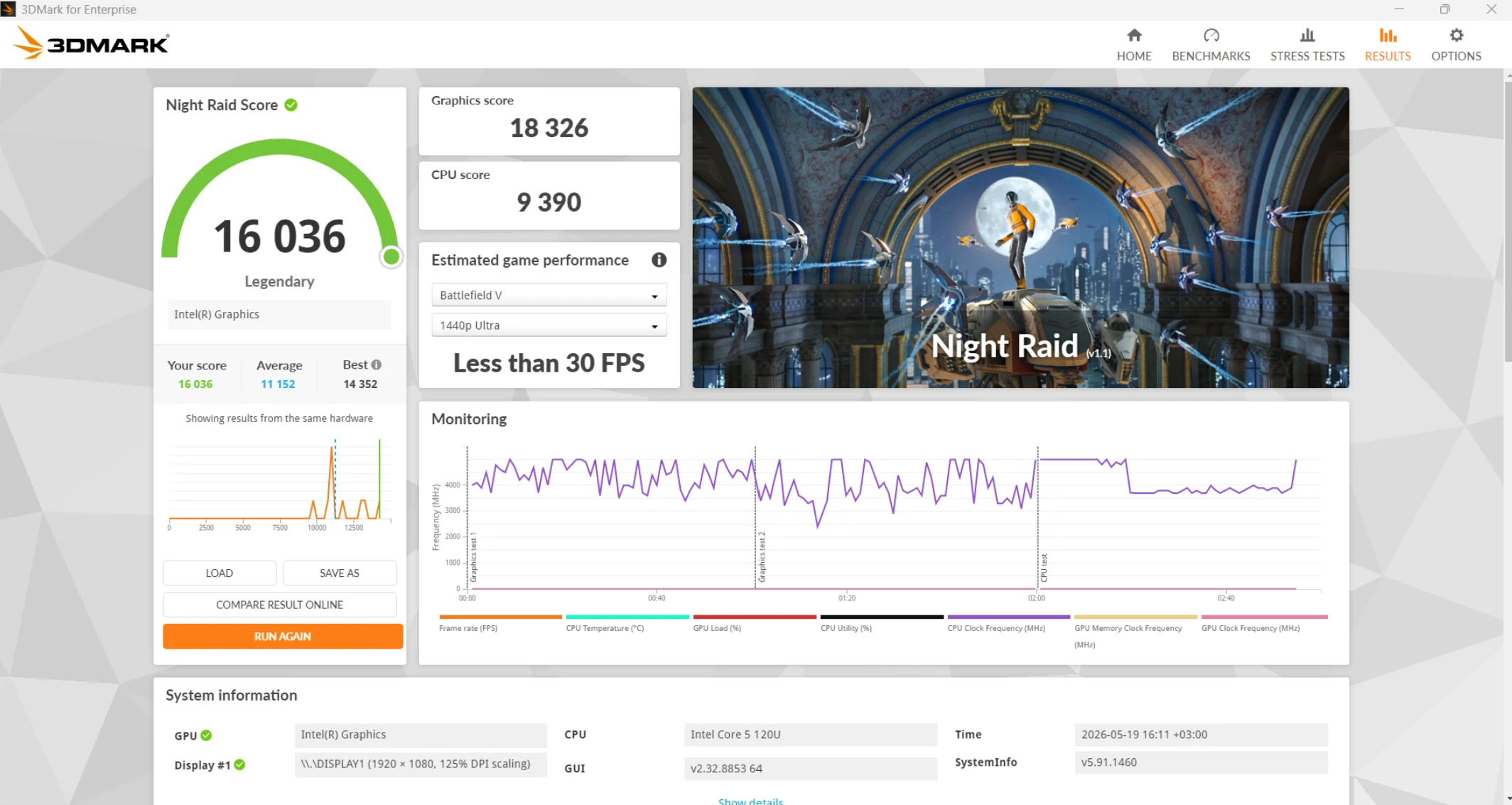
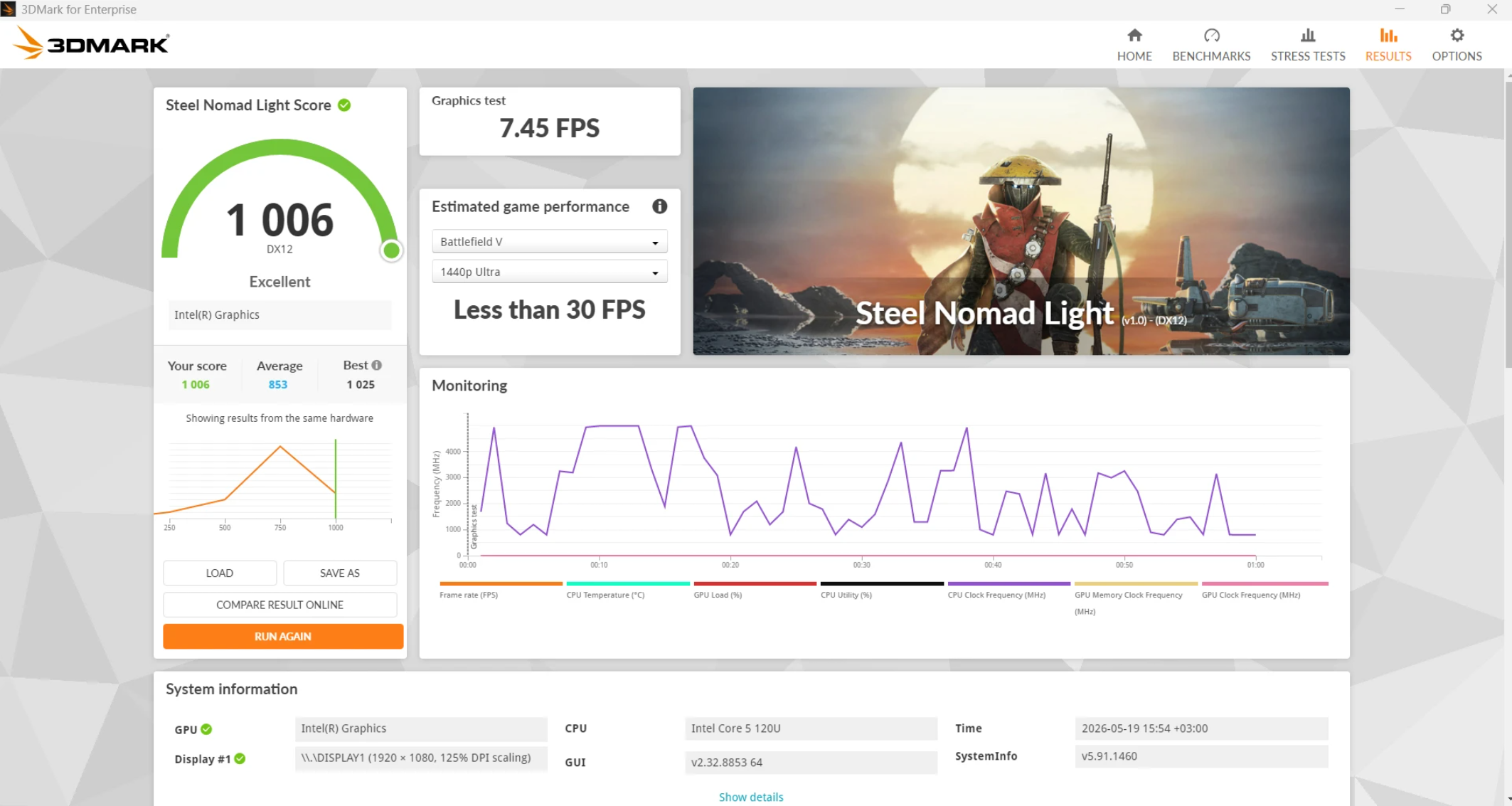
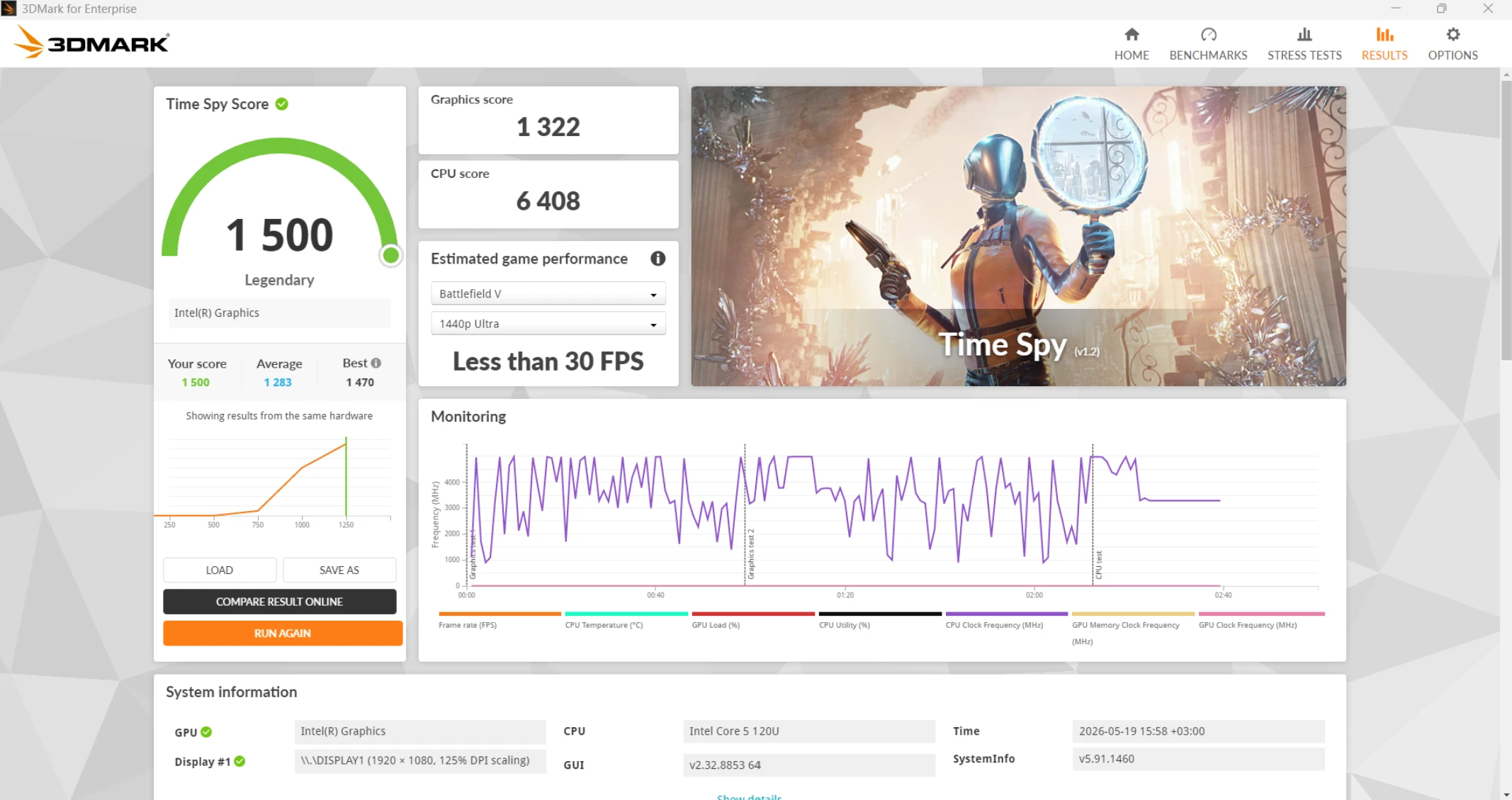
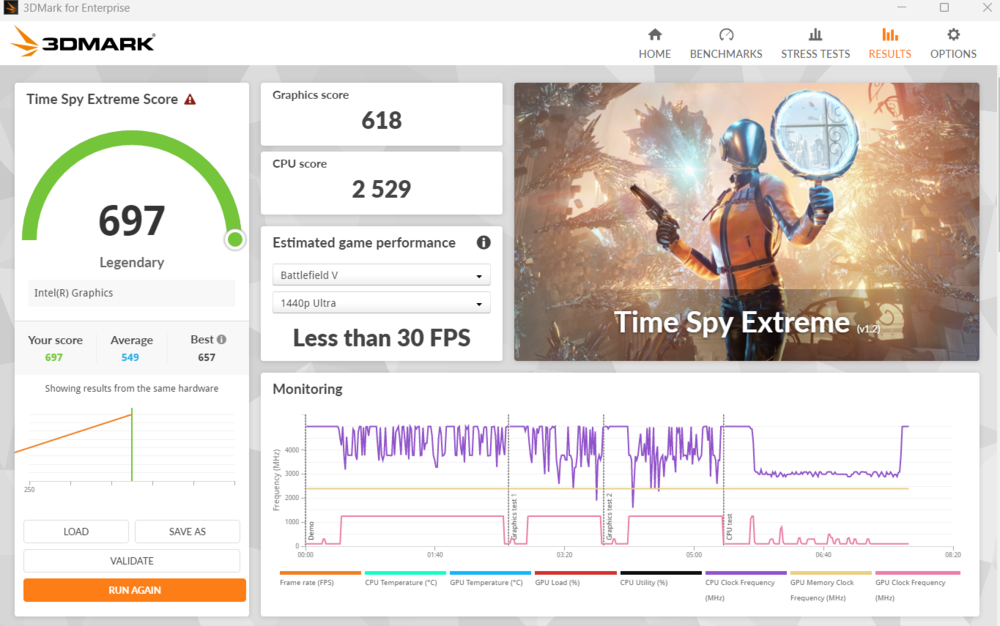
In lightweight and older games, the system demonstrates comfortable performance: Half-Life 2 reaches around 132 FPS, Mirror’s Edge runs at 61–62 FPS, and Metro 2033 is close to 60 FPS. This confirms that the integrated graphics are sufficient for running previous-generation titles at medium to high settings.
At the same time, modern games show a very different picture. Morbid Metal delivers around 47 FPS on low settings, while Cronos: The New Dawn drops to approximately 17 FPS even with aggressively reduced graphics settings. This clearly defines the limits of the platform: contemporary AAA titles fall outside its comfortable usage range.
Overall, the Acer Aspire 17 A17-51M-52RX can be viewed as a solution for basic and mid-level productivity workloads with the added ability to run light or older games. For a fully comfortable gaming experience in modern titles, a configuration with a discrete GPU is necessary.
Read also: ASUS ROG Zephyrus G14 (2023) Review: Real Beast
Cooling system and noise level
The cooling system of the Acer Aspire 17 A17-51M-52RX effectively handles heat dissipation from internal components even under sustained load. Temperatures remain within comfortable limits, without critical overheating or sharp performance drops that would indicate throttling in everyday usage scenarios.

The noise level can also be described as moderate. During normal operation, the cooling system is virtually inaudible, while under increased load the fans ramp up, but the noise remains unobtrusive and stays within a comfortable range for a typical working environment.

Overall, the balance between thermal performance and acoustic load is well implemented: the cooling system ensures stable operation without excessive noise, allowing the laptop to be used for extended periods without discomfort.
Read also: Lenovo Yoga Pro 9i Aura Edition (2025) Review: High-End Laptop for Creative Work
Battery life
Modern laptops are expected not only to deliver sufficient performance, but also to provide solid battery life, as being tied to a power outlet significantly limits mobility and usage scenarios.
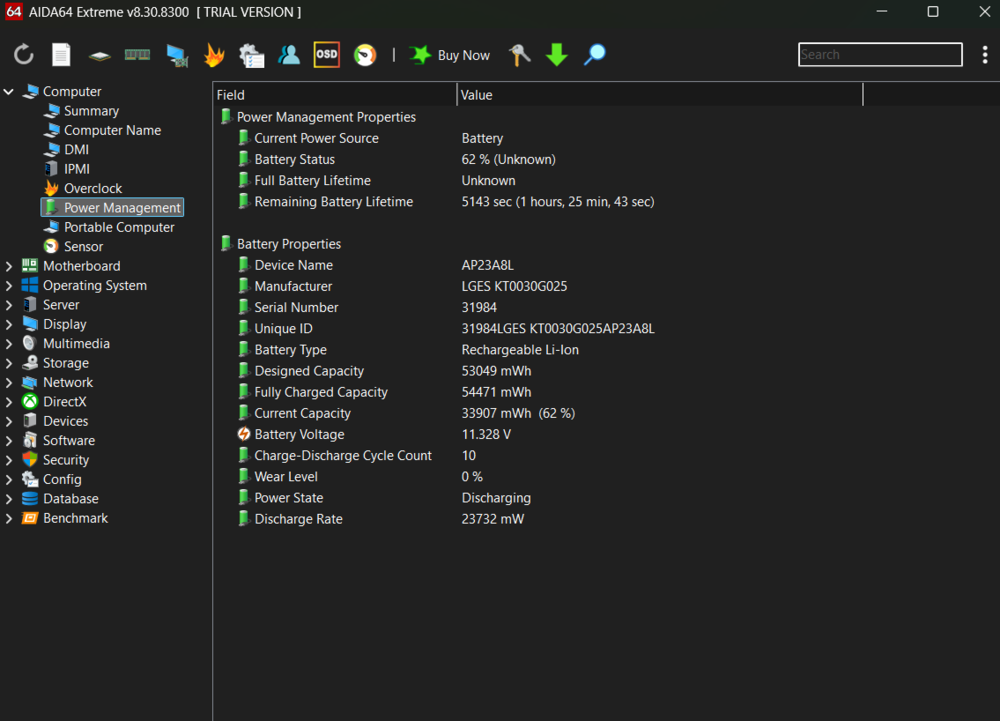
In the case of the Acer Aspire 17 A17-51M-52RX, the battery life situation appears generally balanced. At first glance, the 50 Wh battery capacity may seem modest. For a 17-inch laptop, this is a relatively conservative figure, especially considering the chassis size and hardware configuration. In this class of devices, some competitors offer higher-capacity batteries, which naturally raises expectations regarding runtime.
However, in practical use, the battery life turns out to be вполне acceptable. In office workloads, web browsing, and document editing at around 50% display brightness, the laptop is capable of lasting slightly over 4 hours on a single charge. This is a typical result for large-format Windows laptops with a similar performance level.
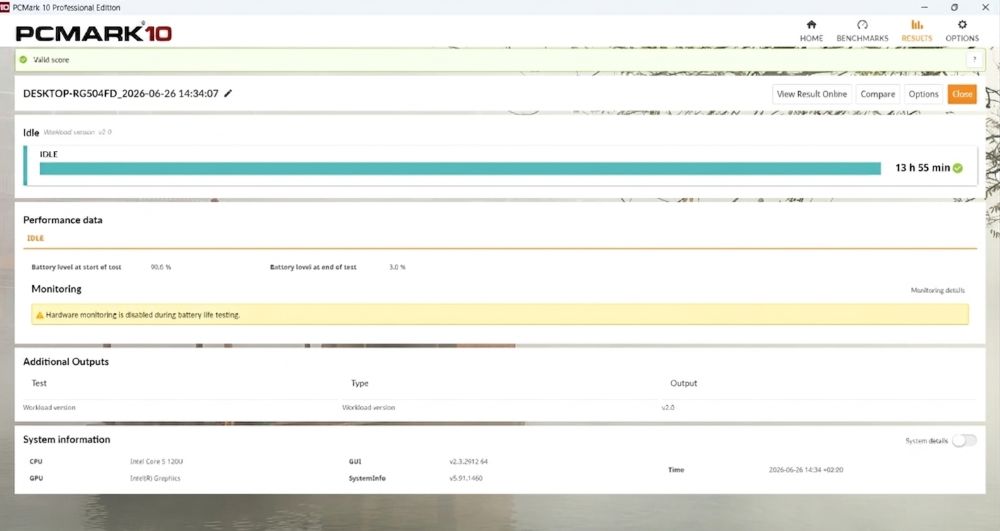

In more demanding scenarios – such as gaming or other resource-intensive tasks – battery life predictably drops and may last just over an hour. This is an expected outcome for a system with integrated graphics and an energy-efficient processor, which draws significantly more power under peak loads.
Separately, it is worth noting the included 65 W power adapter. It provides stable power delivery under load and allows the laptop to be fully recharged in a little over 2 hours. Within its class, this can be considered a standard and in some cases slightly above-average result.
The battery life of the Acer Aspire 17 A17-51M-52RX does not aim to set records, but it aligns with typical expectations for a 17-inch all-purpose laptop, providing predictable operation without the need for constant connection to a power outlet in office-oriented usage scenarios.
Read also:Acer Nitro V 16 AI Gaming Laptop Review: Balanced, Stable, and Engaging
Conclusions
The Acer Aspire 17 A17-51M-52RX is not about technological prestige or a pursuit of premium positioning. It follows a different philosophy: a large 17-inch workspace where work is no longer constrained by a small display. It is stable, predictable, and honest in its capabilities – handling office tasks, education workloads, and everyday multitasking efficiently, without trying to present itself as something more.
Its strength lies in comfort and practicality, while its weakness is compromise. The balanced display with a matte finish and thoughtful ergonomics make it well-suited as a desktop-oriented tool and a comfortable home office solution, rather than a constant travel companion.

A modern Intel Core i5-120U processor, 16 GB of RAM, and a fast SSD deliver a well-balanced level of performance sufficient for office tasks and education – without excess, but also without noticeable shortcomings.

The Acer Aspire 17 A17-51M remains a representative example of the rational class of devices: it is honest, predictable, and highly efficient within its intended niche. It performs its role effectively as a reliable workstation tool for stationary use and as a full replacement for a bulky desktop PC.
Read also:
- Lenovo ThinkPad X9 14 Gen 1 Aura Edition Laptop Review – Familiar Design, Minus the TrackPoint
- Acer Nitro V15 (ANV15-41-R99Y) Gaming Laptop Review
Where to buy Acer Aspire 17 A17-51M