



© ROOT-NATION.com - Use of content is permitted with a backlink.
Samsung’s flagship earbuds, the Galaxy Buds4 Pro, were introduced at Galaxy Unpacked alongside the new flagship Samsung Galaxy S26 lineup. In addition to a dual-driver acoustic system and support for 24-bit/96 kHz audio, the earbuds include a range of advanced features, from head gesture controls to automatic switching to transparency mode during conversations. This review takes a closer look at their capabilities and the type of users they are likely to appeal to.
Read also: Wireless earbuds reviews (TWS)
TABLE OF CONTENTS:
Samsung Galaxy Buds4 Pro Specifications
- Type: TWS, in-ear
- Bluetooth version: 6.1
- Audio codecs: SSC-UHQ (24-bit/96 kHz), SSC, AAC, SBC, LC3
- Drivers: dynamic + planar
- Noise cancellation: adaptive ANC
- Controls: touch, voice, head gestures
- Battery: earbuds – 61 mAh, case – 515 mAh
- Earbud battery life: up to 7 hours without ANC, up to 6 hours with ANC
- Battery life with case (total): up to 30 hours without ANC, up to 24 hours with ANC
- Charging: wired USB Type-C, wireless
- Water resistance: IP57
- Colour: black, white
- Additional features: Hi-Res Audio certification, 6 microphones and AI for ENC, support for 24-bit/96kHz audio (on new Samsung devices only), auto-pause, Multipoint support (for Samsung devices only), Auracast support, simultaneous translation feature, 360 Audio with head tracking
Price

The flagship Samsung Galaxy Buds4 Pro are currently the most expensive earbuds in Samsung’s lineup, priced at around $245 or €210. While this is not the upper limit for the true wireless stereo (TWS) segment, it is still a relatively high price point. Products in this range are typically not impulse purchases, and buyers usually expect a clear understanding of what they are getting for the cost. This review aims to assess that in detail.
Package contents

The packaging and contents of the Samsung Galaxy Buds4 Pro are fairly minimal. The earbuds come in a compact dark grey box with an image of the product on the front. Inside, there is the charging case with the earbuds, basic documentation, and two additional pairs of silicone ear tips in different sizes, making a total of three sizes available.
Read also:
- Samsung Galaxy S26 Plus Review: Is It Worth the Price?
- Samsung Galaxy S26 Ultra Review: Reference Flagship Without Major Changes

It is possible that retail units of the Samsung Galaxy Buds4 Pro will also include a charging cable, although it was not present in the review sample. However, its inclusion or omission is largely irrelevant, since bundled charging cables for earbuds are typically short and of limited practical value.
Design and materials
The design of the Samsung Galaxy Buds4 Pro prioritises simplicity, usability, and solid build materials. The charging case now adopts a more conventional horizontal “box” form factor with rounded edges. By comparison, the previous generation, the Samsung Galaxy Buds3 Pro, used a vertically oriented case design.
Read also:
- Samsung Galaxy S26 Review: Most Compact Flagship with Minimal Changes
- Samsung Galaxy Fold7 Review: Slim and Lightweight Foldable Smartphone
In the case of the Samsung Galaxy Buds4 Pro, the charging case is made of a matte plastic finish and features a transparent glossy lid. The design is visually clean, but its practicality is debatable: over time, the transparent surface is likely to accumulate scratches, which can affect the overall appearance of the device. That said, this is not a problem unique to this model, as even opaque cases are not fully resistant to wear. Using a protective case can help preserve the external condition of the headset over time.

On the front of the charging case for the Samsung Galaxy Buds4 Pro, there is a brand logo and an LED indicator. The indicator lights up green when the case is opened or closed, and red during charging. On the back, there is a USB Type-C port for wired charging and a single physical button.
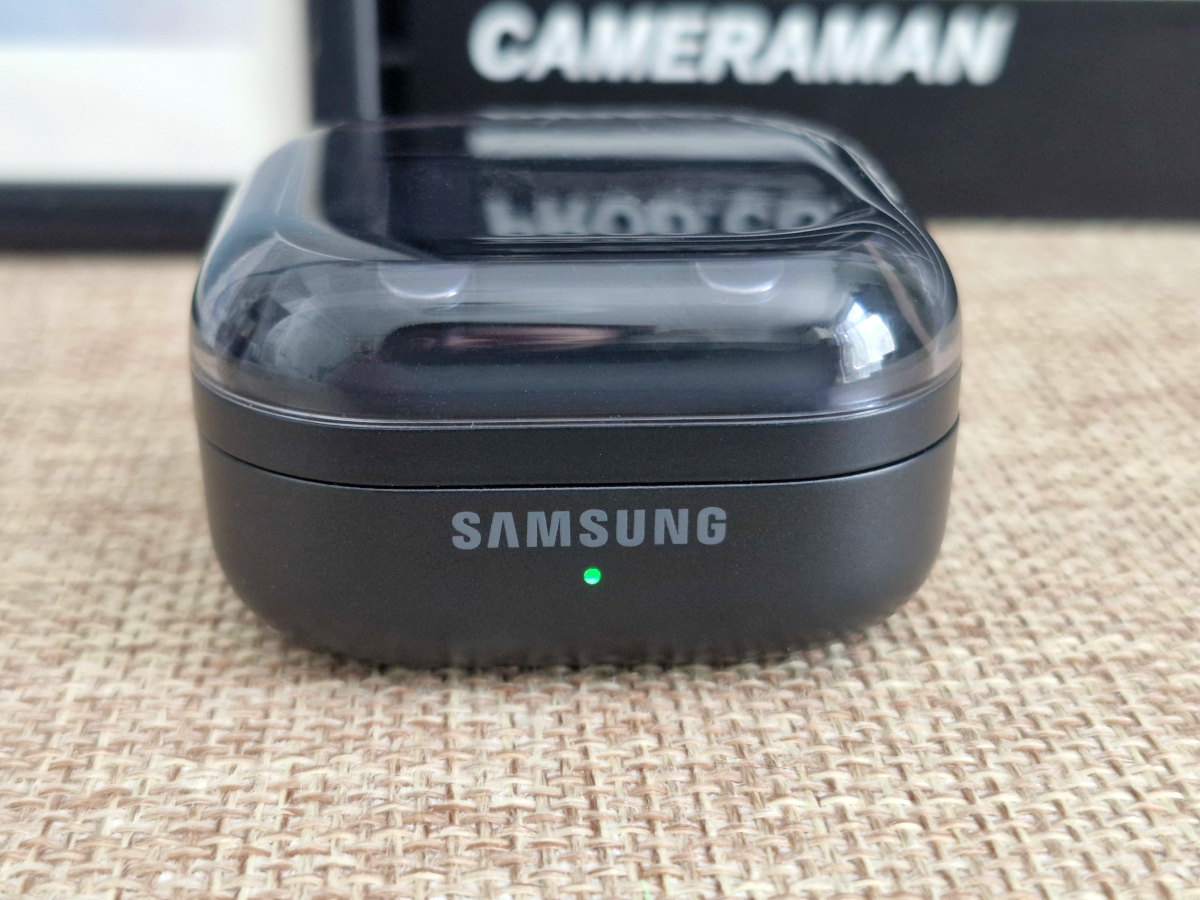
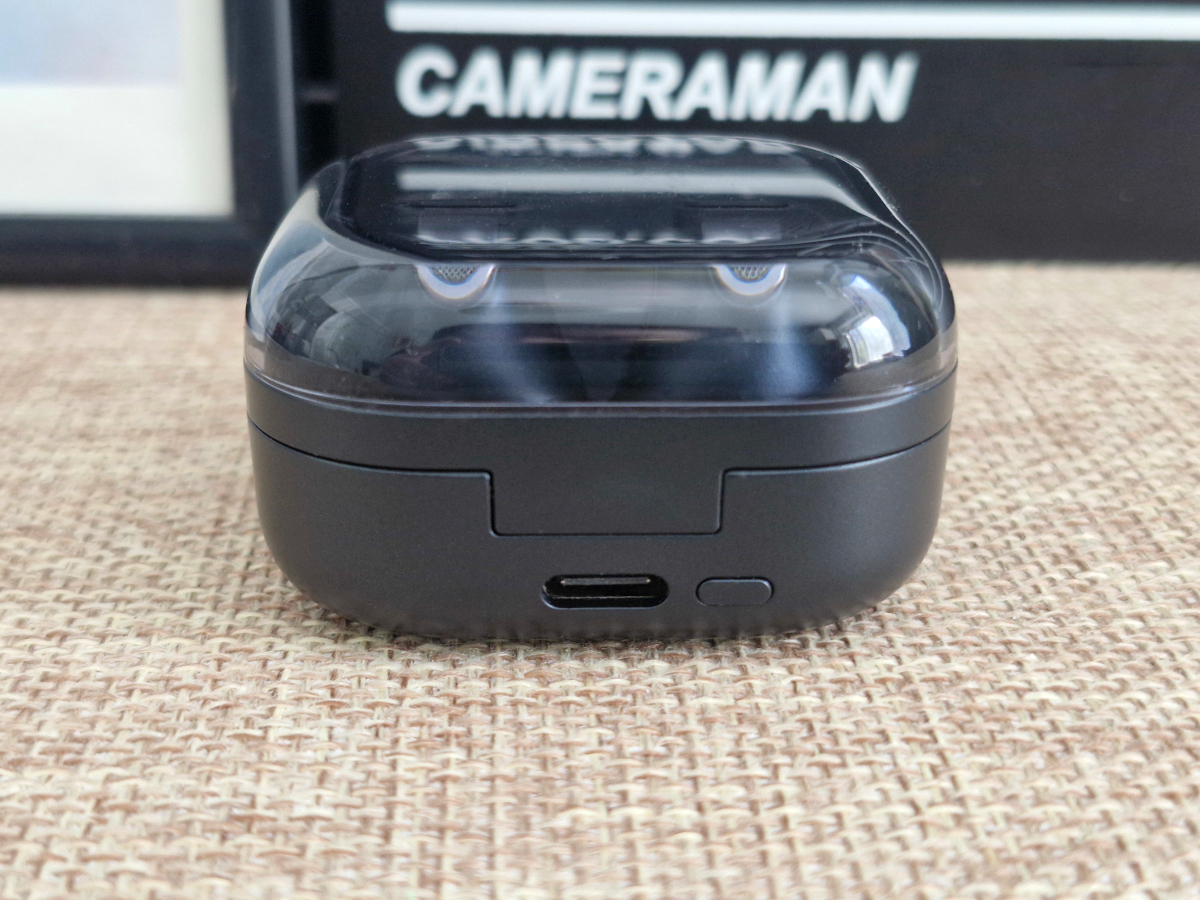
On the underside of the charging case for the Samsung Galaxy Buds4 Pro, there is a wireless charging area, with technical markings integrated within that section.

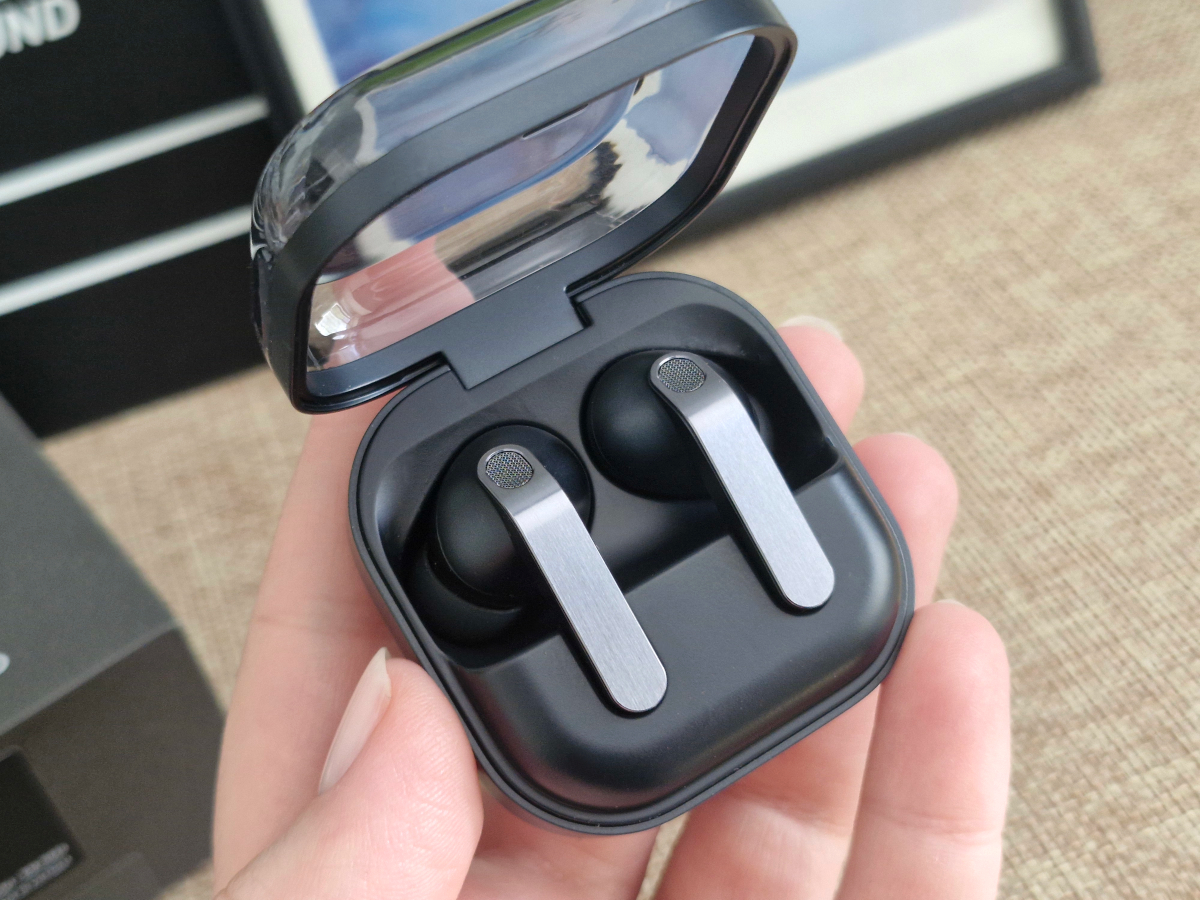
Let’s look at the earbuds themselves. The Samsung Galaxy Buds4 Pro use a fairly conventional stem-style design, which is also one of the more universally comfortable form factors. Unlike the charging case, the earbuds combine matte black plastic with a metallic outer panel, giving them a more premium appearance. The outer surface includes several grille sections that likely house microphones. On the inner side, there are dual charging contacts located at the lower part, as well as a small window that is presumably used for a proximity sensor enabling auto-pause functionality. The silicone ear tips fit quite securely, and replacing them requires some effort, though this reduces the likelihood of accidental detachment during use. As a practical addition, the earbuds are rated IP57 for dust and water resistance.

Read also:
- ASUS ROG Cetra Open Wireless Review: Open-Ear Design, Hybrid Multipoint, and Strong Battery Life
- EarFun Air Pro 4+ Review: Affordable Hi-Res Earphones with Integrated AI
Ergonomics of the Samsung Galaxy Buds4 Pro
The earbuds sit securely and comfortably even in ears where not all models fit well, both during stationary use and while moving. According to the manufacturer, their shape was developed using computer modelling that incorporates aggregated anatomical data of the human ear. This may contribute to the relatively comfortable fit during extended wear.
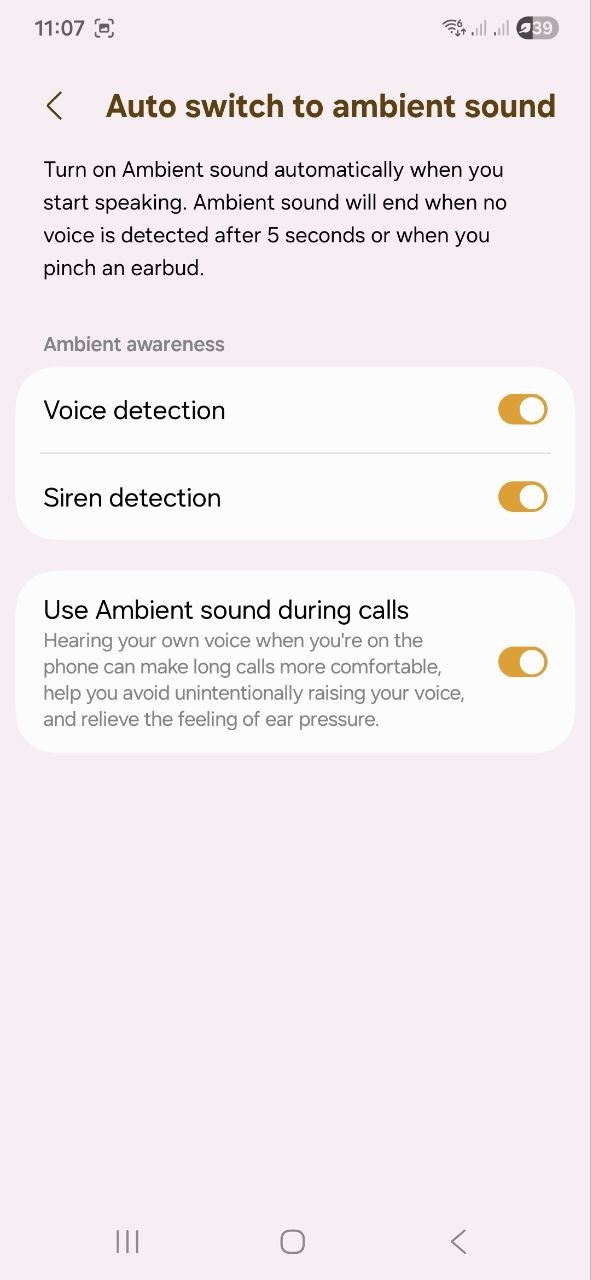
They are lightweight and tend to be barely noticeable in use, to the point where their presence is quickly forgotten. The earbuds also include automatic detection features: they can recognise voice activity (both the user’s and a conversation partner’s) as well as emergency sirens, and switch to transparency mode accordingly. This reduces the need to manually remove the earbuds when interacting with people or reacting to environmental sounds in public spaces.

Pairing and setup
“At last!” I thought to myself when I realised that I didn’t need to download any apps to connect and set up the Galaxy Buds4 Pro. Mind you, this only applies to Samsung smartphones – for other Android devices, you’ll need the Galaxy Wearable app.


Testing was performed with a Samsung Galaxy S23 FE, where the pairing process was straightforward. After enabling Bluetooth on the phone and opening the charging case, the earbuds connected automatically within a few seconds.
On Samsung devices, configuration can be accessed directly through the system settings. The connected earbuds appear at the top of the main settings menu; selecting them opens the dedicated configuration interface for the headset.

Here we see a range of useful options. At the top, as is common in headset companion interfaces, the remaining battery levels for both the earbuds and the charging case are displayed. Below that is the noise control section. It includes several modes: Off, Ambient Sound (also referred to as transparency mode, with five adjustable intensity levels), Adaptive mode, and ANC (active noise cancellation), which also offers five levels of intensity.
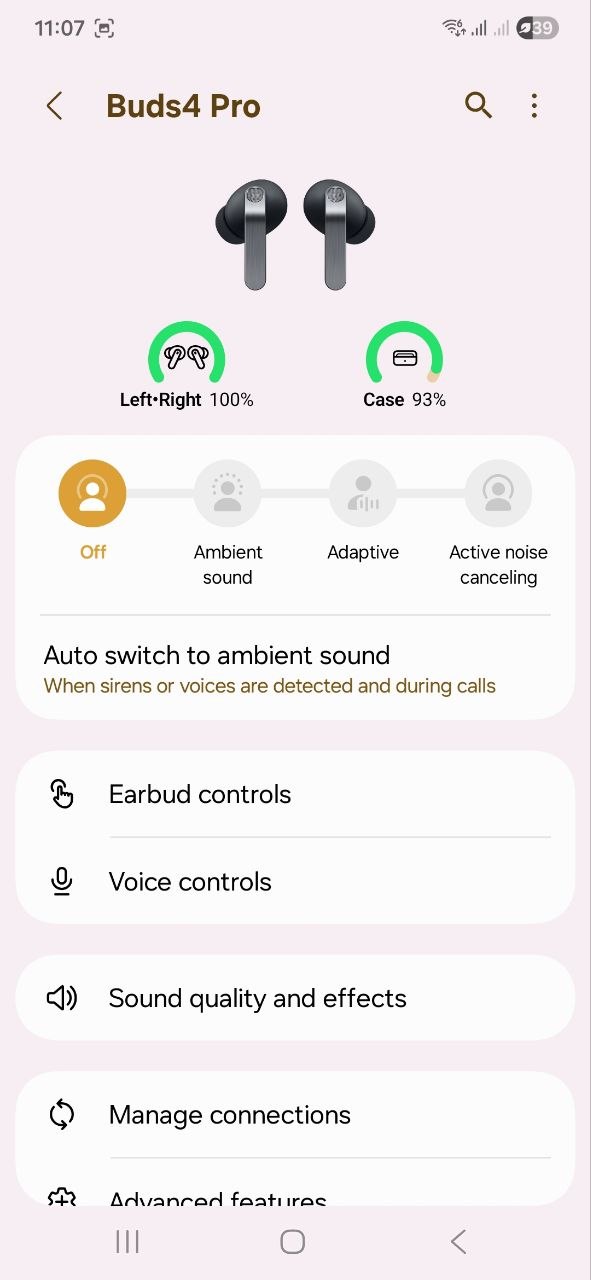
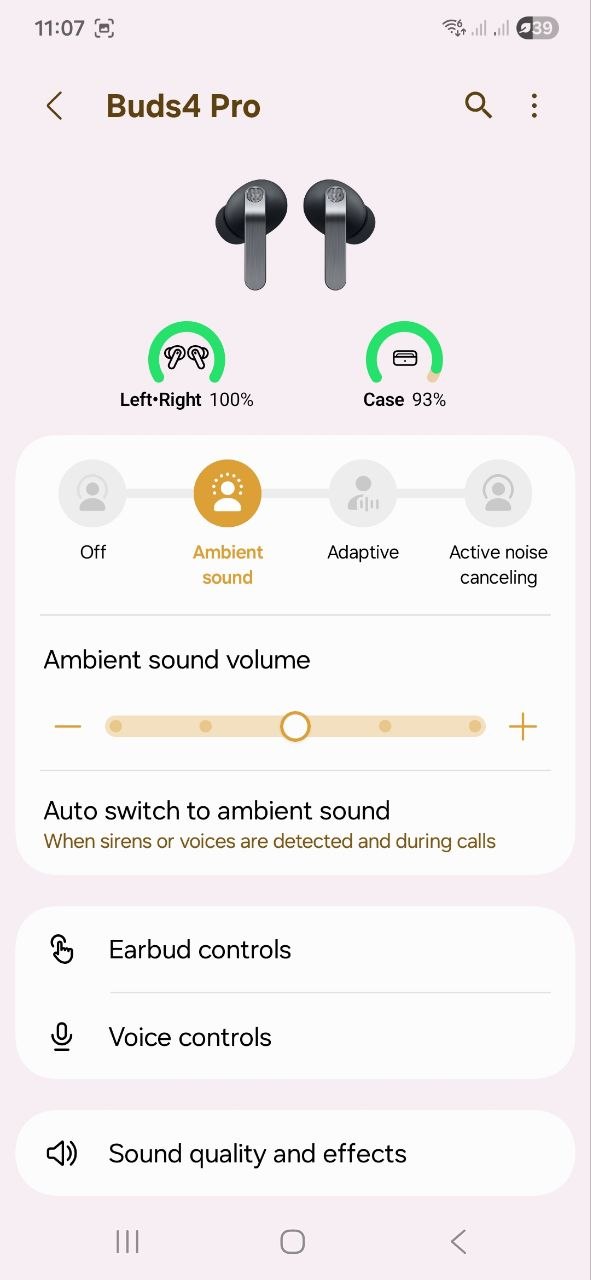
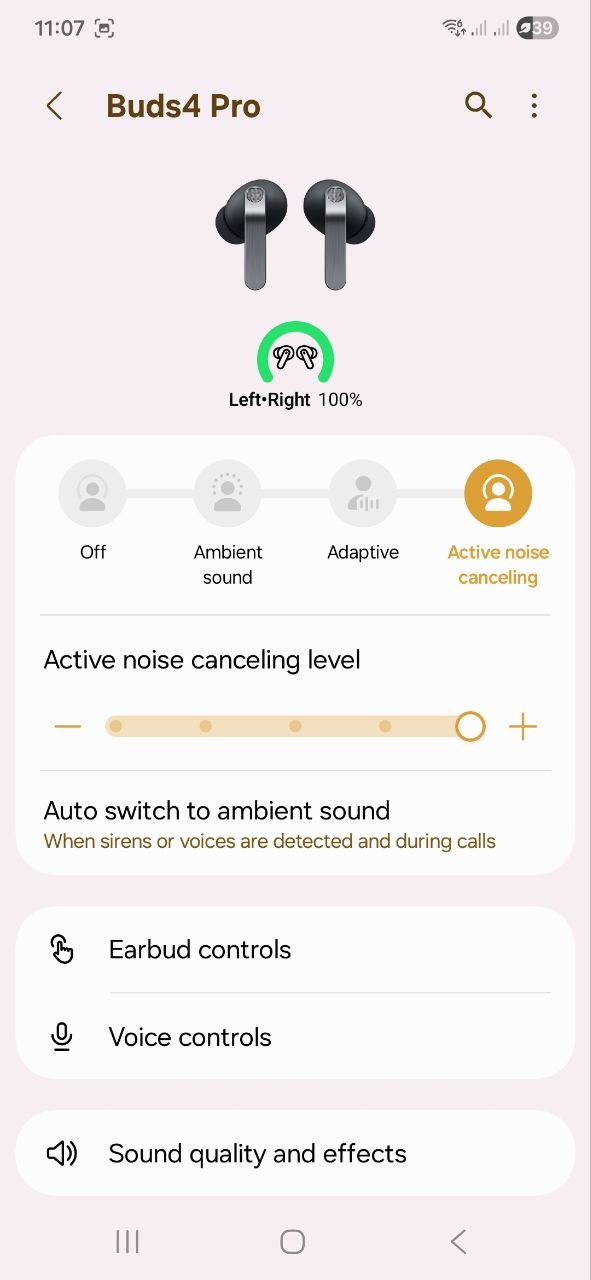
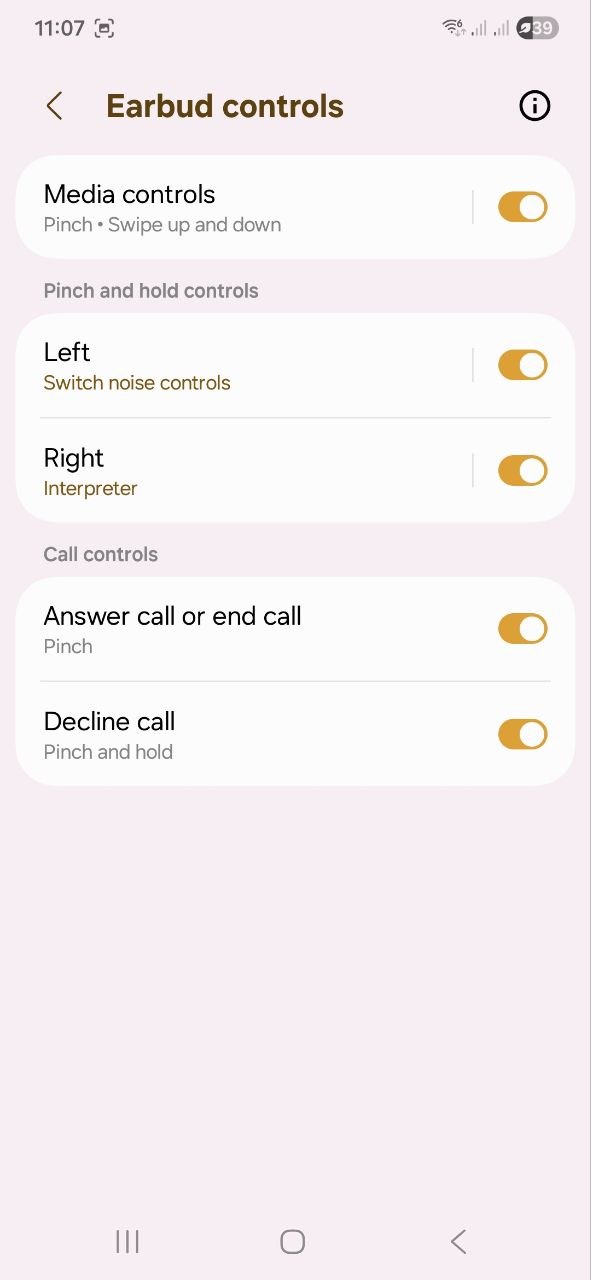
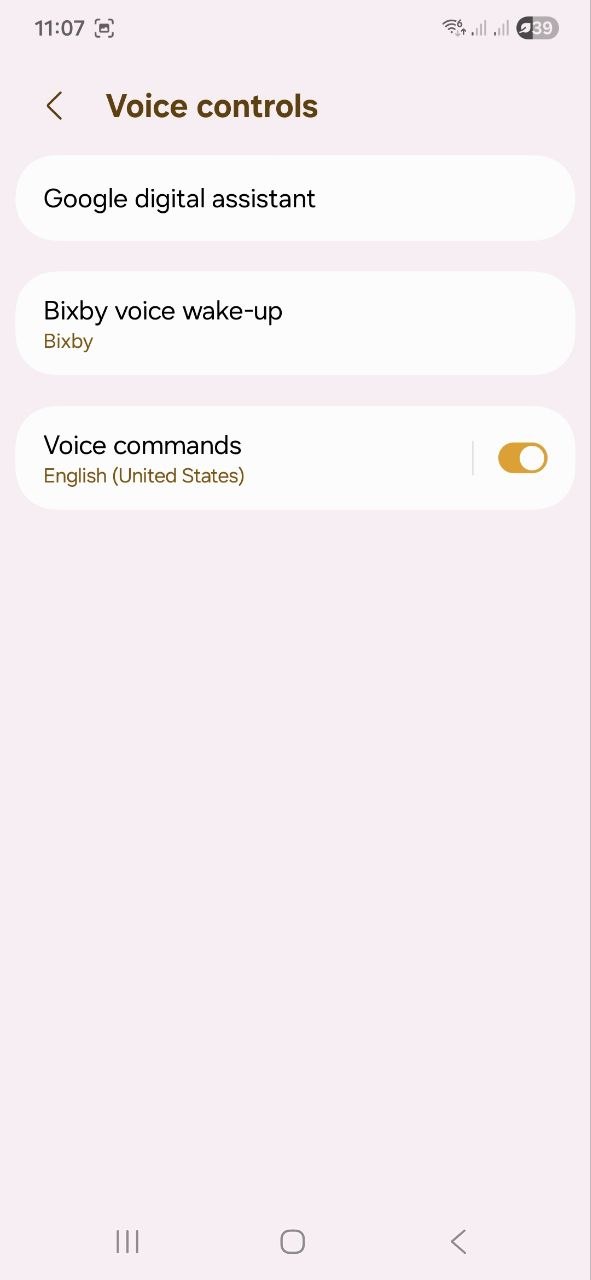
Next is the option for switching to transparency mode when sirens or human speech are detected, as well as earbud controls. In this section, users can configure touch gestures, modify them, or disable them entirely. In newer Samsung models, this same menu also includes head gesture controls. However, on the Samsung Galaxy S23 FE, this feature is not available. Further down, there is voice control support via voice assistants, including Bixby and Google Assistant.
The most interesting section, in my view, is “Sound quality and effects.” Here, users can enable Audio 360, adjust sound through an equaliser, activate sound normalization, and perform a personalised sound calibration. There is also a fit test to check how well the earbuds are positioned, along with an adaptive sound feature. What is notably missing here is the “Advanced sound settings” section, which would normally allow enabling the UHQ mode (24-bit/96 kHz audio) as well as voice call enhancement features. Unfortunately, these options are available only on flagship devices in the Samsung Galaxy S23 to Samsung Galaxy S26 range, and are not supported on the Samsung Galaxy S23 FE. On the Samsung Galaxy S25 FE, Samsung has added an option to improve call quality, but 24-bit audio playback remains unavailable.

This is what it looks like on the S25 FE.

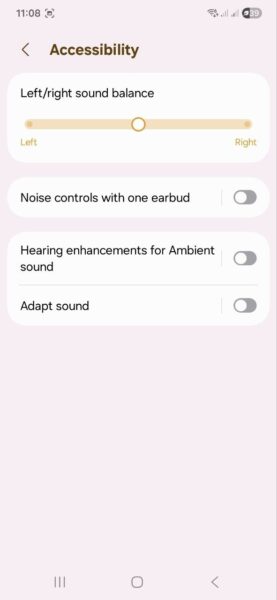
Below are the “Connection management” and “Additional features” sections, where users can enable spoken notifications, activate auto-pause for audio, video, and calls, and turn on reminders to move or stretch the neck after prolonged inactivity. In the “Labs” section, there is also a dedicated gaming mode. Under “Accessibility,” users can adjust the left-right audio balance, enable noise control using a single earbud, activate adaptive sound, and increase sensitivity for Ambient Sound mode.

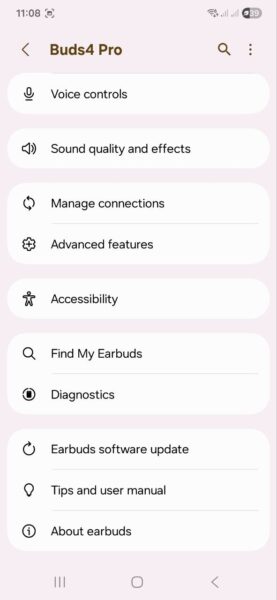
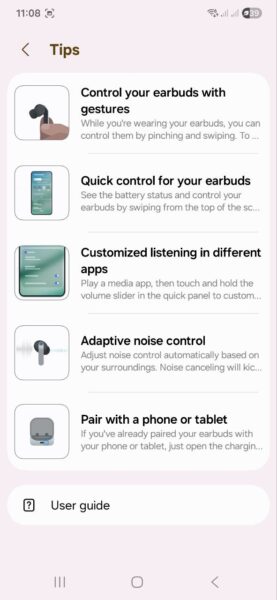
Further down are more technical options: device search, diagnostics, software updates, and a user manual section that provides a fairly detailed guide covering the various functions of the Samsung Galaxy Buds4 Pro.
Read also:
- Kiwi Ears x Z-Reviews Serene Planar Headphones Review: Collaboration with Distinct Tuning
- Huawei FreeBuds 7i Review: Focus on Productivity
Control options for the Samsung Galaxy Buds4 Pro
The earbuds provide three primary control methods: traditional touch controls, voice commands, and head gesture controls.

Voice control will be familiar to most users, so there is little need to go into it in detail. With the Samsung Galaxy Buds4 Pro, users can activate either Bixby or Google Assistant and assign basic tasks. A more notable feature is head gesture control. It is used for managing calls: nodding accepts an incoming call, while shaking the head rejects it. It can also be used for interacting with voice assistants and certain other functions. However, this feature is limited to Samsung flagship smartphones, so it could not be tested in this review environment.

Regarding touch controls, there are some usability issues in my experience. On the Samsung Galaxy Buds4 Pro, the control surface is positioned on the front and supports a set of swipe and tap gestures (referred to in the app as “pinch” controls). Technically, this description is closer to the actual interaction, as it requires holding the stem from the back with the thumb while using the index finger on the front for tapping or swiping. In practice, this implementation proved inconvenient. Although the gestures are performed as instructed, tap actions are not always reliably registered. Swipes, which are used to adjust media volume, perform more consistently.
After several days of use, I eventually stopped using the touch controls altogether and instead managed playback directly from the smartphone or a smartwatch. This is, of course, a subjective impression and may work well for other users, but in this case the interaction model did not feel comfortable. A more conventional placement of the touch area – on the outer face of the earbud – would likely have been easier to use.
Sound
The Samsung Galaxy Buds4 Pro use a dual-driver acoustic system consisting of a dynamic driver and a planar driver intended to handle low frequencies and improve bass response. Audio transmission is handled via Bluetooth 6.1. Supported codecs include standard SBC and AAC, as well as LC3 and SSC-UHQ (24-bit/96 kHz). However, SSC-UHQ is limited to recent Samsung flagship devices and is not available across all supported smartphones.

I don’t have a direct reference for how SSC-UHQ sounds, but even without it, the Samsung Galaxy Buds4 Pro should satisfy most users in terms of audio performance. The sound profile is well-balanced: good detail, spaciousness, clarity, and deep low-end response. Across different genres – indie, pop, metal and alternative, electronic, instrumental music, jazz, and film soundtracks – there is no strong need to adjust or correct the tuning. Vocals remain clear, the highs are not overly sharp, and the bass adds a noticeable sense of depth without dominating the mix. The built-in equaliser also allows further tuning if needed. Overall, the default sound quality can reasonably be considered strong.
Another notable feature is Audio 360 with head tracking. While expectations for it were initially low, it turns out to be a more engaging experience than anticipated. It creates a simulated “concert hall” effect, giving the impression that performers are positioned around the listener rather than strictly inside the headspace. This is not true spatial audio in a fully physical sense – it is still a software-based effect – but it delivers a noticeable sense of immersion. The trade-off is that the sound becomes louder and less bass-focused, with vocals and high frequencies more prominent. However, this shift also makes the listening experience more dynamic and atmospheric, similar to standing close to the stage at a live concert. Despite some compromises in tonal balance, the effect is engaging enough that revisiting familiar tracks in this mode feels distinctly different from standard playback.
Read also:
- EarFun Clip Review: Open-Ear Sport and Urban Clips with LDAC Support
- EarFun Air Pro 4 Review: Solid Hi-Res Earbuds Under $100
Headset functionality and ANC

Call quality on the Samsung Galaxy Buds4 Pro is at a solid level overall. Voice transmission remains clear in relatively quiet environments, while performance drops slightly in noisy surroundings. This is mainly due to stronger noise suppression, which can reduce perceived loudness, making the speaker sound quieter to the other party. However, this does not significantly affect mutual understanding during conversations.
One practical aspect is the automatic switch to transparency mode during phone calls. This helps users hear their own voice more naturally, reducing the tendency to speak louder than necessary.
For both calls and media playback, noise control is handled by a six-microphone array – three microphones per earbud. Active noise cancellation (ANC) and transparency mode perform well and include adjustable intensity levels. The system also includes a feature that lowers music volume and allows ambient sound in when speech is detected. This can be disabled, but in practice it makes conversations more convenient, as it reduces the need to remove the earbuds during interactions.
Battery life
Each earbud is equipped with a 61 mAh battery, providing up to 7 hours of playback without ANC and around 6 hours with ANC enabled. In practice, higher volume levels can reduce these figures slightly.
The charging case contains a 515 mAh battery, bringing total runtime to approximately 30 hours without ANC and around 24 hours with ANC. These results are broadly in line with mid-range market expectations – neither outstanding nor weak, but sufficient for everyday use. The earbuds support both wired and wireless charging, including the ability to recharge the case from a compatible smartphone via reverse wireless charging.

Charging the case of the Samsung Galaxy Buds4 Pro via cable is very fast in practice. It took about 4 minutes to go from 23% to 100%, meaning a full charge is effectively achieved in roughly 5 minutes under the tested conditions. No bundled cable or power adapter was included in the review unit, so a standard Samsung USB-C cable and a 25 W charger from a smartphone were used. The charge level increases visibly in short intervals, which is uncommon for most wireless earbud cases. While this charging speed is notable, it is still dependent on the power source and testing conditions.
Conclusions and competitors
For owners of Samsung smartphones – especially recent flagship models – the Samsung Galaxy Buds4 Pro are a well-integrated option with a wide feature set. Deep ecosystem integration enables fast pairing and configuration while providing access to the full range of available functions. From a hardware and feature perspective, the earbuds offer strong overall sound quality supported by a dual-driver system, effective noise cancellation and transparency modes, solid battery life, fast charging, and wireless charging support. Additional features include automatic pausing, transparency switching during conversations, spatial audio, and real-time AI translation.
However, there are also limitations. In this review, touch control implementation was not particularly convenient, and some advanced features are restricted to Samsung flagship smartphones. On non-flagship Android devices – and especially on iOS – functionality may be further reduced. In such cases, the earbuds become a more simplified product, which makes their price less easy to justify.

Which models can compete with the Samsung Galaxy Buds4 Pro? In reality, there are quite a few, but I would highlight several options. If the focus is on sound quality, I would consider the Audio-Technica ATH-TWX7. They offer an extended frequency range, Hi-Res support, and active noise cancellation (ANC), and even include wireless charging. However, the device uses a single driver, Bluetooth 5.1, and provides lower battery life compared to some competing models.
At a similar price point, the Huawei FreeBuds Pro 5 are also worth considering. They feature dual drivers, Hi-Res audio support, adaptive ANC, an extended frequency range, and even an online translation function. For Apple smartphone users, the AirPods Pro 3 are generally a more suitable option. Like the Galaxy Buds4 Pro, they integrate well within a single ecosystem and include a full set of flagship features such as auto-pause and a heart rate sensor for workouts.
Read also:
- Marshall Major V Headphones Review: Life’s better when it rocks
- SIMGOT EG280 Review: Budget IEMs for Gamers and Audio Enthusiasts
Where to buy the Samsung Galaxy Buds4 Pro


