





© ROOT-NATION.com - Use of content is permitted with a backlink.
Have you ever noticed a strange thing: you buy a cool new gaming monitor or laptop with a juicy OLED screen, expect a “wow effect,” and instead get sand in your eyes and a heavy head after an hour of work? You lower the brightness, turn on the “night mode,” but it only gets worse.
Surprise: the problem is often not the quality of the matrix or even the blue light. The problem is how your screen manages light. Millions of users face an “invisible enemy” – PWM (pulse width modulation).
Manufacturers rarely indicate this parameter in specifications, and the “Eye Care” sticker sometimes turns out to be just marketing. Let’s take a look at what PWM is, why even expensive gadgets flicker, and how to choose a screen that is safe for your eyes.
TABLE OF CONTENTS:
What is PWM and why engineers love it

A monitor screen is a set of LEDs. When you want to make the image dimmer, engineers need to make these diodes shine weaker. There are two ways to do this:
- DC Dimming (Direct Current): It’s like a water tap. If you want less light, you turn down the tap, reducing the voltage. The diode lights up constantly, but dimly. This is the safest method.
- PWM: It’s like a switch. Instead of supplying less current, the electronics turn the backlight on and off quickly. Need 50% brightness? It means that 50% of the time the screen is on full brightness, and 50% of the time it’s completely off.
If this happens quickly (hundreds of times per second), the eye does not notice the pauses, and the brain “averages” the picture.
So why do manufacturers use PWM?
This is not a worldwide conspiracy, but an engineering compromise.
- Color: With a normal voltage reduction (DC), LEDs can change color – white becomes yellowish or green. PWM allows you to maintain perfect color reproduction and deep blacks even at minimum brightness (which is critical for OLEDs).
- Price and size: Digital PWM controllers are more compact and cheaper than high-quality analog circuits.
How it affects health: facts vs. myths

Even if you don’t consciously see the flicker, your brain detects it. The pupils react microscopically to changes in brightness, and the visual cortex is forced to constantly “glue” the intermittent flow of light.
Researchers estimate that 10% to 30% of people are hypersensitive to PWM. Symptoms are classic: headache, fatigue, dry eyes, and sometimes nausea.
The IEEE 1789-2015 standard provides the following gradation of danger:
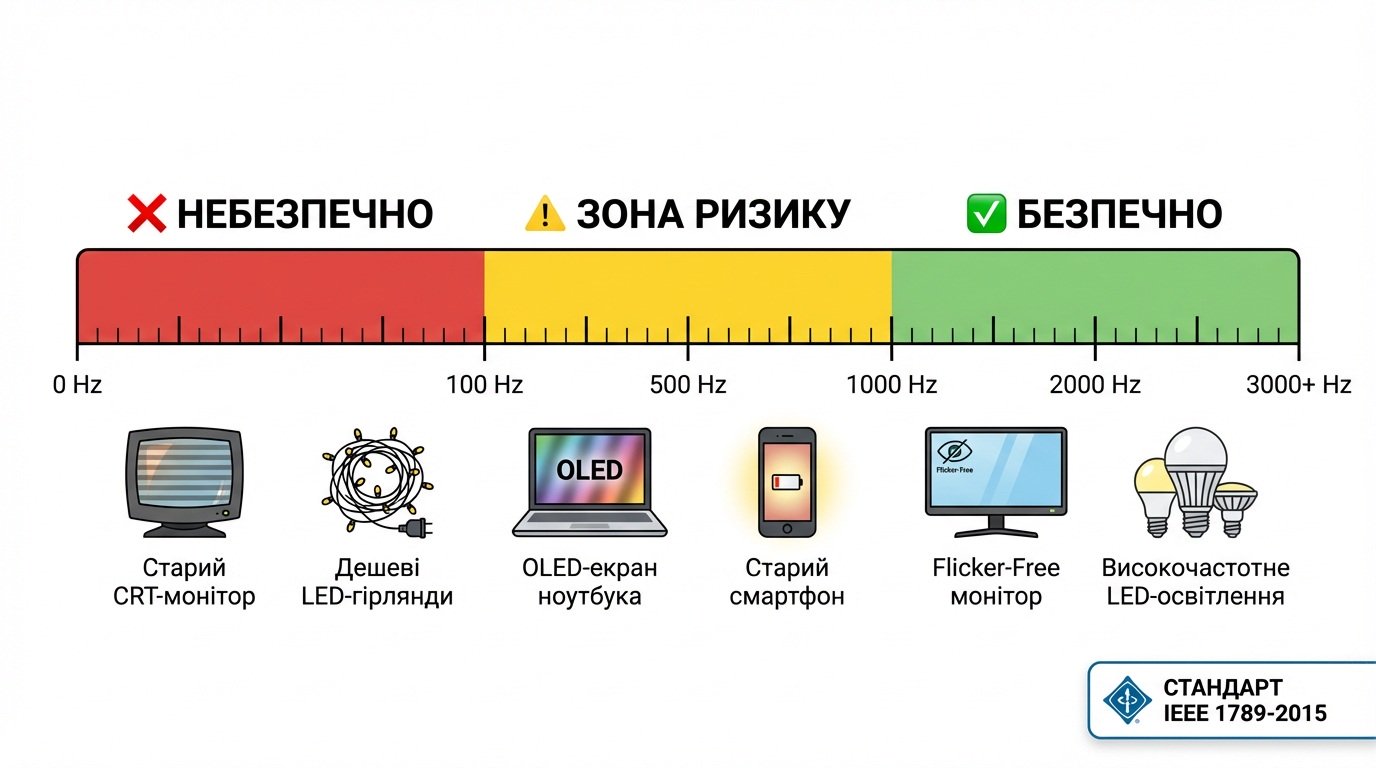
- < 100 Hz: Dangerous. Can cause serious discomfort (found in older CRTs and cheap LED lights).
- 100 – 1000 Hz: Risk zone. This is where many OLED laptop screens are located.
- > 1000-3000 Hz: Conditionally safe. Flicker is so fast that the biological systems of the eye do not have time to react to it.
Important clarification: Scientists have not yet found evidence that PWM causes irreversible eye disease. Symptoms usually go away when you move away from the screen. However, chronic fatigue over the years will not help your productivity.
An important nuance: PWM brightness vs. PWM clarity
Before you panic, you need to distinguish between two concepts. Not everything that flickers is evil.
- PWM Dimming: This is uncontrolled flickering to reduce brightness. It’s not good.
- Strobing (BFI / ELMB / DyAc): This is a tool for gamers. The monitor intentionally inserts a black frame to remove blur in dynamic shooters (CS:GO, Valorant).

Many modern gaming monitors are Flicker-Free (operate on direct current). But if you turn on the “ELMB” or “Motion Blur Reduction” function in the menu, they will start flickering. This is your conscious choice for the sake of clarity in the game, which can be turned off for working with text.
Practical test: Pencil and Camera
You don’t need an oscilloscope to test your monitor. There are simple methods.
Important: Test at 20-30% brightness – this is where the PWM “wakes up”.
1. Pencil test
Take a pencil and quickly wave it in front of the white screen (like a fan).
- Do you see a blurry “trail?” ✅ Everything is fine.
- Do you see a clear “fence” of several pencils (stroboscopic effect)? ❌ This is low-frequency PWM.

2. Camera test (nuances)
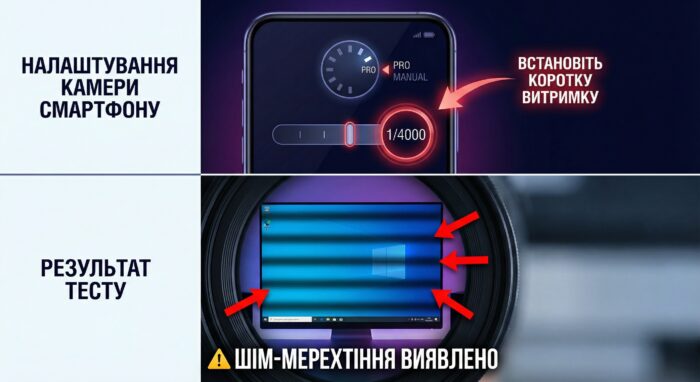
Modern smartphones have “anti-banding” algorithms that hide flicker in video. To see the truth:
- Turn on the Pro/Manual mode.
- Set the shutter speed to 1/1000 or 1/4000.
- Hover over the screen. If you see dark running bars, it’s PWM.
Security rating: Who can you trust?
The market situation has changed. Many models that were previously considered “suspicious” have been made safe in new revisions.
| Device type | Technology | Verdict |
|---|---|---|
| Gaming monitors with Flicker-Free certification | DC Dimming | ✅ Safe. These are honest Flicker-Free monitors. They flicker only if you turn on the ELMB/Strobing mode yourself. |
| Premium IPS monitors (new revisions) | DC Dimming | ✅ Safe. Most modern models have gotten rid of PWM. |
| Budget gaming monitors (new models) | DC Dimming | ✅ Safe. Even affordable models often have DC Dimming in newer revisions. |
| Budget VA monitors (old models) | PWM ~200-350 Hz | ⚠️ Risk. Some older or cheapest office models still use PWM. |
| OLED laptops (previous generations) | PWM ~240 Hz | ❌ C aution. The screens are gorgeous, but at <50% brightness, they often turn on low-frequency flicker. |
“Under the hood: Hybrid dimming and Duty Cycle
Tech enthusiasts may ask: “Why does my laptop not tire my eyes during the day but burn them out at night?” The answer lies in Hybrid Dimming technology.
Manufacturers have done a trick. They use DC Dimming (safe voltage reduction) at 100% to 30% brightness. But as soon as you cross the 30% threshold (for example, when working in the dark), the system automatically switches to PWM. This is done to maintain contrast at the lowest brightness. Therefore, the advice “turn down the brightness to rest your eyes” works exactly the opposite on such screens.
Another important parameter is Duty Cycle (duty cycle ). PWM with a frequency of 200 Hz at 90% brightness (where pauses are very short) is much easier for the eye to perceive than the same 200 Hz at 10% brightness (where the screen is off 90% of the time).
By the way, these principles of voltage control are universal. If you are interested in the engineering side of the issue – how signals are formed, the role of duty cycle in power control, and how it is implemented in practice in microcontrollers – a detailed technical guide to PWM basics explains these concepts using examples with Arduino and LEDs. Understanding the physics of the process will help you not only make better gadget choices, but also understand the operation of home electronics.
PWM is all around us
Don’t be afraid of this abbreviation everywhere.
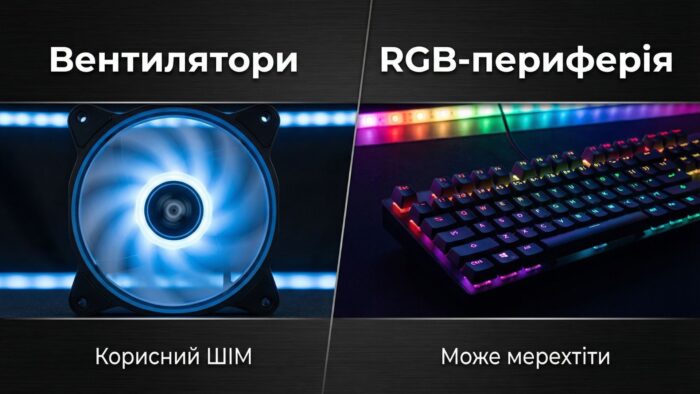
- Fans (4-pin PWM): Here, PWM is a blessing. It allows you to smoothly control the speed of the cooler without unnecessary noise.
- RGB peripherals: This is where the surprises come in. Cheap keyboards with RGB backlighting often flicker. It may be imperceptible to the direct eye, but peripheral vision picks up on these pulsations, adding a “background” load to the brain while playing.


Bruh why images have ukranian text? Thats’s cringe
It’s simple, the original article is in Ukrainian, we have 50 languages on our site, from time to time there is incomplete localization, sorry. We try to make all the screenshots in the reviews in English so that everyone understands. But in the author’s articles, the localization is often incomplete and the original pictures simply remain. We apologize.