© ROOT-NATION.com - Use of content is permitted with a backlink.
Last year, Lenovo introduced the second generation of its handheld gaming console, the Lenovo Legion Go 2. While retaining the same overall form factor, the new device received a substantial upgrade in specifications, including a more powerful processor, increased storage and RAM, a redesigned set of controllers, and a larger battery. In addition, the display technology was upgraded from IPS to OLED. On paper, the changes look impressive. However, the device is not without its trade-offs. Stay tuned to learn about the key strengths and drawbacks of the Legion Go 2.
Read also: All game consoles reviws
TABLE OF CONTENTS:
Lenovo Legion Go 2 Specifications
- Display: 8.8″, OLED, touchscreen, WUXGA (1920×1200), refresh rate up to 144 Hz, DCI-P3 colour space, brightness 500 nits, aspect ratio 16:10, VESA True Black 1000 certified
- Operating system: Windows 11
- Processor: AMD Ryzen Z2 / AMD Ryzen Z2 Extreme
- Graphics: AMD Radeon, integrated
- RAM: 32 GB, LPDDR5X
- Storage: 1 TB/2 TB PCIe SSD
- Connectivity: Wi-Fi 6E (2×2AX), Bluetooth 5.3
- Ports: 2×USB4 Type-C (with Power Delivery 3.0 and DisplayPort 1.4), 1×3.5 mm combined audio jack, microSD card reader (up to 2 TB) + 2×Type-C for charging on each controller
- Audio: stereo, 2 × 2 W speakers with support for Nahimic audio technologies
- Battery: 74 Wh
- Dimensions: main unit 206.0 × 136.70 × 22.95 mm, with controllers 295.60 × 136.70 × 42.25 mm
- Weight: from 0.92 kg
- Additional features: 2 detachable gamepads, spot lighting, touchpad, FPS (mouse) mode, Legion Space software, case and gamepad holder included, built-in stand, fingerprint scanner in the power button
Read also:
- Review of Lenovo Legion Go: Portable Gaming Console-Transformer
- Using the Nintendo Switch 2: Few Games Available, but It’s Hard to Go Back
Lenovo Legion Go 2 Price

The Legion Go 2 is available in several configurations, which has a fairly significant impact on the price. For instance, the base model featuring a Ryzen Z2 processor and 1 TB of storage, with the discount available at the time of writing, costs around $1,230/€1,060; the version with a Ryzen Z2 Extreme processor and 1 TB costs $1,565/€1,350; and the top-of-the-range model is priced at $2,480/€2,140. Admittedly, the price isn’t exactly affordable. But, unfortunately, this is the fate of the entire gaming hardware market, and high-performance hardware has become significantly more expensive. Let’s see what we get for this money.
Where to buy Lenovo Legion Go 2
Package contents
The portable gaming console comes in a large branded box. Inside, you will find the Legion Go 2 with two detachable controllers, a carrying case for storage and transport, a 65 W power adapter, documentation, as well as additional accessories – a mouse-mode stand for the right controller and a protective contact cover for the same controller.

A brief note on the carrying case is also worth adding. Unlike the case for the first model, which was denser and held its shape better, this is a softer solution. On the positive side, the materials feel more pleasant to the touch, and there are two small pockets for accessories. However, the charger still needs to be carried separately, as there is no dedicated space for it here.


Read also:
- Nintendo Switch 2 Review: Move Over, Steam Deck
- EVERDRIVE N8 PRO Review: Ultimate Cartridge for Nintendo Entertainment System (NES)
Design and build
Structurally, the second model is very similar to the first. It consists of a main unit with the display and all core hardware, along with two detachable, multifunction controllers. The body is made of plastic across all components (the controllers also feature a textured inner surface to improve grip and prevent slipping). The overall finish feels pleasant to the touch. The device is available only in black. On the downside, fingerprints and signs of use are easily noticeable, although they are just as easy to remove. Overall, maintaining a clean appearance of the console should not be difficult.
Main unit
The “base” unit housing all internal hardware has become slightly more refined, measuring 20.6 × 13.7 × 2.3 cm. On the front, there is an 8.8-inch touchscreen panel with the same overall dimensions as before, surrounded by fairly thick bezels, with the bottom one being the most prominent. On this lower bezel, there are two small cutouts for the built-in microphones. In the top-right area, there is a small window for the ambient light sensor.

Flipping the device over reveals the rear cooling grille, which now has a mesh-like design. The series logo is positioned at the top, while below it there is a retractable stand for stable placement of the console on a desk. The hinge mechanism feels fairly firm, allowing the user to set a desired viewing angle with confidence that the device will stay in place and not slide or shift.


Moving on to the edges of the device. The main elements are placed on the top side. Here we have an additional cooling grille, a pair of speakers positioned on the left and right, an LED indicator, volume control buttons, a USB4 port (with DisplayPort 2.0 and Power Delivery 3.0 support), and the power button. The power button is not only neatly backlit, but also integrates a fingerprint scanner. In practice, this is a very convenient solution.


The sides are reserved only for controller attachment points, while the bottom houses an additional USB-C port, a combined 3.5 mm audio jack for wired headsets, and a microSD card reader. Thanks to the latter, the storage capacity can be expanded by up to 2 TB.

Controllers
The TrueStrike controllers, which closely replicate the design language of Xbox gamepads, have seen some refinements compared to the previous generation. They now feature a more rounded, smoother shape, which in my view feels more comfortable in hand. There are also several new elements introduced here, but each of them will be covered in turn.

Starting with the left controller. On the front, it features Hall-effect analog sticks with a neatly integrated illuminated ring, which can be customized in the proprietary Legion Space software. At the top, there are two buttons: one provides quick access to Legion Space, while the other serves the View function. Below the analog stick is a classic D-pad, and beneath that are two additional buttons – Page and a shortcut for switching directly to the desktop.

On the back and top, we see a similar button layout to the previous generation: programmable Y1 and Y2 buttons that can be customized, along with the LB shoulder button and the LT trigger. Under Y2, as before, there is a dedicated release button for detaching the controller from the main unit. The detachment process is quick and convenient, although reattaching the controller requires a bit of getting used to.
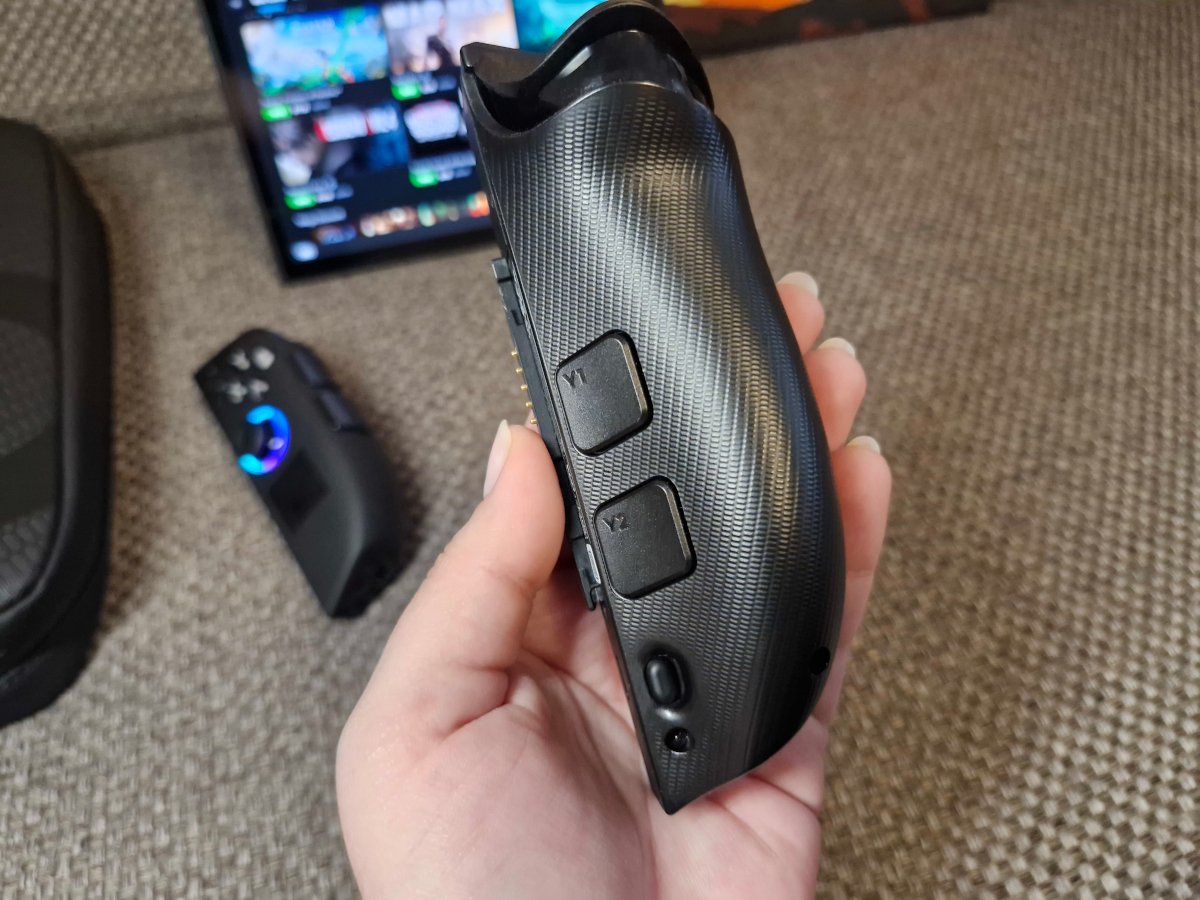
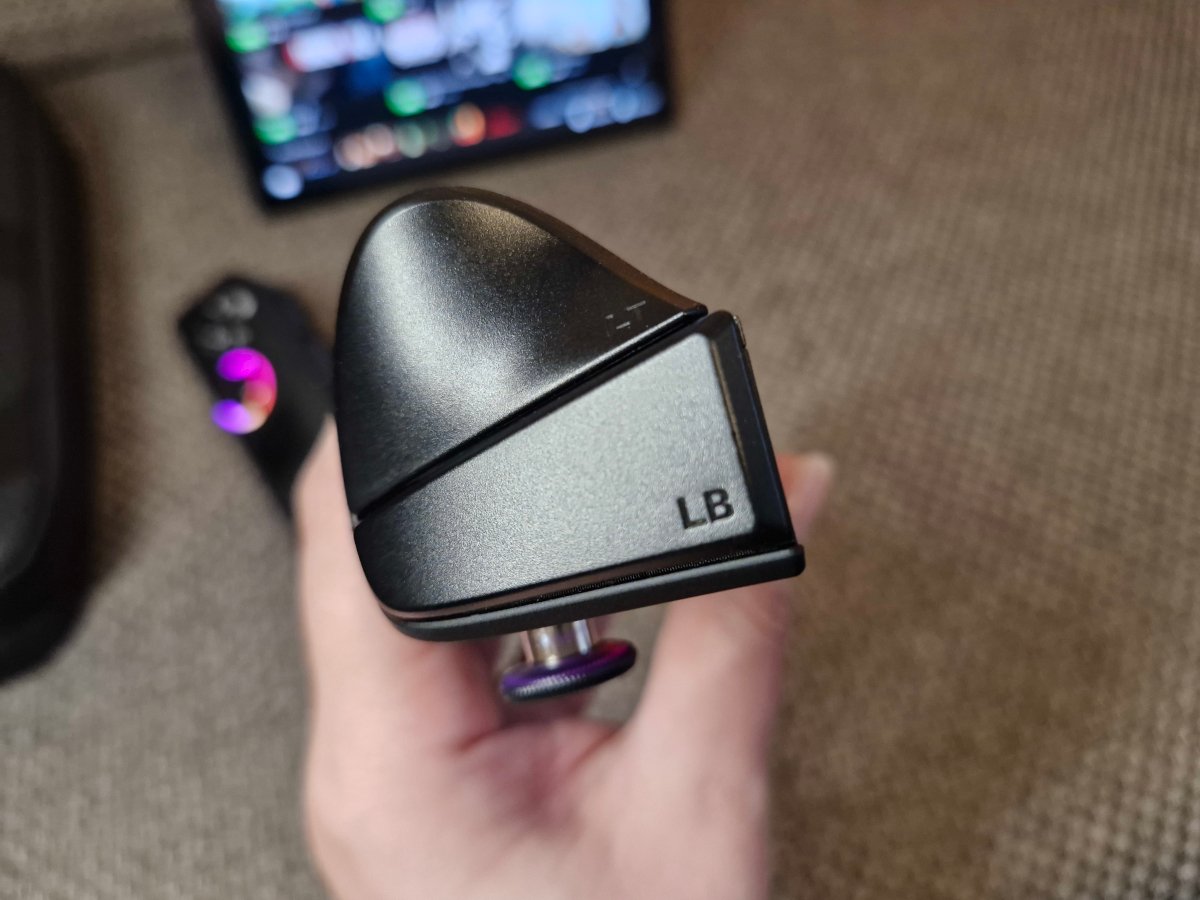
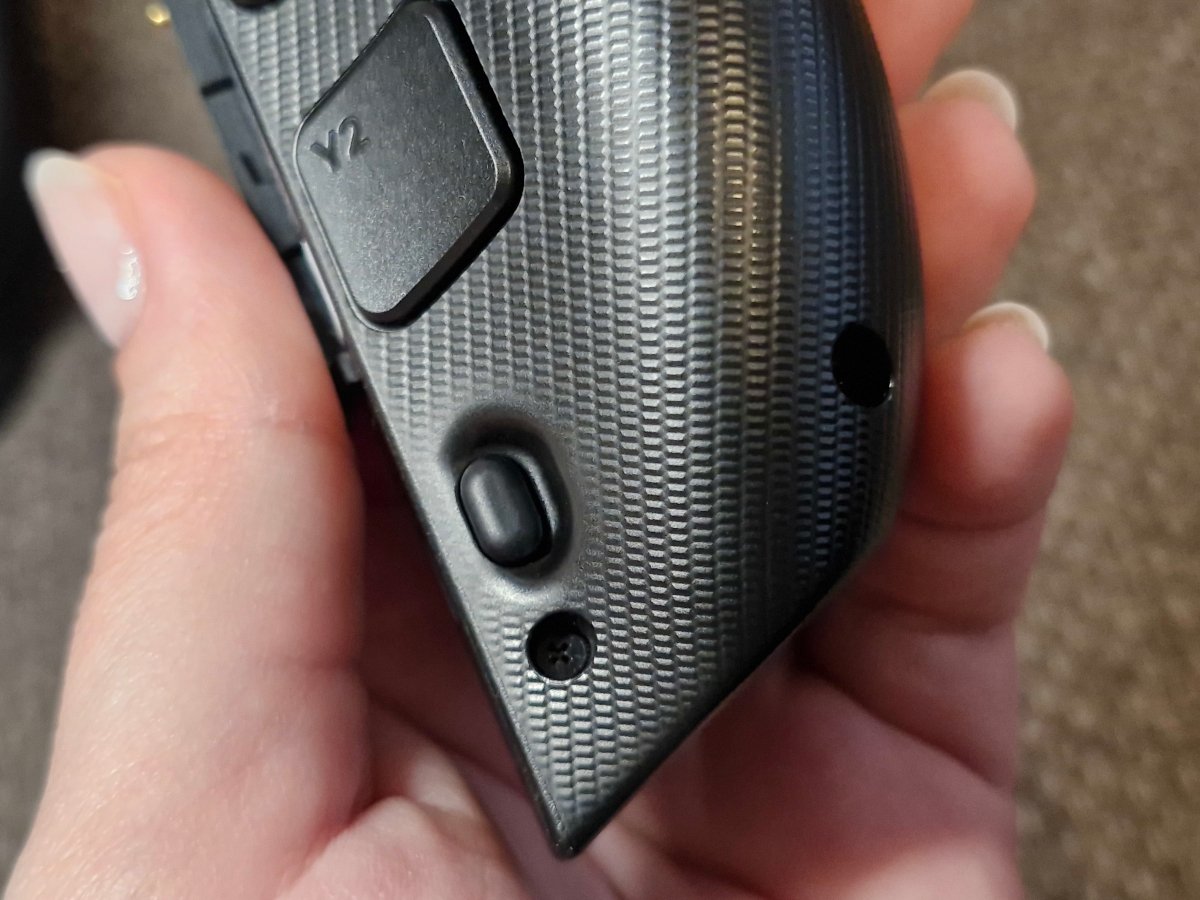
However, there is one more addition that wasn’t present in the first generation – a USB-C charging port on each controller. In other words, while previously the controllers could only be charged by attaching them to the main unit, they can now be conveniently charged via a cable as well. This allows for longer gaming sessions without needing to interrupt gameplay due to a depleted controller battery.

On the right controller, there is a similar Hall-effect joystick with integrated lighting. However, compared to the left side, it is positioned slightly lower. Below it sits a compact touchpad, which unfortunately has a surface that tends to pick up fingerprints quite quickly.

On the top edge, we also find the M1 and M2 buttons. On the rear side, there are additional M3 and Y3 keys, a scroll wheel, and a button for detaching the controller from the main unit.


Additionally, on the bottom – just like in the previous model – there is an optical sensor and a switch that activates FPS mode. In simple terms, the right controller can be transformed into a vertical mouse using the included stand, enabling a more traditional FPS-style control scheme.

I wouldn’t say using the controller in this way feels intuitive from the very first try – many users will likely need some time to get used to its particular quirks and handling characteristics.

Read also:
- Lenovo Yoga Pro 9i Aura Edition (2025) Review: High-End Laptop for Creative Work
- Review of Lenovo Legion Glasses: glasses – a pocket monitor for gaming and more
Ergonomics and usage modes
One way or another, the Lenovo Legion Go 2 has grown slightly in both size and weight. While the first generation weighed 0.85 kg with controllers attached, the new model ranges from 0.92 kg to 1.08 kg depending on the configuration.
However, this does not significantly affect overall ergonomics. As with the previous model, the device is most comfortable to use with some form of arm support – whether that is chair armrests, a sofa, or simply your knees. The form factor still allows for a variety of usage scenarios:
- Portable mode. Used as a standard handheld console. However, prolonged use can become tiring without proper arm support.
- Desktop mode. Detach the controllers and extend the rear kickstand to place the main unit on a desk, effectively turning it into an 8.8-inch display while holding the controllers separately. With an optional controller base (not included in the review unit), the setup can be converted into a near-classic gamepad configuration. Unfortunately, it was not available in the review kit, so its advantages could not be evaluated.
- FPS mode. Switch the toggle on the right controller to “FPS” mode, attach it to the magnetic base stand, and use it as a vertical mouse with full button input and a scroll wheel. This is a rather specific experience that requires some adaptation, but it may be useful both for certain game genres and general PC-like usage.
- Tablet mode. The touchscreen allows the device to function as a Windows tablet – for watching videos, browsing the web, checking email, and similar tasks. However, increasing the UI scaling is recommended, as text can feel small on the 8.8-inch display.
- PC mode. The Lenovo Legion Go 2 can also serve as the core of a gaming setup. By connecting an external monitor, keyboard, and mouse, it effectively becomes a full PC for gaming and productivity. That said, peripheral connectivity may require either a USB hub or Bluetooth devices, since there is no USB-A port for traditional dongle receivers.
Read also:
- A Look at JSAUX Accessories for Switch 2
- JSAUX accessories for portable consoles review, part 2: Backpack, docking station with M.2 SSD and adapters

There is, however, another usage scenario that slightly expands on the second mode. In desktop setup, if you connect an additional controller – or at least a keyboard (or a keyboard + mouse combo) – it becomes possible to play in a local multiplayer setup. Unfortunately, a second controller was not available for this review, so my partner and I simply used a keyboard instead, spending several evenings playing Mortal Kombat. Naturally, a keyboard is far from the most comfortable input method for fighting games, but it was still an enjoyable experience. This, in turn, highlights that the Lenovo Legion Go 2 can, in practice, be shared with others. In a sense, it also works as a “family-friendly” gaming device, allowing gameplay to be split and enjoyed together with close ones.

In my view, one of the most significant advantages of the console is its versatility. In practice, it can help pass the time during long journeys, provide entertainment on vacation or at a summer house, or serve as a home device for both gaming and productivity tasks.
Display
The display size from the previous generation remains unchanged at 8.8 inches. However, the panel type has been updated – from IPS to OLED. It is still a touchscreen with a refresh rate of up to 144 Hz and a peak brightness of 500 nits. The resolution, however, has been reduced to WUXGA (1920×1200) instead of QHD+ (2560×1600). Does this make the image appear “grainy”? Not really. At this diagonal size, the difference is not practically noticeable. What is clearly improved, however, is the overall image quality: thanks to the switch to OLED, colors appear more vibrant and contrast is significantly higher.

The only drawback that can be attributed to the display of the Lenovo Legion Go 2 is its reflectivity. Glare from sunlight or artificial lighting sometimes requires finding an optimal viewing angle for comfortable use, although this is typical for any device with a glossy screen surface. Otherwise, the panel performs excellently: wide viewing angles, a solid brightness headroom, and strong contrast enabled by true blacks all contribute to a highly immersive gaming experience. It also works well for productivity tasks such as text work, though slightly increasing the UI scaling is recommended to reduce eye strain.
Read also:
- Lenovo ThinkPad X9 14 Gen 1 Aura Edition Laptop Review – Familiar Design, Minus the TrackPoint
- Review of “Mafia: The Old Country” – Classic Sicilian Tale of Struggle, Love, and Betrayal
What’s inside
Depending on the configuration, the “engine” powering the Lenovo Legion Go 2 can be either the Ryzen Z2 or the top-tier Ryzen Z2 Extreme, both based on the newer Zen 5 architecture with RDNA 3.5 graphics. If the base Z2 is a well-balanced option for users who are not chasing ultra settings, the Extreme version is better suited for demanding gamers.One of its key features is the NPU, which helps optimize system resources, improves frame rates through “smart” upscaling, and extracts maximum performance from each scene while helping to manage heat output and battery consumption.

Regardless of which processor is used, the console is equipped with fast and power-efficient 32 GB LPDDR5X RAM – twice as much as in the original Legion Go (which offered only 16 GB). This provides significantly more headroom for modern games, helping maintain stable frame rates and reducing stuttering in AAA titles. As for internal storage, the device is available in 1 TB or 2 TB configurations (compared to 512 GB on the previous generation). In both cases, microSD expansion support up to 2 TB is also present. The cooling system has been improved as well, featuring Legion ColdFront thermal management. On the wireless side, the console supports Wi-Fi 6E (2×2 AX) and Bluetooth 5.3. In terms of connectivity, it offers two USB4 Type-C ports (with Power Delivery 3.0 and DisplayPort 1.4), a dedicated USB-C charging port on each controller, and a combined 3.5 mm audio jack.
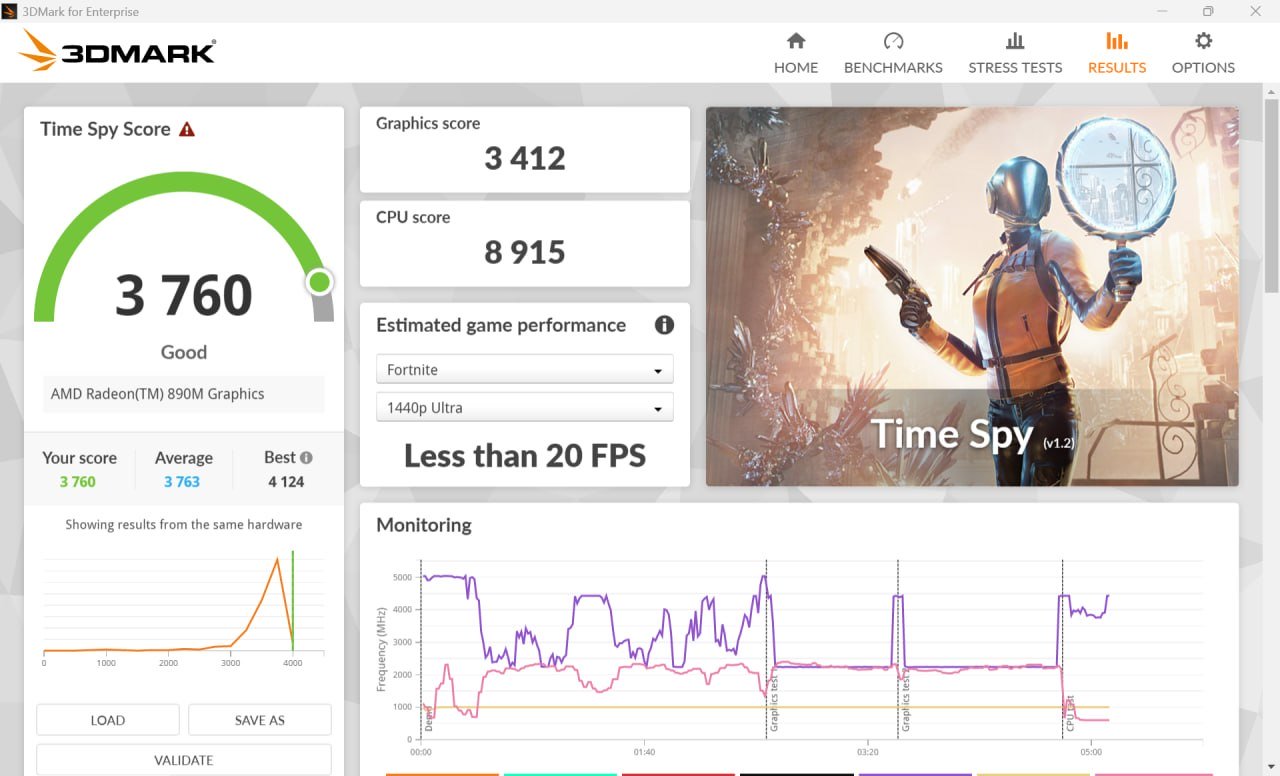
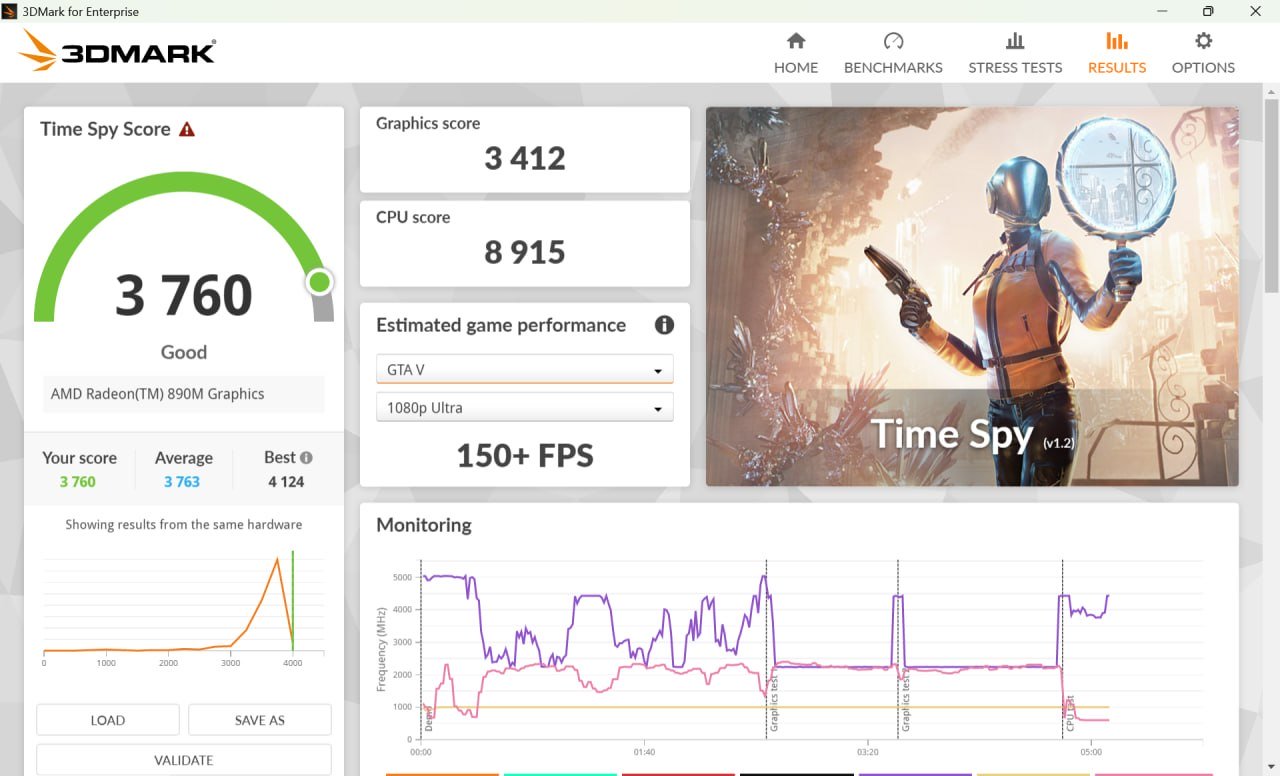
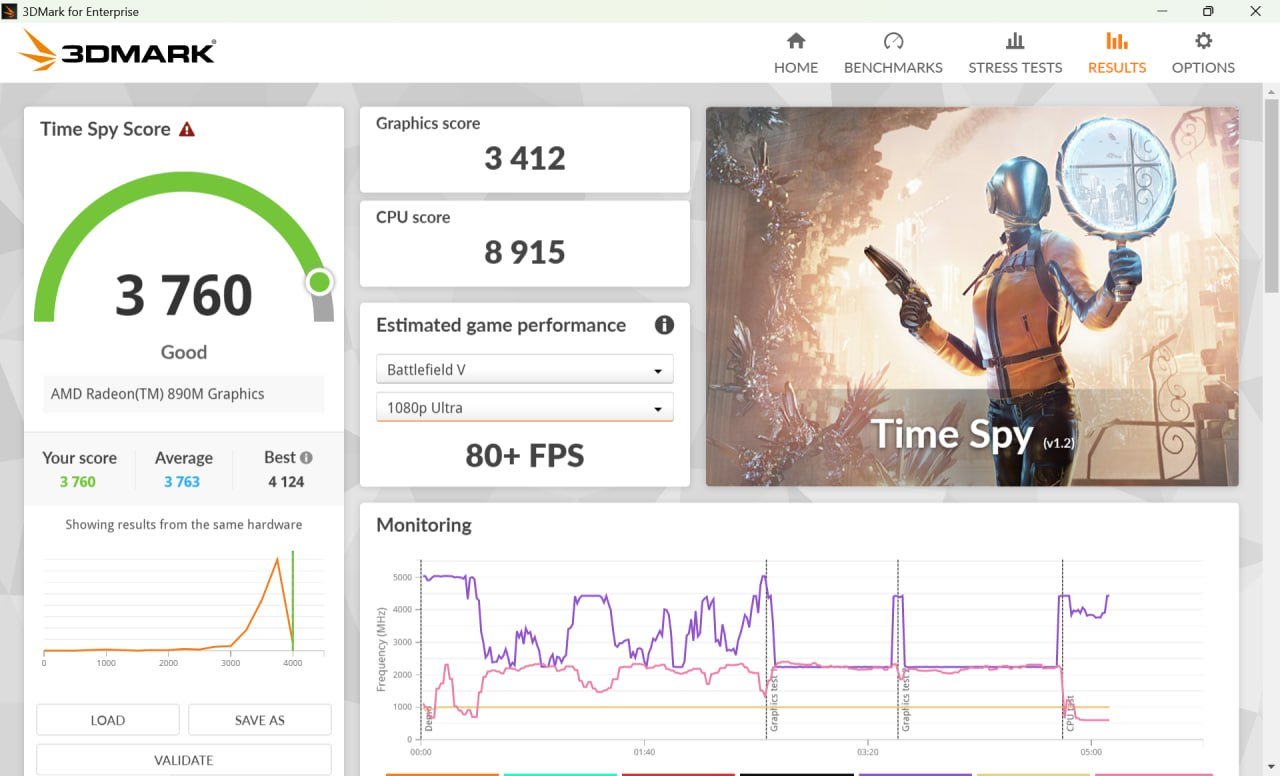
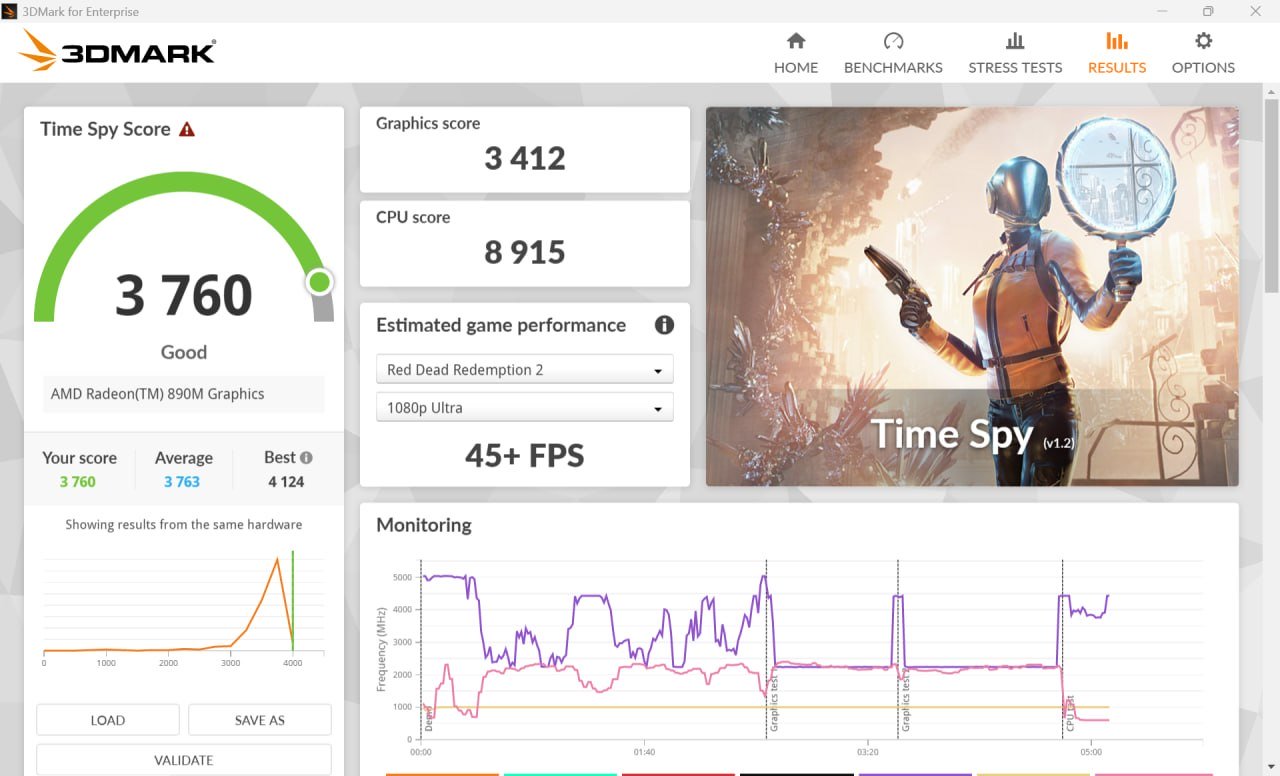
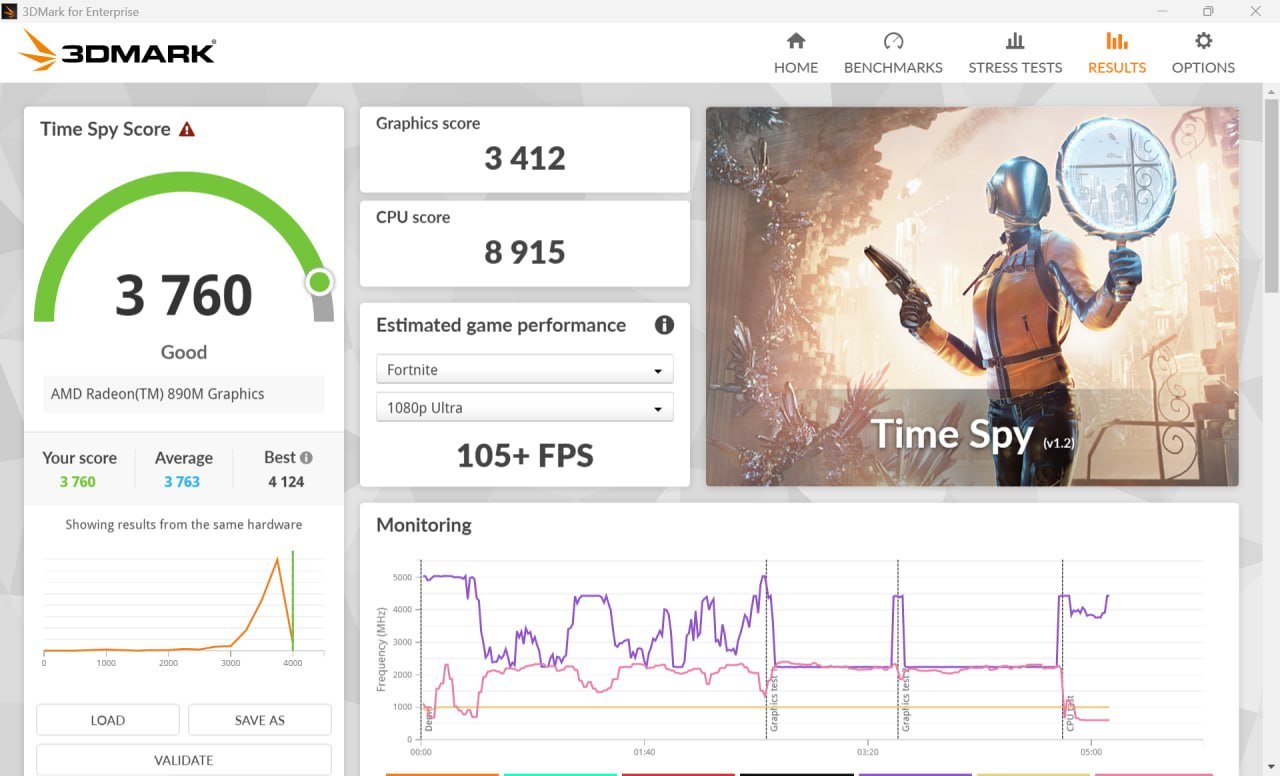
In popular benchmarking software such as 3DMark (Time Spy score), the results translate into real-world frame rates across well-known titles at different resolutions. Overall, the conclusion is fairly straightforward: at Full HD, the device is capable of delivering a very high-quality gaming experience. On an 8.8-inch display, this resolution is more than sufficient.
At Ultra settings in 1080p, the results are as follows:
- GTA V – 150+ fps
- Battlefield V – 80+ fps
- Red Dead Redemption 2 – 45+ fps
- Fortnite – 105+ fps
For comparison, at 1440p with Ultra settings, performance drops significantly:
- Fortnite – under 20 fps
- Battlefield V – up to 50 fps
These results clearly show that the system is best optimized for Full HD gaming on its built-in display.
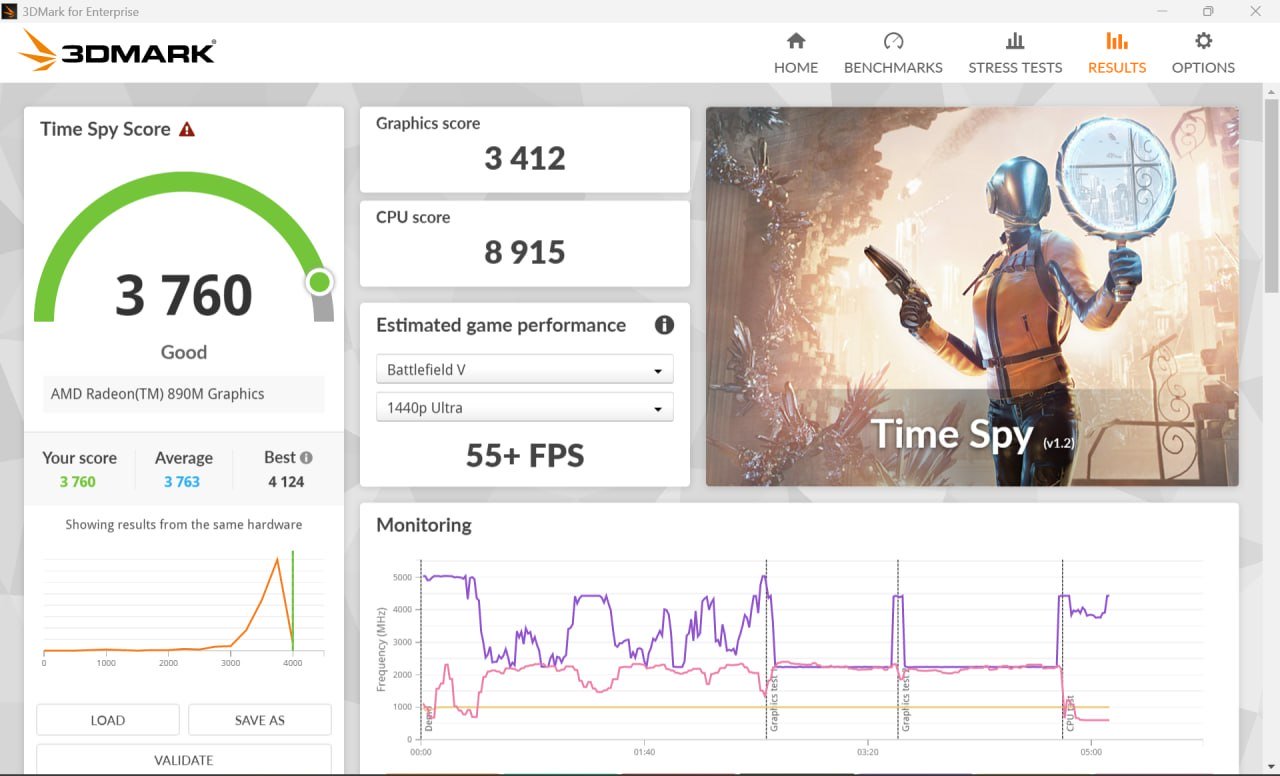
And a few more synthetic tests:
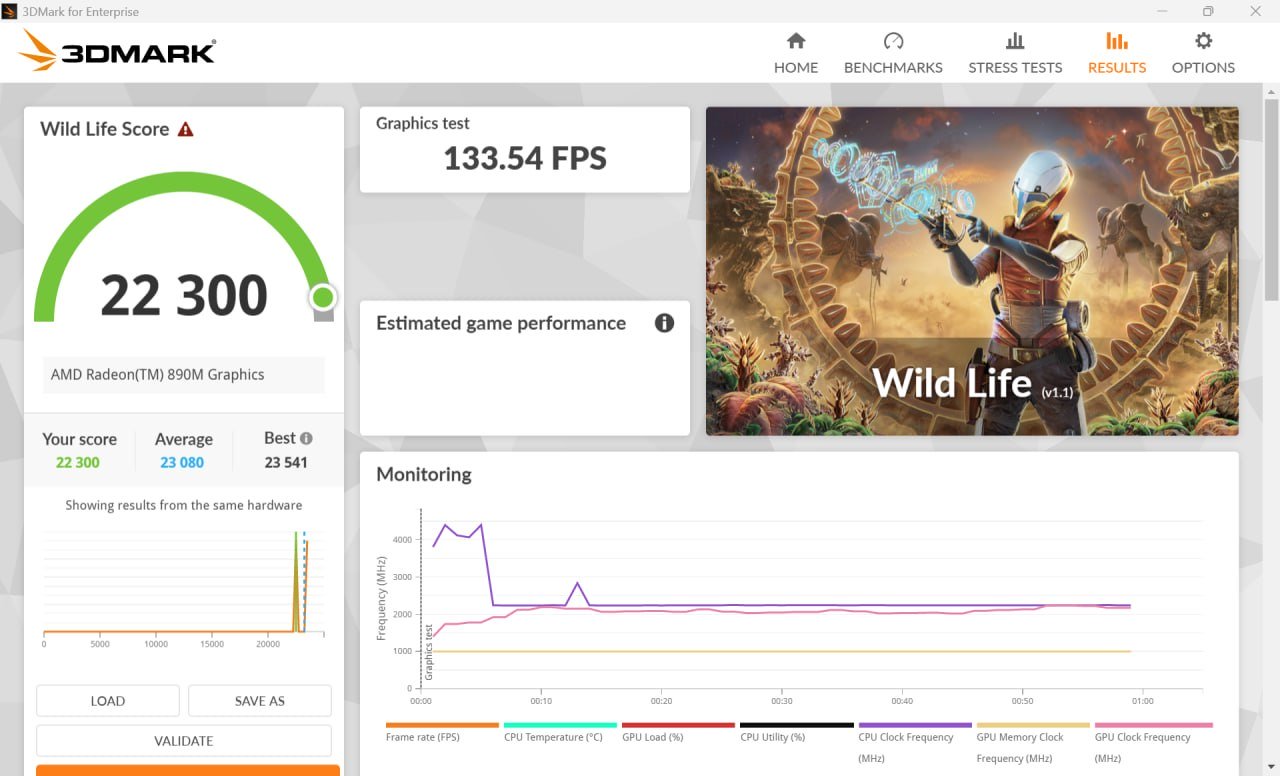
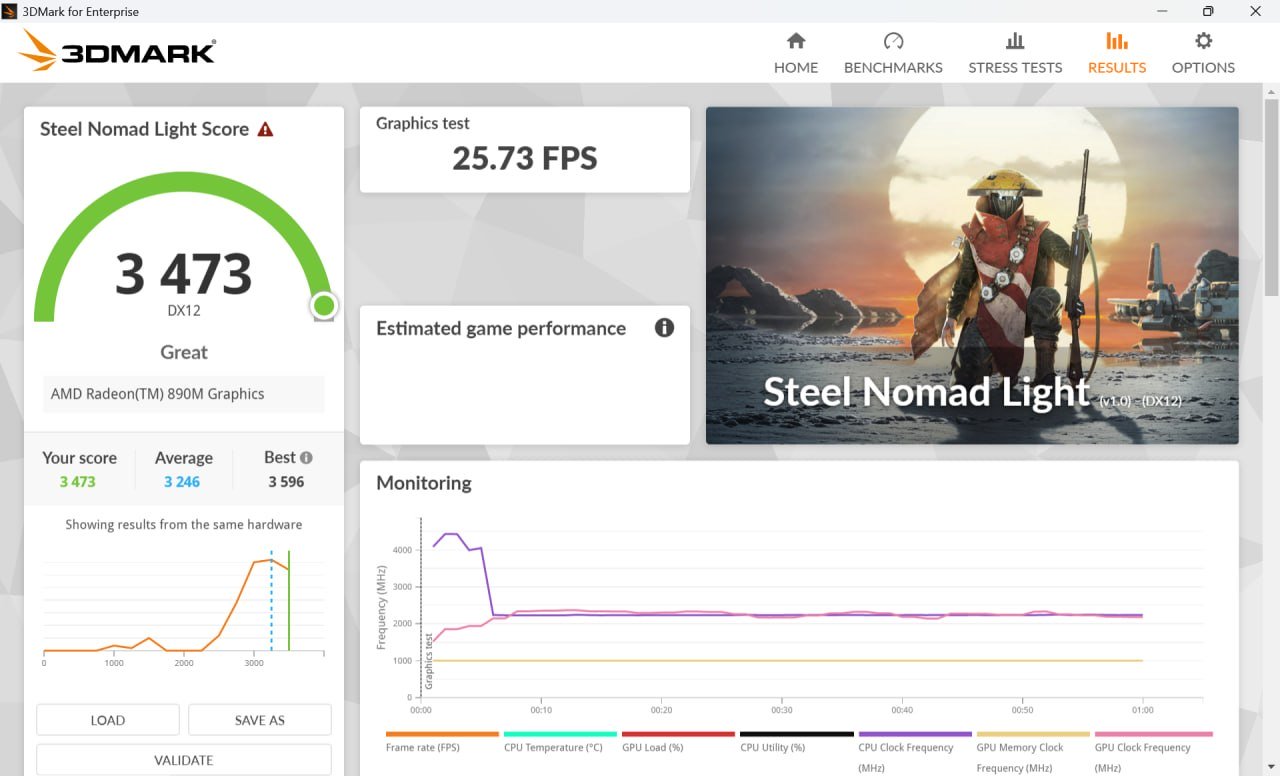
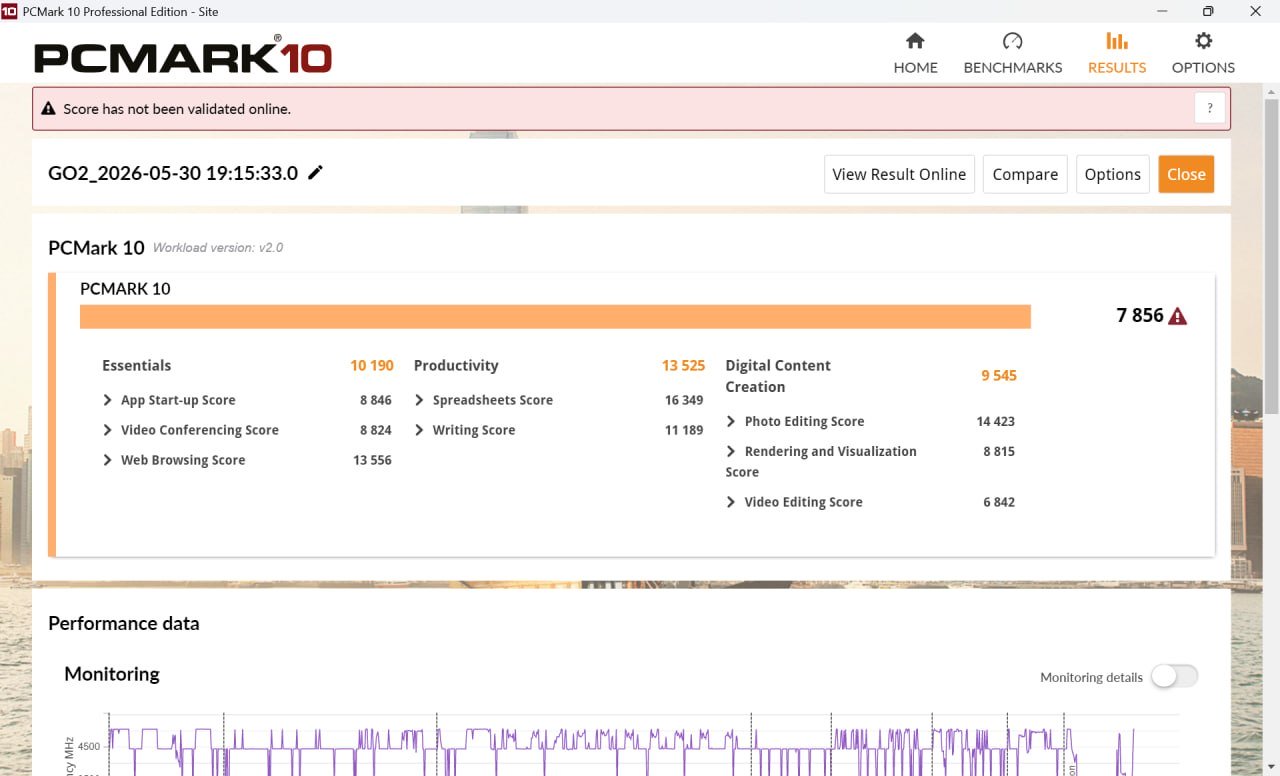
Software and Legion Space
Just like its predecessor, the Lenovo Legion Go 2 ships with Windows 11 preinstalled. There is not much need to go into detail here, as this is a familiar and standard setup. What does deserve closer attention is the proprietary Legion Space software. It has been slightly updated compared to the previous version, but still brings together all essential gaming-related features in a single, unified interface.

The first tab here is the game store, and for some reason this section is duplicated in the Legion Store as well. In my view, a single entry point would have been sufficient, but the current layout is what it is. Next comes the “Library” section, which aggregates installed games. Below that, the interface also suggests titles that may potentially be of interest to the user.


The most interesting part comes next. In the “Settings” section, users get access not only to general system parameters, but also to more granular controls such as performance tuning and cooling management – from the power-efficient “Quiet Mode” to maximum performance mode. This is also where audio, microphone, and display settings can be adjusted.
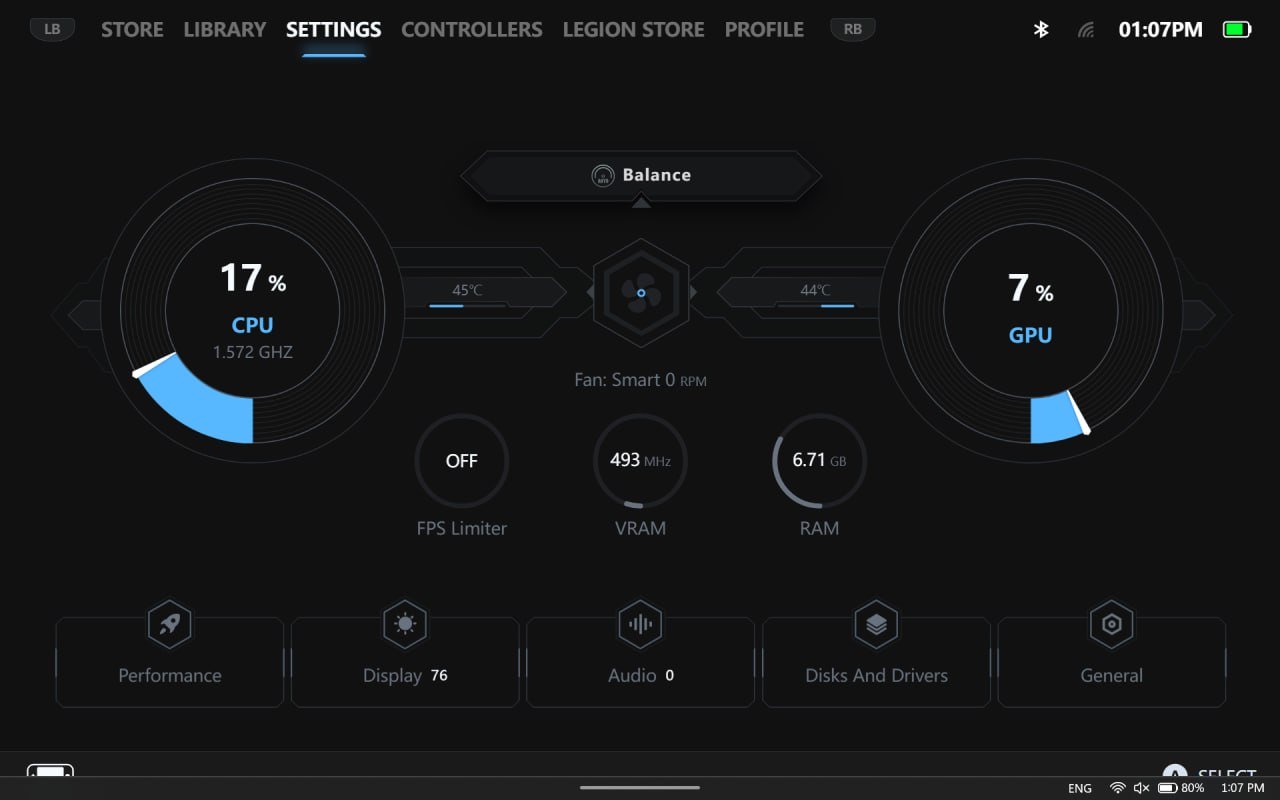
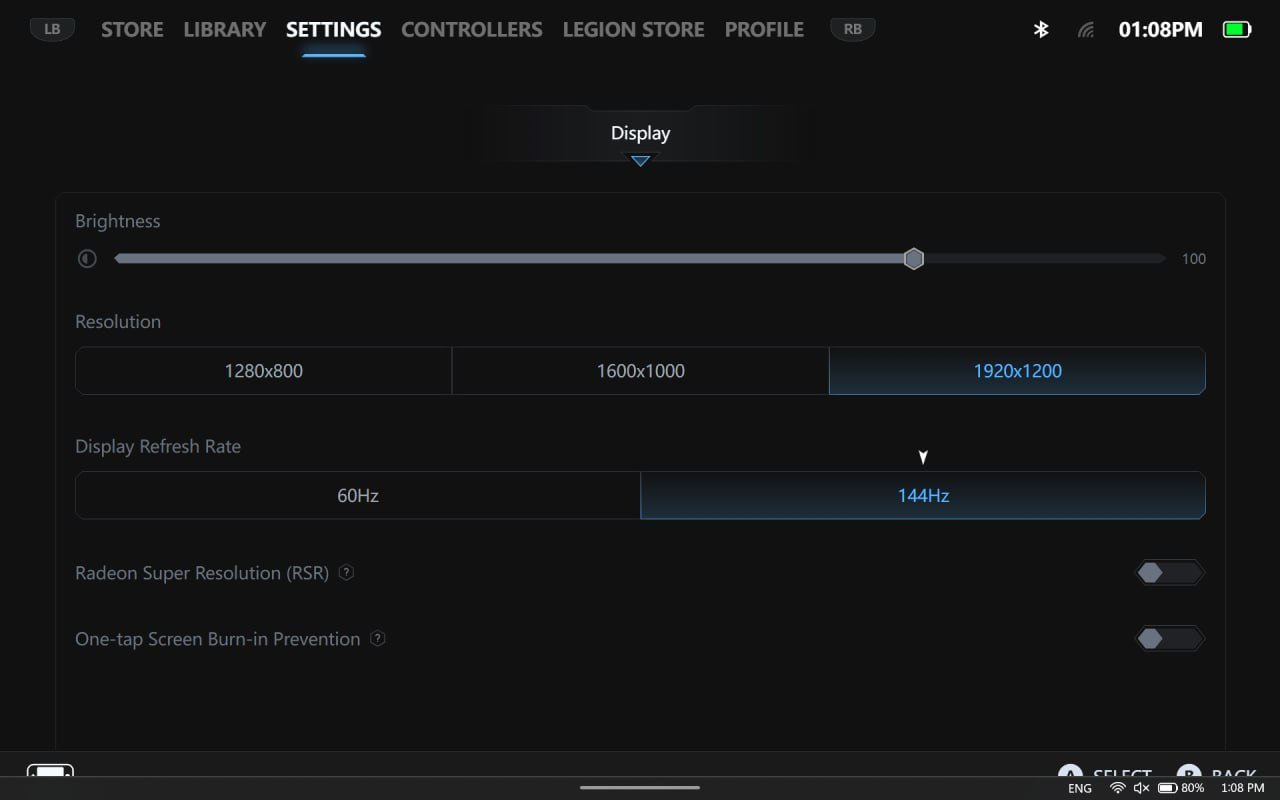
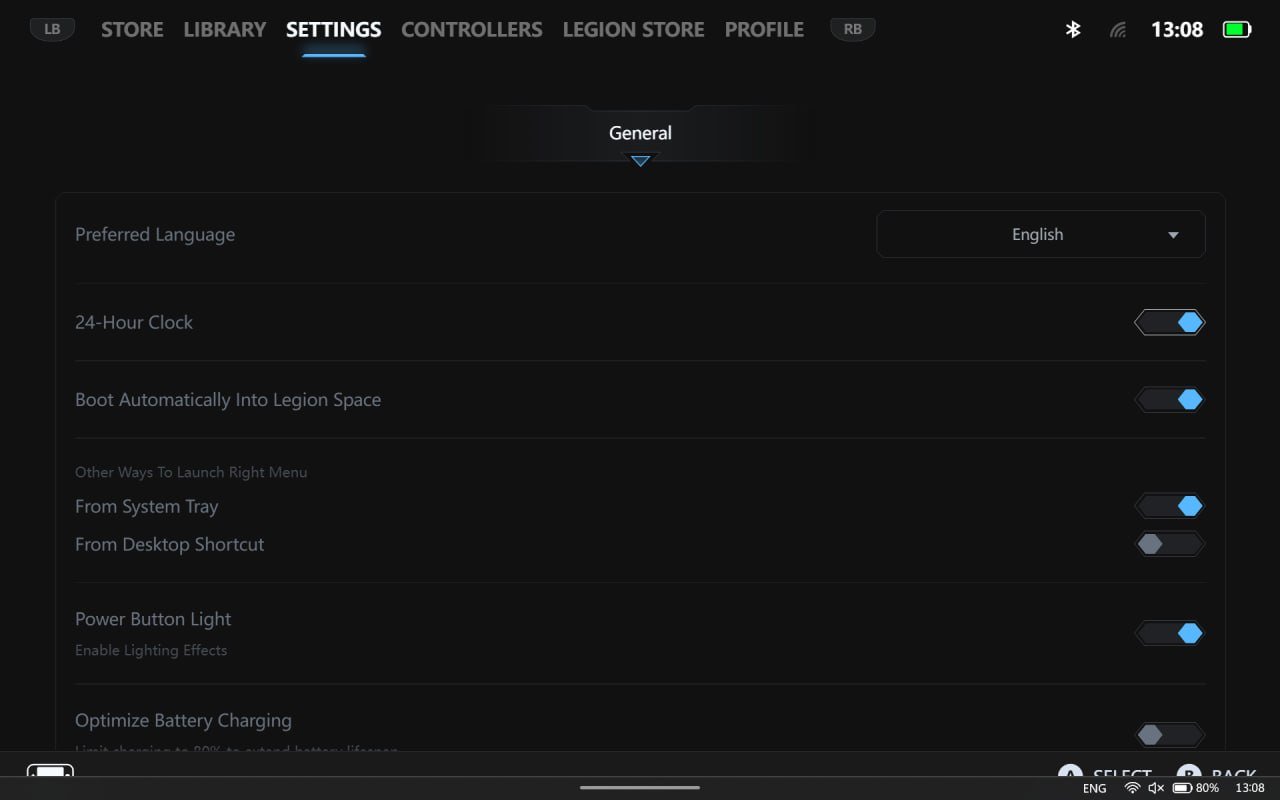
In the fourth section, all controller-related settings are collected. Here, users can calibrate the controllers, access a built-in “cheat sheet” of button combinations, and also remap inputs – programming individual buttons, combos, and gestures (for example, short press vs. long press actions).

And finally, there are the profile settings. This section provides access to technical support, as well as a downloads center and a screenshot management area.

It is convenient that the right controller includes a button that opens Legion Space not in full-screen mode, but as a side panel. This panel mirrors most of the settings available in the full version, allowing quick adjustments to options such as display or performance without needing to minimize the game. Overall, the application is fairly intuitive and easy to navigate. However, the only drawback is its responsiveness. I don’t recall the original Legion Go requiring as much as 10 seconds to load Legion Space. Considering that the Lenovo Legion Go 2 has more powerful hardware, this issue likely lies on the software side rather than the hardware.
Read also:
- Lost Records Bloom & Rage Review: An Ambitious but Uneven Successor to Life is Strange
- Star Wars Episode I: Jedi Power Battles Remaster review: Relive your childhood… if you dare
Audio
Sound on the Lenovo Legion Go 2 is handled by a pair of speakers positioned on the top edge, each rated at 2 W. The device also supports Nahimic audio technologies. Given the size and output power, the speakers cannot deliver particularly deep or spacious sound. However, for a wide range of games, videos, or films, they are more than adequate. At the very least, there is a healthy volume headroom available. If more detailed spatial audio is needed – for example, for enemy positioning in games or deeper immersion – using a gaming headset is recommended. It can be connected either via a wired connection or wirelessly.
Lenovo Legion Go 2 Battery life
Another plus for the Legion Go 2 is its larger battery, despite slightly more refined dimensions. The capacity increase is substantial – roughly 1.5× – going from 49.2 Wh to 74 Wh. However, real-world battery life has not improved to the same extent compared to the previous model. For example, in a balanced performance mode while playing Mortal Kombat, with both the native controllers and a keyboard connected, the battery dropped from 100% to 20% in about 2.5 hours. A full charge takes approximately 1.5 hours.

During gaming, the cooling system becomes quite audible (especially when the device is plugged in), although it does not drown out in-game sounds. In everyday use – such as watching videos, browsing the web, and similar tasks – the battery life is significantly longer, reaching around 5 hours depending on the workload on the Lenovo Legion Go 2.
Impressions of the Lenovo Legion Go 2
Undoubtedly, Lenovo’s console has noticeably “matured.” It has become more powerful and now offers more memory – both RAM and internal storage – as well as a top-tier display.
And thanks to its well-thought-out detachable controller design, it also offers maximum flexibility – the console can be used for mobile gaming, stationary setups, or even productivity tasks. However, there are still a few “buts.”

Due to the relatively high weight, the Lenovo Legion Go 2 is not particularly comfortable to hold for long periods. Battery life, despite the larger 74 Wh capacity, has not improved dramatically, and pricing is also difficult to ignore, as it can now compete with gaming laptops. That said, the Legion Go 2 will likely find its own audience – users who value powerful hardware, compact form factor, and versatility across different usage scenarios.
Read also:
- Everything About Project Helix: Xbox’s Last Big Bet or a Way Out of the Memory Crisis
- Your router is not only for Wi-Fi – here’s what else it can do
- Razer Joro Review: Ultra-Compact Gaming Keyboard
- Everything You Need to Know Before Installing Solar Panels: A Look Into the World of Energy Generation and Storage Systems
Where to buy the Legion Go 2
Where to buy Lenovo Legion Go 2