





© ROOT-NATION.com - Use of content is permitted with a backlink.
Let’s take a look at the changes and improvements many users would like to see in Windows 12, and which features Microsoft may need to address in its next operating system release.

Will we finally see an operating system that no longer frustrates users with inconsistent design and behavior? Can Microsoft deliver a meaningful step forward that changes how people perceive Windows? Today, we’ll look at what users genuinely expect from Windows 12.
Read also: Instructions, Guides, How To for Windows
TABLE OF CONTENTS:
Windows 12: a reset opportunity or another compromise?
Windows has long been both a strength and a source of frustration. On one hand, it remains the most widely used operating system in the world, relied upon in offices, schools, and home environments. On the other hand, it still carries legacy interface elements that date back to the 1990s. This tension has been a recurring topic in discussions about the platform’s development and continues to generate debate. Although early rumors about Windows 12 are already circulating, it is clear that the system would need to be more than a routine update. It would have to represent a broader rethinking of the platform.

Why does this topic capture the imagination of millions of users? If we were to compile a list of the most desired technological changes in the PC world, a “clean-slate” version of Windows would likely rank near the top five. Consider how much daily frustration could be avoided if the operating system were finally made consistent, logical, and coherent. At the same time, there are many indications that Microsoft tends to move forward cautiously rather than radically. However, this does not necessarily mean that everything will remain unchanged. Windows 12 may simply end up looking quite different from what we might expect today.

It is difficult to discuss Windows 12 without briefly considering the current state of Windows 11. For some readers, this may feel like a sensitive topic, given the ongoing frustrations around the platform. However, this overview will avoid deep technical detail and instead focus on practical examples of what is currently missing and what could be improved in future versions. The goal is to outline what the future of Windows might look like in a more structured and coherent form. But why refer to it as something that “should be”? Is this already happening? In a limited sense, yes. Some early steps in that direction are already visible. However, Microsoft still appears to be only scratching the surface of what the platform could potentially become. If this raises interest, the following sections will explore these ideas in more detail.
Read also: Computers in Space: Limitations as an Advantage
A final departure from the past
Windows 11 is generally considered more modern in appearance than its predecessors. However, fewer users are aware of how deeply remnants from the Windows 95 and Windows XP eras are still embedded within the system. When opening Control Panel or Device Manager, parts of the interface still feel like they originate from the early 2000s. This inconsistency is not only a visual issue. It reflects a broader architectural pattern in which older components have been repeatedly layered rather than fully redesigned.
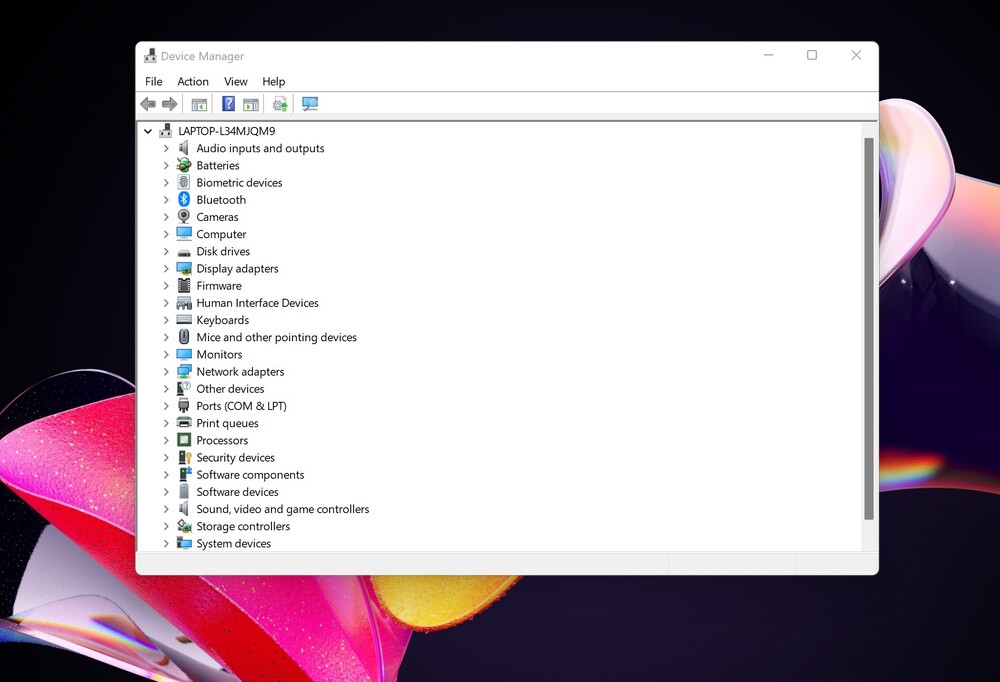
The main problem is not the existence of legacy components, but rather their coexistence with modern ones. Fluent Design alongside Windows XP–era settings interfaces creates a noticeable inconsistency within the same operating system. In practical terms, this is comparable to combining two fundamentally different design generations within a single environment. While both serve the same functional purpose, the overall result lacks visual and structural coherence.
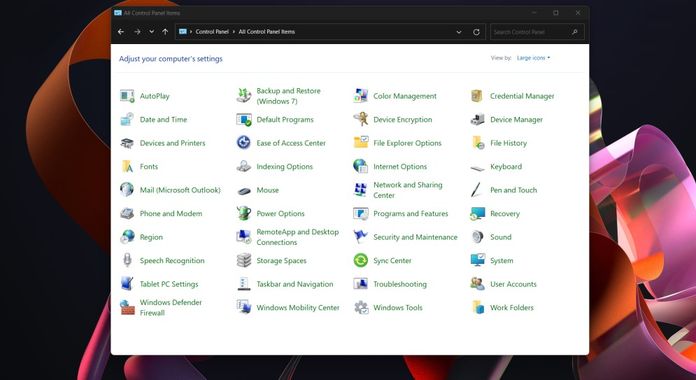
And so we come to the main limitation of Windows 11, which also points to what needs to be done in Windows 12. At present, Fluent Design is an add-on to the system, not its foundation. The old-fashioned windows haven’t gone anywhere. There is no unified visual language as such. In Windows 12, all this needs to change once and for all. I can’t imagine continuing to open the Control Panel and search for settings there, as if I were in the archives of a Soviet research institute.
Read also: Five Mistakes to Avoid When Working with Windows 11
The Start menu and taskbar, finally making sense
This brings us to one of the most important aspects for most users. Is it even realistic to imagine Windows 12 with a truly well-designed Start menu? There are likely very few users who have not expressed some level of dissatisfaction with this part of the system. However, based on the current development direction, it appears that a different approach may be needed compared to what has been implemented so far.

Note that the Start menu in Windows 11 is often considered one of the more underutilized elements of the system. It offers limited customization, lacks a clear structure in how items are arranged, and provides a search experience that does not always feel consistent.
At the same time, the taskbar still does not allow users to position it freely along different edges of the screen, such as the left or right side. This was a feature available in earlier versions like Windows 7 and has since been removed. While this may seem like a minor detail, it is precisely these small limitations that contribute to everyday frustration for a large number of users.
Of course, these are expectations rather than confirmed changes, as it is not yet possible to predict with certainty what future versions of the system will include. However, the current direction of Windows development suggests a clear choice ahead: either Microsoft will increasingly respond to user feedback, or some users may begin looking for alternative platforms.
Read also: Windows 11 and “K2 Plan”: How Microsoft Is Trying to Fix What It Broke
The ubiquitous Copilot
This is where things become genuinely interesting. Another potential step forward in Windows 12 is closely tied to artificial intelligence. As already noted, Copilot in Windows 11 currently appears as a taskbar button that opens a side panel. At best, this can be described as a basic level of system integration, since it does not yet function as a deeply embedded part of the operating system. Still, the existence of the tool itself suggests a direction of development.
However, due to the limited scope of the current implementation, Copilot is mostly used for simple queries rather than more complex system-level interactions. At one point, Microsoft demonstrated a more integrated approach under the “Copilot+ PC” initiative. In practice, though, this remains restricted to specific hardware and currently appears closer to a product positioning strategy than a broadly available system shift. What this indicates is a gradual, rather than immediate, transition toward a model where AI is not just a feature, but a foundational layer of the operating system.

I imagine Copilot in Windows 12 as a kind of digital system operator. It would monitor system health, analyze running processes, detect driver conflicts, and resolve minor issues before the user becomes aware of them. It would translate system messages into plain language, explain why an application is slowing down, and suggest what could be safely removed. Most importantly, it would learn the user’s working patterns over time, gradually becoming more useful rather than simply responding to commands.
When describing such a Copilot, it is important to recognize that it cannot be meaningfully compared to the assistant currently available in Windows. Referring to today’s Copilot as merely an “advanced search tool” is already close to its actual scope. What is being described here represents a different class of system behavior, not just an incremental improvement. In the same way that a quantum computer is fundamentally different from a conventional PC, a fully integrated AI assistant at the operating system level would represent a qualitatively different approach to how the system operates.
An unclear concept? Possibly. However, it serves as a useful illustration of the potential that artificial intelligence could bring at the operating system level. In this form, Copilot would no longer be just a feature. Instead, it would become part of a broader design philosophy underlying Windows 12.
Read also: What Happens to Astronauts’ Brains in Space?
Two versions of the system: full and simplified
This would establish a fundamentally new Windows paradigm, one that until recently was not widely considered. However, there is another aspect that is often overlooked in discussions about Microsoft’s strategy: market diversity.
The current PC market is more varied than ever. It includes high-end laptops costing several thousand dollars, as well as budget devices priced significantly lower. Both segments are large and widely used, and both require an operating system that remains usable in practice. At present, Windows is largely uniform across all hardware tiers. For lower-end systems, this often results in reduced performance and a less responsive experience.
For this reason, it can be argued that Windows 12 should include a lighter version designed for devices with limited hardware resources. This is not only a matter of convenience, but also a way to retain users who are increasingly moving toward alternative platforms such as ChromeOS or Linux, often due to performance constraints on lower-end Windows systems. In this context, the emergence of more affordable macOS-based devices (often discussed under names such as MacBook Neo) could also be interpreted as a signal worth attention for Windows developers. If such devices expand the lower-price segment of the market, they may accelerate a broader shift toward macOS, which would represent an undesirable scenario for Microsoft from a market share perspective.
Read also: Five Windows 11 Tools for Improving Productivity
Deeper integration with mobile devices
We have now reached the end of this list, but certainly not the least important point. It is worth acknowledging that the future potential for integration between Windows and mobile devices appears significantly more promising than what is currently available. This is also no longer a distant prospect, as it might have seemed in the past.
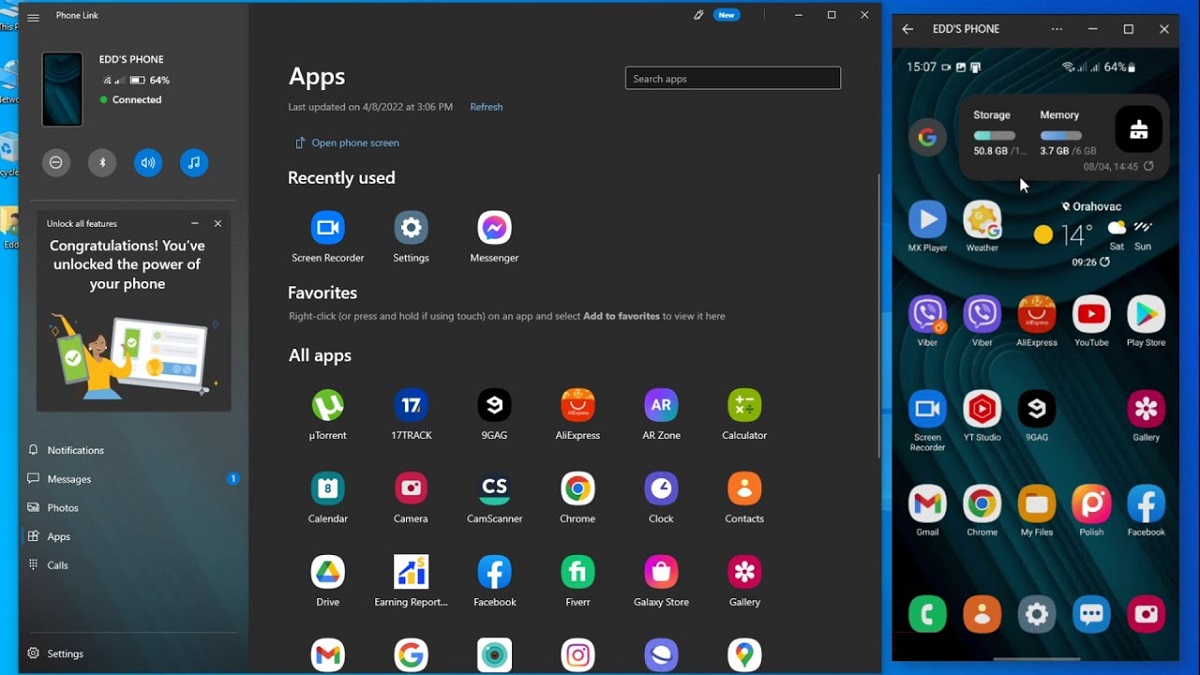
Phone Link is a step in the right direction, but it remains too conservative to meaningfully change user behavior. Automatic synchronization of photos, messages, files, and notifications should be the default. This would ideally work without repeated pairing confirmations, without requiring the same Wi-Fi network, and without noticeable delays. It is also important to recognize that users now operate across multiple screens simultaneously. In this context, the operating system should function as a bridge between devices rather than introducing additional friction or barriers.

In the context of rapid advances in artificial intelligence, Windows 12 has the potential to become a platform that not only addresses the shortcomings of previous versions, but also demonstrates that Microsoft is responding more directly to user expectations. The points outlined above are based on available information and current technological trends. It is therefore reasonable to expect that such changes could emerge within the period of active PC usage for many users. Ultimately, the expectation is for Windows 12 to provide a more consistent and reliable experience, closer to what users have long associated with a well-functioning operating system.
Read also:
- Seven Annoying Windows 11 Features – and How to Fix Them
- How to Reduce RAM Usage in Windows 11
- How to Use Microsoft PowerToys

