





© ROOT-NATION.com - Use of content is permitted with a backlink.
On October 14, Microsoft will officially end support for Windows 10. Almost at the same time, Windows 11 version 25H2 is arriving. A coincidence? Hardly. The company aims not only to close the Windows 10 chapter but also to deliver a more mature and stable platform for the next stage of its ecosystem.
Read also: Instructions, Guides, How To for Windows
Microsoft has confirmed that Windows 11 25H2 will be released in fall 2025. This time, however, the company’s strategy is different. Instead of introducing sweeping changes – which often lead to technical issues and user frustration – the update is positioned as an evolutionary step. The focus is not on showcasing flashy new features but on refining existing functionality, improving stability, and optimizing overall system performance.

This decision seems reasonable in light of what happened in 2024, when the release of Windows 11 24H2, despite high expectations, triggered a wave of issues ranging from compatibility to performance. For Microsoft, it was a clear signal that users increasingly value stability and reliability over experimental changes. In this sense, Windows 11 25H2 could serve as a kind of “trust test” between the company and its user base.
Read also: Microsoft Ends Windows 10 Support: Is There Life After the End?
TABLE OF CONTENTS:
Germanium platform: stability instead of experiments
Windows 11 25H2 will be built on the same platform as its predecessor, known internally as Germanium. This looks less like a technical adjustment and more like a strategic move. After several years of experimentation, Microsoft appears to be aiming for a stable foundation for its operating system. History has shown that each platform shift – from Cobalt in 21H2 to Nickel in 22H2 and 23H2 – introduced new risks, from unexpected bugs to driver and software compatibility issues. The transition to Germanium in Windows 11 24H2 was another such challenge, and now Microsoft seems to be prioritizing continuity rather than another architectural reset.
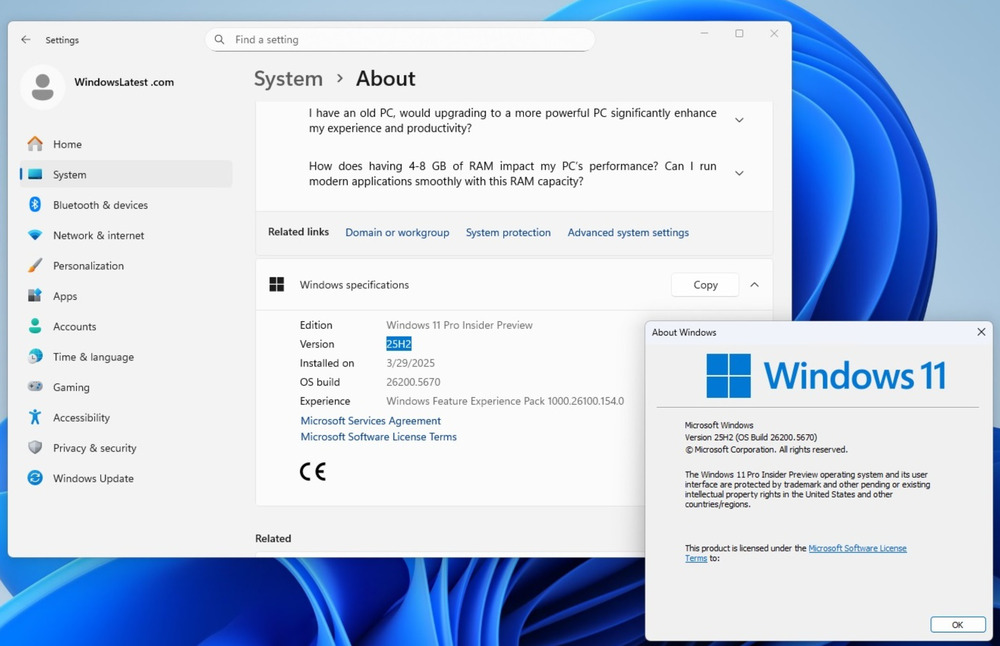
Another notable point is the way the update will be delivered. Windows 11 25H2 will arrive as an “enablement package.” Instead of requiring a full system reinstall – which could take hours and often introduced technical complications – users will download a small file under 1 MB that simply unlocks features already built into the system but left inactive. Microsoft has used this method before with Windows 11 23H2, and now the company is applying it on a broader scale.
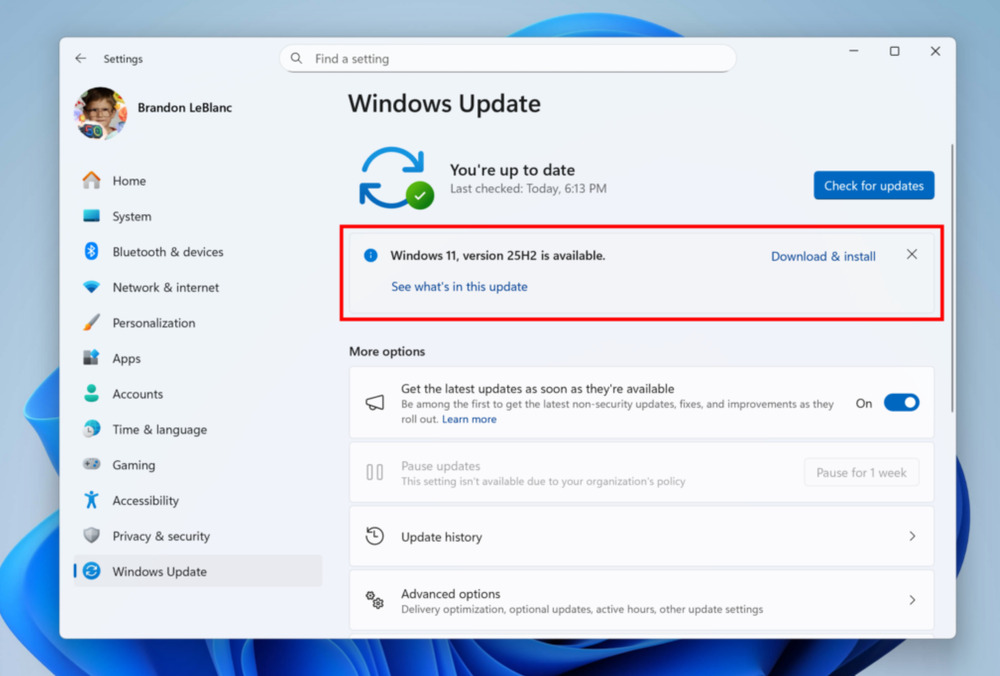
This approach comes across as pragmatic: Microsoft is trying to minimize technical risks, reduce user fragmentation, and speed up the rollout of new features. In practice, it’s an attempt to make major Windows updates less disruptive and more like routine monthly security patches. Given the criticism surrounding Windows 11 24H2, the company is aiming to rebuild user trust by focusing on stability and predictability.
Read also: Windows 11 Open Source: Myth or Reality?
Start Menu on steroids: a new dimension of personalisation
One of the main updates in Windows 11 25H2 will be a significant redesign of the Start menu. This isn’t just a cosmetic tweak; it represents Microsoft’s effort to finally strike a balance between aesthetics, functionality, and user feedback. Since the launch of Windows 11, the Start menu has been one of the most debated elements of the system, with many users finding it overly simplified and limited compared to previous versions.
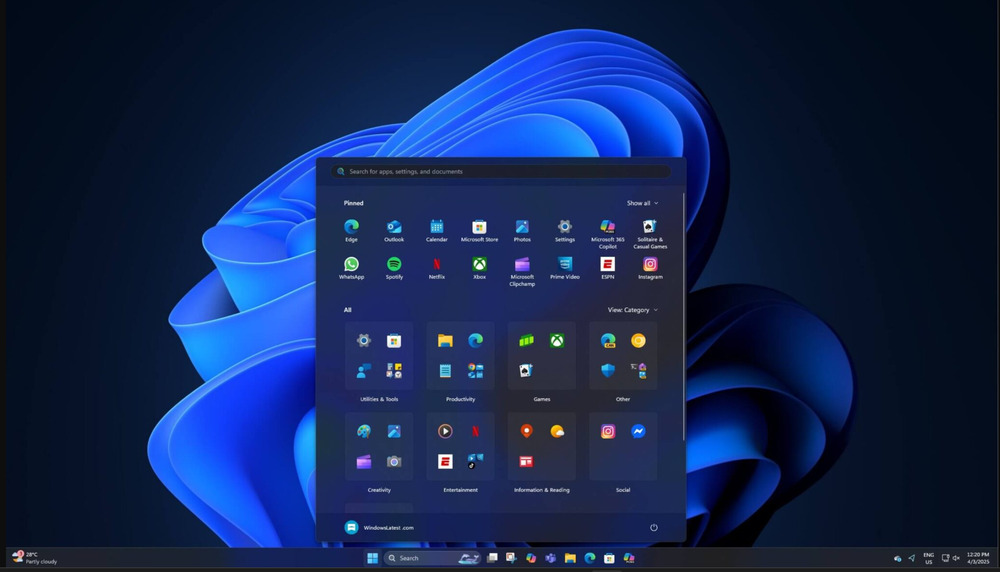
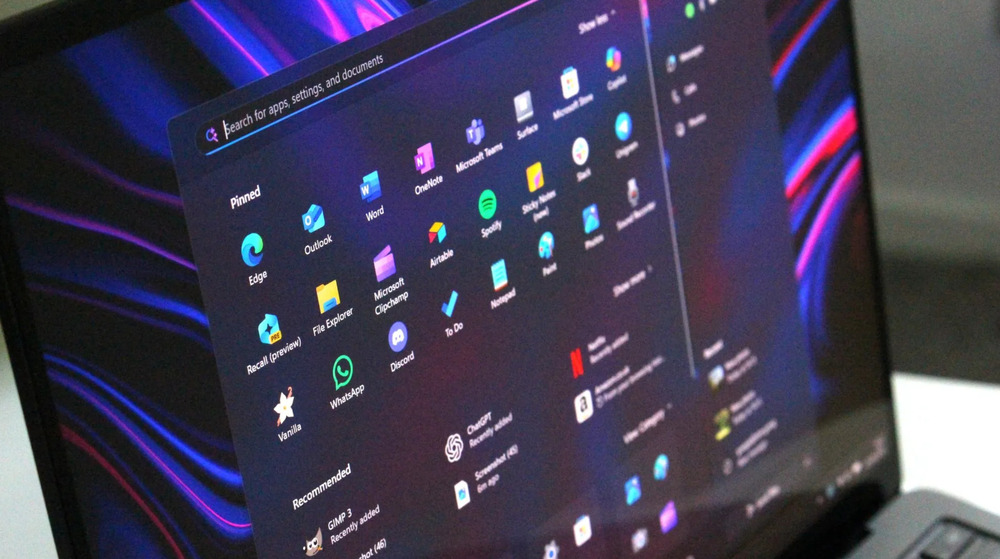
In Windows 11 25H2, Microsoft introduces a more flexible Start menu that displays all apps in a single, scrollable window. A key addition is the introduction of two display modes: “Categories” and “Grid.” The Categories mode automatically groups apps by purpose, creating a logical hierarchy that reduces the time needed to find a specific tool – for example, Outlook and the web browser appear at the top of their respective categories. The Grid mode is more traditional, featuring a layout of pinned icons, which is particularly convenient for users who prefer a visual structure.
Another notable change concerns interface adaptability. The Start menu can now scale based on display size: on larger monitors, users can arrange up to eight columns of pinned apps, a feature particularly useful for workstations and multitasking scenarios.
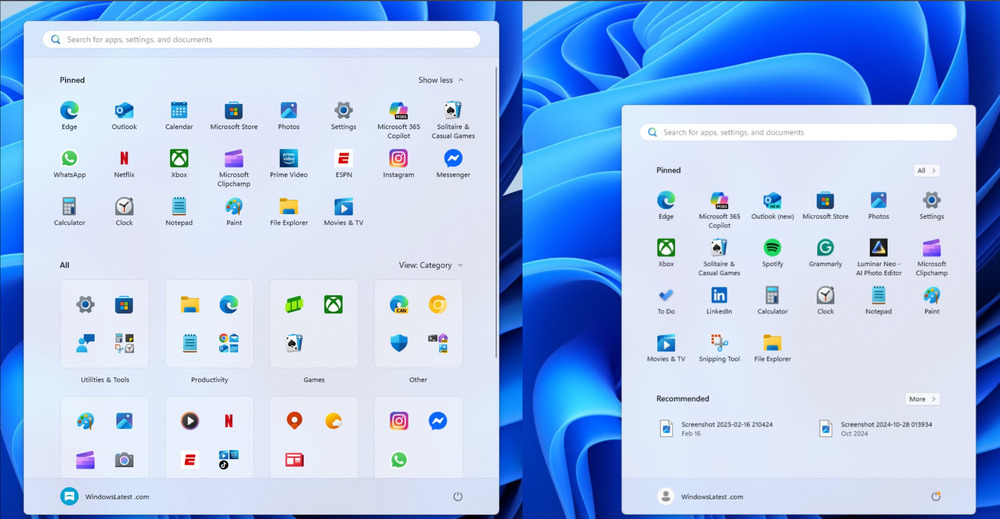
It’s also worth noting a change that responds to long-standing user requests: Microsoft will allow the Recommendations section to be fully disabled. This move appears to step back from pushing system tips and promotional content, while restoring control to the user. In this way, the Start menu returns closer to the classic concept: a fast and convenient way to access needed apps without unnecessary clutter.
From an analytical perspective, the Start menu redesign reflects a shift in Microsoft’s strategy. The company appears to be moving away from imposing its own vision of a “modern interface” and toward a more pragmatic approach – listening to users and making the system more convenient, even if it means scaling back on experimentation. This could indicate a broader trend: stability and usability are increasingly taking precedence over radical innovation.
Read also: Secret Behind Microsoft’s Profits: What the Company Hid for 15 Years
An AI agent in settings that really helps
After years of experimenting with artificial intelligence in Windows, Microsoft is finally introducing a solution that seems genuinely practical rather than purely demonstrative. Windows 11 25H2 will include a new AI assistant called Mu, integrated directly into the Settings app. Unlike Copilot, which was often seen as a separate chatbot with limited practical use, Mu is positioned as a task-oriented tool – a digital assistant capable of automating routine actions and supporting users in real-world scenarios.
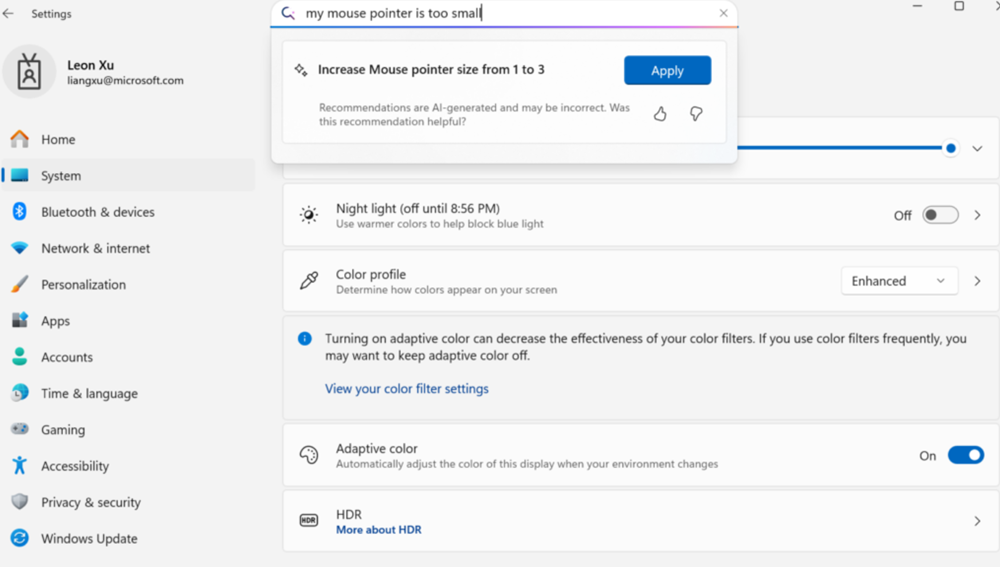
Its key feature is that Mu runs on a local AI model, analyzing user intent and suggesting specific solutions. This reduces reliance on cloud computing, improves response speed, and enhances privacy. Users interact with it using natural language – for example, by saying, “text is too small” or “how do I control my PC by voice.” Mu not only provides instructions but can also apply changes automatically with a single click. In this way, Windows settings are gradually shifting from static menus to an intelligent, context-aware management system.
At launch, the feature will be available only on Copilot+ series PCs with Snapdragon processors and an English interface. This limitation appears to serve as a testing phase, allowing Microsoft to evaluate local AI models in a relatively controlled environment. In the future, support for AMD and Intel chips is expected, along with an expanded language base, which would make Mu accessible to a much broader audience.
From an analytical perspective, Mu represents a significant shift in Windows’ development paradigm. While Copilot initially drew skepticism due to its overly “marketing-driven” approach and limited integration, Mu could demonstrate how AI can move from being a presentation gimmick to an organic part of the user experience. If Microsoft succeeds in scaling this approach across all devices and languages, it could fundamentally change how users interact with the system – from traditional “searching through menus” to an intuitive “describe the problem, get a solution” model.
Read also: Rare Earth Metal Situation: Whoever Controls the Resources, Rules the World
Drivers under the microscope: CodeQL for security
Windows 11 25H2 introduces significant changes to driver certification, which could have a notable impact on overall system stability and security. Going forward, Microsoft requires all hardware manufacturers to undergo strict static code analysis using CodeQL version 2.22.1 or higher.
This isn’t just a technical update – it effectively replaces the outdated Static Driver Verifier (SDV), which had been the standard tool for decades but no longer meets modern requirements. CodeQL works by converting code into a large database that can be queried to identify vulnerabilities. This method allows the detection of not only common errors but also more complex, non-obvious scenarios that could potentially lead to critical failures or security breaches. Essentially, Microsoft is bringing an approach long used in the open-source world into driver development.

However, the new standards also carry certain risks. For modern hardware, this should mean higher-quality drivers and fewer random “blue screen” crashes. For older devices, the consequences could be less favorable: many drivers created under previous guidelines may no longer meet the new requirements and could simply disappear from Windows Update. Users will either need to find compatible alternatives manually or accept that their hardware will gradually lose official support.
In a broader sense, this is another signal of a shift in Windows’ philosophy: moving from a focus on maximum compatibility to prioritizing security, stability, and modern standards. Microsoft is clearly indicating that the “baggage of the past” can no longer hold back the evolution of its ecosystem.
Read also: How to Spot Fake Photos: New Challenges of the Digital Age
Goodbye PowerShell 2.0 and WMIC
Microsoft is continuing its systematic effort to remove outdated and potentially insecure components from Windows. In Windows 11 25H2, this process becomes even more noticeable: users will say a final goodbye to PowerShell 2.0 and the WMIC (Windows Management Instrumentation Command-line) tool.
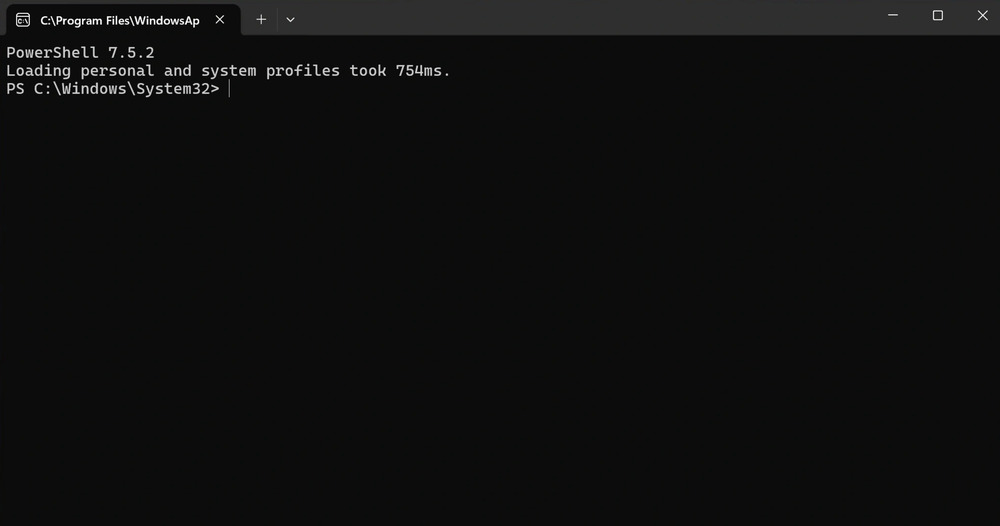
PowerShell 2.0, which debuted in the Windows 7 era, has been officially deprecated since 2017 but remained in the system out of inertia. Its removal is not just symbolic; it’s part of Microsoft’s broader strategy to reduce technical debt, simplify system architecture, and lower risks associated with outdated or insecure code. Importantly, any scripts or workflows that attempt to call PowerShell 2.0 will now be automatically redirected to PowerShell 5.1, preserving much of the backward compatibility. This means that most enterprise scripts and automation solutions should continue to function without major issues.
The same fate has befallen WMIC. This command-line tool was once the standard method for interacting with Windows Management Instrumentation but gradually became obsolete as more modern PowerShell solutions emerged. Microsoft began phasing it out in the Insider Preview as of January 2023 and is now removing it entirely.
In a broader context, this reflects the company’s strategic direction: a gradual but steady removal of legacy code that has accumulated in Windows over the years. Each step not only makes the system lighter and more secure but also signals Microsoft’s willingness to trade maximum compatibility for stability and protection against contemporary threats.
Read also: What is CorePC – All about the new project from Microsoft
Fighting bloated software: users take control
One of the longstanding frustrations in Windows 11 has been the preinstalled apps that are difficult – or sometimes impossible – to remove through standard methods. Microsoft largely ignored this feedback for years, but in Windows 11 25H2, the company is finally addressing it by adding a native way to remove default Microsoft Store apps.
A new option, “Remove default Microsoft Store packages from the system,” will appear in the Group Policy Editor. It allows users to select specific apps from a list and remove them completely. This includes apps such as Xbox, Windows Media Player, Windows Terminal, and even Notepad. It’s a significant step forward, giving users an official tool to control which apps they actually need and which can be safely removed.
However, there is a downside. This feature will be available only in the Pro and Enterprise editions. Windows 11 Home users will still need to rely on third-party tools, PowerShell scripts, or other non-standard methods. In this way, Microsoft continues to differentiate between “basic” and “advanced” users, reserving more flexible controls for professional and enterprise environments.
From an analytical perspective, this reflects Microsoft’s attempt to strike a compromise: on one hand, partially addressing demand for system control, and on the other, keeping the Home edition as “managed” and standardized as possible. Still, the mere introduction of this feature is symbolic – Microsoft is acknowledging that the excessive number of preinstalled apps had become a reputational issue.
Read also: How to install and use Windows without a key
Performance diagnostics
Microsoft is officially acknowledging what users have noted since the launch of Windows 11: the system can run slower than its predecessor, especially on older or lower-powered PCs. In response to growing criticism, the company is introducing a new diagnostic platform designed to systematically monitor performance issues and respond to them more quickly.
The innovation centers on automatically collecting diagnostic logs whenever a user reports slowdowns or lagging interface responses. The system records the specific scenarios where delays occur and generates a detailed technical report. Importantly, this data will be collected only on devices enrolled in the Windows Insider program, and users must give explicit consent before any information is sent to Microsoft. This approach addresses common concerns about “default telemetry.”

The company claims this approach will make it easier to pinpoint bottlenecks and optimize the system more effectively. Early results are already noticeable: for instance, the Home tab in File Explorer, which used to take 15–20 seconds to load on older machines, now opens in just 2–3 seconds. It’s a small but telling example of how user feedback can directly influence improvements in Windows.
From an analytical perspective, the new diagnostics suggest an attempt by Microsoft to shift its approach to OS development. Rather than large, “revolutionary” updates that often introduce new problems, the company is moving toward gradual, targeted optimizations. If this strategy proves successful, Windows 11 25H2 could become the first version in a long time to be associated less with experimentation and more with genuine stability.
Read also: How Chinese Companies Circumvent the US Ban on AI Chips
When will Windows 11 25H2 be available to users?
Windows 11 25H2 is already available in the Release Preview channel for Windows Insider participants, signaling that the official launch is imminent. The most likely timing is October, immediately following the end of Windows 10 support. This alignment appears intentional, as Microsoft aims to encourage millions of users on the older OS to transition to the updated platform.
For users already on Windows 11 24H2, the changes won’t be revolutionary but will be noticeable. Key updates include a redesigned Start menu that finally reflects user feedback, the Mu AI assistant integrated into Settings, and the ability to remove unnecessary preinstalled apps through official tools. These features focus on practicality rather than presentation flair.
For Windows 10 users facing the choice of paying for extended support or upgrading to Windows 11, 25H2 could be an ideal migration point. It offers a mature platform without drastic changes to usage patterns and a gentler learning curve compared to earlier Windows 11 releases.
In a broader sense, this indicates that Microsoft is finally betting on evolution rather than revolution. The company appears focused on regaining user trust through predictability and gradual improvements. This may well define the new Windows strategy: not to impress, but to deliver reliable performance.
Read also:
- Nine of the Strangest and Most Mysterious Weapons
- JSAUX accessories for portable consoles review, part 2: Backpack, docking station with M.2 SSD and adapters
- 15 Creepiest Space Objects and Concepts That Defy Explanation
- American Attack Aircraft, Part 3: The First Production Variants

