





© ROOT-NATION.com - Use of content is permitted with a backlink.
Today I’m reviewing the Hellyberry HM47 Pro Wireless – an interesting and somewhat unconventional gaming mouse that has only recently gone on sale. The model stands out for two main reasons. First, Hellyberry is a sub-brand of HATOR, a Ukrainian manufacturer that has established itself as a producer of gaming peripherals with a strong focus on affordability. In other words, a typical “value for money” brand. Second, the HM47 Pro Wireless is positioned not just as an affordable product, but as an ultra-budget mouse with relatively high-end specifications and a fairly rich bundle, reflecting the brand’s core design philosophy. The specifications are straightforward: an ultra-lightweight body (47 g), a symmetrical shape, a PixArt PAW3395 sensor, tri-mode connectivity, and an included charging dock. All of this is offered at around $41 / €35. On paper, this is a strong claim for another “best value” product in its segment. Whether it holds up in practice is what we will examine in this review.
Read also: All gaming mouse reviews
TABLE OF CONTENTS:
Hellyberry HM47 Pro Wireles Specifications
- Connectivity: wireless (2.4 GHz RF, Bluetooth 5.1), wired (USB-A to USB-C)
- Sensor: PixArt PAW3395
- Maximum sensor resolution: 26,000 DPI
- Maximum acceleration: 50G
- Polling rate: 1000 Hz
- Main button switches (RMB / LMB): Raesha Optical Switches (100 million clicks, actuation force 60±5g)
- Side button switches: HUANO
- Scroll wheel encoder: Kailh Dustproof
- Number of buttons: 6
- Backlighting: LED indicator (mouse), RGB (docking station)
- Proprietary software: HM47 PRO Mouse Software (Windows)
- Onboard memory: 5 profiles
- Shape: symmetrical (right-handed)
- Casing materials: UV-coated plastic
- Grip type: claw, fingertip, palm, hybrid
- Dimensions: 124×63×40 mm
- Weight: 47 g
- Coating: 100% PTFE
- Battery: 300 mAh
- Battery life: up to 50 hours
- Charging time: 2 hours
- Docking station: magnetic, with RGB and a USB-A port for the dongle
- Docking station cable: detachable USB-A to USB-C with paracord braiding, length 1.8 m
- Package contents: mouse, 2.4 GHz RF wireless dongle, charging dock, detachable USB-A to USB-C cable, set of replacement Teflon glides, user manual

Positioning and Price
The positioning of this mouse can be summarized quite simply: it is essentially HATOR taken one step further in terms of value focus. As noted earlier in the review, the model clearly follows the parent company’s core philosophy – delivering modern gaming peripherals with up-to-date hardware at accessible price points. The Hellyberry HM47 Pro Wireless continues this approach, offering specifications that are solid by current standards while being priced even lower than comparable HATOR mice. The retail price is around $41 / €35.
Package Contents
The mouse comes in a compact cardboard box in the brand’s signature color scheme. While HATOR typically uses a yellow-and-black palette, Hellyberry opts for a purple and lime-green design. The back of the box provides a clear overview of the product, including specifications, key features, and the full list of included accessories.


As noted at the beginning of the review, in addition to its relatively high-end internal components, the mouse also comes with a fairly extensive set of accessories. The package includes:
- mouse
- 2.4 GHz wireless RF dongle
- charging dock
- detachable USB-A to USB-C cable
- set of replacement PTFE skates
- user manual

The detachable USB-A to USB-C cable is intended exclusively for the docking station and features a proprietary connector on one end. The cable length is standard at 1.8 m. It uses a braided paracord-style sleeving and includes a ferrite core near the connector. Overall, the cable is of acceptable quality, though it is somewhat stiff and tends to retain its shape, making it less pliable than more flexible alternatives. That said, this is unlikely to be a significant issue in practice, since its primary function is simply to connect the dock to a PC rather than serve as a daily-use mouse cable.


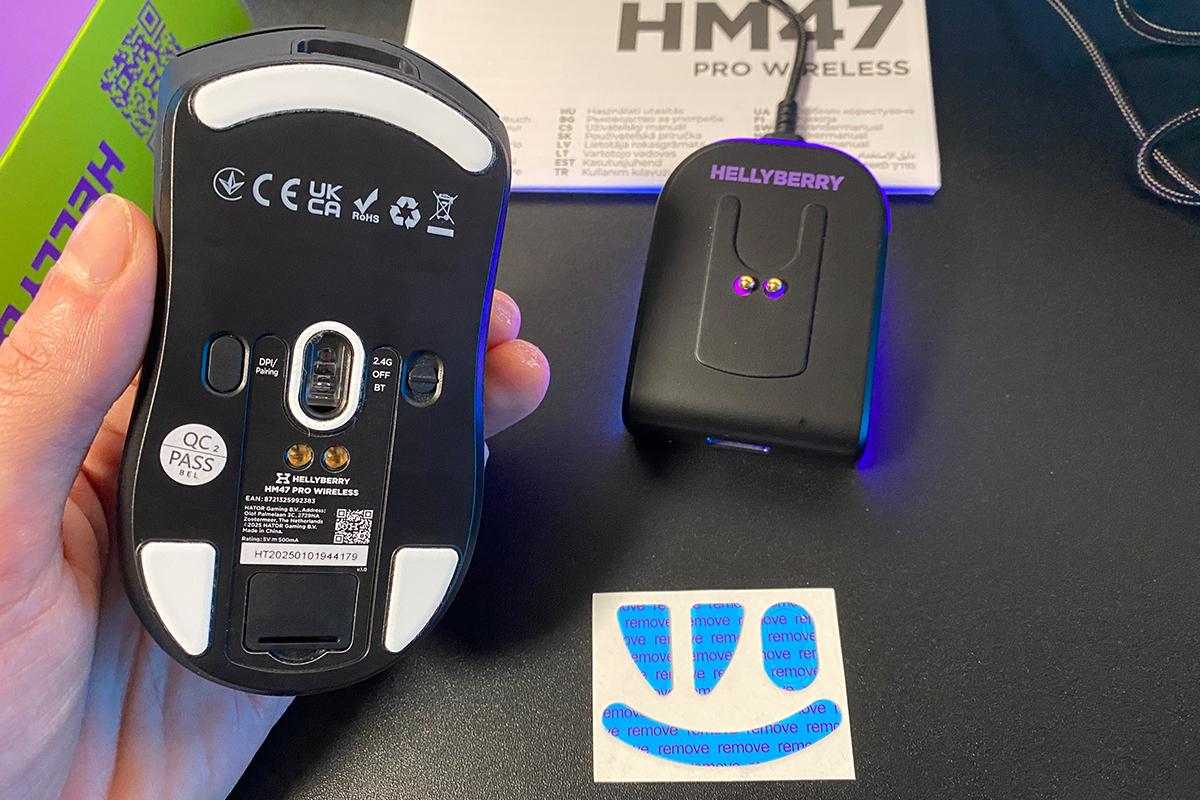
The magnetic charging dock is arguably the most interesting accessory in the package, aside from the mouse itself. Given the price point, its inclusion is somewhat unexpected. At the same time, the dock itself is reasonably well built. It does not feel like a low-cost piece of plastic and generally gives the impression of a more thoughtfully executed component.


On the rear, there is a USB-C port used to connect the dock to a PC via the included cable. On the front, a standard USB-A port is provided for the wireless receiver. On the top surface, there is a Hellyberry logo along with two magnetic contact points used for docking the mouse. The design is completed with a strip of RGB lighting, which supports multiple lighting effects.


Lighting effects are switched using a button on the bottom of the dock. A short press cycles through the available effects, while a long press turns the lighting off. Also located on the underside are two rubberized pads that improve stability on the desk surface. The dock remains firmly in place during normal use; even when the desk is deliberately shaken, it does not shift position.


As expected, there are a few minor nuances. In my unit, the port for the wireless dongle turned out to be unusually tight, to the point where inserting the RF adapter required noticeable force. Visually, there is nothing unusual here: a standard USB-A receiver and a corresponding USB-A port. However, the fit between them is significantly tighter than expected.

Fortunately, this does not affect the operation or functionality of the devices. As long as the dongle is not frequently inserted and removed, it is unlikely to cause any practical issues. It is also worth noting that the mouse can be used without the charging dock. In that case, the dongle can be connected directly in the usual way, and the dock is not required for basic wireless operation.


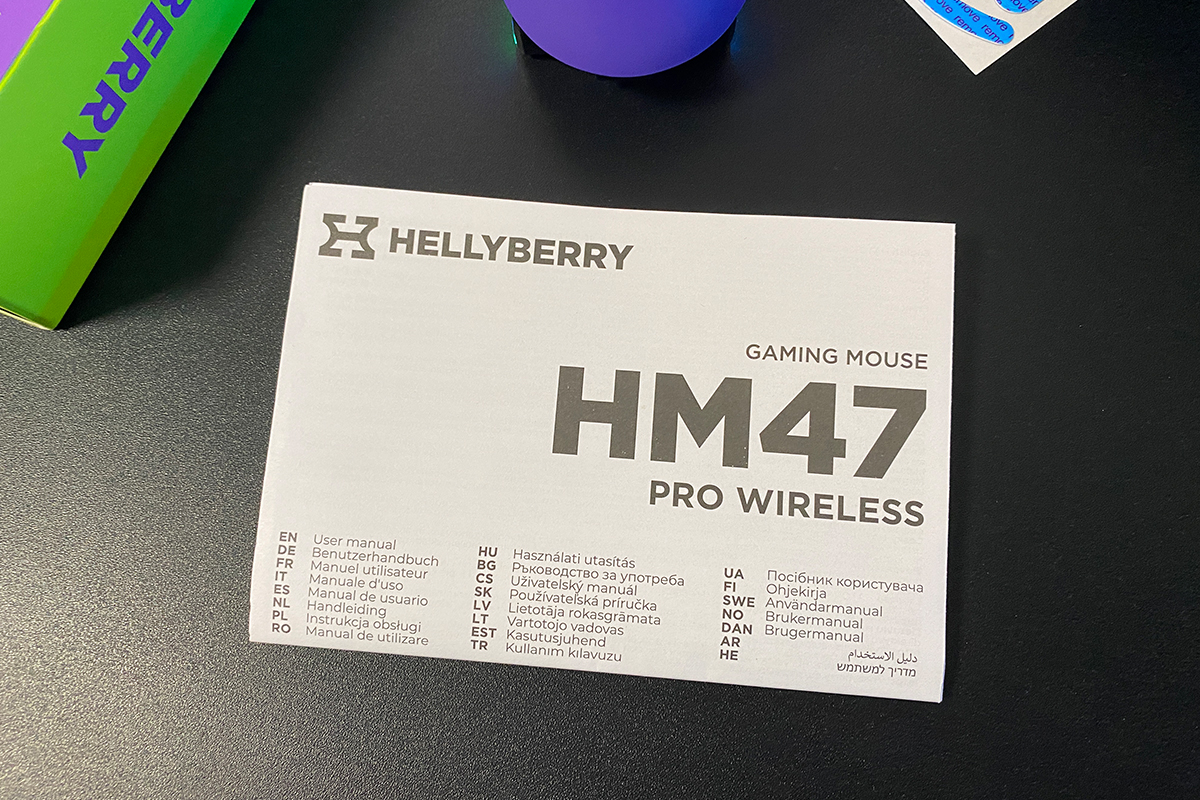
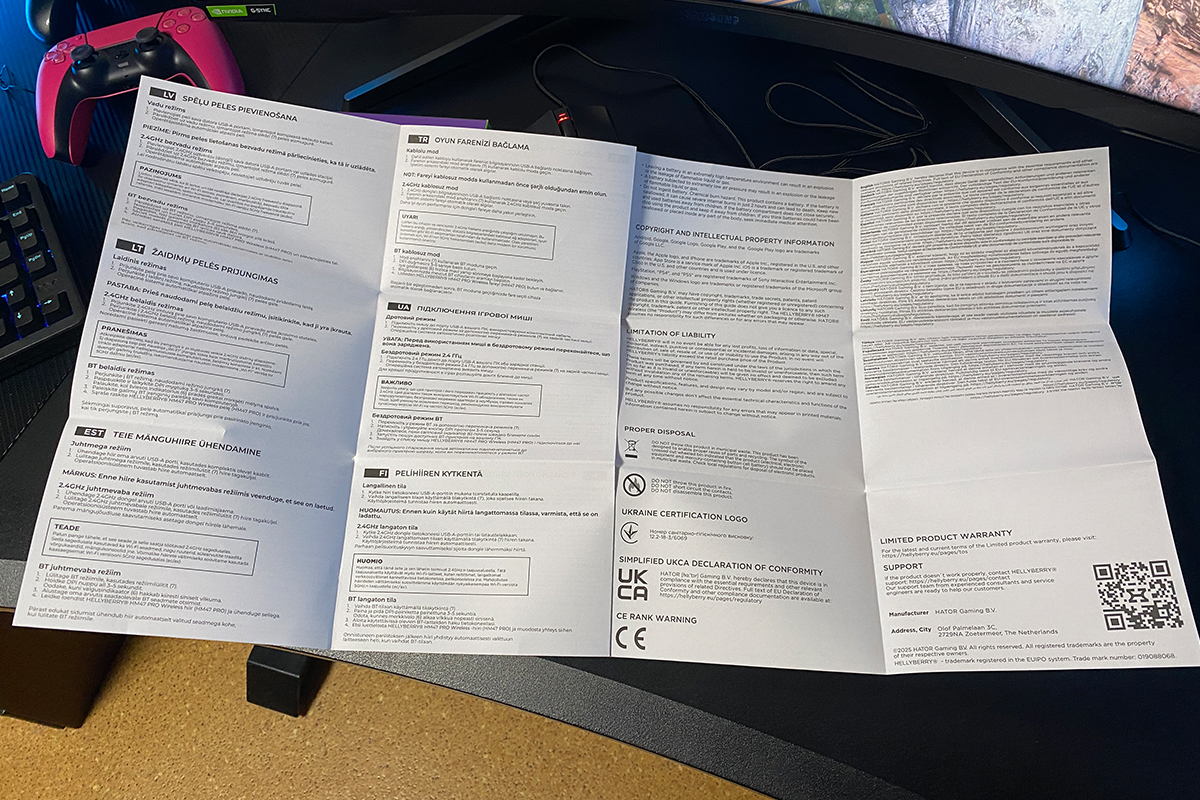
The rest of the package contents are fairly standard. It includes a set of replacement PTFE skates (identical to those pre-installed on the mouse) and a user manual presented as a large fold-out sheet covering 23 languages.
Read also:
- Quasar 3 ULTIMA 8K Gaming Mouse Review: New Offering from HATOR
- Hator Quasar 2 Ultra 4K Wireless Gaming Mouse Review
Design, Ergonomics, Build Quality
The Hellyberry HM47 Pro Wireless features a fairly standard symmetrical design, typical of most gaming mice. Visually, the model is minimalistic, with no unnecessary elements such as extensive lighting effects. The only notable visual details are a small Hellyberry logo on the side and the distinctive color scheme of the shell.

Regarding color options, the model is currently available in two variants: Black-Violet and White-Violet. As noted earlier, violet is the signature color of Hellyberry (similar to yellow in HATOR), so the mouse’s color scheme can be considered part of the brand’s established visual identity.

In terms of shape, the model is a typical symmetrical mouse designed for right-handed use. The exact dimensions are 124 × 63 × 40 mm. Size-wise, the HM47 Pro Wireless is most comparable to popular models such as the VGN Dragonfly F1 and VXE R1, as shown in the comparison screenshot. However, the key distinguishing factor is the weight – only 47 g. In this regard, the model outperforms many competitors and firmly falls into the ultra-lightweight category.

The upper shell of the mouse, excluding the main buttons, is a single continuous piece. The body is made of plastic with a UV coating. According to the manufacturer, this surface treatment is intended to provide a pleasant tactile feel and improve grip during use. It is also described as wear-resistant, maintaining a clean appearance even after prolonged intensive use.


From personal experience, this holds true. The mouse feels comfortable in hand, and the plastic is solid and pleasant to the touch. I also did not notice any significant fingerprint buildup or visible sweat marks on the surface after extended use.

The main buttons, as with most gaming mice, are separated from the main shell. There are small indentations that naturally accommodate the fingers. The clicks feel soft, with a slight pre-travel present. Side travel is minimal and, under normal use, is not noticeable in practice.


The main button clicks are generally distinct. The sound profile is typical for this class – crisp with a slightly muted tone. Overall, the left and right clicks are acceptable, although they feel slightly loose to me. There is a lack of sharper tactile feedback, which becomes more noticeable when switching from higher-end models. For example, this is evident when comparing it to my main mouse, the Razer DeathAdder V3 HyperSpeed, which costs roughly three times more. A video will be included below so you can assess the click sound of the mouse yourself.
Do the slightly “loose” main buttons interfere with gaming or everyday use? Not significantly. In fact, they are something you get used to fairly quickly. However, as a characteristic trade-off – and more precisely a compromise – it is still worth mentioning. And speaking of compromises, it is generally understood that a mouse offering this level of hardware at this price point will inevitably involve some. In this case, the feel of the main clicks is one of those compromises that stands out.

There is a small LED indicator located on the shell between the main buttons. It shows the currently selected DPI profile by lighting up in a corresponding color. The colors for each DPI stage can be configured manually in the manufacturer’s software. The indicator can also be set to a breathing effect or disabled entirely. In addition, it lights up while the mouse is charging on the dock and blinks during Bluetooth pairing or connection activation.

The scroll wheel is, without exaggeration, very well implemented: it provides quiet scrolling with clearly defined steps, is not overly recessed into the body, and features a distinct click. The rubber coating has a solid texture that improves grip. The wheel itself shows no noticeable lateral play or wobble. It uses a Kailh Dustproof encoder. Detailed information about the sensor and switches will be covered in a separate section for clarity. In this part, the focus is limited to design, build quality, materials, and general tactile experience.


The side panels are integrated into the main shell and essentially form a continuation of the top housing. As a result, the same UV-coated plastic material is used. There is no additional texture applied to the sides. The design is limited to ergonomic finger grooves and a small Hellyberry logo.


On the left side, there are two additional buttons. They are relatively small and feature a slight downward slope, which makes them easier to press with thumb swipes. Pre-travel is minimal, and there is no noticeable lateral play. The clicks are soft and quiet, although a small amount of post-travel is present. Overall, the side buttons are functional and comfortable to use. However, similar to the main buttons, they lack a certain level of tactile sharpness in the actuation, at least in my assessment. The sound of the side buttons and scroll wheel can be heard in the video above.

The bottom panel of the mouse is also a single continuous piece. It features three large PTFE skates, along with a surrounding sensor ring made from the same material.

To the right of the sensor, there is a mode switch that allows selection between 2.4 GHz RF, OFF, and Bluetooth. If the mouse is used in wired mode, the switch can be left in the OFF position. For charging, the switch position is not critical – the cable can be connected directly without interrupting operation in any active wireless mode.
On the left side of the sensor, there is a DPI / pairing button. As the name suggests, a short press cycles through DPI profiles, while a long press activates Bluetooth pairing mode.
At the bottom, there are also two magnetic contacts used to connect the mouse to the charging dock. Beneath them is a small compartment for storing the wireless receiver, which is covered by a removable cap.


As you may have noticed in the photos, the mouse shell consists of two main parts: the upper unibody section and the bottom plate. Their junction forms a visible seam. In more expensive models, this seam is usually nearly imperceptible both visually and to the touch. In this case, however, the fit is not as refined. When running a finger along the edge, the transition between the two parts can be slightly felt.


Does this affect build reliability or the user experience? No. I highlight these details (as with the buttons) to illustrate that the mouse uses a somewhat simplified construction. In other words, at this price point, it is not realistic to expect the same level of refinement or tactile precision as in more expensive HATOR models or higher-tier devices in general. In practical terms, the build is simple and reliable, but not fully refined. This is a typical and expected trade-off for an ultra-budget model that otherwise offers high-end internal components.

For charging, the mouse can be used either with the included docking station or via a standard front-mounted USB Type-C port using a cable.

Overall build quality is solid. The shell shows no noticeable flex, creaking, or looseness, even under strong squeezing. The only caveat, as mentioned earlier, is the somewhat simplified tactile execution and clicks that lack a certain level of sharpness. However, this does not make the mouse inferior to more expensive models. It simply feels more basic in hand, which is an expected and reasonable trade-off given its price and internal hardware.
In terms of ergonomics, the Hellyberry HM47 Pro Wireless performs well. It uses a classic symmetrical shape that is comfortable with different grip styles. The 47 g weight also places it in the ultra-lightweight category, allowing it to compete on relatively equal terms with significantly more expensive models.

Read also:
- HATOR Hypergang 3 Wireless Review: Gaming Hi-Res Headphone with ANC
- HATOR Skyfall 80 Mag Ultima 8K Review: Magnetic-Switch Keyboard from Ukrainian Brand
Sensor, Encoder, Switches
As previously noted, the Hellyberry HM47 Pro Wireless is equipped with the PixArt PAW3395 sensor, featuring up to 26,000 DPI and a maximum acceleration of 50G. At present, this sensor is widely considered a reference option in high-end gaming mice.
Its value is not defined by peak DPI figures, but rather by tracking accuracy and power efficiency. The sensor supports Motion Sync technology, which aligns data transmission with the polling rate of the PC, resulting in smoother cursor movement. In practical terms, it is a well-proven sensor that maintains stable tracking even during fast and abrupt movements in FPS games.
The polling rate is 1000 Hz, which remains the standard for both gaming and general use. From my experience, including testing several higher-end 8000 Hz models, I do not perceive a meaningful difference in control or responsiveness in typical usage scenarios. For me, the primary factors in a mouse remain shape, weight, and grip comfort. In these aspects, the Hellyberry HM47 Pro Wireless performs well.

The main buttons use Raesha optical switches rated for 100 million clicks with an actuation force of 60 ±5 g. In general terms, these switches can be described as a solid mid-range option from the Chinese market. They are not entry-level components, but they also do not belong to the premium tier, such as the latest Razer optical switches.

The main advantage of optical switches is the absence of physical electrical contacts, which effectively eliminates issues such as double-clicking. From a tactile perspective, they also tend to feel softer compared to traditional mechanical switches. In essence, these switches are a reliable, utilitarian solution that prioritizes durability over click sharpness. This likely explains the somewhat reduced tactile crispness mentioned in the previous section.

The side buttons use Huano switches. This is a well-established and reliable choice that has been widely used in gaming peripherals for a long time, and there is not much more to add beyond that.

The scroll wheel uses a Kailh Dustproof encoder. This is a solid choice, with its main advantage being a dust-resistant design that helps prevent debris from entering the mechanism. In theory, this reduces the risk of issues such as unintended or “phantom” scroll steps developing over time. My subjective impressions of the scroll wheel’s operation have already been described in the previous section.

Read also:
- HATOR Skyfall 80 Pro Wireless Review: Silent Switches, Hot-Swap Support, and a Mini Display
- HATOR Icefall Pro Wireless Review: 75% Gaming Keyboard with Mini Screen
Software
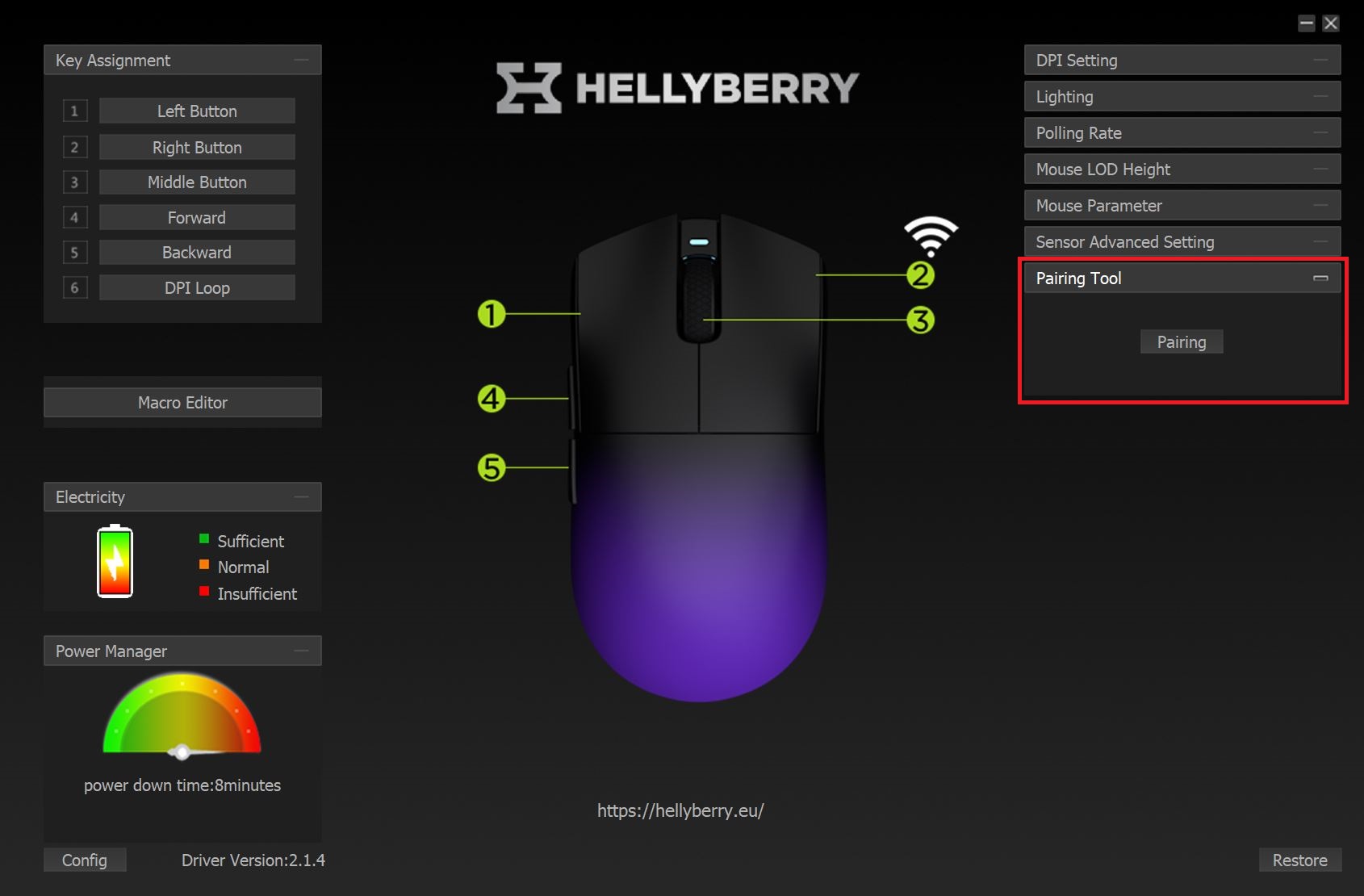
The mouse is configured through the proprietary HM47PRO Mouse Software, currently available only for Windows. The application is minimalistic in design, but it includes all essential configuration options.
In practice, the software is structured as a single window with layered settings. In the upper-left section, users can configure the main buttons, scroll wheel, and side buttons. Button remapping is supported, along with assignment of various functions and macros.

Below the button settings section, there is a macro menu. It allows users to record and edit macros.

Below the macro section, there is a battery icon that displays the current charge level of the mouse. When the mouse is charging, this indicator shows a corresponding animation. In practice, this type of battery representation is not particularly convenient. A simple percentage-based indicator with exact values would be more practical and informative.

Below the battery icon, there is a menu for setting the idle sleep timeout in wireless mode. The sleep timer can be adjusted from 1 to 8 minutes of inactivity. However, disabling the sleep mode entirely is not possible.
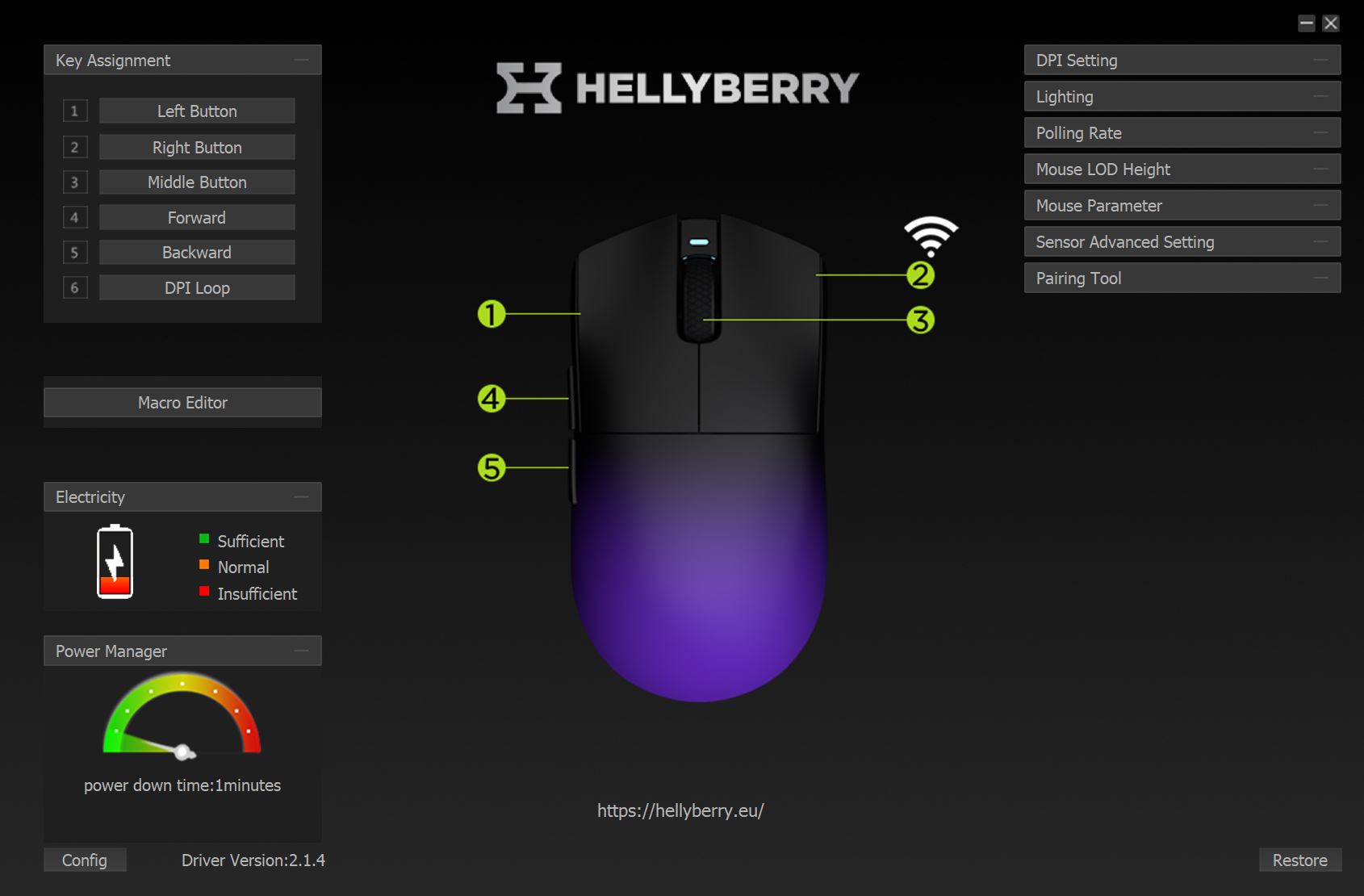
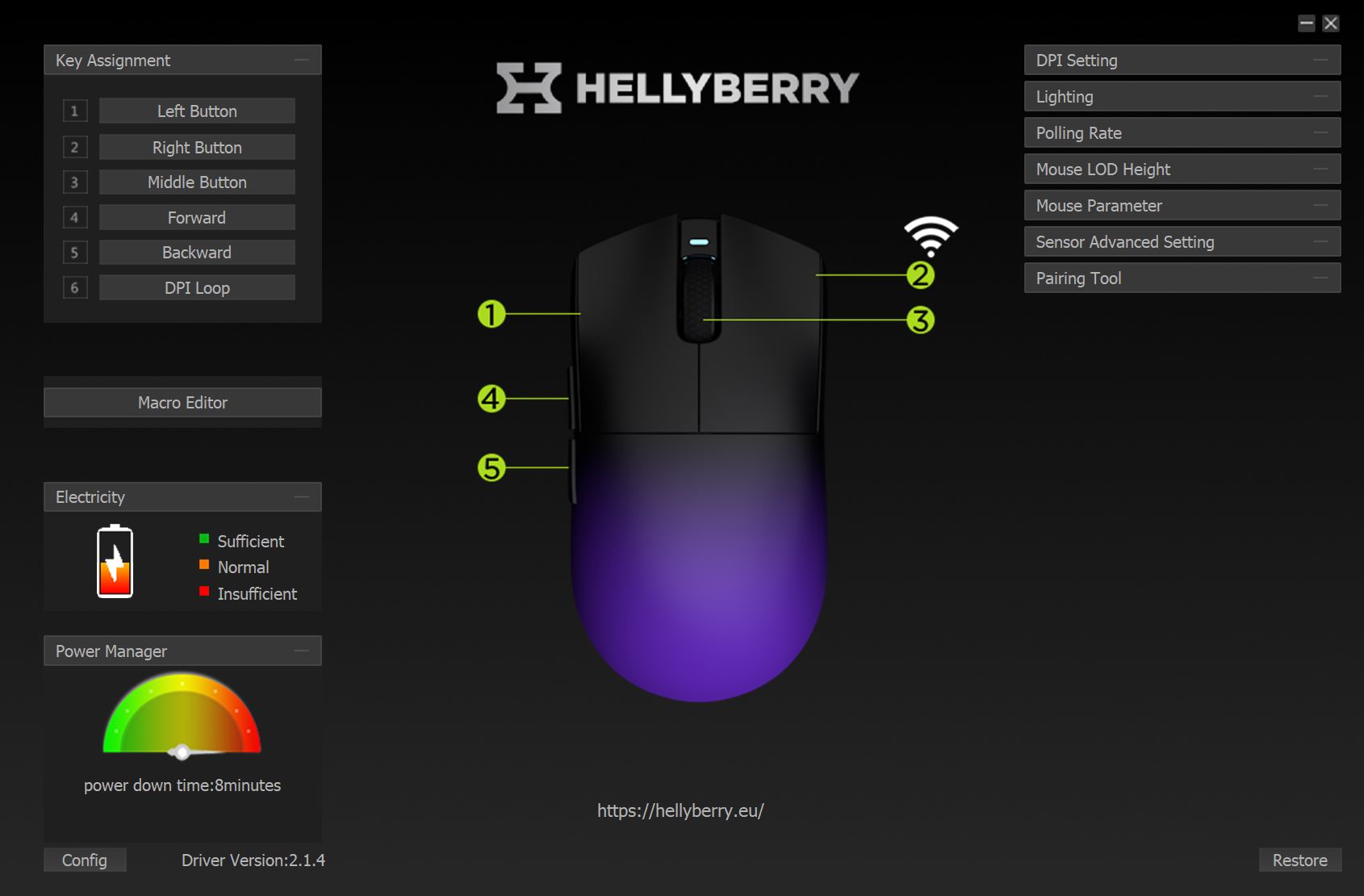
Below the sleep timer, there is a “Config” button used to switch between configuration profiles. The mouse includes onboard memory with five independent, fully customizable profiles.

In the center of the interface, there is a schematic diagram of the mouse with numbered buttons and controls. It serves primarily as a reference to help identify which physical button corresponds to each configurable function.
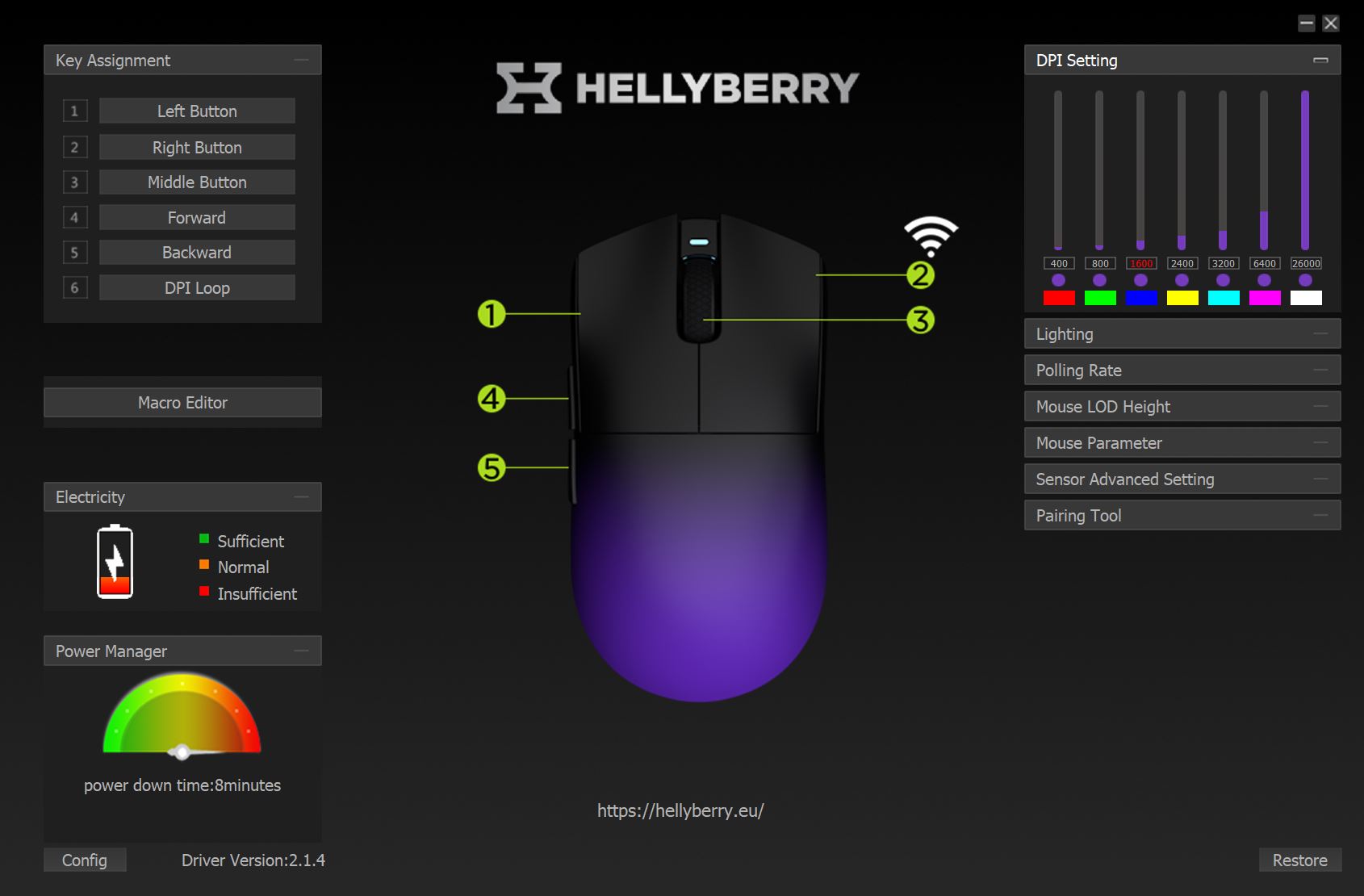
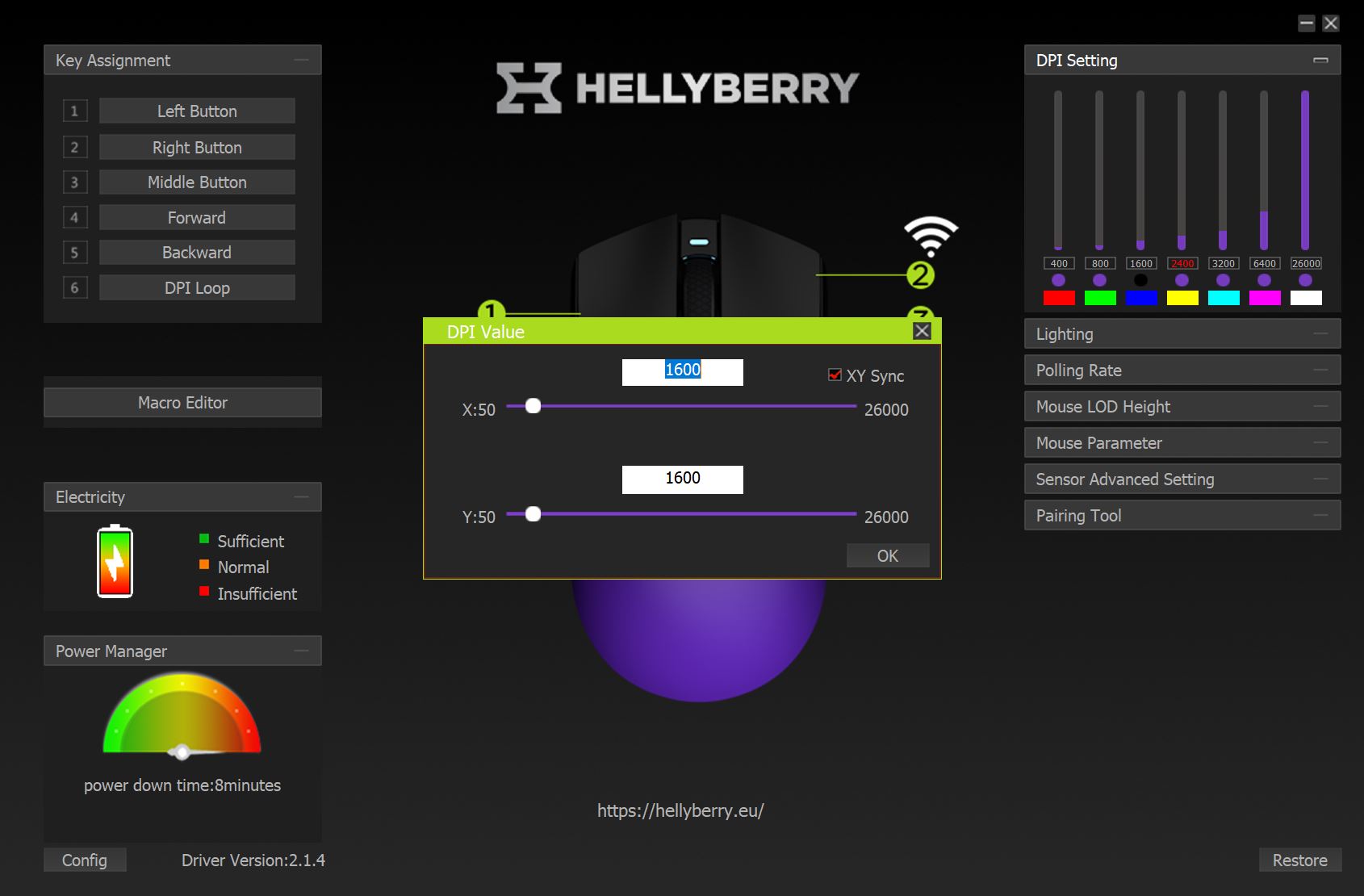
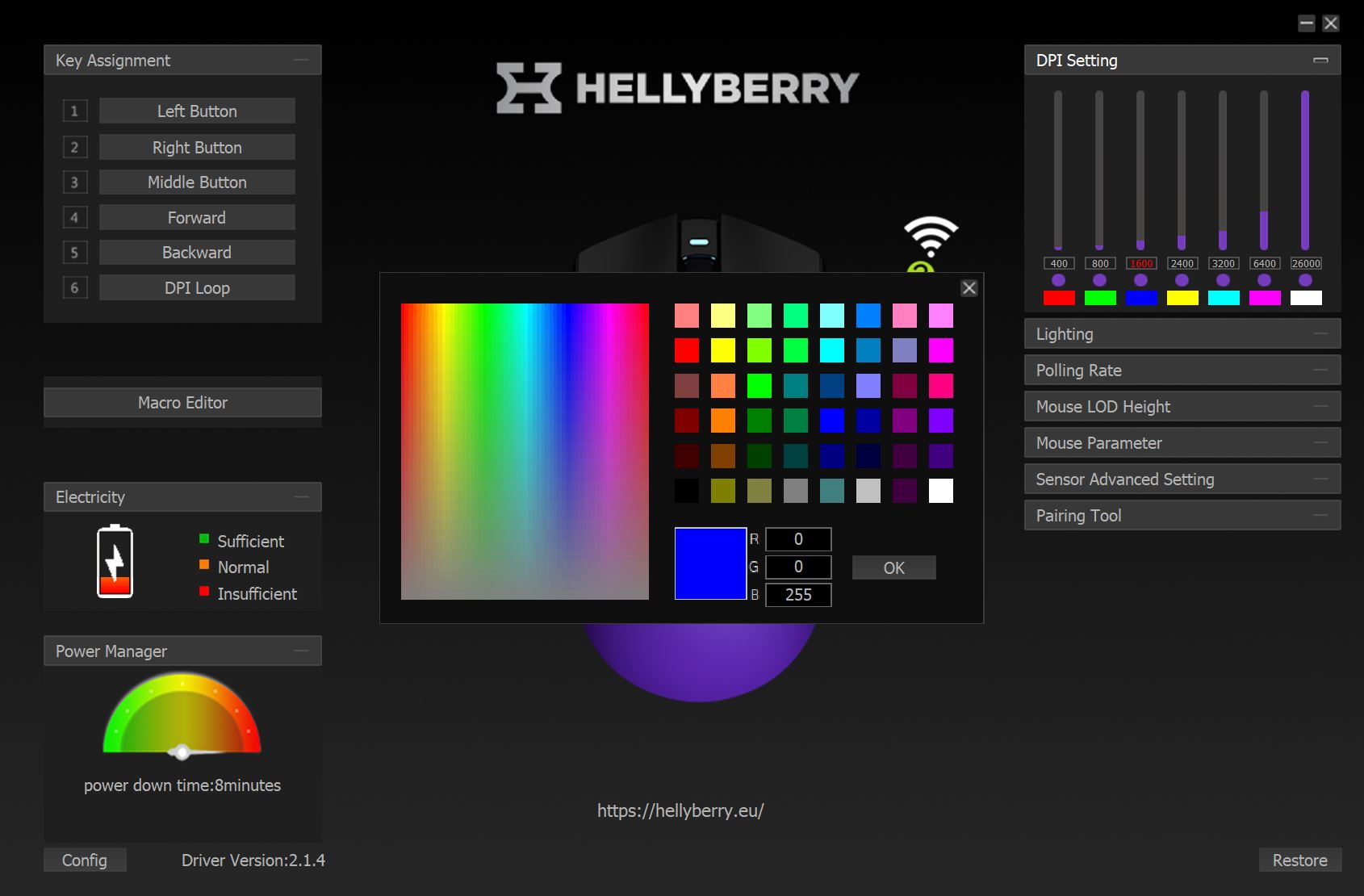
On the right side, there is a DPI settings menu where users can assign custom values to each DPI stage, as well as define corresponding indicator colors. As noted earlier, when the DPI level is changed on the mouse, the LED indicator reflects the selected profile by lighting up in the assigned color.
Below the DPI menu, there are settings for the mouse’s LED indicator. In practice, the available options are limited to three lighting effects, brightness adjustment, and the ability to fully disable the indicator. It is worth clarifying that this section only controls the LED on the mouse itself. The lighting on the charging dock cannot be configured here. The dock’s RGB effects are changed separately using the button located on its underside.

Below the lighting settings, there is a polling rate menu. In general, there is little practical reason to change these settings, as 1000 Hz, as mentioned earlier, remains the standard for both gaming and everyday use.

The “LOD” menu is used to adjust the lift-off distance of the sensor. The available options are limited to 1 mm and 2 mm.

The system settings menu only contains a shortcut to the mouse settings in Windows. As a general note, it is worth checking whether “Enhance pointer precision” is enabled in the operating system. If it is active, it is recommended to disable it, as this setting can interfere with consistent mouse input behavior.

Below the Windows system settings section, there are advanced sensor options. In this menu, Motion Sync can be enabled to improve cursor movement consistency. There are also options for Angle Snapping and Ripple Control, which introduce artificial smoothing and correction at higher DPI levels. For the most accurate and unprocessed tracking behavior, it is generally recommended to keep only Motion Sync enabled and disable the additional filtering features.

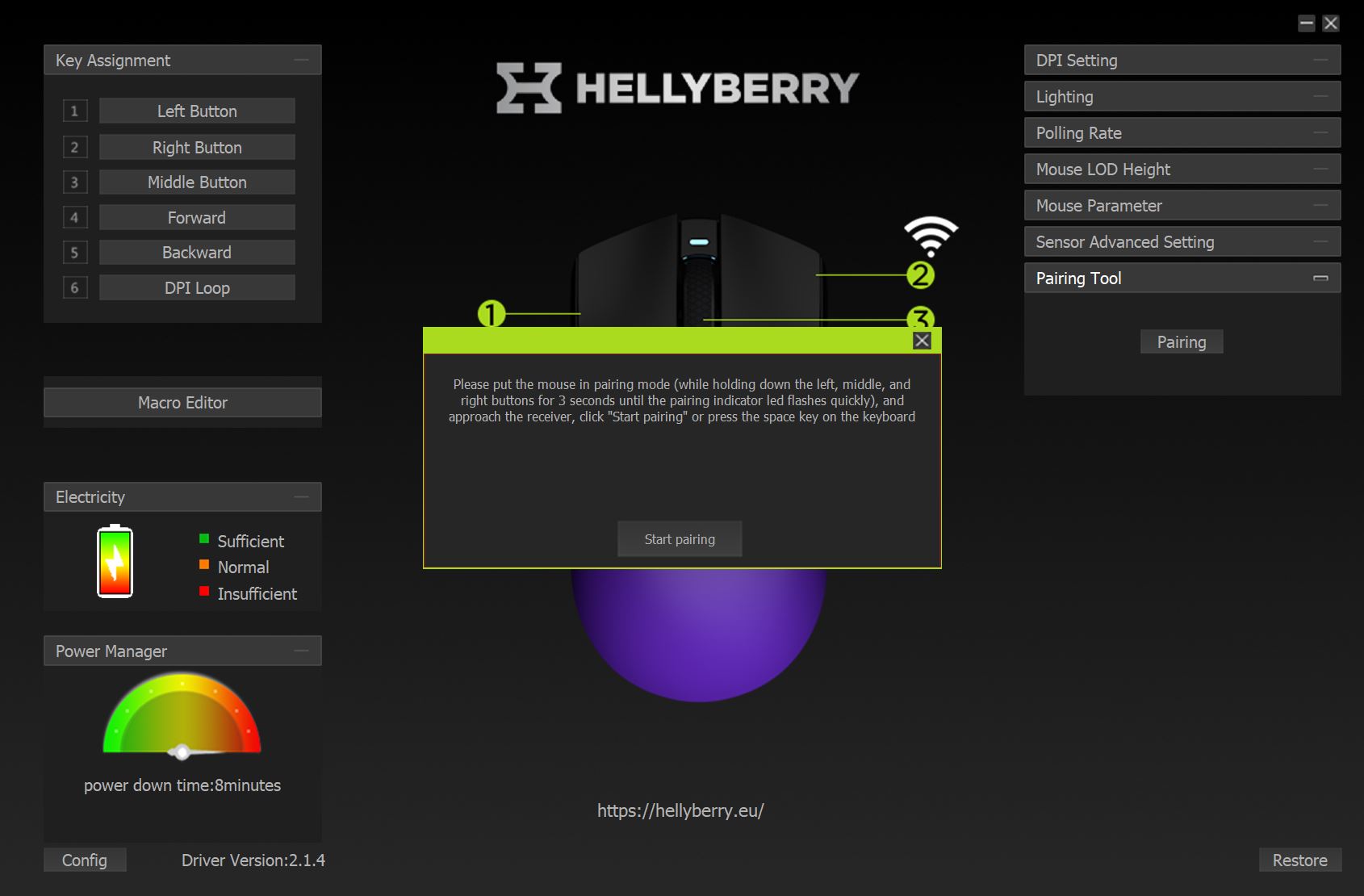
The final section, “Pairing Utility,” allows re-pairing the mouse with the included USB receiver in case the connection is lost. The required button combination is clearly displayed within the software interface, making the process straightforward to follow.
In the bottom-right corner, there is a profile reset button that allows the user to restore a selected profile to its default settings.

That concludes the available settings in the mouse software. As noted earlier, the application is minimalistic and straightforward, while still covering all essential configuration options. I did not encounter any bugs during use. The only aspects worth criticizing are the limited battery status indication and the lack of macOS support. Otherwise, it is a functional and fairly standard utility.
Read also:
- HATOR Arc 3 Review: Flagship Computer Chair from Ukrainian Brand
- Review of HATOR Darkside 3 Pro Fabric Gaming Chair: Perfect Balance of Price and Quality… and Cat Approves
Battery Life
The mouse is equipped with a 300 mAh battery. According to the manufacturer, the claimed battery life is up to 50 hours, with a full charging time of approximately 2 hours.

In practice, this translates to roughly a week of use under moderate to heavy workload, including gaming – typically around 5–7 days depending on usage intensity. However, the included docking station largely eliminates concerns about battery life. In everyday use, it is sufficient to place the mouse on the dock after finishing work and ensure USB power delivery remains enabled in the system’s BIOS when the PC is turned off. If the dock’s lighting is distracting at night, it can be fully disabled by long-pressing the button on the underside of the base.

The charging process via the docking station is implemented in a convenient way. Once the mouse is placed on the контакти, the LED indicator turns on, and the software displays a battery charging animation. I did not observe any issues with the device entering sleep mode during charging. The mouse charges correctly and its status is properly reflected in the application.

Finally, but no less important, is wake-up behavior from sleep mode. As mentioned earlier, to save power in wireless mode, the mouse enters sleep after a period of inactivity. In practice, it wakes up instantly: a simple touch and movement are enough to reactivate it. There is no noticeable delay and no need to press any buttons.
Conclusion
Summing up, the new model from the HATOR sub-brand appears to be a successful release in my opinion. The Hellyberry HM47 Pro Wireless is, by most parameters, a strong offering in the $46 / €39 price segment and can reasonably be considered a solid value-oriented option.
On the positive side, it offers a high-end sensor, a comfortable symmetrical shape, stable wireless connectivity, functional software, decent battery life, an included charging dock, an ultra-lightweight design, and, of course, a very accessible price point.

From an objective standpoint, given the price, I cannot identify any critical drawbacks. As for debatable aspects – or more precisely, trade-offs, as mentioned earlier – these include a somewhat simplified construction and, in particular, the feel of the main and side clicks, which, in my view, lack a certain level of sharpness. However, this does not indicate poor build quality. Rather, it reflects the fact that expectations for the same level of tactile refinement as in more expensive models are not realistic at this price point, given the overall feature set and included accessories. Overall, it remains a well-rounded gaming mouse for its price segment.
Read also:
- John Ternus: The Engineer Apple Has Been Waiting For for Quarter Century
- Balcony Solar System, Part 1: EcoFlow Stream Pro (Ultra) – A Residential Energy Independence Solution
- Samsung Galaxy S26 Ultra Review: Reference Flagship Without Major Changes

